
تكوين الوصول إلى API عبر OAuth 2.0 لخدمات Google
إنشاء مشروع في Google Developer Console للوصول إلى API
إنشاء مشروع في Google Developer Console خطوة أساسية للوصول إلى واستخدام واجهات Google APIs لتطبيقاتك. تتضمن هذه العملية إعداد مشروع، الموافقة على الشروط، التحقق من هويتك، وتكوين إعدادات API لتناسب احتياجاتك. ستوجهك الخطوات التالية خلال عملية إنشاء مشروع والحصول على بيانات الاعتماد المطلوبة للخدمات مثل Calendar و Contacts APIs.
خطوات إنشاء مشروع في Google Developer Console
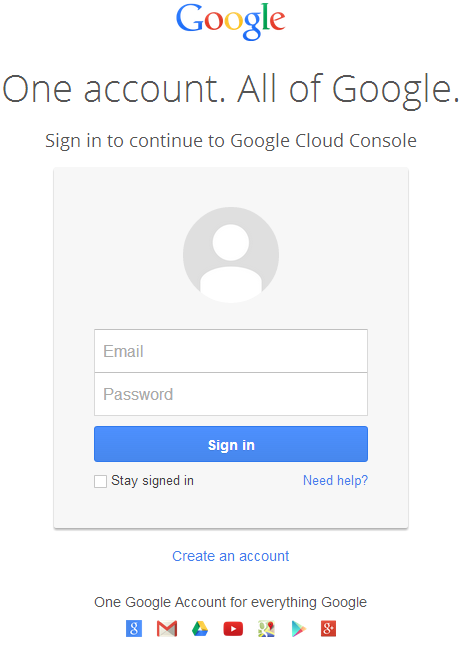
- اذهب إلى الرابط https://cloud.google.com/console/project وسجّل الدخول باستخدام بيانات اعتماد Gmail الخاصة بك
 |
|---|
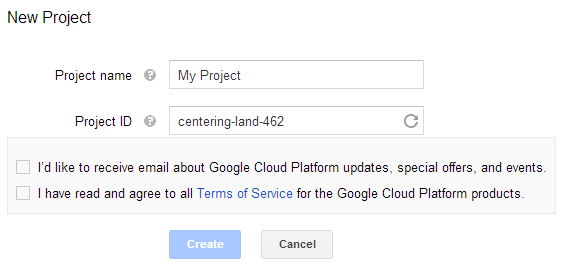
- حدد المربع "لقد قرأت وأوافق على جميع شروط الخدمة لمنتجات Google Cloud Platform." واضغط زر إنشاء
 |
|---|
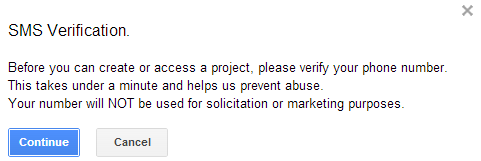
- سيُطلب "التحقق عبر SMS". اضغط زر المتابعة:
 |
|---|
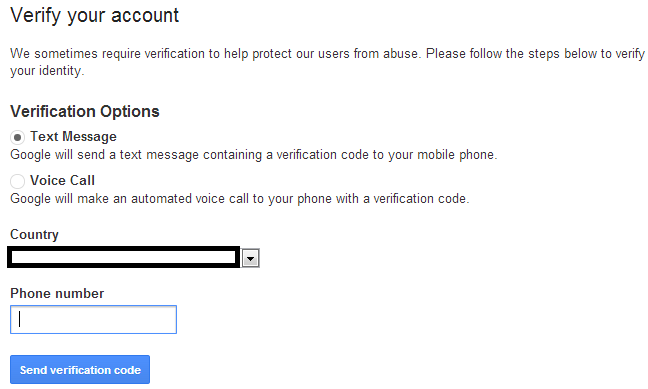
- أدخل اسم بلدك ورقم الهاتف المحمول. اضغط الزر: إرسال رمز التحقق
 |
|---|
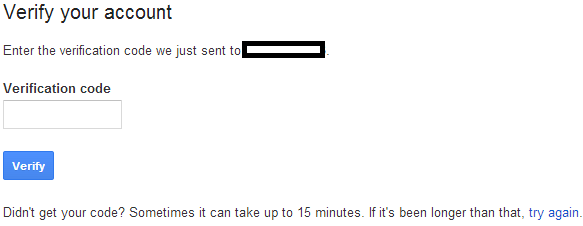
- أدخل رمز التحقق المستلم على هاتفك المحمول.
 |
|---|
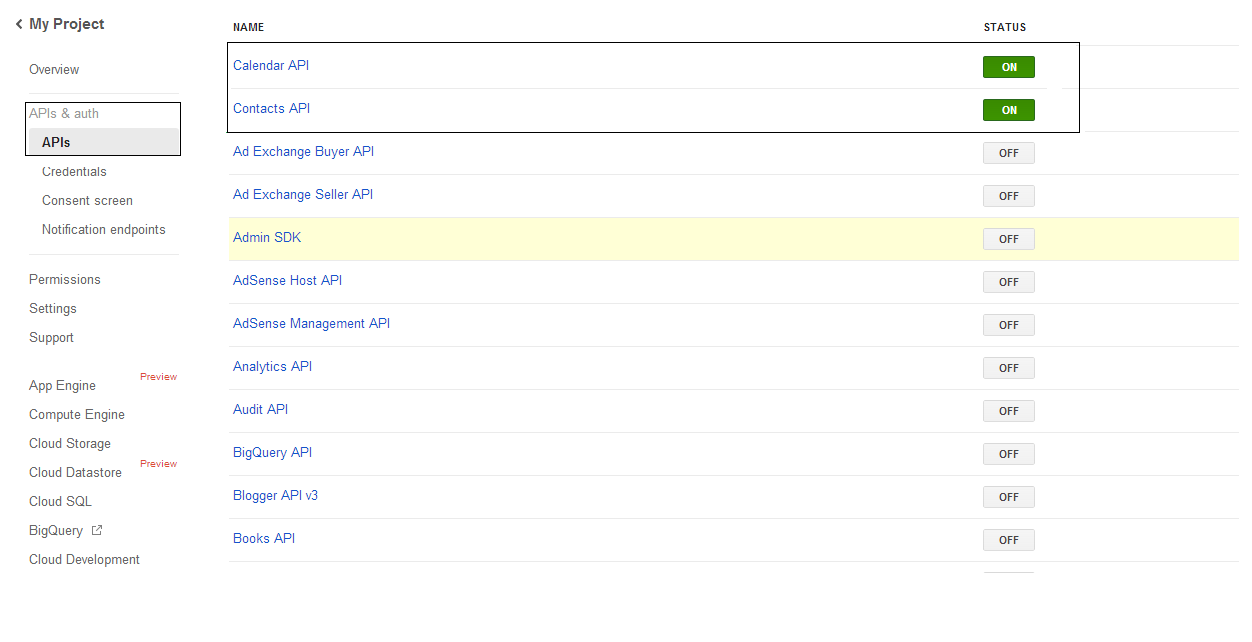
- في قائمة APIs & auth \ APIs، فعّل حالة Calendar API و Contacts API. إيقاف تشغيل جميع الآخرين.
 |
|---|
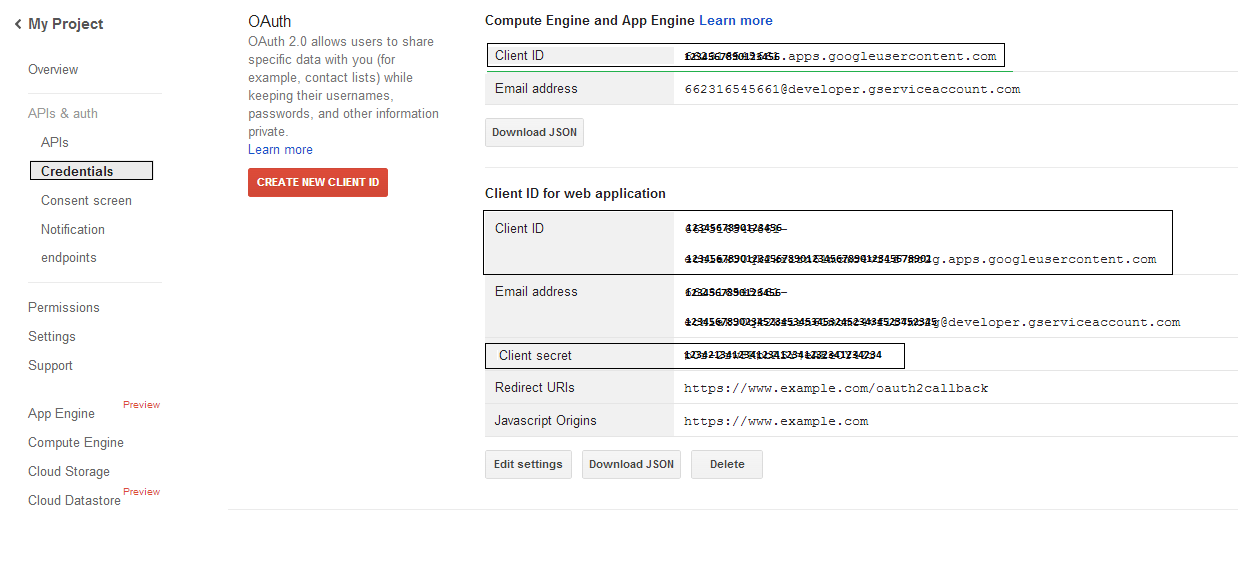
- في APIs & auth -> Credentials، اضغط زر "CREATE NEW CLIENT ID" تحت قسم "OAuth". اختر "Installed application" و "Other" من الخيارات المتاحة، واضغط زر "Create Client ID". لاحظ معرف العميل (Client ID) والسر السري للعميل (Client Secret) هنا اللذين سيُستخدمان في أكواد العينة في هذا القسم.
 |
|---|
تكامل آمن لـ Google OAuth 2.0
عند العمل مع Google OAuth 2.0 في Aspose.Email لـ .NET، ستحتاج إلى الفئات التالية:
-
فئة GoogleOAuthHelper - تبسط عملية مصادقة مستخدم Google والحصول على الرموز اللازمة للتفاعل مع واجهات Google APIs، مثل التقويم، جهات الاتصال، و Gmail.
-
فئة GoogleUser - صُممت لتجميع وإدارة بيانات الاعتماد المطلوبة للمستخدم للمصادقة والتفاعل مع خدمات Google، خاصة واجهات برمجة التطبيقات التي تتطلب مصادقة OAuth 2.0 مثل تقويم Google.
-
فئة TokenResponse - هي نموذج مصمم لتمثيل ومعالجة بيانات الاستجابة من نقطة انتهاء توكن OAuth 2.0، حيث يتم الحصول على رموز الوصول مقابل التفويض.
في المقالات التالية ستجد نماذج شيفرة توضح كيفية استخدام هذه الفئات في بيئة .NET لإنشاء تفاعل آمن مع خدمات OAuth 2.0.
المصادقة عبر OAuth 2.0 باستخدام فئة GoogleOAuthHelper
تتعامل الفئة مع إنشاء URL رمز التفويض، وتوليد تحديات الرمز، واسترجاع رموز الوصول والتجديد. باستخدام GoogleOAuthHelper, يمكن للمطورين تبسيط تدفق OAuth 2.0، وضمان اتصال آمن وفعال مع خدمات Google. يُظهر مقتطف الشيفرة التالي كيفية تنفيذ GoogleOAuthHelper الفئة في مشروع:
// For complete examples and data files, please go to https://github.com/aspose-email/Aspose.Email-for-.NET

using Newtonsoft.Json;
using System;
using System.Collections.Generic;
using System.IO;
using System.Net;
using System.Security.Cryptography;
using System.Text;

/// <summary>
/// Developer console:
/// https://console.cloud.google.com/projectselector2
/// Documentation:
/// https://developers.google.com/identity/protocols/oauth2/native-app
/// </summary>
internal class GoogleOAuthHelper
{
    public const string AUTHORIZATION_URL = "https://accounts.google.com/o/oauth2/v2/auth";
    public const string TOKEN_REQUEST_URL = "https://oauth2.googleapis.com/token";

    public const string REDIRECT_URI = "urn:ietf:wg:oauth:2.0:oob";
    public const string REDIRECT_TYPE = "code";

    public static string codeVerifier;
    public static string codeChallenge;

    public static CodeChallengeMethod codeChallengeMethod = CodeChallengeMethod.S256;

    public const string SCOPE =
        "https%3A%2F%2Fwww.googleapis.com%2Fauth%2Fcalendar" + // Calendar
        "+" +
        "https%3A%2F%2Fwww.google.com%2Fm8%2Ffeeds%2F" + // Contacts
        "+" +
        "https%3A%2F%2Fmail.google.com%2F"; // IMAP & SMTP

    static GoogleOAuthHelper()
    {
        CreateCodeVerifier();
        CreateCodeChallenge();
    }

    internal static string CreateCodeVerifier()
    {
        string allowedChars = "0123456789AaBbCcDdEeFfGgHhIiJjKkLlMmNnOoPpQqRrSsTtUuVvWwXxYyZz-._~";

        const int minLength = 43;
        const int maxLength = 128;

        Random random = new Random();
        int length = minLength + random.Next(maxLength - minLength);
        List<char> codeVerifierChars = new List<char>();

        for (int i = 0; i < length; i++)
        {
            int index = random.Next(allowedChars.Length);
            codeVerifierChars.Add(allowedChars[index]);
        }

        return codeVerifier = string.Join("", codeVerifierChars.ToArray());
    }

    internal static string CreateCodeChallenge()
    {
        if (codeChallengeMethod == CodeChallengeMethod.Plain)
            return codeChallenge = codeVerifier;

        byte[] hashValue = null;
        using (SHA256 sha256 = SHA256.Create())
            hashValue = sha256.ComputeHash(Encoding.ASCII.GetBytes(codeVerifier));

        string b64 = Convert.ToBase64String(hashValue);
        b64 = b64.Split('=')[0];
        b64 = b64.Replace('+', '-');
        b64 = b64.Replace('/', '_');

        return codeChallenge = b64;
    }

    internal static string GetAuthorizationCodeUrl(GoogleUser user)
    {
        return GetAuthorizationCodeUrl(user, SCOPE, REDIRECT_URI, REDIRECT_TYPE);
    }

    internal static string GetAuthorizationCodeUrl(
        GoogleUser user, string scope, string redirectUri, string responseType)
    {
        string state = System.Web.HttpUtility.UrlEncode(Guid.NewGuid().ToString());

        string approveUrl = AUTHORIZATION_URL +
            $"?client_id={user.ClientId}&redirect_uri={redirectUri}&response_type={responseType}&scope={scope}&" +
            $"code_challenge={codeChallenge}&code_challenge_method={codeChallengeMethod.ToString()}&" +
            $"state={state}";

        return approveUrl;
    }

    internal static TokenResponse GetAccessTokenByRefreshToken(GoogleUser user)
    {
        HttpWebRequest request = (HttpWebRequest)WebRequest.Create(TOKEN_REQUEST_URL);
        request.CookieContainer = new CookieContainer();
        request.Method = "POST";
        request.ContentType = "application/x-www-form-urlencoded";

        string clientId = System.Web.HttpUtility.UrlEncode(user.ClientId);
        string clientSecret = System.Web.HttpUtility.UrlEncode(user.ClientSecret);
        string refreshToken = System.Web.HttpUtility.UrlEncode(user.RefreshToken);
        string grantType = System.Web.HttpUtility.UrlEncode("refresh_token");

        string encodedParameters = $"client_id={clientId}&client_secret={clientSecret}&refresh_token={refreshToken}&grant_type={grantType}";

        byte[] requestData = Encoding.UTF8.GetBytes(encodedParameters);
        request.ContentLength = requestData.Length;
        if (requestData.Length > 0)
            using (Stream stream = request.GetRequestStream())
                stream.Write(requestData, 0, requestData.Length);

        HttpWebResponse response = (HttpWebResponse)request.GetResponse();
        string responseText = null;
        using (TextReader reader = new StreamReader(response.GetResponseStream(), Encoding.ASCII))
            responseText = reader.ReadToEnd();

        TokenResponse tokensResponse = JsonConvert.DeserializeObject<TokenResponse>(responseText);

        return tokensResponse;
    }

    internal static TokenResponse GetAccessTokenByAuthCode(string authorizationCode, GoogleUser user)
    {
        HttpWebRequest request = (HttpWebRequest)WebRequest.Create(TOKEN_REQUEST_URL);
        request.CookieContainer = new CookieContainer();
        request.Method = "POST";
        request.ContentType = "application/x-www-form-urlencoded";

        string clientId = System.Web.HttpUtility.UrlEncode(user.ClientId);
        string clientSecret = System.Web.HttpUtility.UrlEncode(user.ClientSecret);
        string authCode = System.Web.HttpUtility.UrlEncode(authorizationCode);
        string redirectUri = System.Web.HttpUtility.UrlEncode(REDIRECT_URI);
        string grantType = System.Web.HttpUtility.UrlEncode("authorization_code");

        string encodedParameters = $"client_id={clientId}&client_secret={clientSecret}&code={authCode}&code_verifier={codeVerifier}&redirect_uri={redirectUri}&grant_type={grantType}";

        byte[] requestData = Encoding.UTF8.GetBytes(encodedParameters);
        request.ContentLength = requestData.Length;
        if (requestData.Length > 0)
            using (Stream stream = request.GetRequestStream())
                stream.Write(requestData, 0, requestData.Length);

        HttpWebResponse response = (HttpWebResponse)request.GetResponse();
        string responseText = null;
        using (TextReader reader = new StreamReader(response.GetResponseStream(), Encoding.ASCII))
            responseText = reader.ReadToEnd();

        TokenResponse tokensResponse = JsonConvert.DeserializeObject<TokenResponse>(responseText);

        return tokensResponse;
    }

    public enum CodeChallengeMethod
    {
        S256,
        Plain
    }
}
Google OAuth Helper يجب استخدامه كما يلي:
- يجب أولاً توليد رابط رمز التفويض.
- افتح الرابط في متصفح وأكمل جميع العمليات. نتيجة لذلك، ستحصل على رمز تفويض.
- استخدم رمز التفويض للحصول على رمز تجديد.
- عند وجود رمز التجديد، يمكنك استخدامه لاسترجاع رموز الوصول.
GoogleUser user = new GoogleUser(email, password, clientId, clientSecret);

string authUrl = GoogleOAuthHelper.GetAuthorizationCodeUrl(user);

Console.WriteLine("Go to the following URL and get your authorization code:");
Console.WriteLine(authUrl);
Console.WriteLine();

Console.WriteLine("Enter the authorization code:");
string authorizationCode = Console.ReadLine();
Console.WriteLine();

TokenResponse tokenInfo = GoogleOAuthHelper.GetAccessTokenByAuthCode(authorizationCode, user);
Console.WriteLine("The refresh token has been received:");
Console.WriteLine(tokenInfo.RefreshToken);
Console.WriteLine();

user.RefreshToken = tokenInfo.RefreshToken;
tokenInfo = GoogleOAuthHelper.GetAccessTokenByRefreshToken(user);
Console.WriteLine("The new access token has been received:");
Console.WriteLine(tokenInfo.AccessToken);
Console.WriteLine();
فئة GoogleUser للمصادقة عبر OAuth 2.0
يُظهر مقتطف الشيفرة التالي كيفية تنفيذ GoogleUser فئة:
// For complete examples and data files, please go to https://github.com/aspose-email/Aspose.Email-for-.NET

public class GoogleUser
{
    public GoogleUser(string email, string password, string clientId, string clientSecret)
        : this(email, password, clientId, clientSecret, null)
    {
    }

    public GoogleUser(string email, string password, string clientId, string clientSecret, string refreshToken)
    {
        Email = email;
        Password = password;
        ClientId = clientId;
        ClientSecret = clientSecret;
        RefreshToken = refreshToken;
    }

    public readonly string Email;
    public readonly string Password;
    public readonly string ClientId;
    public readonly string ClientSecret;

    public string RefreshToken;
}
المصادقة عبر OAuth 2.0 باستخدام فئة TokenResponse
يُظهر مقتطف الشيفرة التالي كيفية TokenResponse يمكن تنفيذ الفئة:
// For complete examples and data files, please go to https://github.com/aspose-email/Aspose.Email-for-.NET

using Newtonsoft.Json;

public class TokenResponse
{
    [JsonProperty(NullValueHandling = NullValueHandling.Ignore, PropertyName = "access_token", Required = Required.Default)]
    public string AccessToken { get; set; }

    [JsonProperty(NullValueHandling = NullValueHandling.Ignore, PropertyName = "token_type", Required = Required.Default)]
    public string TokenType { get; set; }

    [JsonProperty(NullValueHandling = NullValueHandling.Ignore, PropertyName = "expires_in", Required = Required.Default)]
    public int ExpiresIn { get; set; }

    [JsonProperty(NullValueHandling = NullValueHandling.Ignore, PropertyName = "refresh_token", Required = Required.Default)]
    public string RefreshToken { get; set; }

    [JsonProperty(NullValueHandling = NullValueHandling.Ignore, PropertyName = "scope", Required = Required.Default)]
    public string Scope { get; set; }
}