
Google सेवाओं के लिए OAuth 2.0 API एक्सेस को कॉन्फ़िगर करना
API एक्सेस के लिए Google Developer Console प्रोजेक्ट बनाएं
Google Developer Console में प्रोजेक्ट बनाना आपके अनुप्रयोगों के लिए Google APIs तक पहुँच और उपयोग करने का एक आवश्यक कदम है। इस प्रक्रिया में एक प्रोजेक्ट सेट अप करना, शर्तों से सहमत होना, अपनी पहचान सत्यापित करना, और API सेटिंग्स को अपनी आवश्यकताओं के अनुसार कॉन्फ़िगर करना शामिल है। निम्नलिखित चरण आपको प्रोजेक्ट बनाने और Calendar तथा Contacts APIs जैसी सेवाओं के लिए आवश्यक क्रेडेंशियल प्राप्त करने की प्रक्रिया में मार्गदर्शन करेंगे।
Google Developer Console में प्रोजेक्ट बनाने के चरण
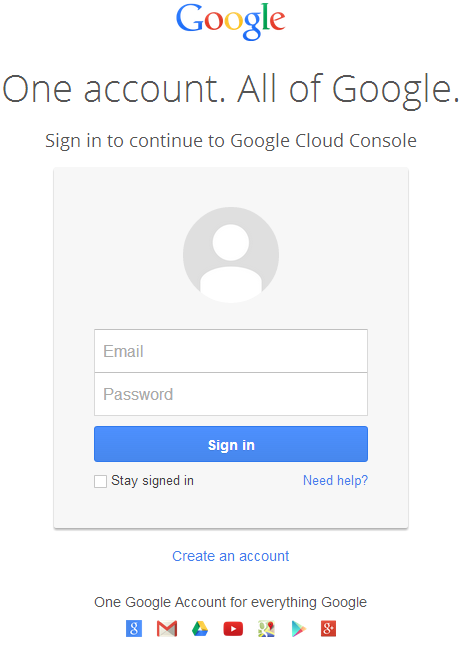
- लिंक https://cloud.google.com/console/project पर जाएँ और अपने Gmail क्रेडेंशियल्स का उपयोग करके लॉगिन करें
 |
|---|
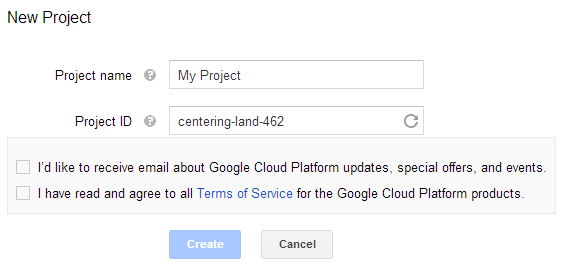
- चेक बॉक्स चुनें "I have read and agree to all Terms of Service for the Google Cloud Platform products." और Create बटन दबाएँ
 |
|---|
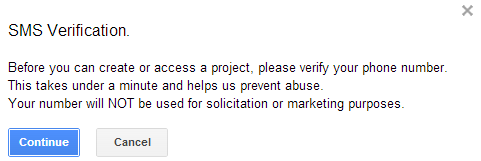
- "SMS Verification" की अनुरोध किया जाएगा। जारी रखें बटन दबाएँ:
 |
|---|
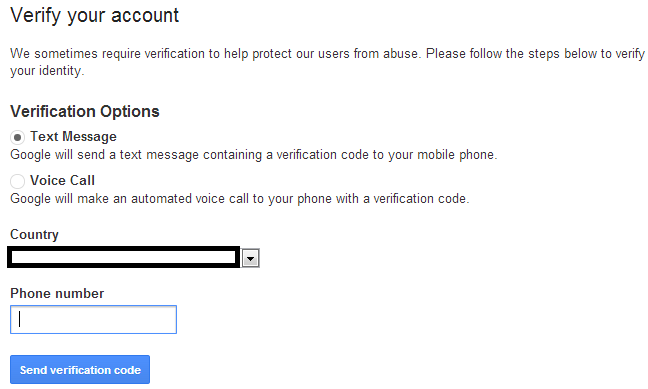
- अपना देश नाम और मोबाइल नंबर दर्ज करें। बटन दबाएँ: Send Verification Code
 |
|---|
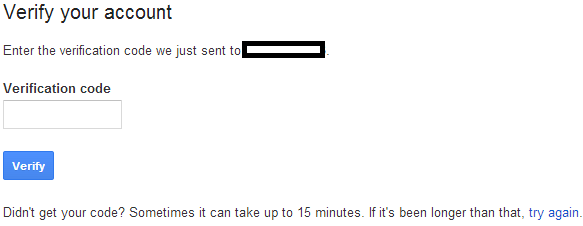
- अपने मोबाइल पर प्राप्त सत्यापन कोड दर्ज करें।
 |
|---|
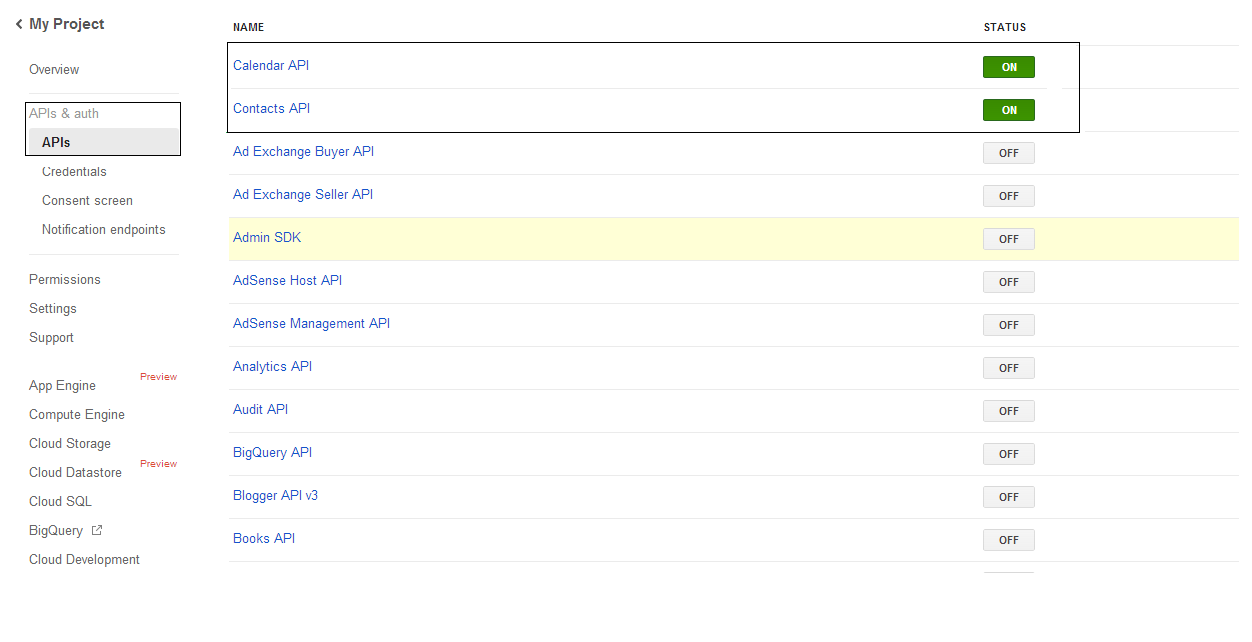
- APIs & auth \ APIs सूची में Calendar API और Contacts API की स्थिति को चालू (ON) करें। अन्य सभी को बंद (OFF) करें।
 |
|---|
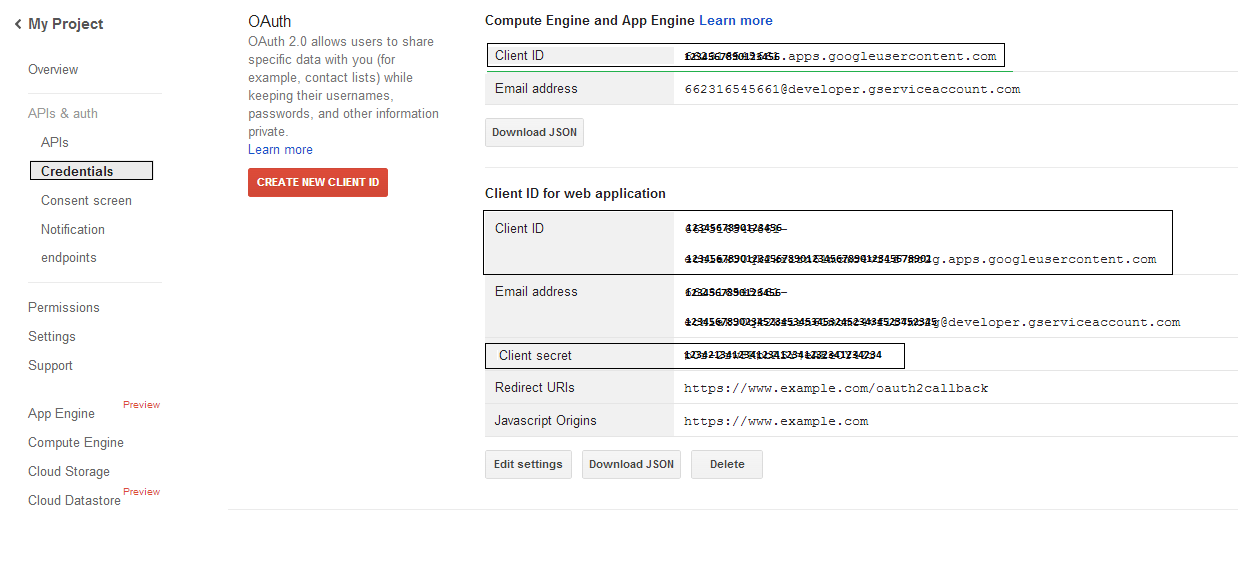
- APIs & auth -> Credentials पर, "CREAET NEW CLIENT ID" बटन दबाएँ "OAuth" सेक्शन के अंतर्गत। "Installed application" और "Other" विकल्प चुनें, और "Create Client ID" बटन दबाएँ। यहाँ दर्शाया गया क्लाइंट आईडी और क्लाइंट सीक्रेट नोट करें, जो इस सेक्शन के नमूना कोड में उपयोग किया जाएगा।
 |
|---|
सुरक्षित Google OAuth 2.0 एकीकरण
Aspose.Email for .NET में Google OAuth 2.0 के साथ काम करते समय आपको निम्नलिखित क्लासों की आवश्यकता होगी:
-
GoogleOAuthHelper क्लास - Google उपयोगकर्ता को प्रमाणित करने और Google APIs (जैसे कैलेंडर, संपर्क, और Gmail) के साथ इंटरैक्ट करने के लिए आवश्यक टोकन प्राप्त करने की प्रक्रिया को सरल बनाता है।
-
GoogleUser क्लास - यह उपयोगकर्ता के लिए आवश्यक प्रमाणपत्रों को संलग्न और प्रबंधित करने के लिए डिज़ाइन की गई है, ताकि वह Google सेवाओं के साथ प्रमाणित और इंटरैक्ट कर सके, विशेष रूप से उन APIs के लिए जिनके लिए OAuth 2.0 प्रमाणन आवश्यक है जैसे Google कैलेंडर।
-
TokenResponse क्लास - यह एक मॉडल है जिसे OAuth 2.0 टोकन एंडपॉइंट से प्रतिक्रिया डेटा को प्रतिनिधित्व और संभालने के लिए डिज़ाइन किया गया है, जहाँ एक्सेस टोकन प्राधिकरण के बदले प्राप्त किए जाते हैं।
निम्नलिखित लेखों में आप कोड उदाहरण पाएँगे जो दर्शाते हैं कि इन क्लासों को .NET वातावरण में सुरक्षित OAuth 2.0 सेवा इंटरैक्शन के लिए कैसे उपयोग किया जाता है।
GoogleOAuthHelper क्लास के साथ OAuth 2.0 प्रमाणन
यह क्लास प्राधिकरण कोड URL बनाता है, कोड चैलेंज उत्पन्न करता है, और एक्सेस व रीफ़्रेश टोकन प्राप्त करता है। इसका उपयोग करके GoogleOAuthHelper, डेवलपर्स OAuth 2.0 फ्लो को सुव्यवस्थित कर सकते हैं, जिससे Google सेवाओं के साथ सुरक्षित और कुशल संचार सुनिश्चित होता है। निम्नलिखित कोड स्निपेट दिखाता है कि कैसे लागू किया जाए GoogleOAuthHelper क्लास को प्रोजेक्ट में जोड़ें:
// For complete examples and data files, please go to https://github.com/aspose-email/Aspose.Email-for-.NET

using Newtonsoft.Json;
using System;
using System.Collections.Generic;
using System.IO;
using System.Net;
using System.Security.Cryptography;
using System.Text;

/// <summary>
/// Developer console:
/// https://console.cloud.google.com/projectselector2
/// Documentation:
/// https://developers.google.com/identity/protocols/oauth2/native-app
/// </summary>
internal class GoogleOAuthHelper
{
    public const string AUTHORIZATION_URL = "https://accounts.google.com/o/oauth2/v2/auth";
    public const string TOKEN_REQUEST_URL = "https://oauth2.googleapis.com/token";

    public const string REDIRECT_URI = "urn:ietf:wg:oauth:2.0:oob";
    public const string REDIRECT_TYPE = "code";

    public static string codeVerifier;
    public static string codeChallenge;

    public static CodeChallengeMethod codeChallengeMethod = CodeChallengeMethod.S256;

    public const string SCOPE =
        "https%3A%2F%2Fwww.googleapis.com%2Fauth%2Fcalendar" + // Calendar
        "+" +
        "https%3A%2F%2Fwww.google.com%2Fm8%2Ffeeds%2F" + // Contacts
        "+" +
        "https%3A%2F%2Fmail.google.com%2F"; // IMAP & SMTP

    static GoogleOAuthHelper()
    {
        CreateCodeVerifier();
        CreateCodeChallenge();
    }

    internal static string CreateCodeVerifier()
    {
        string allowedChars = "0123456789AaBbCcDdEeFfGgHhIiJjKkLlMmNnOoPpQqRrSsTtUuVvWwXxYyZz-._~";

        const int minLength = 43;
        const int maxLength = 128;

        Random random = new Random();
        int length = minLength + random.Next(maxLength - minLength);
        List<char> codeVerifierChars = new List<char>();

        for (int i = 0; i < length; i++)
        {
            int index = random.Next(allowedChars.Length);
            codeVerifierChars.Add(allowedChars[index]);
        }

        return codeVerifier = string.Join("", codeVerifierChars.ToArray());
    }

    internal static string CreateCodeChallenge()
    {
        if (codeChallengeMethod == CodeChallengeMethod.Plain)
            return codeChallenge = codeVerifier;

        byte[] hashValue = null;
        using (SHA256 sha256 = SHA256.Create())
            hashValue = sha256.ComputeHash(Encoding.ASCII.GetBytes(codeVerifier));

        string b64 = Convert.ToBase64String(hashValue);
        b64 = b64.Split('=')[0];
        b64 = b64.Replace('+', '-');
        b64 = b64.Replace('/', '_');

        return codeChallenge = b64;
    }

    internal static string GetAuthorizationCodeUrl(GoogleUser user)
    {
        return GetAuthorizationCodeUrl(user, SCOPE, REDIRECT_URI, REDIRECT_TYPE);
    }

    internal static string GetAuthorizationCodeUrl(
        GoogleUser user, string scope, string redirectUri, string responseType)
    {
        string state = System.Web.HttpUtility.UrlEncode(Guid.NewGuid().ToString());

        string approveUrl = AUTHORIZATION_URL +
            $"?client_id={user.ClientId}&redirect_uri={redirectUri}&response_type={responseType}&scope={scope}&" +
            $"code_challenge={codeChallenge}&code_challenge_method={codeChallengeMethod.ToString()}&" +
            $"state={state}";

        return approveUrl;
    }

    internal static TokenResponse GetAccessTokenByRefreshToken(GoogleUser user)
    {
        HttpWebRequest request = (HttpWebRequest)WebRequest.Create(TOKEN_REQUEST_URL);
        request.CookieContainer = new CookieContainer();
        request.Method = "POST";
        request.ContentType = "application/x-www-form-urlencoded";

        string clientId = System.Web.HttpUtility.UrlEncode(user.ClientId);
        string clientSecret = System.Web.HttpUtility.UrlEncode(user.ClientSecret);
        string refreshToken = System.Web.HttpUtility.UrlEncode(user.RefreshToken);
        string grantType = System.Web.HttpUtility.UrlEncode("refresh_token");

        string encodedParameters = $"client_id={clientId}&client_secret={clientSecret}&refresh_token={refreshToken}&grant_type={grantType}";

        byte[] requestData = Encoding.UTF8.GetBytes(encodedParameters);
        request.ContentLength = requestData.Length;
        if (requestData.Length > 0)
            using (Stream stream = request.GetRequestStream())
                stream.Write(requestData, 0, requestData.Length);

        HttpWebResponse response = (HttpWebResponse)request.GetResponse();
        string responseText = null;
        using (TextReader reader = new StreamReader(response.GetResponseStream(), Encoding.ASCII))
            responseText = reader.ReadToEnd();

        TokenResponse tokensResponse = JsonConvert.DeserializeObject<TokenResponse>(responseText);

        return tokensResponse;
    }

    internal static TokenResponse GetAccessTokenByAuthCode(string authorizationCode, GoogleUser user)
    {
        HttpWebRequest request = (HttpWebRequest)WebRequest.Create(TOKEN_REQUEST_URL);
        request.CookieContainer = new CookieContainer();
        request.Method = "POST";
        request.ContentType = "application/x-www-form-urlencoded";

        string clientId = System.Web.HttpUtility.UrlEncode(user.ClientId);
        string clientSecret = System.Web.HttpUtility.UrlEncode(user.ClientSecret);
        string authCode = System.Web.HttpUtility.UrlEncode(authorizationCode);
        string redirectUri = System.Web.HttpUtility.UrlEncode(REDIRECT_URI);
        string grantType = System.Web.HttpUtility.UrlEncode("authorization_code");

        string encodedParameters = $"client_id={clientId}&client_secret={clientSecret}&code={authCode}&code_verifier={codeVerifier}&redirect_uri={redirectUri}&grant_type={grantType}";

        byte[] requestData = Encoding.UTF8.GetBytes(encodedParameters);
        request.ContentLength = requestData.Length;
        if (requestData.Length > 0)
            using (Stream stream = request.GetRequestStream())
                stream.Write(requestData, 0, requestData.Length);

        HttpWebResponse response = (HttpWebResponse)request.GetResponse();
        string responseText = null;
        using (TextReader reader = new StreamReader(response.GetResponseStream(), Encoding.ASCII))
            responseText = reader.ReadToEnd();

        TokenResponse tokensResponse = JsonConvert.DeserializeObject<TokenResponse>(responseText);

        return tokensResponse;
    }

    public enum CodeChallengeMethod
    {
        S256,
        Plain
    }
}
Google OAuth Helper को इस प्रकार उपयोग किया जाना चाहिए:
- पहले एक प्राधिकरण कोड URL उत्पन्न करना होगा।
- URL को ब्राउज़र में खोलें और सभी संचालन पूर्ण करें। परिणामस्वरूप, आपको एक प्राधिकरण कोड प्राप्त होगा।
- एक रीफ़्रेश टोकन प्राप्त करने के लिए प्राधिकरण कोड का उपयोग करें।
- जब रीफ़्रेश टोकन मौजूद हो, आप इसका उपयोग एक्सेस टोकन प्राप्त करने के लिए कर सकते हैं।
GoogleUser user = new GoogleUser(email, password, clientId, clientSecret);

string authUrl = GoogleOAuthHelper.GetAuthorizationCodeUrl(user);

Console.WriteLine("Go to the following URL and get your authorization code:");
Console.WriteLine(authUrl);
Console.WriteLine();

Console.WriteLine("Enter the authorization code:");
string authorizationCode = Console.ReadLine();
Console.WriteLine();

TokenResponse tokenInfo = GoogleOAuthHelper.GetAccessTokenByAuthCode(authorizationCode, user);
Console.WriteLine("The refresh token has been received:");
Console.WriteLine(tokenInfo.RefreshToken);
Console.WriteLine();

user.RefreshToken = tokenInfo.RefreshToken;
tokenInfo = GoogleOAuthHelper.GetAccessTokenByRefreshToken(user);
Console.WriteLine("The new access token has been received:");
Console.WriteLine(tokenInfo.AccessToken);
Console.WriteLine();
OAuth 2.0 प्रमाणन के लिए GoogleUser क्लास
निम्नलिखित कोड स्निपेट दिखाता है कि कैसे लागू किया जाए GoogleUser क्लास:
// For complete examples and data files, please go to https://github.com/aspose-email/Aspose.Email-for-.NET

public class GoogleUser
{
    public GoogleUser(string email, string password, string clientId, string clientSecret)
        : this(email, password, clientId, clientSecret, null)
    {
    }

    public GoogleUser(string email, string password, string clientId, string clientSecret, string refreshToken)
    {
        Email = email;
        Password = password;
        ClientId = clientId;
        ClientSecret = clientSecret;
        RefreshToken = refreshToken;
    }

    public readonly string Email;
    public readonly string Password;
    public readonly string ClientId;
    public readonly string ClientSecret;

    public string RefreshToken;
}
TokenResponse क्लास का उपयोग करके OAuth 2.0 से प्रमाणित करें
निम्नलिखित कोड स्निपेट दिखाता है कि कैसे TokenResponse क्लास को इस प्रकार लागू किया जा सकता है:
// For complete examples and data files, please go to https://github.com/aspose-email/Aspose.Email-for-.NET

using Newtonsoft.Json;

public class TokenResponse
{
    [JsonProperty(NullValueHandling = NullValueHandling.Ignore, PropertyName = "access_token", Required = Required.Default)]
    public string AccessToken { get; set; }

    [JsonProperty(NullValueHandling = NullValueHandling.Ignore, PropertyName = "token_type", Required = Required.Default)]
    public string TokenType { get; set; }

    [JsonProperty(NullValueHandling = NullValueHandling.Ignore, PropertyName = "expires_in", Required = Required.Default)]
    public int ExpiresIn { get; set; }

    [JsonProperty(NullValueHandling = NullValueHandling.Ignore, PropertyName = "refresh_token", Required = Required.Default)]
    public string RefreshToken { get; set; }

    [JsonProperty(NullValueHandling = NullValueHandling.Ignore, PropertyName = "scope", Required = Required.Default)]
    public string Scope { get; set; }
}