
Mengonfigurasi Akses API OAuth 2.0 ke Layanan Google
Buat Proyek Google Developer Console untuk Akses API
Membuat proyek di Google Developer Console adalah langkah penting untuk mengakses dan memanfaatkan API Google bagi aplikasi Anda. Proses ini meliputi penyiapan proyek, persetujuan syarat, verifikasi identitas, dan konfigurasi pengaturan API sesuai kebutuhan. Langkah-langkah berikut akan memandu Anda melalui proses pembuatan proyek dan memperoleh kredensial yang diperlukan untuk layanan seperti Calendar dan Contacts API.
Langkah-langkah Membuat Proyek di Google Developer Console
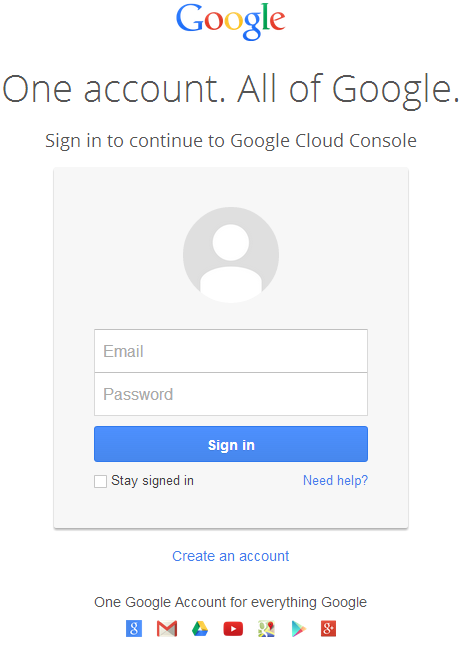
- Buka tautan https://cloud.google.com/console/project dan masuk menggunakan kredensial Gmail Anda
 |
|---|
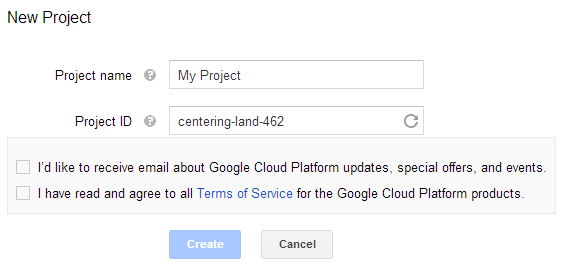
- Centang kotak "I have read and agree to all Terms of Service for the Google Cloud Platform products." dan tekan tombol Create
 |
|---|
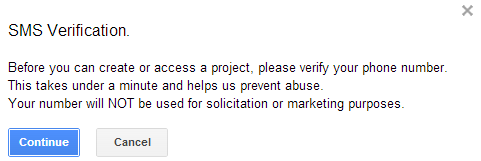
- "SMS Verification" akan diminta. Tekan tombol lanjut:
 |
|---|
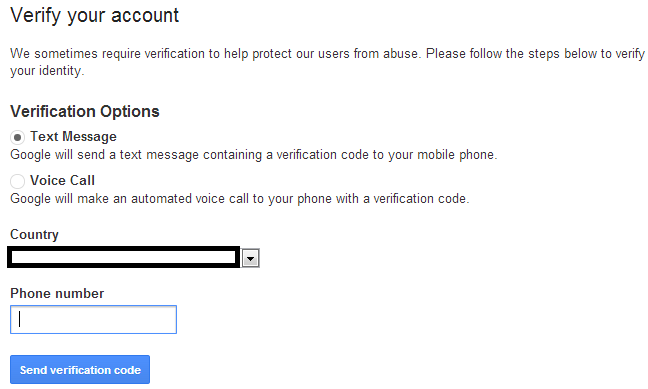
- Masukkan nama negara Anda dan nomor ponsel. Tekan tombol: Send Verification Code
 |
|---|
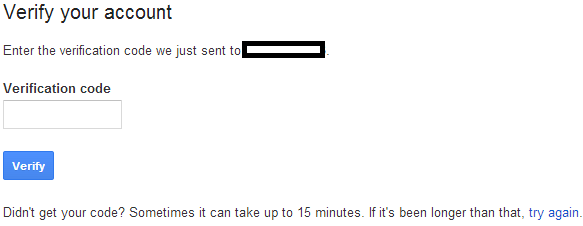
- Masukkan kode verifikasi yang diterima di ponsel Anda.
 |
|---|
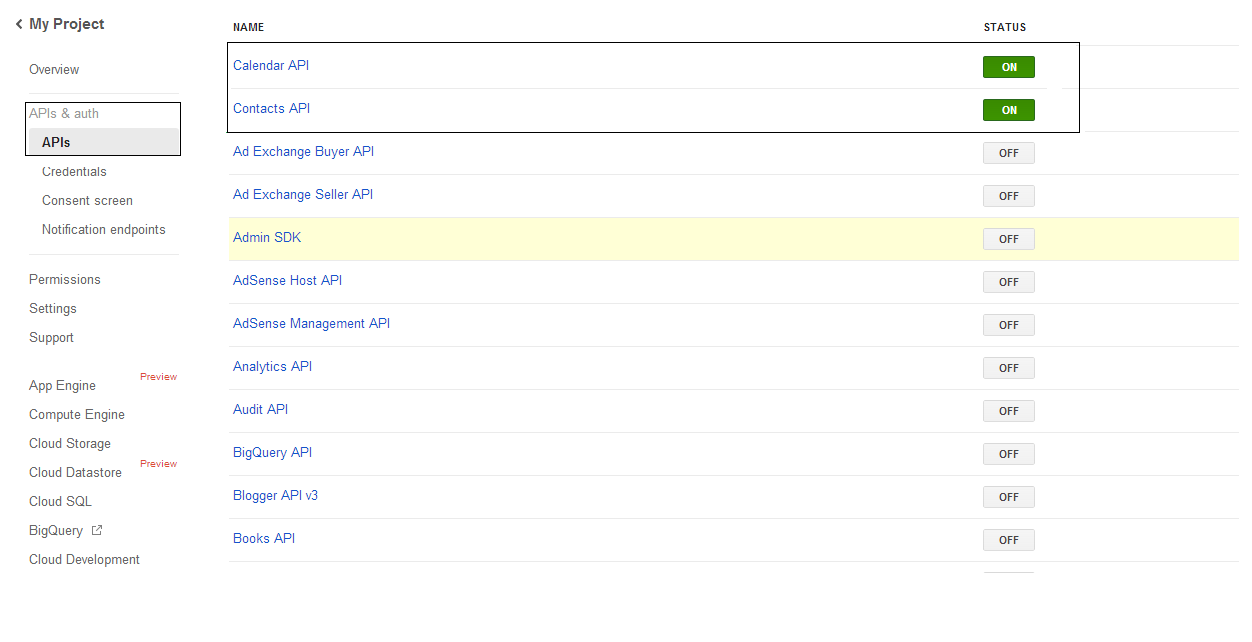
- Di daftar APIs & auth \ APIs, aktifkan status Calendar API dan Contacts API. Nonaktifkan semua yang lain.
 |
|---|
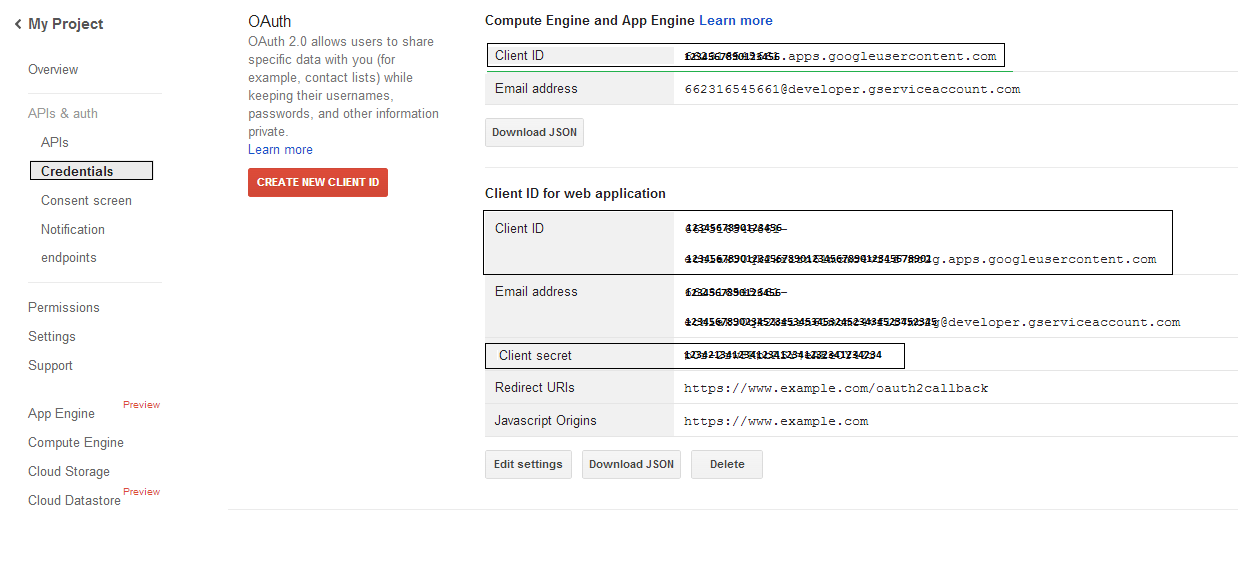
- Pada APIs & auth -> Credentials, tekan tombol "CREAET NEW CLIENT ID" di bawah bagian "OAuth". Pilih "Installed application" dan "Other" dari pilihan yang ada, lalu tekan tombol "Create Client ID". Catat Client ID dan Client Secret di sini yang akan digunakan dalam contoh kode pada bagian ini.
 |
|---|
Integrasi Google OAuth 2.0 yang Aman
Saat bekerja dengan Google OAuth 2.0 di Aspose.Email untuk .NET, Anda akan memerlukan kelas-kelas berikut:
-
Kelas GoogleOAuthHelper - Menyederhanakan proses otentikasi pengguna Google dan memperoleh token yang diperlukan untuk berinteraksi dengan API Google, seperti Calendar, Contacts, dan Gmail.
-
Kelas GoogleUser - Dirancang untuk mengenkapsulasi dan mengelola kredensial yang dibutuhkan pengguna untuk mengotentikasi dan berinteraksi dengan layanan Google, khususnya API yang memerlukan otentikasi OAuth 2.0 seperti Google Calendar.
-
Kelas TokenResponse - Ini adalah model yang dirancang untuk merepresentasikan dan menangani data respons dari endpoint token OAuth 2.0, dimana token akses diperoleh sebagai pertukaran untuk otorisasi.
Pada artikel berikut Anda akan menemukan contoh kode yang mendemonstrasikan cara menggunakan kelas-kelas ini dalam lingkungan .NET untuk membangun interaksi aman dengan layanan OAuth 2.0.
Otentikasi OAuth 2.0 dengan Kelas GoogleOAuthHelper
Kelas ini menangani pembuatan URL kode otorisasi, pembuatan tantangan kode, dan pengambilan token akses serta refresh. Dengan menggunakan GoogleOAuthHelper, pengembang dapat menyederhanakan alur OAuth 2.0, memastikan komunikasi yang aman dan efisien dengan layanan Google. Potongan kode berikut memperlihatkan cara mengimplementasikan GoogleOAuthHelper kelas ke dalam proyek:
// For complete examples and data files, please go to https://github.com/aspose-email/Aspose.Email-for-.NET

using Newtonsoft.Json;
using System;
using System.Collections.Generic;
using System.IO;
using System.Net;
using System.Security.Cryptography;
using System.Text;

/// <summary>
/// Developer console:
/// https://console.cloud.google.com/projectselector2
/// Documentation:
/// https://developers.google.com/identity/protocols/oauth2/native-app
/// </summary>
internal class GoogleOAuthHelper
{
    public const string AUTHORIZATION_URL = "https://accounts.google.com/o/oauth2/v2/auth";
    public const string TOKEN_REQUEST_URL = "https://oauth2.googleapis.com/token";

    public const string REDIRECT_URI = "urn:ietf:wg:oauth:2.0:oob";
    public const string REDIRECT_TYPE = "code";

    public static string codeVerifier;
    public static string codeChallenge;

    public static CodeChallengeMethod codeChallengeMethod = CodeChallengeMethod.S256;

    public const string SCOPE =
        "https%3A%2F%2Fwww.googleapis.com%2Fauth%2Fcalendar" + // Calendar
        "+" +
        "https%3A%2F%2Fwww.google.com%2Fm8%2Ffeeds%2F" + // Contacts
        "+" +
        "https%3A%2F%2Fmail.google.com%2F"; // IMAP & SMTP

    static GoogleOAuthHelper()
    {
        CreateCodeVerifier();
        CreateCodeChallenge();
    }

    internal static string CreateCodeVerifier()
    {
        string allowedChars = "0123456789AaBbCcDdEeFfGgHhIiJjKkLlMmNnOoPpQqRrSsTtUuVvWwXxYyZz-._~";

        const int minLength = 43;
        const int maxLength = 128;

        Random random = new Random();
        int length = minLength + random.Next(maxLength - minLength);
        List<char> codeVerifierChars = new List<char>();

        for (int i = 0; i < length; i++)
        {
            int index = random.Next(allowedChars.Length);
            codeVerifierChars.Add(allowedChars[index]);
        }

        return codeVerifier = string.Join("", codeVerifierChars.ToArray());
    }

    internal static string CreateCodeChallenge()
    {
        if (codeChallengeMethod == CodeChallengeMethod.Plain)
            return codeChallenge = codeVerifier;

        byte[] hashValue = null;
        using (SHA256 sha256 = SHA256.Create())
            hashValue = sha256.ComputeHash(Encoding.ASCII.GetBytes(codeVerifier));

        string b64 = Convert.ToBase64String(hashValue);
        b64 = b64.Split('=')[0];
        b64 = b64.Replace('+', '-');
        b64 = b64.Replace('/', '_');

        return codeChallenge = b64;
    }

    internal static string GetAuthorizationCodeUrl(GoogleUser user)
    {
        return GetAuthorizationCodeUrl(user, SCOPE, REDIRECT_URI, REDIRECT_TYPE);
    }

    internal static string GetAuthorizationCodeUrl(
        GoogleUser user, string scope, string redirectUri, string responseType)
    {
        string state = System.Web.HttpUtility.UrlEncode(Guid.NewGuid().ToString());

        string approveUrl = AUTHORIZATION_URL +
            $"?client_id={user.ClientId}&redirect_uri={redirectUri}&response_type={responseType}&scope={scope}&" +
            $"code_challenge={codeChallenge}&code_challenge_method={codeChallengeMethod.ToString()}&" +
            $"state={state}";

        return approveUrl;
    }

    internal static TokenResponse GetAccessTokenByRefreshToken(GoogleUser user)
    {
        HttpWebRequest request = (HttpWebRequest)WebRequest.Create(TOKEN_REQUEST_URL);
        request.CookieContainer = new CookieContainer();
        request.Method = "POST";
        request.ContentType = "application/x-www-form-urlencoded";

        string clientId = System.Web.HttpUtility.UrlEncode(user.ClientId);
        string clientSecret = System.Web.HttpUtility.UrlEncode(user.ClientSecret);
        string refreshToken = System.Web.HttpUtility.UrlEncode(user.RefreshToken);
        string grantType = System.Web.HttpUtility.UrlEncode("refresh_token");

        string encodedParameters = $"client_id={clientId}&client_secret={clientSecret}&refresh_token={refreshToken}&grant_type={grantType}";

        byte[] requestData = Encoding.UTF8.GetBytes(encodedParameters);
        request.ContentLength = requestData.Length;
        if (requestData.Length > 0)
            using (Stream stream = request.GetRequestStream())
                stream.Write(requestData, 0, requestData.Length);

        HttpWebResponse response = (HttpWebResponse)request.GetResponse();
        string responseText = null;
        using (TextReader reader = new StreamReader(response.GetResponseStream(), Encoding.ASCII))
            responseText = reader.ReadToEnd();

        TokenResponse tokensResponse = JsonConvert.DeserializeObject<TokenResponse>(responseText);

        return tokensResponse;
    }

    internal static TokenResponse GetAccessTokenByAuthCode(string authorizationCode, GoogleUser user)
    {
        HttpWebRequest request = (HttpWebRequest)WebRequest.Create(TOKEN_REQUEST_URL);
        request.CookieContainer = new CookieContainer();
        request.Method = "POST";
        request.ContentType = "application/x-www-form-urlencoded";

        string clientId = System.Web.HttpUtility.UrlEncode(user.ClientId);
        string clientSecret = System.Web.HttpUtility.UrlEncode(user.ClientSecret);
        string authCode = System.Web.HttpUtility.UrlEncode(authorizationCode);
        string redirectUri = System.Web.HttpUtility.UrlEncode(REDIRECT_URI);
        string grantType = System.Web.HttpUtility.UrlEncode("authorization_code");

        string encodedParameters = $"client_id={clientId}&client_secret={clientSecret}&code={authCode}&code_verifier={codeVerifier}&redirect_uri={redirectUri}&grant_type={grantType}";

        byte[] requestData = Encoding.UTF8.GetBytes(encodedParameters);
        request.ContentLength = requestData.Length;
        if (requestData.Length > 0)
            using (Stream stream = request.GetRequestStream())
                stream.Write(requestData, 0, requestData.Length);

        HttpWebResponse response = (HttpWebResponse)request.GetResponse();
        string responseText = null;
        using (TextReader reader = new StreamReader(response.GetResponseStream(), Encoding.ASCII))
            responseText = reader.ReadToEnd();

        TokenResponse tokensResponse = JsonConvert.DeserializeObject<TokenResponse>(responseText);

        return tokensResponse;
    }

    public enum CodeChallengeMethod
    {
        S256,
        Plain
    }
}
Google OAuth Helper harus digunakan sebagai berikut:
- URL kode otorisasi harus dihasilkan terlebih dahulu.
- Buka URL di browser dan selesaikan semua operasi. Sebagai hasilnya, Anda akan menerima kode otorisasi.
- Gunakan kode otorisasi untuk menerima token penyegaran.
- Ketika token penyegaran ada, Anda dapat menggunakannya untuk mengambil token akses.
GoogleUser user = new GoogleUser(email, password, clientId, clientSecret);

string authUrl = GoogleOAuthHelper.GetAuthorizationCodeUrl(user);

Console.WriteLine("Go to the following URL and get your authorization code:");
Console.WriteLine(authUrl);
Console.WriteLine();

Console.WriteLine("Enter the authorization code:");
string authorizationCode = Console.ReadLine();
Console.WriteLine();

TokenResponse tokenInfo = GoogleOAuthHelper.GetAccessTokenByAuthCode(authorizationCode, user);
Console.WriteLine("The refresh token has been received:");
Console.WriteLine(tokenInfo.RefreshToken);
Console.WriteLine();

user.RefreshToken = tokenInfo.RefreshToken;
tokenInfo = GoogleOAuthHelper.GetAccessTokenByRefreshToken(user);
Console.WriteLine("The new access token has been received:");
Console.WriteLine(tokenInfo.AccessToken);
Console.WriteLine();
Kelas GoogleUser untuk Otentikasi OAuth 2.0
Potongan kode berikut memperlihatkan cara mengimplementasikan GoogleUser kelas:
// For complete examples and data files, please go to https://github.com/aspose-email/Aspose.Email-for-.NET

public class GoogleUser
{
    public GoogleUser(string email, string password, string clientId, string clientSecret)
        : this(email, password, clientId, clientSecret, null)
    {
    }

    public GoogleUser(string email, string password, string clientId, string clientSecret, string refreshToken)
    {
        Email = email;
        Password = password;
        ClientId = clientId;
        ClientSecret = clientSecret;
        RefreshToken = refreshToken;
    }

    public readonly string Email;
    public readonly string Password;
    public readonly string ClientId;
    public readonly string ClientSecret;

    public string RefreshToken;
}
Otentikasi dengan OAuth 2.0 menggunakan Kelas TokenResponse
Potongan kode berikut memperlihatkan cara TokenResponse kelas dapat diimplementasikan:
// For complete examples and data files, please go to https://github.com/aspose-email/Aspose.Email-for-.NET

using Newtonsoft.Json;

public class TokenResponse
{
    [JsonProperty(NullValueHandling = NullValueHandling.Ignore, PropertyName = "access_token", Required = Required.Default)]
    public string AccessToken { get; set; }

    [JsonProperty(NullValueHandling = NullValueHandling.Ignore, PropertyName = "token_type", Required = Required.Default)]
    public string TokenType { get; set; }

    [JsonProperty(NullValueHandling = NullValueHandling.Ignore, PropertyName = "expires_in", Required = Required.Default)]
    public int ExpiresIn { get; set; }

    [JsonProperty(NullValueHandling = NullValueHandling.Ignore, PropertyName = "refresh_token", Required = Required.Default)]
    public string RefreshToken { get; set; }

    [JsonProperty(NullValueHandling = NullValueHandling.Ignore, PropertyName = "scope", Required = Required.Default)]
    public string Scope { get; set; }
}