
Utilizzare OAuth per accedere ai servizi di posta
Il supporto OAuth 2.0 è stato aggiunto ad Aspose.Email e può essere utilizzato per accedere ai server SMTP, POP3, IMAP e EWS. In generale, tutti i server che supportano token OAuth 2.0 possono essere usati con Aspose.Email, ma i nostri client email sono stati testati con i server di posta Google e i server Microsoft Office 365. Accesso al server da SmtpClient, Pop3Client, ImapClient e EWSClient con OAuth può essere implementato in 2 modi.
- Fornisci il token di accesso direttamente nel costruttore del client email. In questo caso, l’utente deve capire che la durata dei token di accesso è limitata. Quando il token è scaduto, il client email non può essere usato per accedere al server.
- Fornisci un’implementazione personalizzata del provider di token basata su ITokenProvider interfaccia nel costruttore del client email. In questo caso, il client controlla il tempo di scadenza del token e richiede ITokenProvider per un nuovo token di accesso quando quello precedente è scaduto. In questo modo, il client aggiorna i token periodicamente e può lavorare con il server per tempo illimitato. Spesso i servizi supportano un modo semplice per aggiornare i token di accesso. Ad esempio, l’uso dei refresh token nei servizi Google o del flusso di autenticazione ROPC nella piattaforma di identità Microsoft può essere utilizzato per l’implementazione del provider di token.
Configura un account sul server appropriato
I seguenti articoli ti aiutano a configurare gli account per accedere ai servizi di posta.
- Per Office 365
- Per Gmail
Accedi ai servizi di posta con i token di accesso
I seguenti esempi di codice mostrano come connettersi ai servizi di posta utilizzando token di accesso.
// Connecting to SMTP server
try (SmtpClient client = new SmtpClient(
        "smtp.gmail.com",
        587,
        "user1@gmail.com",
        "accessToken",
        true,
        SecurityOptions.SSLExplicit)) {

}

// Connecting to IMAP server
try (ImapClient client = new ImapClient(
        "imap.gmail.com",
        993,
        "user1@gmail.com",
        "accessToken",
        true,
        SecurityOptions.SSLImplicit)) {

}

// Connecting to POP3 server
try (Pop3Client client = new Pop3Client(
        "pop.gmail.com",
        995,
        "user1@gmail.com",
        "accessToken",
        true,
        SecurityOptions.Auto)) {

}
Accedi ai servizi di posta con i provider di token
I seguenti esempi di codice mostrano come connettersi ai servizi di posta utilizzando un provider di token.
ITokenProvider tokenProvider = TokenProvider.Google.getInstance(
        "ClientId",
        "ClientSecret",
        "RefreshToken");

// Connecting to SMTP server
try (SmtpClient client = new SmtpClient(
        "smtp.gmail.com",
        587,
        "user1@gmail.com",
        tokenProvider,
        SecurityOptions.SSLExplicit)) {

}

// Connecting to IMAP server
try (ImapClient client = new ImapClient(
        "imap.gmail.com",
        993,
        "user1@gmail.com",
        tokenProvider,
        SecurityOptions.SSLImplicit)) {

}

// Connecting to POP3 server
try (Pop3Client client = new Pop3Client(
        "pop.gmail.com",
        995,
        "user1@gmail.com",
        tokenProvider,
        SecurityOptions.Auto)) {

}
Implementazione di ITokenProvider personalizzato per Office 365
Puoi utilizzare l’implementazione del provider di token qui sotto per accedere ai servizi di posta di Office 365.
import java.io.BufferedReader;
import java.io.IOException;
import java.io.InputStream;
import java.io.InputStreamReader;
import java.io.OutputStream;
import java.io.UnsupportedEncodingException;
import java.net.HttpURLConnection;
import java.net.URL;
import java.net.URLDecoder;
import java.net.URLEncoder;
import java.nio.charset.StandardCharsets;
import java.util.HashMap;
import java.util.Map;

/**
 * <p>
 * Azure resource owner password credential (ROPC) token provider
 * https://docs.microsoft.com/en-us/azure/active-directory/develop/v2-oauth-ropc
 * https://docs.microsoft.com/en-us/exchange/client-developer/exchange-web-services/how-to-authenticate-an-ews-application-by-using-oauth
 * https://portal.azure.com
 * https://developer.microsoft.com/en-us/graph/graph-explorer/#
 * token parser https://jwt.io
 * </p>
 */
class AzureROPCTokenProvider implements ITokenProvider {

    private static final String GRANT_TYPE = "password";

    private final String clientId;
    private final String clientSecret;
    private final String userName;
    private final String password;
    private final String tenant;
    private final String scope;

    private OAuthToken token;

    public AzureROPCTokenProvider(String tenant, String clientId, String clientSecret,
                                  String userName, String password, String[] scopeAr) {
        this.tenant = tenant;
        this.clientId = clientId;
        this.clientSecret = clientSecret;
        this.userName = userName;
        this.password = password;
        this.scope = joinToStr(scopeAr, " ");
    }

    public synchronized OAuthToken getAccessToken(boolean ignoreExistingToken) {
        if (this.token != null && !this.token.getExpired() && !ignoreExistingToken)
            return this.token;
        token = null;

        Map<String, String> tokenArgs = geToken();

        java.util.Calendar c = java.util.Calendar.getInstance();
        c.add(java.util.Calendar.SECOND, Integer.parseInt(tokenArgs.get("expires_in")));
        token = new OAuthToken(tokenArgs.get("access_token"), TokenType.AccessToken, c.getTime());
        return token;
    }

    public final OAuthToken getAccessToken() {
        return getAccessToken(false);
    }

    public void dispose() {
    }

    private String getEncodedParameters() {
        return "client_id=" + urlEncode(clientId) + "&scope=" + urlEncode(scope) + "&username=" + urlEncode(userName)
                + "&password=" + urlEncode(password) + "&grant_type="
                + urlEncode(GRANT_TYPE);
    }

    private String getUri() {
        if (tenant == null || tenant.trim().isEmpty())
            return "https://login.microsoftonline.com/common/oauth2/v2.0/token";
        else
            return "https://login.microsoftonline.com/" + tenant + "/oauth2/v2.0/token";
    }

    private Map<String, String> geToken() {
        try {
            HttpURLConnection connection = (HttpURLConnection) new URL(getUri()).openConnection();
            connection.setRequestMethod("POST");

            byte[] requestData = getEncodedParameters().getBytes(StandardCharsets.UTF_8);

            connection.setUseCaches(false);
            connection.setDoInput(true);
            connection.setDoOutput(true);
            connection.setRequestProperty("Content-Type", "application/x-www-form-urlencoded");
            connection.setRequestProperty("Content-Length", "" + requestData.length);

            final OutputStream st = connection.getOutputStream();
            try {
                st.write(requestData, 0, requestData.length);
            } finally {
                st.flush();
                st.close();
            }

            connection.connect();

            if (connection.getResponseCode() >= HttpURLConnection.HTTP_BAD_REQUEST) {
                throw new IllegalAccessError("Operation failed: " + connection.getResponseCode() + "/" +
                        connection.getResponseMessage() + "\r\nDetails:\r\n{2}"
                        + readInputStream(connection.getErrorStream()));
            }

            String responseText = readInputStream(connection.getInputStream());

            Map<String, String> result = new HashMap<>();
            String[] fromJsonToKeyValue = responseText.replace("{", "").replace("}", "")
                    .replace("\"", "").replace("\r", "")
                    .replace("\n", "").split(",");
            for (String keyValue : fromJsonToKeyValue) {
                String[] pair = keyValue.split(":");
                String name = pair[0].trim().toLowerCase();
                String value = urlDecode(pair[1].trim());
                result.put(name, value);
            }

            return result;
        } catch (IOException e) {
            throw new IllegalAccessError(e.getMessage());
        }
    }

    static String urlEncode(String value) {
        try {
            return URLEncoder.encode(value, StandardCharsets.UTF_8.toString());
        } catch (UnsupportedEncodingException e) {
            throw new IllegalAccessError(e.getMessage());
        }
    }

    static String urlDecode(String value) {
        try {
            return URLDecoder.decode(value, StandardCharsets.UTF_8.toString());
        } catch (UnsupportedEncodingException e) {
            throw new IllegalAccessError(e.getMessage());
        }
    }

    static String readInputStream(InputStream is) {
        if (is == null)
            return "";

        BufferedReader reader = new BufferedReader(new InputStreamReader(is));
        StringBuilder result = new StringBuilder();
        String line;
        try {
            while ((line = reader.readLine()) != null) {
                result.append(line);
            }
        } catch (IOException e) {
            // ignore
        }
        return result.toString();
    }

    static String joinToStr(String[] arr, String sep) {
        StringBuilder sb = new StringBuilder();
        for (int i = 0; i < arr.length; i++) {
            if (i > 0)
                sb.append(sep);
            sb.append(arr[i]);
        }
        return sb.toString();
    }
}
Gli esempi di codice seguenti mostrano come connettersi ai servizi di Office 365 utilizzando il provider di token personalizzato.
ITokenProvider tokenProvider = new AzureROPCTokenProvider(
        "Tenant",
        "ClientId",
        "ClientSecret",
        "EMail",
        "Password",
        scopes);

// Connecting to SMTP server
try (SmtpClient client = new SmtpClient(
        "smtp.office365.com",
        587,
        "Test1@test.onmicrosoft.com",
        tokenProvider,
        SecurityOptions.SSLExplicit)) {

}

// Connecting to IMAP server
try (ImapClient client = new ImapClient(
        "outlook.office365.com",
        993,
        "Test1@test.onmicrosoft.com",
        tokenProvider,
        SecurityOptions.SSLImplicit)) {

}

// Connecting to POP3 server
try (Pop3Client client = new Pop3Client(
        "outlook.office365.com",
        995,
        "Test1@test.onmicrosoft.com",
        tokenProvider,
        SecurityOptions.Auto)) {

}

// Connecting to EWS server
final String mailboxUri = "https://outlook.office365.com/ews/exchange.asmx";
ICredentials credentials = new OAuthNetworkCredential(tokenProvider);
try (IEWSClient ewsClient = EWSClient.getEWSClient(mailboxUri, credentials)) {

}
Permessi per accedere a Office 365 tramite IMAP, POP3 o SMTP
È necessario applicare i permessi API corretti e concedere il consenso amministratore per accedere ai servizi di posta di Office 365:
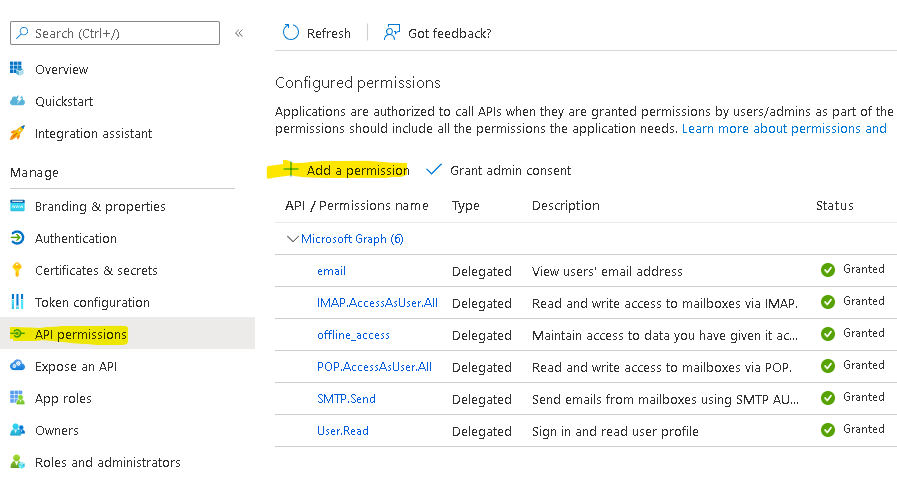
Nella procedura guidata Permessi API / Aggiungi un permesso, seleziona Microsoft Graph e poi Permessi delegati per trovare gli ambiti di autorizzazione elencati di seguito:
offline_access
IMAP.AccessAsUser.All
POP.AccessAsUser.All
SMTP.Send
Esempio di provider di token:
ITokenProvider tokenProvider = new AzureROPCTokenProvider(OAuth.Tenant, OAuth.ClientId, OAuth.ClientSecret, User.EMail, User.Password,
        new String[] {
                "offline_access",
                "https://outlook.office.com/IMAP.AccessAsUser.All", // IMAP scope
                "https://outlook.office.com/POP.AccessAsUser.All",  // POP3 scope
                "https://outlook.office.com/SMTP.Send"              // SMTP scope
        });