
繰り返しパターンから発生を生成する
Contents
[
Hide
]
Aspose.Email を使用すると、繰り返しパターンで発生を生成できます。本記事ではその方法を説明します。 次の発生を生成する および ユーザーフレンドリーなアイテムの説明を取得する. MAPI カレンダーの繰り返しパターンからの発生は Aspose.Email を使用して生成できます。以下のコードスニペットは、繰り返しパターンから発生を生成する方法を示しています。
次の発生または n 個の次の発生を計算する
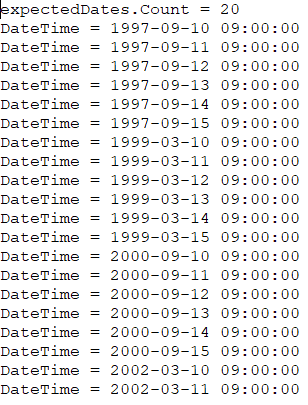
「次」の発生を取得するには、パラメータ nNextOccurrences = 1 で GenerateOccurrences メソッドを使用します。以下のコードスニペットは、nNextOccurrences = 20 を使用して 20 件の発生を生成する方法を示しています。以下のコードの出力は次のとおりです:
SimpleDateFormat sdf = new SimpleDateFormat("yyyy-MM-dd HH:mm:ss");

CalendarRecurrence recurrencePattern = new CalendarRecurrence();

recurrencePattern.setStartDate(sdf.parse("1997-09-10 09:00:00"));
RecurrenceRule rule = recurrencePattern.getRRules().add();
rule.setFrequency(Frequency.Monthly);
rule.setCount(20);
rule.setInterval(18);
rule.getByMonthDay().add(new int[] { 10, 11, 12, 13, 14, 15 });
DateCollection expectedDates = recurrencePattern.generateOccurrences(20);
System.out.println("expectedDates.Count = " + expectedDates.size());
for (int i = 0; i < expectedDates.size(); i++) {
    System.out.println("DateTime = " + sdf.format(expectedDates.getItem(i)));
}
繰り返しのユーザーフレンドリーテキストを取得
ルールのユーザーフレンドリーなテキストは、以下のように FriendlyText プロパティを使用して取得できます。コードの出力は次のようになります: "毎月 1 日と月末から数えて 1 日目に最大 2 回繰り返す。" 以下のコードスニペットは、繰り返しのユーザーフレンドリーなテキストを取得する方法を示します。
RecurrenceRule rule = recurrencePattern.getRRules().add();
rule.setFrequency(Frequency.Monthly);
rule.setCount(2);
rule.getByMonthDay().add(1);
rule.getByMonthDay().add(-1);
System.out.println(rule.getFriendlyText());