
Gmail ユーティリティ機能
FreeBusy クエリの使用
Aspose.Email は、基準に従って予定が期限切れかどうかを確認するクエリ機構を提供します。 FreebusyQuery この目的のためにクラスが提供されており、特定のカレンダーに対するクエリを作成できます。
カレンダーのクエリ
このコードサンプルはカレンダーのクエリ機能を示しています。サンプルでは以下のタスクが実行されます:
- カレンダーを作成して挿入する
- 予定を作成する
- 予定を挿入する
- 用意する FreebusyQuery
- 取得する FreebusyResponse
// Use the OAuthUser and GoogleOAuthHelper classes below to receive an access token
IGmailClient client = GmailClient.getInstance(accessToken, "user@domain.com");
try {
    Calendar newCalendar = new Calendar("summary", null, null, "Europe/Kiev");

    // Insert calendar and get back id of newly inserted calendar and Fetch the same calendar using calendar id
    String id = client.createCalendar(newCalendar);
    Calendar fetchedCalendar = client.fetchCalendar(id);
    String calendarId = fetchedCalendar.getId();
    try {
        // Get list of appointments in newly inserted calendar. It should be zero
        Appointment[] appointments = client.listAppointments(calendarId);

        // Create a new appointment and Calculate appointment start and finish time
        java.util.Calendar c = java.util.Calendar.getInstance();
        Date startDate = c.getTime();
        c.add(java.util.Calendar.HOUR_OF_DAY, 1);
        Date endDate = c.getTime();

        // Create attendees list for appointment
        MailAddressCollection attendees = new MailAddressCollection();
        attendees.add("user1@domain.com");
        attendees.add("user2@domain.com");

        // Create appointment
        Appointment app1 = new Appointment("Location", startDate, endDate, MailAddress.to_MailAddress("user2@domain.com"), attendees);
        app1.setSummary("Summary");
        app1.setDescription("Description");
        app1.setStartTimeZone("Europe/Kiev");
        app1.setEndTimeZone("Europe/Kiev");

        // Insert the newly created appointment and get back the same in case of successful insertion
        Appointment newAppointment = client.createAppointment(calendarId, app1);

        // Create Freebusy query by setting min/max timeand time zone
        FreebusyQuery query = new FreebusyQuery();
        c = java.util.Calendar.getInstance();
        c.add(java.util.Calendar.DATE, -1);
        query.setTimeMin(c.getTime());
        c.add(java.util.Calendar.DATE, 2);
        query.setTimeMax(c.getTime());
        query.setTimeZone("Europe/Kiev");

        // Set calendar item to search and Get the reponse of query containing
        query.getItems().add(calendarId);
        FreebusyResponse resp = client.getFreebusyInfo(query);

        client.deleteAppointment(calendarId, newAppointment.getUniqueId());
    } finally {
        client.deleteCalendar(calendarId);
    }
} finally {
    client.dispose();
}
Google Developer Console でプロジェクトを作成する
Gmail アカウントを持つユーザーのために、Google Developer Console 上でプロジェクトを作成します。Google プロジェクトの API と認証 -> 認証情報ページで、クライアント ID やクライアントシークレットなどの情報を記録します。この情報は、gmail アカウントのユーザー名とパスワードと共に、このセクションでのコード(例:Google カレンダー、アクセス制御リスト、予定、連絡先、設定など)の実行に必要です。
Google Developer Console でプロジェクトを作成する手順
以下は、Google Developer Console でプロジェクトを作成するためのステップバイステップチュートリアルです。
-
リンク https://console.cloud.google.com にアクセスし、Gmail の認証情報でログインしてください
-
チェックボックス「I have read and agree to all Terms of Service for the Google Cloud Platform products.」を選択し、NEW PROJECT ボタンを押してください
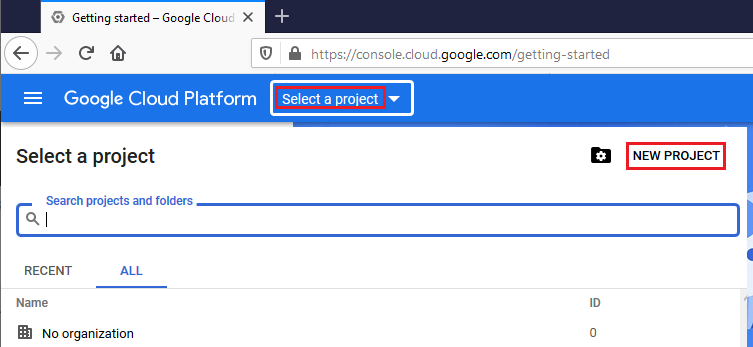
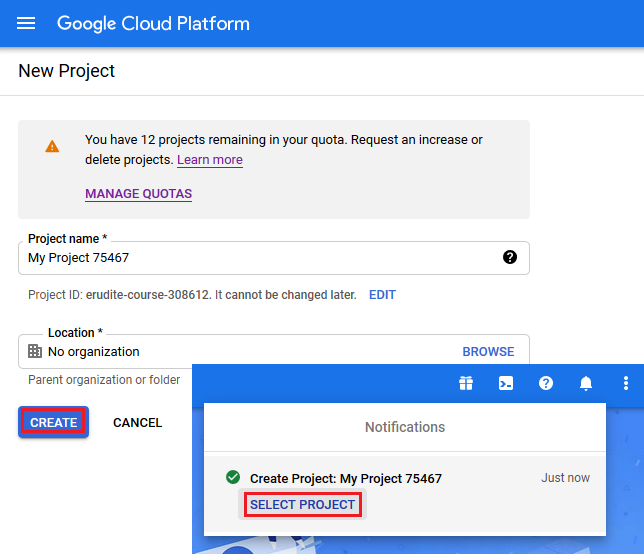
- Create と Select 新しいプロジェクト
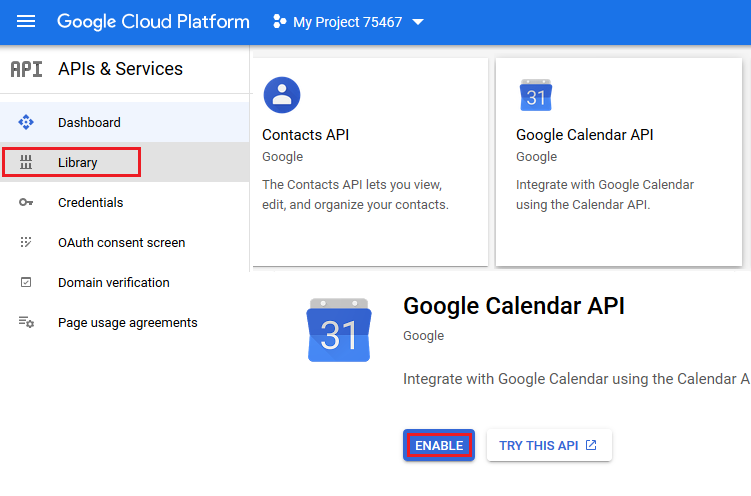
- Library を選択し、Contact と Calendar API を有効にする
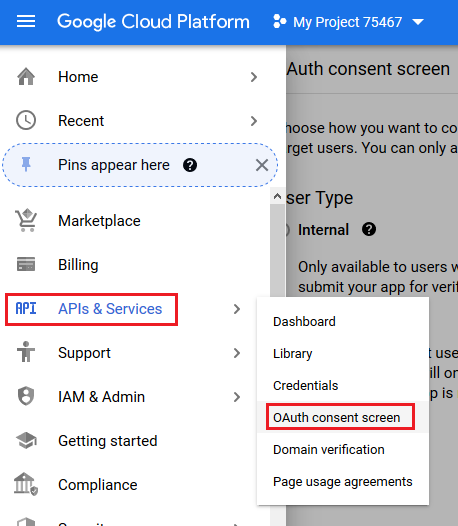
- OAuth consent screen を開く
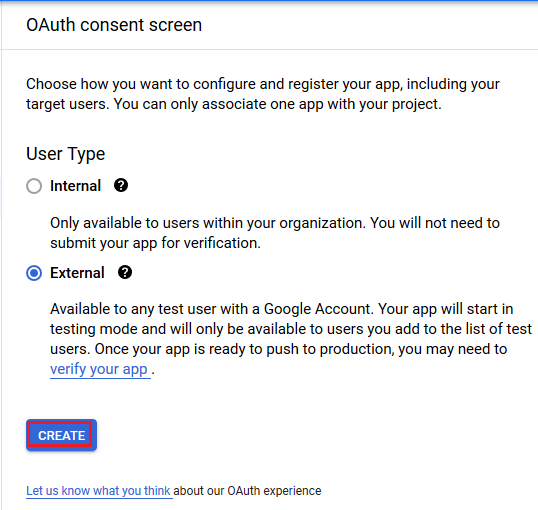
- External チェックボックスを選択し、CREATE ボタンを押してください
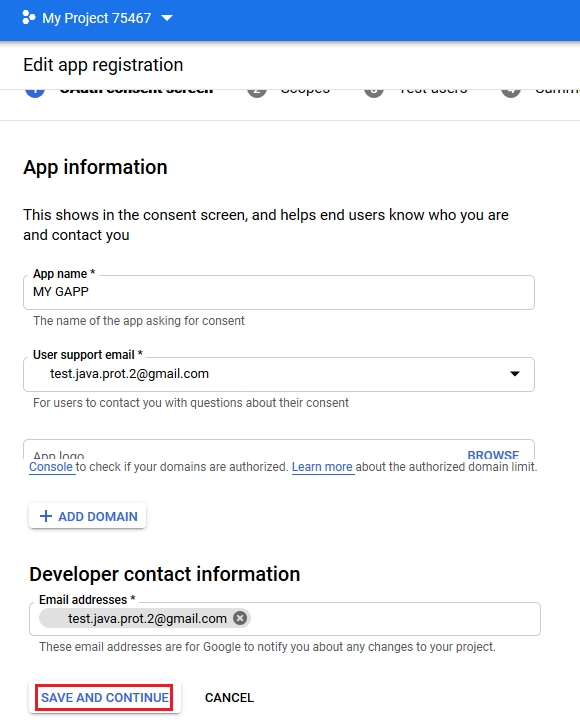
- アプリ登録を編集し、SAVE AND CONTINUE ボタンを押してください
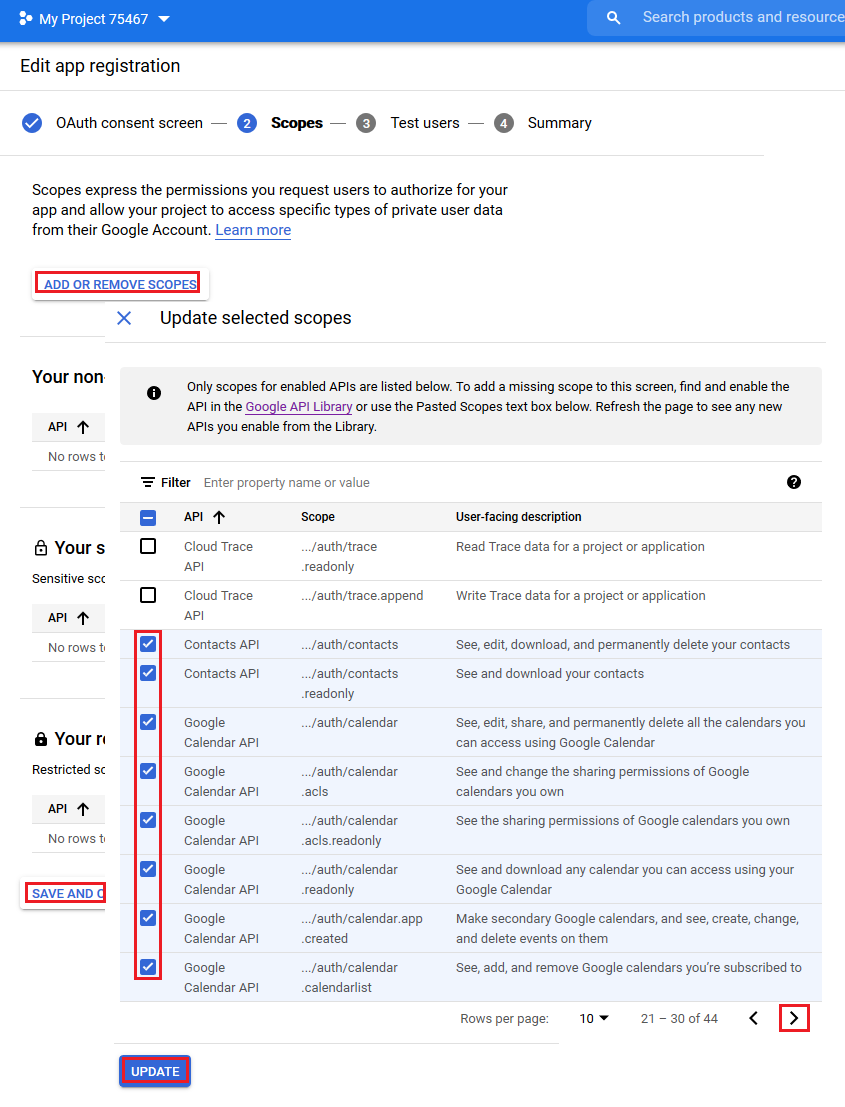
- スコープを追加して UPDATE ボタンを押してください
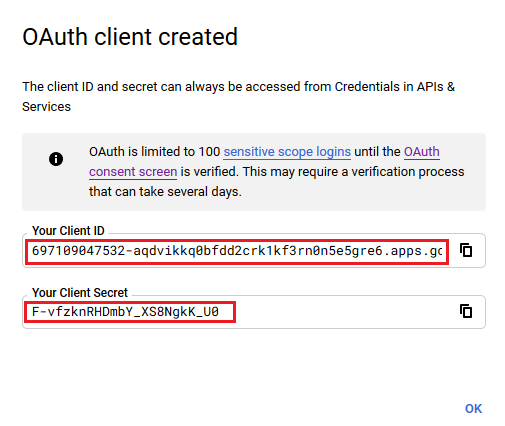
- OAuth認証情報を作成する
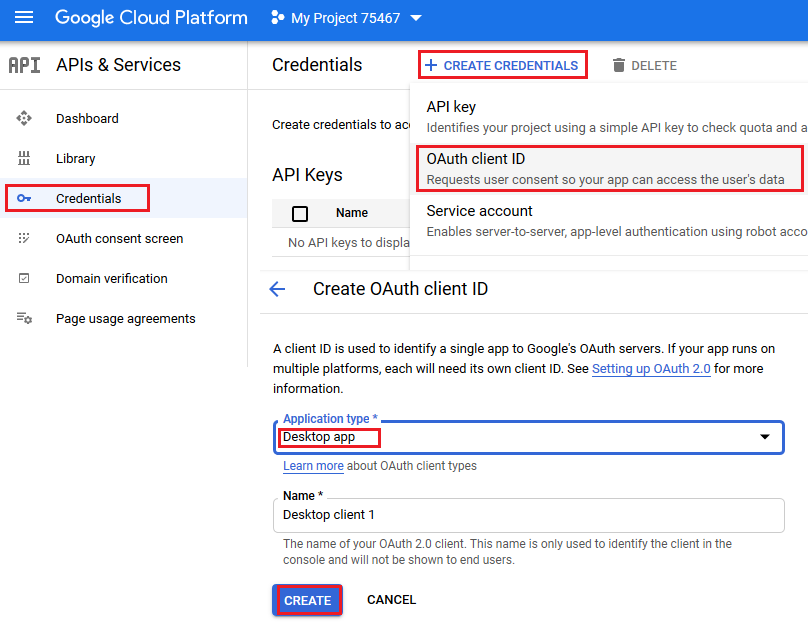
- このセクションのサンプルコードで使用されるクライアントIDとクライアントシークレットです。
ヘルパークラス
このセクションのコード例を実行するには、以下のヘルパークラスが必要です。これらのクラス GoogleOAuthHelper および OAuthUser これはデモンストレーションを簡略化したものです。これらのクラスのメソッドは、いつでも変更される可能性のあるウェブページの内部構造を使用しています。
GoogleOAuthHelper クラス
以下のコードスニペットは、実装方法を示しています GoogleOAuthHelper クラス。
import java.io.BufferedReader;
import java.io.IOException;
import java.io.InputStream;
import java.io.InputStreamReader;
import java.io.OutputStream;
import java.io.UnsupportedEncodingException;
import java.net.HttpURLConnection;
import java.net.URL;
import java.net.URLDecoder;
import java.net.URLEncoder;
import java.nio.charset.StandardCharsets;
import java.security.MessageDigest;
import java.security.NoSuchAlgorithmException;
import java.util.HashMap;
import java.util.Map;
import java.util.UUID;

import javax.xml.bind.DatatypeConverter;

/**
 * <p>
 * Developers console https://console.developers.google.com/projectselector/apis/credentials?pli=1
 * Documentation https://developers.google.com/identity/protocols/OAuth2InstalledApp
 * </p>
 */
class GoogleOAuthHelper {
    public static final String AUTHORIZATION_URL = "https://accounts.google.com/o/oauth2/v2/auth";
    public static final String TOKEN_REQUEST_URL = "https://oauth2.googleapis.com/token";
    public static final String REDIRECT_URI = "urn:ietf:wg:oauth:2.0:oob";
    public static final String REDIRECT_TYPE = "code";
    public static final String SCOPE = "https%3A%2F%2Fwww.googleapis.com%2Fauth%2Fcalendar" // Calendar
            + "+https%3A%2F%2Fwww.google.com%2Fm8%2Ffeeds%2F" // Contacts
            + "+https%3A%2F%2Fmail.google.com%2F"; // IMAP & SMTP

    static class OAuthUser {
        String email;
        String clientId;
        String clientSecret;
        String refreshToken;
    }

    static String createCodeChalange() {
        String verifierStr = UUID.randomUUID().toString() + "-" + UUID.randomUUID().toString();
        System.out.println("Code Verifier: " + verifierStr);

        MessageDigest digest;
        try {
            digest = MessageDigest.getInstance("SHA-256");
        } catch (NoSuchAlgorithmException e) {
            throw new IllegalAccessError(e.getMessage());
        }
        byte[] hash = digest.digest(verifierStr.getBytes(StandardCharsets.UTF_8));
        String base64Hash = DatatypeConverter.printBase64Binary(hash);

        base64Hash = base64Hash.split("=")[0];
        base64Hash = base64Hash.replace('+', '-').replace('/', '_');
        return base64Hash;
    }

    static String getAuthorizationCodeUrl(OAuthUser acc) {
        return getAuthorizationCodeUrl(acc, SCOPE, REDIRECT_URI, REDIRECT_TYPE);
    }

    static String getAuthorizationCodeUrl(OAuthUser acc, String scope, String redirectUri, String responseType) {
        System.out.println("---------------------------------------------------------");
        System.out.println("------------- OAuth 2.0 AuthorizationCodeUrl -------------");
        System.out.println("---------------------------------------------------------");
        System.out.println("Login: " + acc.email);
        String codeChallenge = createCodeChalange();

        String state = urlEncode(UUID.randomUUID().toString());
        String approveUrl = AUTHORIZATION_URL + "?client_id=" + acc.clientId + "&redirect_uri=" + redirectUri + "&response_type=" + responseType + "&scope=" + scope
                + "&code_challenge=" + codeChallenge + "&code_challenge_method=S256&state=" + state;

        System.out.println("Approve Url: " + approveUrl);
        return approveUrl;
    }

    static String urlEncode(String value) {
        try {
            return URLEncoder.encode(value, StandardCharsets.UTF_8.toString());
        } catch (UnsupportedEncodingException e) {
            throw new IllegalAccessError(e.getMessage());
        }
    }

    static String urlDecode(String value) {
        try {
            return URLDecoder.decode(value, StandardCharsets.UTF_8.toString());
        } catch (UnsupportedEncodingException e) {
            throw new IllegalAccessError(e.getMessage());
        }
    }

    static String getAccessTokenByAuthCode(String authorizationCode, String codeVerifier, OAuthUser user) {
        String encodedParameters = "client_id=" + urlEncode(user.clientId) + "&client_secret=" + urlEncode(user.clientSecret) + "&code=" + urlEncode(authorizationCode)
                + "&code_verifier=" + codeVerifier + "&redirect_uri=" + urlEncode(REDIRECT_URI) + "&grant_type=authorization_code";
        System.out.println("---------------------------------------------------------");
        System.out.println("------------- OAuth 2.0 AccessTokenByAuthCode -------------");
        System.out.println("---------------------------------------------------------");
        System.out.println("Authorization code: " + authorizationCode);

        String result = "";
        Map<String, String> token = geToken(encodedParameters);
        for (String key : token.keySet()) {
            System.out.println(key + ": " + token.get(key));
            if (key.equals("refresh_token")) {
                result = token.get(key);
            }
        }

        System.out.println("---------------------------------------------------------");

        return result;
    }

    static String getAccessTokenByRefreshToken(OAuthUser user) {
        String encodedParameters = "client_id=" + urlEncode(user.clientId) + "&client_secret=" + urlEncode(user.clientSecret) + "&refresh_token=" + urlEncode(user.refreshToken)
                + "&grant_type=refresh_token";
        System.out.println("---------------------------------------------------------");
        System.out.println("----------- OAuth 2.0 AccessTokenByRefreshToken -----------");
        System.out.println("---------------------------------------------------------");
        System.out.println("Login: " + user.email);

        String result = "";
        Map<String, String> token = geToken(encodedParameters);
        for (String key : token.keySet()) {
            System.out.println(key + ": " + token.get(key));
            if (key.equals("access_token")) {
                result = token.get(key);
            }
        }

        System.out.println("---------------------------------------------------------");

        return result;
    }

    static Map<String, String> geToken(String encodedParameters) {
        try {
            HttpURLConnection connection = (HttpURLConnection) new URL(TOKEN_REQUEST_URL).openConnection();
            connection.setRequestMethod("POST");

            byte[] requestData = encodedParameters.getBytes(StandardCharsets.UTF_8);

            connection.setUseCaches(false);
            connection.setDoInput(true);
            connection.setDoOutput(true);
            connection.setRequestProperty("Content-Type", "application/x-www-form-urlencoded");
            connection.setRequestProperty("Content-Length", "" + requestData.length);

            final OutputStream st = connection.getOutputStream();
            try {
                st.write(requestData, 0, requestData.length);
            } finally {
                st.flush();
                st.close();
            }

            connection.connect();

            if (connection.getResponseCode() >= HttpURLConnection.HTTP_BAD_REQUEST) {
                throw new IllegalAccessError("Operation failed: " + connection.getResponseCode() + "/" + connection.getResponseMessage() + "\r\nDetails:\r\n{2}"
                        + readInputStream(connection.getErrorStream()));
            }

            String responseText = readInputStream(connection.getInputStream());

            Map<String, String> result = new HashMap<String, String>();
            System.out.println(responseText);
            String[] strs = responseText.replace("{", "").replace("}", "").replace("\"", "").replace("\r", "").replace("\n", "").split(",");
            for (String sPair : strs) {
                String[] pair = sPair.split(":");
                String name = pair[0].trim().toLowerCase();
                String value = urlDecode(pair[1].trim());
                result.put(name, value);
            }

            return result;
        } catch (IOException e) {
            throw new IllegalAccessError(e.getMessage());
        }
    }

    static String readInputStream(InputStream is) {
        if (is == null)
            return "";

        BufferedReader reader = new BufferedReader(new InputStreamReader(is));
        StringBuilder result = new StringBuilder();
        String line;
        try {
            while ((line = reader.readLine()) != null) {
                result.append(line);
            }
        } catch (IOException e) {
            // ignore
        }
        return result.toString();
    }
}
Google OAuth Helper は次のように使用します:
- まず認可コードの URL を生成する必要があります。
- ブラウザーで URL を開き、すべての操作を完了してください。その結果、認可コードが取得できます。
- 認可コードを使用してリフレッシュトークンを取得します。
- リフレッシュトークンが存在する場合、アクセス トークンを取得するために使用できます。
static class OAuthUser {
    String email;
    String clientId;
    String clientSecret;
    String refreshToken;
}

static void getRefreshToken() {
    Scanner inputReader = new Scanner(System.in);
    OAuthUser user = new OAuthUser();

    // Set clientId, clientSecret and email
    System.out.println("Set clientId: ");
    user.clientId = inputReader.nextLine();
    System.out.println("Set clientSecret: ");
    user.clientSecret = inputReader.nextLine();
    System.out.println("Set email: ");
    user.email = inputReader.nextLine();

    // Generate AuthorizationCodeUrl
    String authorizationCodeUrl = GoogleOAuthHelper.getAuthorizationCodeUrl(user);

    System.out.println("You have to retrieve AuthorizationCode manually with generated AuthorizationCodeUrl");
    System.out.println("Set authorizationCode: ");
    String authorizationCode = inputReader.nextLine();
    System.out.println("Copy Code Verifier from the previous step output");
    System.out.println("Set codeVerifier: ");
    String codeVerifier = inputReader.nextLine();

    // Get "Refresh Token"
    String refreshToken = GoogleOAuthHelper.getAccessTokenByAuthCode(authorizationCode, codeVerifier, user);
    user.refreshToken = refreshToken;

    // Get "Access Token"
    String accessToken = GoogleOAuthHelper.getAccessTokenByRefreshToken(user);

    // Use "Access Token" in API
    IGmailClient client = GmailClient.getInstance(accessToken, user.email);
}