
Azure AD 設定と Microsoft Graph 認証
Aspose.Email for Java は Microsoft Graph と完全に統合し、開発者が Microsoft 365 アカウントのメッセージ、連絡先、カレンダー、タスクを管理できるようにします。このガイドでは Azure AD アプリケーションの作成と認証の構成手順を示し、Aspose.Email でのコーディングを開始できるようにします GraphClient.
Aspose.Email で Microsoft Graph API を使用する前に、Azure Active Directory (Azure AD) にアプリケーションを登録し、認証を構成する必要があります。このページでは以下を説明します:
-
Azure AD アプリケーション(プロジェクト)の作成。
-
必要な Microsoft Graph 権限の割り当て。
-
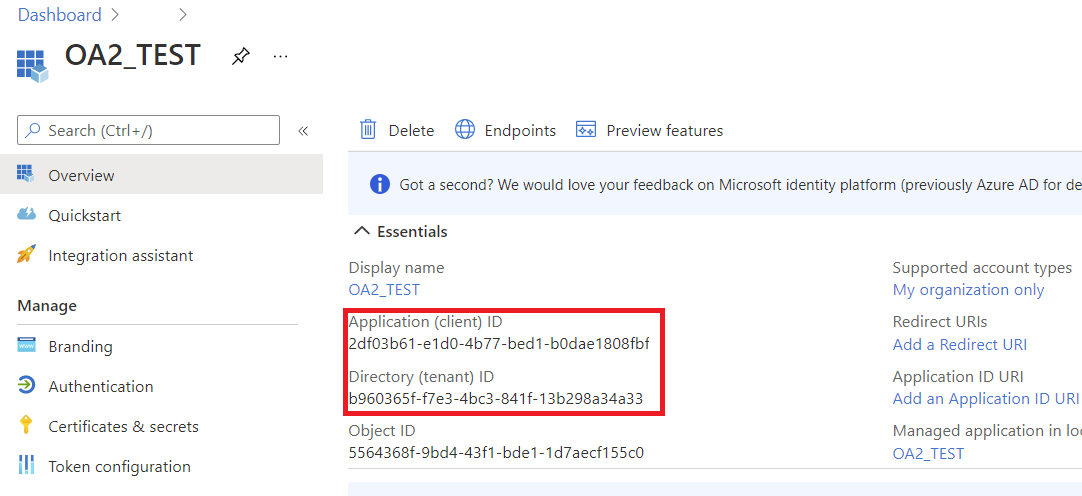
資格情報(クライアント ID、クライアントシークレット、テナント ID)の生成。
-
Aspose.Email トークンプロバイダーを使用した Java の認証。
完了すると、Java アプリケーションから Microsoft Graph とやり取りできるようになります。
1. Azure AD アプリケーションの作成
以下の手順で Azure ポータルにアプリケーションを登録してください:
- サインインしてください Azure ポータル.
- Azure Active Directory → App Registrations → New Registration に移動します。
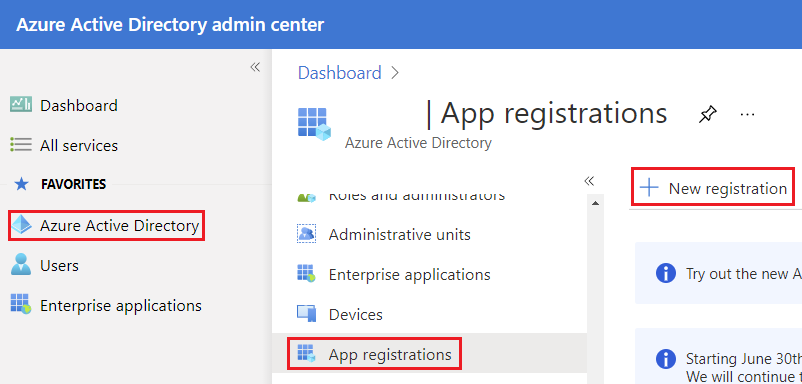
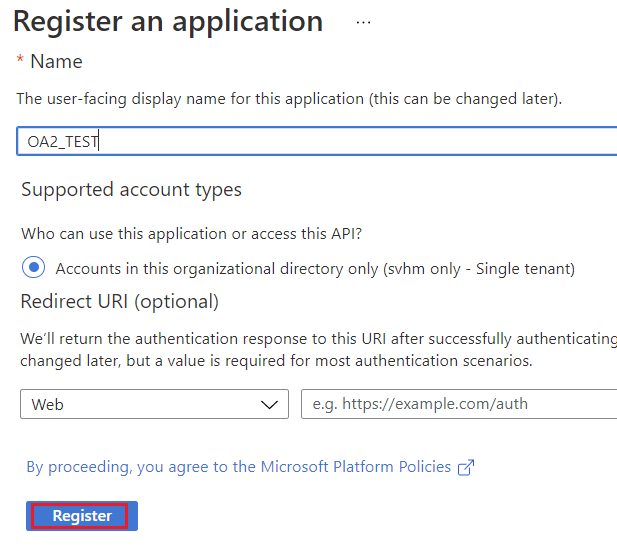
- アプリケーションの Name(例:AsposeEmailGraphApp)を入力してください。
- サポートされているアカウントタイプを選択してください:
- シングルテナント(自組織のみが使用する場合)
- マルチテナント(複数組織がアクセスする場合)
- 必要に応じて Redirect URI を設定します(対話型または Web 認証に必要)。
- Register をクリックします。
2. クライアントシークレットの作成
- 登録後、Certificates & Secrets → New Client Secret に移動します。
- 説明と有効期限を追加します。
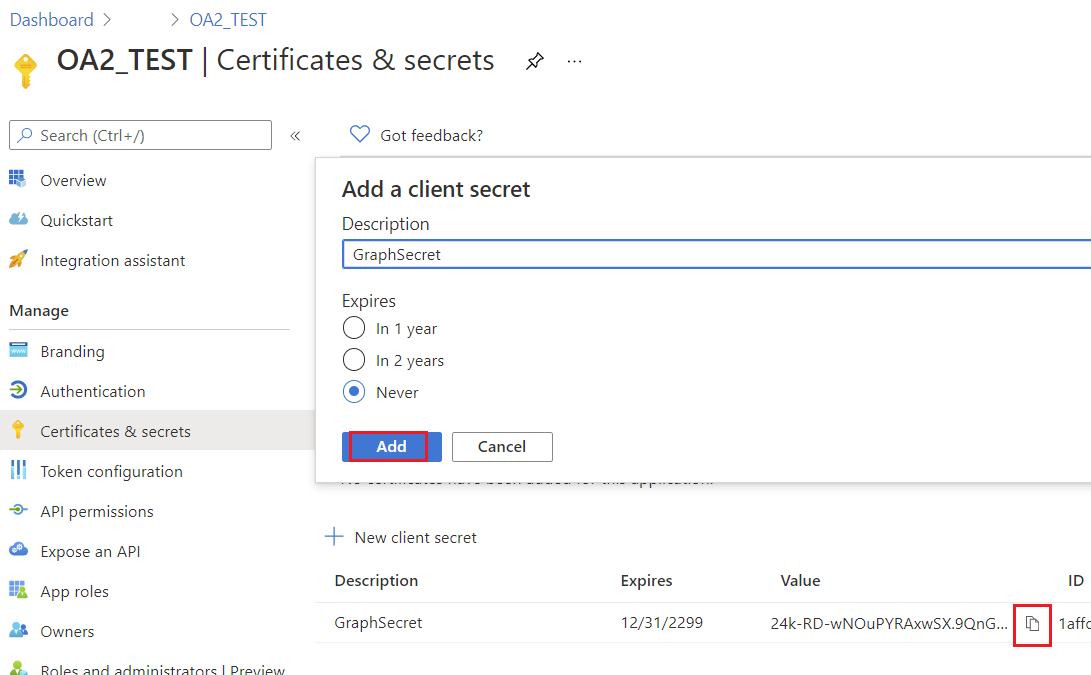
- 生成されたシークレット値をコピーしてください - 再度表示されません。
クライアントシークレット を安全に保管してください。機密クライアントの認証に必要です。
新しく登録されたアプリケーションのブレードが表示されます。
3. Microsoft Graph 権限の構成
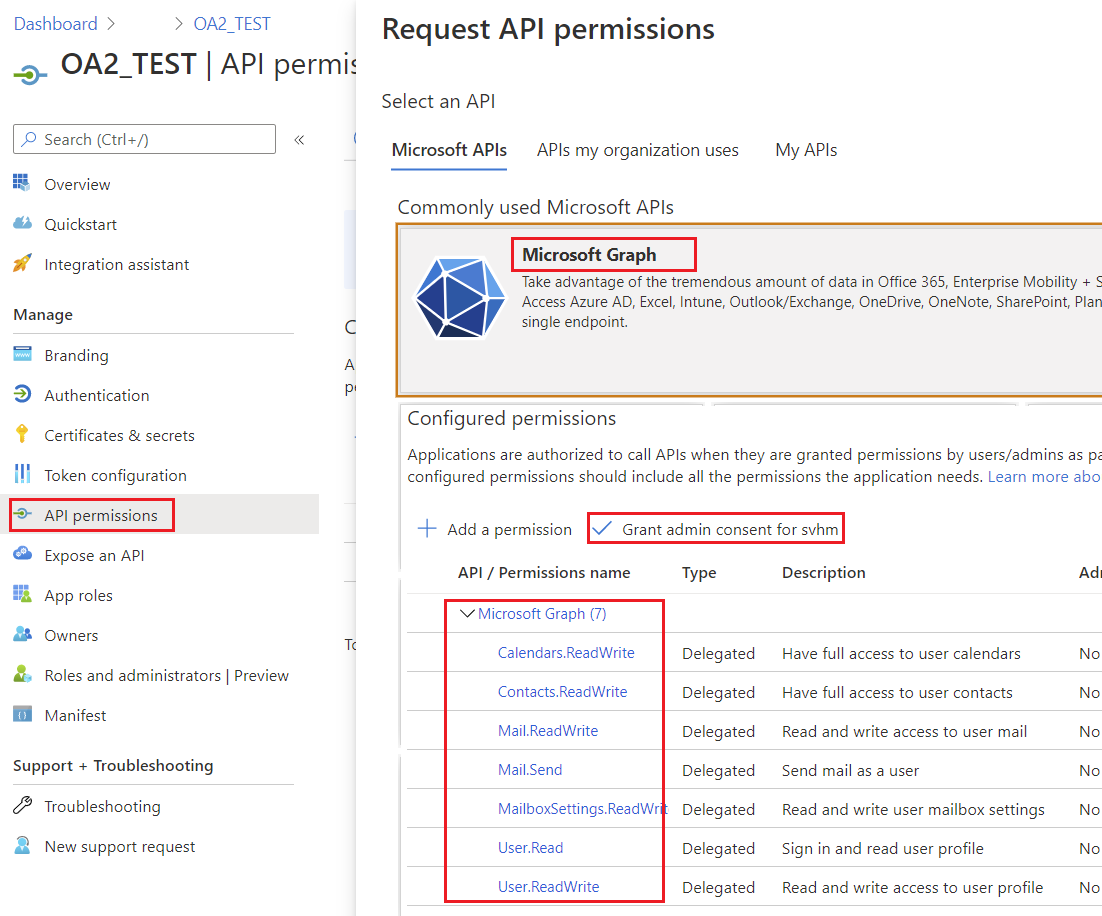
- API Permissions → Add a Permission → Microsoft Graph に移動します。
- シナリオに応じて、権限の種類(Delegated または Application)を選択してください。
- Aspose.Email の操作に必要な権限を追加します:
- Contacts.ReadWrite – 連絡先を管理するため
- Calendars.ReadWrite – カレンダーを管理するため
- Mail.ReadWrite – メッセージの読み取りと送信のため
- Tasks.ReadWrite – タスクを管理するため
- 必要に応じて Grant Admin Consent をクリックしてください。
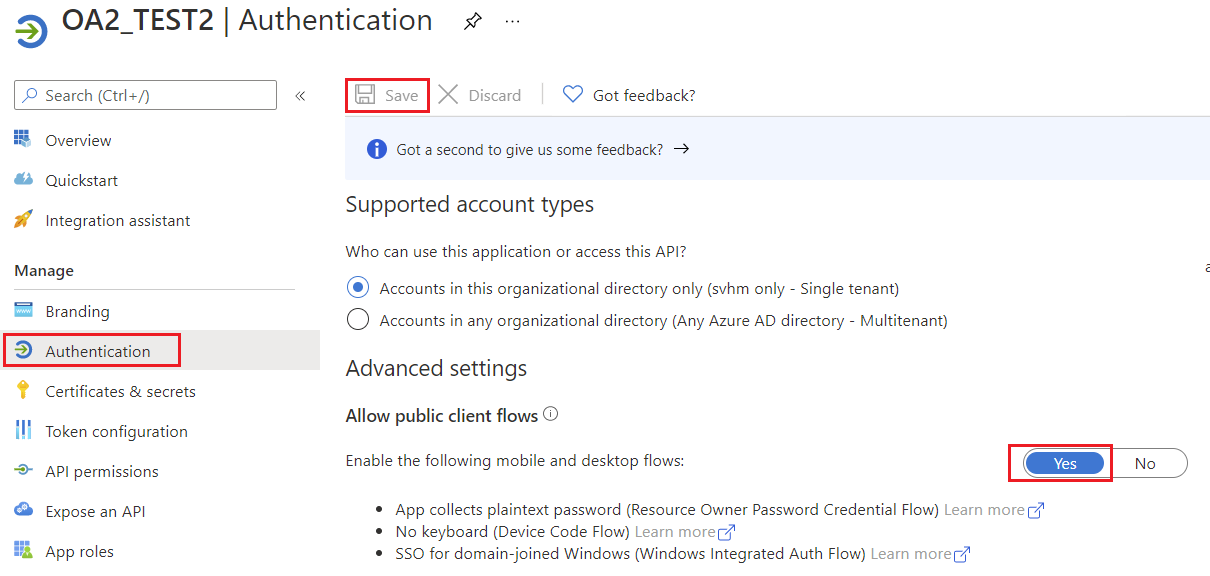
4. パブリッククライアントフローを許可
アプリケーションがパブリッククライアントかどうかを指定します。リダイレクト URI を使用しないトークングラントフローを使用するアプリに適しています。
5. Microsoft Graph 認証
Aspose.Email がサポートする認証方法
| トークンプロバイダー | 使用例 | | ——————————– | ————————————————————————————— | | AzureConfidentialTokenProvider | 機密クライアント(クライアント ID+シークレット) - サーバー側アプリ用 | | AzureROPCConfiguration | リソースオーナーパスワード資格情報(ユーザー名+パスワード) - 非対話型シナリオ用 | | AzurePublicTokenProvider | パブリッククライアント(対話型ログイン) | | AzureTokenProviderBase | カスタム認証実装の基底クラス |
機密クライアントで認証
使用する AzureConfidentialTokenProvider クライアント ID、クライアント シークレット、テナント ID がある場合の認証方法:
AzureConfidentialTokenProvider provider = new AzureConfidentialTokenProvider(
    tenantId,
    clientId,
    clientSecret
);

IGraphClient client = GraphClient.getClient(provider, tenantId);
client.setResource(ResourceType.Users);
client.setResourceId(username);
client.setEndpoint("https://graph.microsoft.com");
これにより、Microsoft Graph とやり取りできる完全に認証された IGraphClient が設定されます。
ROPC(ユーザー名&パスワード)で認証
ユーザー名とパスワードがあるシナリオでは、次を使用してください AzureROPCConfiguration:
AzureROPCConfiguration ropcConfig = new AzureROPCConfiguration(
    tenantId,
    clientId,
    clientSecret,
    username,
    password
);

IGraphClient client = GraphClient.getClient(ropcConfig, tenantId);
client.setResource(ResourceType.Users);
client.setResourceId(username);
client.setEndpoint("https://graph.microsoft.com");
Microsoft Graph 用カスタムトークンプロバイダー
Aspose.Email for Java は Microsoft Graph と連携します IGraphClient インターフェイスです。リクエストを認証するには、次の実装が必要です ITokenProvider が必要です。ほとんどの開発者は組み込みの認証プロバイダーを使用しますが、Resource Owner Password Credentials (ROPC) フローを使用する場合など、独自のプロバイダーを作成したいシナリオもあります。
1. AzureROPCTokenProvider を使用した ITokenProvider の実装
このクラスは次の実装を提供します ITokenProvider Azure Resource Owner Password Credentials (ROPC) フローを使用します。以下の例はデモ目的のみです。本番環境では、クライアント資格情報や PKCE を使用した認可コードなど、より安全なフローの使用を推奨します。
import java.io.BufferedReader;
import java.io.IOException;
import java.io.InputStream;
import java.io.InputStreamReader;
import java.io.OutputStream;
import java.io.UnsupportedEncodingException;
import java.net.HttpURLConnection;
import java.net.URL;
import java.net.URLDecoder;
import java.net.URLEncoder;
import java.nio.charset.StandardCharsets;
import java.util.HashMap;
import java.util.Map;

/**
 * <p>
 * Azure resource owner password credential (ROPC) token provider
 * https://docs.microsoft.com/en-us/azure/active-directory/develop/v2-oauth-ropc
 * https://docs.microsoft.com/en-us/exchange/client-developer/exchange-web-services/how-to-authenticate-an-ews-application-by-using-oauth
 * https://portal.azure.com
 * https://developer.microsoft.com/en-us/graph/graph-explorer/#
 * token parser https://jwt.io
 * </p>
 */
class AzureROPCTokenProvider implements ITokenProvider {

    private static final String GRANT_TYPE = "password";

    private final String clientId;
    private final String clientSecret;
    private final String userName;
    private final String password;
    private final String tenant;
    private final String scope;

    private OAuthToken token;

    public AzureROPCTokenProvider(String tenant, String clientId, String clientSecret,
                                  String userName, String password, String[] scopeAr) {
        this.tenant = tenant;
        this.clientId = clientId;
        this.clientSecret = clientSecret;
        this.userName = userName;
        this.password = password;
        this.scope = joinToStr(scopeAr, " ");
    }

    public synchronized OAuthToken getAccessToken(boolean ignoreExistingToken) {
        if (this.token != null && !this.token.getExpired() && !ignoreExistingToken)
            return this.token;
        token = null;

        Map<String, String> tokenArgs = getToken();

        java.util.Calendar c = java.util.Calendar.getInstance();
        c.add(java.util.Calendar.SECOND, Integer.parseInt(tokenArgs.get("expires_in")));
        token = new OAuthToken(tokenArgs.get("access_token"), TokenType.AccessToken, c.getTime());
        return token;
    }

    public final OAuthToken getAccessToken() {
        return getAccessToken(false);
    }

    public void dispose() {
    }

    private String getEncodedParameters() {
        return "client_id=" + urlEncode(clientId) + "&scope=" + urlEncode(scope) + "&username=" + urlEncode(userName)
                + "&password=" + urlEncode(password) + "&grant_type="
                + urlEncode(GRANT_TYPE);
    }

    private String getUri() {
        if (tenant == null || tenant.trim().isEmpty())
            return "https://login.microsoftonline.com/common/oauth2/v2.0/token";
        else
            return "https://login.microsoftonline.com/" + tenant + "/oauth2/v2.0/token";
    }

    private Map<String, String> getToken() {
        try {
            HttpURLConnection connection = (HttpURLConnection) new URL(getUri()).openConnection();
            connection.setRequestMethod("POST");

            byte[] requestData = getEncodedParameters().getBytes(StandardCharsets.UTF_8);

            connection.setUseCaches(false);
            connection.setDoInput(true);
            connection.setDoOutput(true);
            connection.setRequestProperty("Content-Type", "application/x-www-form-urlencoded");
            connection.setRequestProperty("Content-Length", "" + requestData.length);

            final OutputStream st = connection.getOutputStream();
            try {
                st.write(requestData, 0, requestData.length);
            } finally {
                st.flush();
                st.close();
            }

            connection.connect();

            if (connection.getResponseCode() >= HttpURLConnection.HTTP_BAD_REQUEST) {
                throw new IllegalAccessError("Operation failed: " + connection.getResponseCode() + "/" +
                        connection.getResponseMessage() + "\r\nDetails:\r\n{2}"
                        + readInputStream(connection.getErrorStream()));
            }

            String responseText = readInputStream(connection.getInputStream());

            Map<String, String> result = new HashMap<>();
            String[] fromJsonToKeyValue = responseText.replace("{", "").replace("}", "")
                    .replace("\"", "").replace("\r", "")
                    .replace("\n", "").split(",");
            for (String keyValue : fromJsonToKeyValue) {
                String[] pair = keyValue.split(":");
                String name = pair[0].trim().toLowerCase();
                String value = urlDecode(pair[1].trim());
                result.put(name, value);
            }

            return result;
        } catch (IOException e) {
            throw new IllegalAccessError(e.getMessage());
        }
    }

    static String urlEncode(String value) {
        try {
            return URLEncoder.encode(value, StandardCharsets.UTF_8.toString());
        } catch (UnsupportedEncodingException e) {
            throw new IllegalAccessError(e.getMessage());
        }
    }

    static String urlDecode(String value) {
        try {
            return URLDecoder.decode(value, StandardCharsets.UTF_8.toString());
        } catch (UnsupportedEncodingException e) {
            throw new IllegalAccessError(e.getMessage());
        }
    }

    static String readInputStream(InputStream is) {
        if (is == null)
            return "";

        BufferedReader reader = new BufferedReader(new InputStreamReader(is));
        StringBuilder result = new StringBuilder();
        String line;
        try {
            while ((line = reader.readLine()) != null) {
                result.append(line);
            }
        } catch (IOException e) {
            // ignore
        }
        return result.toString();
    }

    static String joinToStr(String[] arr, String sep) {
        StringBuilder sb = new StringBuilder();
        for (int i = 0; i < arr.length; i++) {
            if (i > 0)
                sb.append(sep);
            sb.append(arr[i]);
        }
        return sb.toString();
    }
}
2. ITokenProvider オブジェクトの作成
この IGraphClient インターフェイスはリクエストの作成、Microsoft Graph への送信、およびレスポンスの処理を担当します。インスタンスを作成するには IGraphClient、実装を提供しなければなりません ITokenProvider。トークンプロバイダーは有効な OAuth アクセストークンを提供することでリクエストを認証します。
以下のコードサンプルは、基本的なインライン実装を作成する方法を示しています ITokenProvider Microsoft Graph リクエストの認証に必要なインターフェイスです:
ITokenProvider tokenProvider = new ITokenProvider() {
    Date expirationDate = null;

    @Override
    public void dispose() {
        // Clean up resources if necessary
    }

    @Override
    public OAuthToken getAccessToken(boolean ignoreExistingToken) {
        // Retrieve an OAuth access token.
        // If ignoreExistingToken is true, always request a new token.
        // Otherwise, return the existing token if it is valid, or request a new one.
        return null;
    }

    @Override
    public OAuthToken getAccessToken() {
        // Return a valid OAuth token.
        // If no valid token exists, request a new one.
        return new OAuthToken("token", expirationDate);
    }
};
3. カスタムトークンプロバイダーの使用
一度 ITokenProvider が設定されれば、次を作成できます GraphClient インスタンスです。このクライアントは、Microsoft Graph を呼び出す際に提供されたトークンプロバイダーを認証に使用します。
ITokenProvider provider = new AzureROPCTokenProvider(
        tenantId,
        clientId,
        clientSecret,
        userName,
        password,
        new String[] {"https://graph.microsoft.com/.default"}
);

IGraphClient client = GraphClient.getClient(provider, tenantId);
client.setResource(ResourceType.Users);
client.setResourceId(userName);
client.setEndpoint("https://graph.microsoft.com");

// Now you can call Microsoft Graph APIs
var folders = client.listFolders(null);
for (GraphFolderInfo folder : folders) {
    System.out.println(folder.getDisplayName());
}
クライアントが作成され認証された後、Microsoft Graph サービスへのリクエストを開始できます。