
Microsoft Graph ユーティリティ機能
Azure Active Directory 管理センターでのプロジェクト作成
MS Office アカウントを持つユーザー向けに、Azure Active Directory 管理センターでプロジェクトを作成します。
Azure Active Directory 管理センターでプロジェクトを作成する手順
以下は Azure Active Directory 管理センターでプロジェクトを作成するステップバイステップのチュートリアルです。
1. Azure Active Directory にアクセスし、MS Office の資格情報でサインインしてください。
Azure Active Directory リンク - https://aad.portal.azure.com/
2. テナント内に Azure AD アプリケーションを作成する。
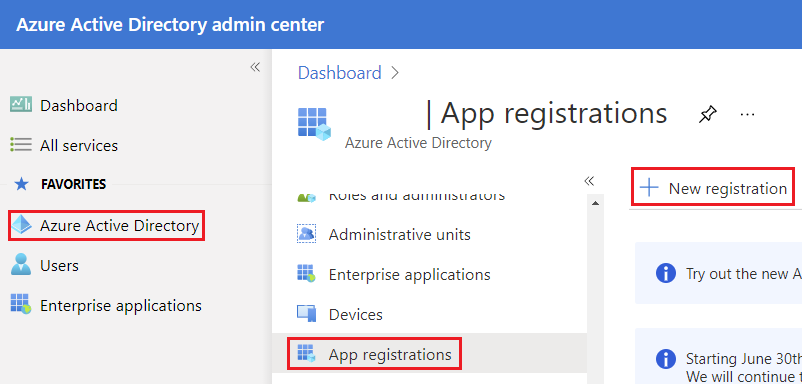
左側のペインで Azure Active Directory ラベルをクリックしてください。これにより Azure Active Directory のブレードが開きます。その画面で App registrations ラベルが表示されます。これが Azure AD アプリケーション登録の開始ポイントです。このブレードで Azure AD 用の新しいアプリケーションを作成できます。
New registration ボタンをクリックして新しいアプリケーションを作成します。
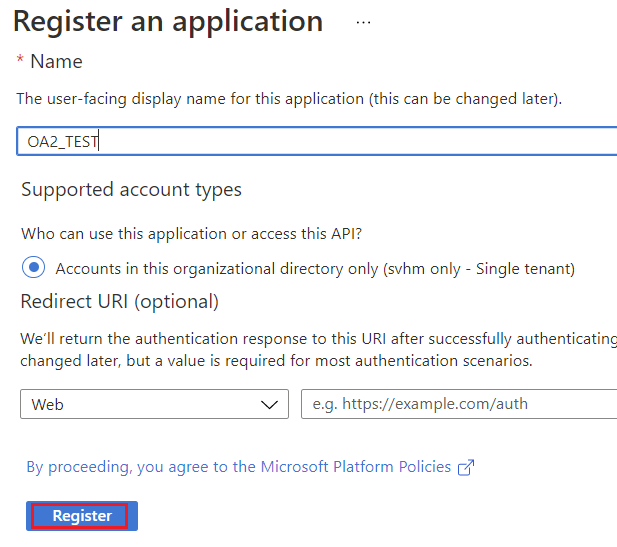
3. 新しいアプリケーション登録ブレードが表示されます。
- Name アプリケーションの名前です。
- Supported account types このセクションはアクセスを制限します。
Register ボタンをクリックしてください。
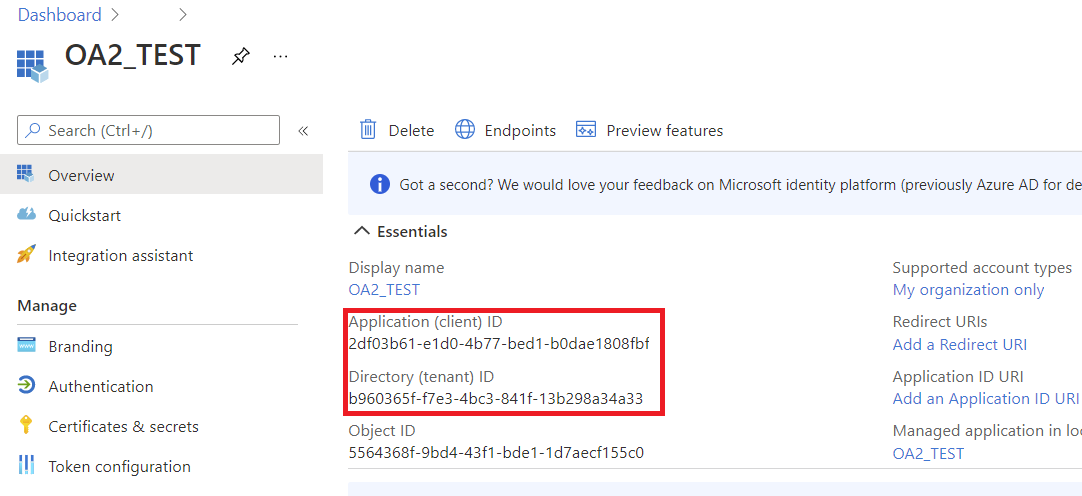
4. 新しく登録されたアプリケーションのブレードが表示されます。
- Application (client) ID アプリケーションの ID。
- Directory (tenant) ID Azure AD テナント ID。
5. Microsoft Graph API の権限を許可
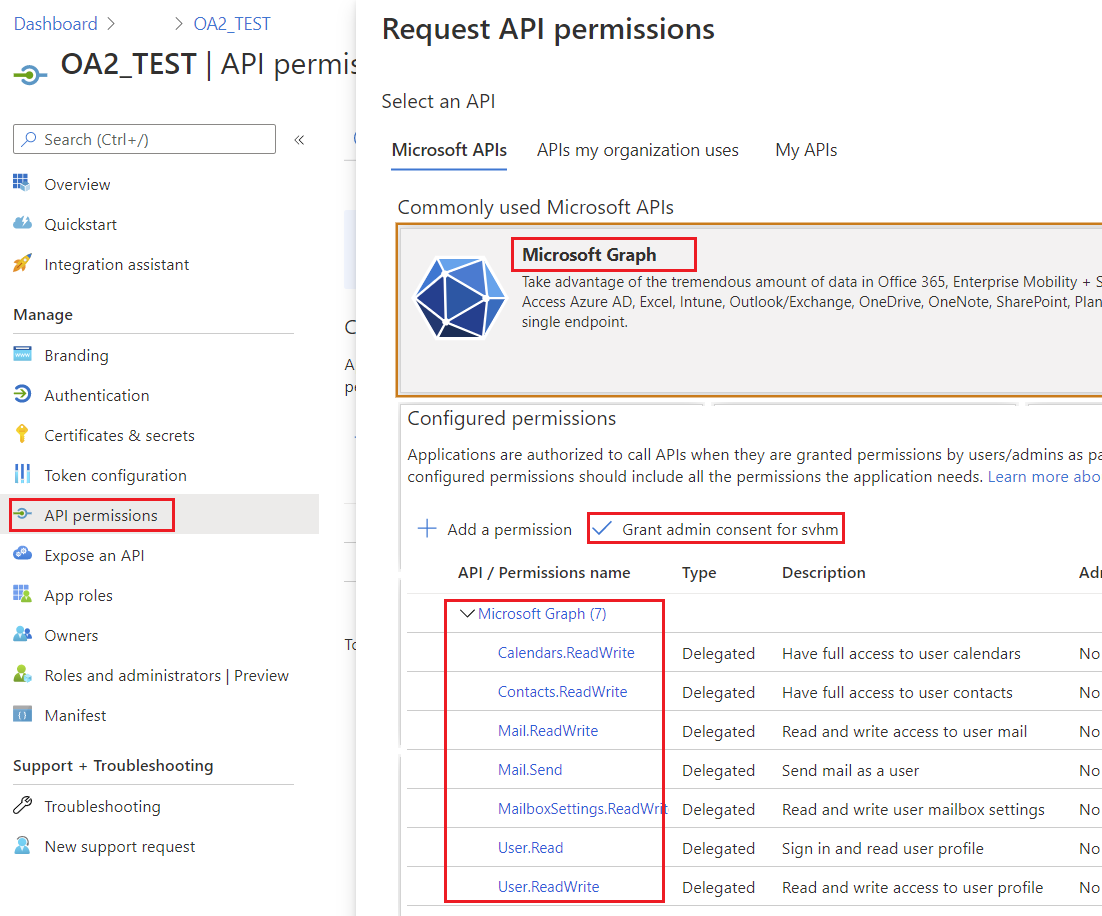
API permissions ラベルをクリックしてください。
Azure はすでにアプリケーションに User.Read の委任された権限を付与しています。この権限により、サインインしたユーザーの情報を取得できます。これらは Microsoft Graph API の権限で、別名 スコープ と呼ばれます。
Microsoft Graph API のスコープの全リスト - https://docs.microsoft.com/en-us/graph/permissions-reference.
+ Add a permission ボタンをクリックし、Microsoft Graph を選択してください。
Delegated permissions をクリックしてください。すると、Microsoft Graph API 用の権限一覧が表示されます。
必要な権限を選択し、Add permissions ボタンをクリックしてください。
Grant admin consent ボタンをクリックしてください。
6. パブリッククライアントフローを許可
アプリケーションがパブリッククライアントかどうかを指定します。リダイレクト URI を使用しないトークングラントフローを使用するアプリに適しています。
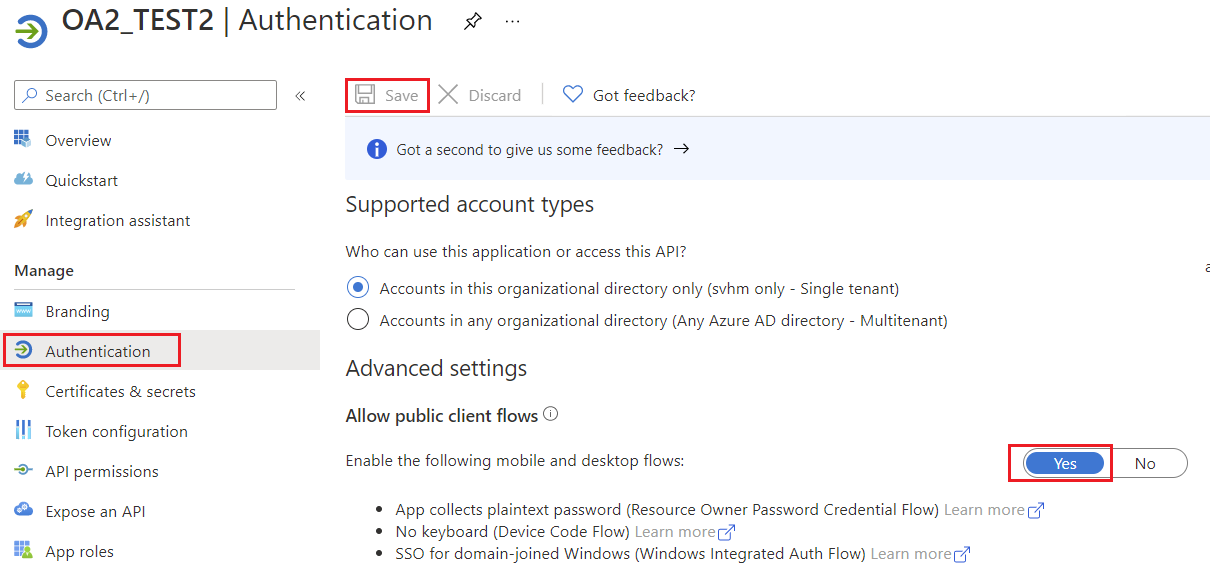
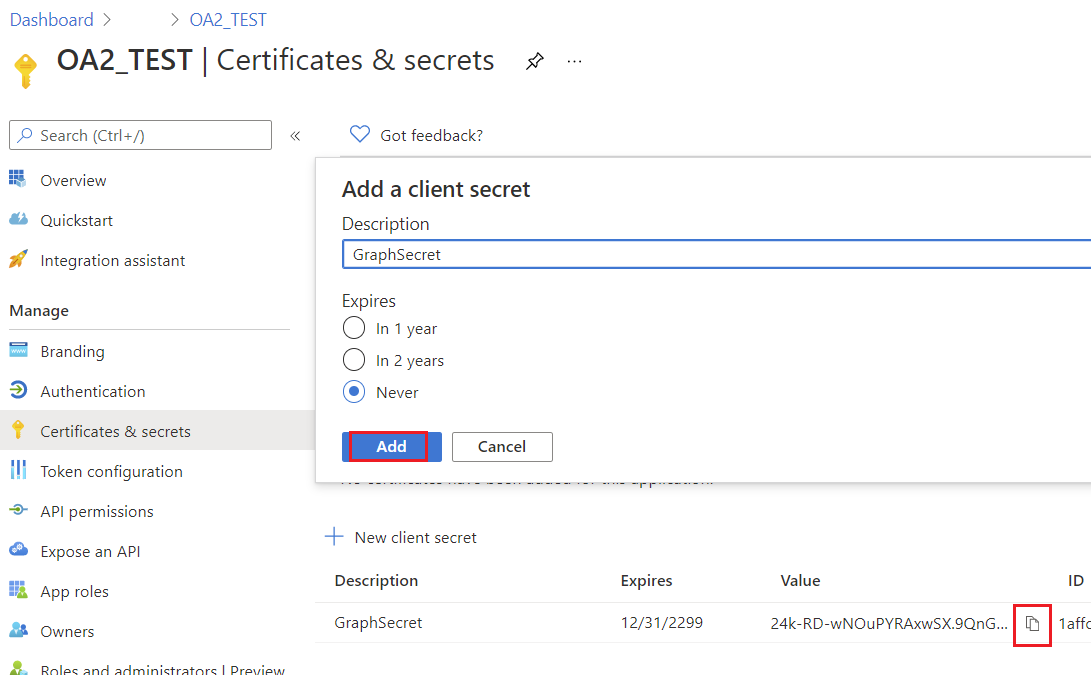
7. アプリケーション用キーの作成
ヘルパークラス
このセクションのコードを実行するには、以下のヘルパークラスが必要です。これらのクラスはデモを簡略化するためのものです。
AzureROPCTokenProvider クラス
次のインスタンス IGraphClient クラスはリクエストの構築、Microsoft Graph API への送信、レスポンスの処理を担当します。このクラスの新しいインスタンスを作成するには、次のインスタンスを提供する必要があります ITokenProvider、Microsoft Graph へのリクエストを認証できます。
import java.io.BufferedReader;
import java.io.IOException;
import java.io.InputStream;
import java.io.InputStreamReader;
import java.io.OutputStream;
import java.io.UnsupportedEncodingException;
import java.net.HttpURLConnection;
import java.net.URL;
import java.net.URLDecoder;
import java.net.URLEncoder;
import java.nio.charset.StandardCharsets;
import java.util.HashMap;
import java.util.Map;

/**
 * <p>
 * Azure resource owner password credential (ROPC) token provider
 * https://docs.microsoft.com/en-us/azure/active-directory/develop/v2-oauth-ropc
 * https://docs.microsoft.com/en-us/exchange/client-developer/exchange-web-services/how-to-authenticate-an-ews-application-by-using-oauth
 * https://portal.azure.com
 * https://developer.microsoft.com/en-us/graph/graph-explorer/#
 * token parser https://jwt.io
 * </p>
 */
class AzureROPCTokenProvider implements ITokenProvider {

    private static final String GRANT_TYPE = "password";

    private final String clientId;
    private final String clientSecret;
    private final String userName;
    private final String password;
    private final String tenant;
    private final String scope;

    private OAuthToken token;

    public AzureROPCTokenProvider(String tenant, String clientId, String clientSecret,
                                  String userName, String password, String[] scopeAr) {
        this.tenant = tenant;
        this.clientId = clientId;
        this.clientSecret = clientSecret;
        this.userName = userName;
        this.password = password;
        this.scope = joinToStr(scopeAr, " ");
    }

    public synchronized OAuthToken getAccessToken(boolean ignoreExistingToken) {
        if (this.token != null && !this.token.getExpired() && !ignoreExistingToken)
            return this.token;
        token = null;

        Map<String, String> tokenArgs = geToken();

        java.util.Calendar c = java.util.Calendar.getInstance();
        c.add(java.util.Calendar.SECOND, Integer.parseInt(tokenArgs.get("expires_in")));
        token = new OAuthToken(tokenArgs.get("access_token"), TokenType.AccessToken, c.getTime());
        return token;
    }

    public final OAuthToken getAccessToken() {
        return getAccessToken(false);
    }

    public void dispose() {
    }

    private String getEncodedParameters() {
        return "client_id=" + urlEncode(clientId) + "&scope=" + urlEncode(scope) + "&username=" + urlEncode(userName)
                + "&password=" + urlEncode(password) + "&grant_type="
                + urlEncode(GRANT_TYPE);
    }

    private String getUri() {
        if (tenant == null || tenant.trim().isEmpty())
            return "https://login.microsoftonline.com/common/oauth2/v2.0/token";
        else
            return "https://login.microsoftonline.com/" + tenant + "/oauth2/v2.0/token";
    }

    private Map<String, String> geToken() {
        try {
            HttpURLConnection connection = (HttpURLConnection) new URL(getUri()).openConnection();
            connection.setRequestMethod("POST");

            byte[] requestData = getEncodedParameters().getBytes(StandardCharsets.UTF_8);

            connection.setUseCaches(false);
            connection.setDoInput(true);
            connection.setDoOutput(true);
            connection.setRequestProperty("Content-Type", "application/x-www-form-urlencoded");
            connection.setRequestProperty("Content-Length", "" + requestData.length);

            final OutputStream st = connection.getOutputStream();
            try {
                st.write(requestData, 0, requestData.length);
            } finally {
                st.flush();
                st.close();
            }

            connection.connect();

            if (connection.getResponseCode() >= HttpURLConnection.HTTP_BAD_REQUEST) {
                throw new IllegalAccessError("Operation failed: " + connection.getResponseCode() + "/" +
                        connection.getResponseMessage() + "\r\nDetails:\r\n{2}"
                        + readInputStream(connection.getErrorStream()));
            }

            String responseText = readInputStream(connection.getInputStream());

            Map<String, String> result = new HashMap<>();
            String[] fromJsonToKeyValue = responseText.replace("{", "").replace("}", "")
                    .replace("\"", "").replace("\r", "")
                    .replace("\n", "").split(",");
            for (String keyValue : fromJsonToKeyValue) {
                String[] pair = keyValue.split(":");
                String name = pair[0].trim().toLowerCase();
                String value = urlDecode(pair[1].trim());
                result.put(name, value);
            }

            return result;
        } catch (IOException e) {
            throw new IllegalAccessError(e.getMessage());
        }
    }

    static String urlEncode(String value) {
        try {
            return URLEncoder.encode(value, StandardCharsets.UTF_8.toString());
        } catch (UnsupportedEncodingException e) {
            throw new IllegalAccessError(e.getMessage());
        }
    }

    static String urlDecode(String value) {
        try {
            return URLDecoder.decode(value, StandardCharsets.UTF_8.toString());
        } catch (UnsupportedEncodingException e) {
            throw new IllegalAccessError(e.getMessage());
        }
    }

    static String readInputStream(InputStream is) {
        if (is == null)
            return "";

        BufferedReader reader = new BufferedReader(new InputStreamReader(is));
        StringBuilder result = new StringBuilder();
        String line;
        try {
            while ((line = reader.readLine()) != null) {
                result.append(line);
            }
        } catch (IOException e) {
            // ignore
        }
        return result.toString();
    }

    static String joinToStr(String[] arr, String sep) {
        StringBuilder sb = new StringBuilder();
        for (int i = 0; i < arr.length; i++) {
            if (i > 0)
                sb.append(sep);
            sb.append(arr[i]);
        }
        return sb.toString();
    }
}