
PST ファイルのカレンダー アイテムの操作
PST に MapiCalendar を追加
「Create a New PST File and Add Subfolders」では、PST ファイルを作成しサブフォルダーを追加する方法を示しました。Aspose.Email を使用すると、作成またはロードした PST ファイルの Calendar サブフォルダーに MapiCalendar を追加できます。PST に MapiCalendar を追加する手順は以下の通りです。
- MapiCalendar オブジェクトを作成します。
- コンストラクタとメソッドを使用して MapiCalendar のプロパティを設定します。
- PersonalStorage.create() メソッドを使用して PST を作成します。
- ルートフォルダーにアクセスし、add_mapi_message_item() メソッドを呼び出すことで、PST ファイルのルートに事前定義されたフォルダー(Calendar)を作成します。
以下のコードスニペットは、MapiCalendar を作成し、新規作成した PST ファイルのカレンダーフォルダーに追加する方法を示しています。
PST からカレンダーアイテムを ICS 形式でディスクに保存
この記事では、Outlook PST ファイルからカレンダーアイテムにアクセスし、ICS 形式でディスクに保存する方法を示します。PersonalStorage と MapiCalendar クラスを使用してカレンダー情報を取得します。カレンダーアイテムを保存する手順は以下の通りです。
- PersonalStorage クラスで PST ファイルをロードします。
- Calendar フォルダーを参照します。
- Calendar フォルダーの内容を取得してメッセージコレクションを取得します。
- メッセージ コレクションをループ処理します。
- PersonalStorage.extract_message() メソッドを呼び出して、MapiCalendar クラスで連絡先情報を取得します。
- MapiCalendar.save() メソッドを呼び出して、カレンダーアイテムを ICS 形式でディスクに保存します。
以下のプログラムは、ディスクから PST ファイルをロードし、すべてのカレンダーアイテムを ICS 形式で保存します。ICS ファイルは、標準の ICS カレンダーファイルを読み込める任意のプログラムで使用できます。Microsoft Outlook で開くと、下のスクリーンショットのように表示されます。
|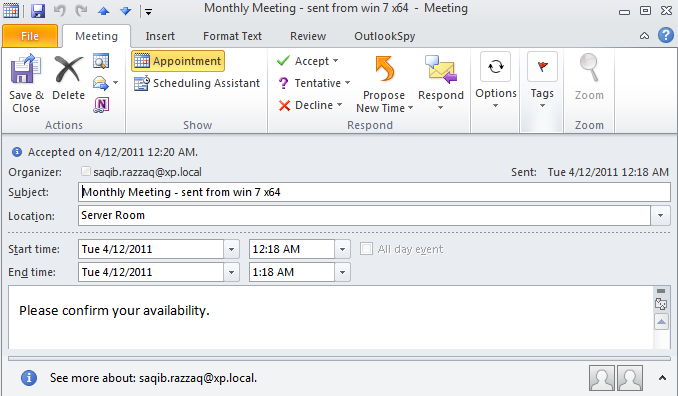 | | :- | 以下のコードスニペットは、Outlook PST からカレンダーアイテムを ICS 形式にエクスポートする方法を示しています。
元のタイムスタンプでICSとして保存
keep_original_date_time_stamp メソッドは、 MapiCalendarIcsSaveOptions クラスは、カレンダーアイテムを ICS(iCalendar)ファイルとして保存する際に、元の日付と時刻スタンプを保持できます。以下のコードサンプルはこのメソッドの実装例を示しています。
import aspose.email as ae

pst = ae.storage.pst.PersonalStorage.from_file("my.pst")

calendar_folder = pst.get_predefined_folder(ae.storage.pst.StandardIpmFolder.APPOINTMENTS)

for msg_info in calendar_folder.enumerate_messages():
    cal = pst.extract_message(msg_info).to_mapi_message_item()

    save_options = ae.mapi.MapiCalendarIcsSaveOptions()
    save_options.keep_original_date_time_stamp = True

    if not (cal is None):
      cal.save("cal.ics", save_options)
繰り返しからの発生項目の変更/削除
Aspose.Email for .NET API を使用して、既存の繰り返しに例外を追加できます。以下のコードサンプルはこの機能の使用例を示します。
from datetime import datetime, timedelta
from aspose.email.storage.pst import PersonalStorage, StandardIpmFolder, FileFormatVersion
from aspose.email.mapi import MapiCalendar, MapiCalendarEventRecurrence, \
    MapiCalendarDailyRecurrencePattern, MapiCalendarRecurrenceEndType, \
    MapiCalendarExceptionInfo, MapiCalendarRecurrencePatternType, \
    MapiRecipientCollection, MapiRecipientType

start_date = datetime.now().date()

recurrence = MapiCalendarEventRecurrence()
pattern = MapiCalendarDailyRecurrencePattern()
pattern.pattern_type = MapiCalendarRecurrencePatternType.DAY
pattern.period = 1
pattern.end_type = MapiCalendarRecurrenceEndType.NEVER_END
recurrence.recurrence_pattern = pattern

exception_date = start_date + timedelta(days=1)

# adding one exception
exception_info = MapiCalendarExceptionInfo()
exception_info.location = "London"
exception_info.subject = "Subj"
exception_info.original_start_date = exception_date
exception_info.start_date_time = exception_date
exception_info.end_date_time = exception_date + timedelta(hours=5)
pattern.exceptions.append(exception_info)
pattern.modified_instance_dates.append(exception_date)
# every modified instance also has to have an entry in the DeletedInstanceDates field with the original instance date.
pattern.deleted_instance_dates.append(exception_date)

# adding one deleted instance
pattern.deleted_instance_dates.append(exception_date + timedelta(days=2))

rec_coll = MapiRecipientCollection()
rec_coll.add("receiver@domain.com", "receiver", MapiRecipientType.TO)
new_cal = MapiCalendar(
    "This is Location",
    "This is Summary",
    "This is recurrence test",
    start_date,
    start_date + timedelta(hours=3),
    "organizer@domain.com",
    rec_coll
)
new_cal.recurrence = recurrence

with PersonalStorage.create("output.pst", FileFormatVersion.UNICODE) as pst:
    calendar_folder = pst.create_predefined_folder("Calendar", StandardIpmFolder.APPOINTMENTS)
    calendar_folder.add_message(new_cal)