
Gmail-hulpprogramma‑functies
Werken met FreeBusy Query
Aspose.Email biedt een querymechanisme om te controleren of een afspraak volgens de criteria moet plaatsvinden of niet. FreebusyQuery klasse wordt hiervoor geleverd en maakt het mogelijk een query voor een specifieke agenda voor te bereiden.
Een agenda bevragen
Dit codevoorbeeld demonstreert de functie om een agenda te bevragen. De volgende taken worden in dit voorbeeld uitgevoerd:
- Maak en voeg een agenda toe
- Maak een afspraak
- Afspraak invoegen
- Bereid een FreebusyQuery
- Haal de FreebusyResponse
// Use the OAuthUser and GoogleOAuthHelper classes below to receive an access token
IGmailClient client = GmailClient.getInstance(accessToken, "user@domain.com");
try {
    Calendar newCalendar = new Calendar("summary", null, null, "Europe/Kiev");

    // Insert calendar and get back id of newly inserted calendar and Fetch the same calendar using calendar id
    String id = client.createCalendar(newCalendar);
    Calendar fetchedCalendar = client.fetchCalendar(id);
    String calendarId = fetchedCalendar.getId();
    try {
        // Get list of appointments in newly inserted calendar. It should be zero
        Appointment[] appointments = client.listAppointments(calendarId);

        // Create a new appointment and Calculate appointment start and finish time
        java.util.Calendar c = java.util.Calendar.getInstance();
        Date startDate = c.getTime();
        c.add(java.util.Calendar.HOUR_OF_DAY, 1);
        Date endDate = c.getTime();

        // Create attendees list for appointment
        MailAddressCollection attendees = new MailAddressCollection();
        attendees.add("user1@domain.com");
        attendees.add("user2@domain.com");

        // Create appointment
        Appointment app1 = new Appointment("Location", startDate, endDate, MailAddress.to_MailAddress("user2@domain.com"), attendees);
        app1.setSummary("Summary");
        app1.setDescription("Description");
        app1.setStartTimeZone("Europe/Kiev");
        app1.setEndTimeZone("Europe/Kiev");

        // Insert the newly created appointment and get back the same in case of successful insertion
        Appointment newAppointment = client.createAppointment(calendarId, app1);

        // Create Freebusy query by setting min/max timeand time zone
        FreebusyQuery query = new FreebusyQuery();
        c = java.util.Calendar.getInstance();
        c.add(java.util.Calendar.DATE, -1);
        query.setTimeMin(c.getTime());
        c.add(java.util.Calendar.DATE, 2);
        query.setTimeMax(c.getTime());
        query.setTimeZone("Europe/Kiev");

        // Set calendar item to search and Get the reponse of query containing
        query.getItems().add(calendarId);
        FreebusyResponse resp = client.getFreebusyInfo(query);

        client.deleteAppointment(calendarId, newAppointment.getUniqueId());
    } finally {
        client.deleteCalendar(calendarId);
    }
} finally {
    client.dispose();
}
Project maken in de Google Developer Console
Er moet een project worden aangemaakt in de Google Developer Console voor een gebruiker met een Gmail-account. Op de pagina API & auth → Credentials van het Google-project moeten gegevens zoals Client-ID en clientgeheim worden genoteerd. Deze informatie, samen met de gebruikersnaam en het wachtwoord van het Gmail-account, is vereist voor het uitvoeren van de code, bijvoorbeeld Google Calendar, toegangslijsten, afspraken, contacten, instellingen enzovoort in deze sectie.
Stappen om een project te maken in de Google Developer Console
Hieronder vind je een stapsgewijze handleiding voor het maken van een project in de Google Developer Console.
-
Ga naar de link https://console.cloud.google.com en log in met je Gmail-referenties
-
Selecteer het selectievakje "I have read and agree to all Terms of Service for the Google Cloud Platform products." en druk op de NEW PROJECT-knop
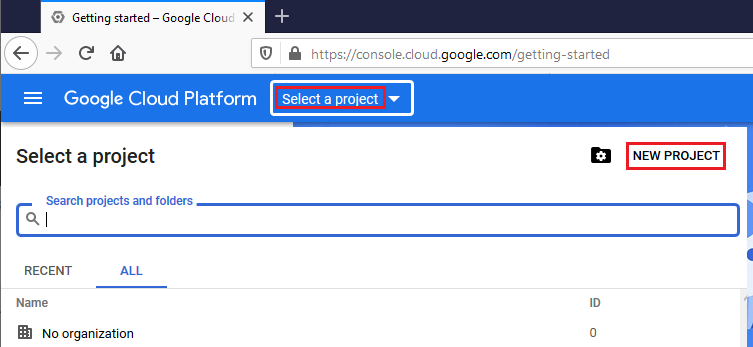
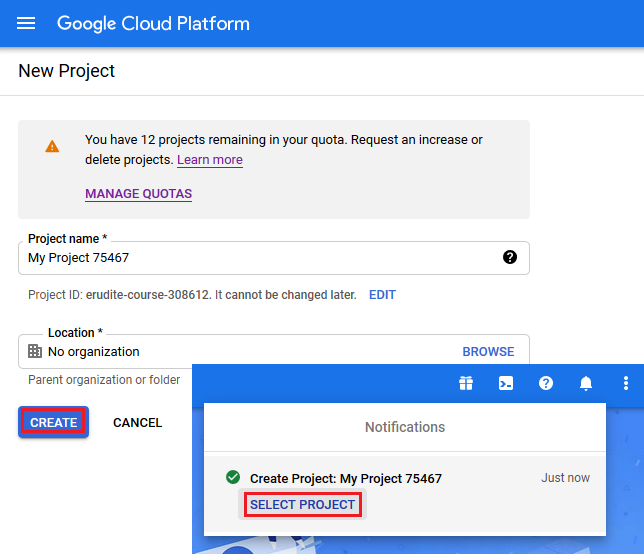
- Create en Select een nieuw project
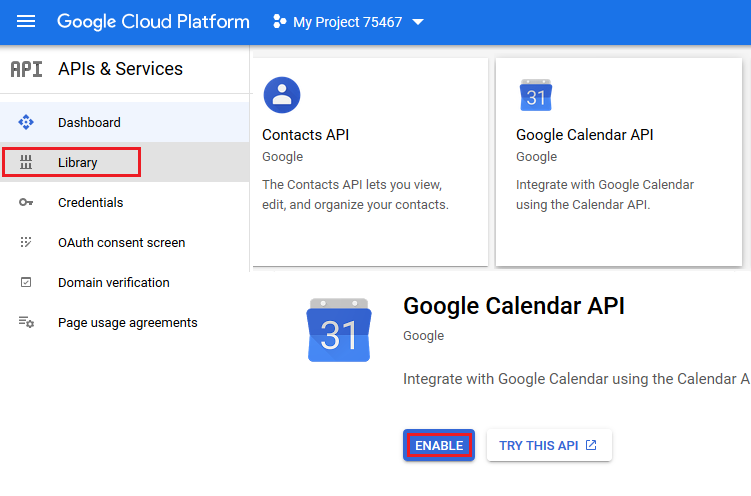
- Selecteer Library en schakel de Contact- en Calendar-API in
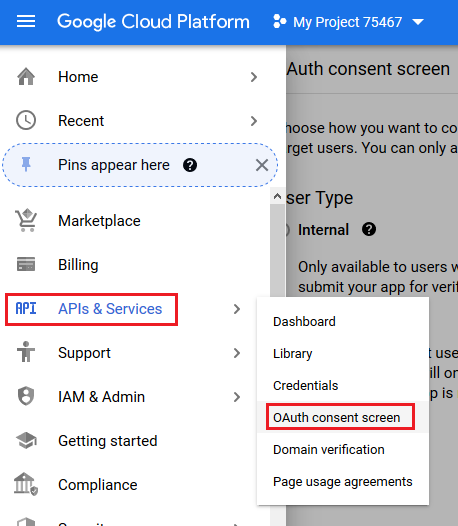
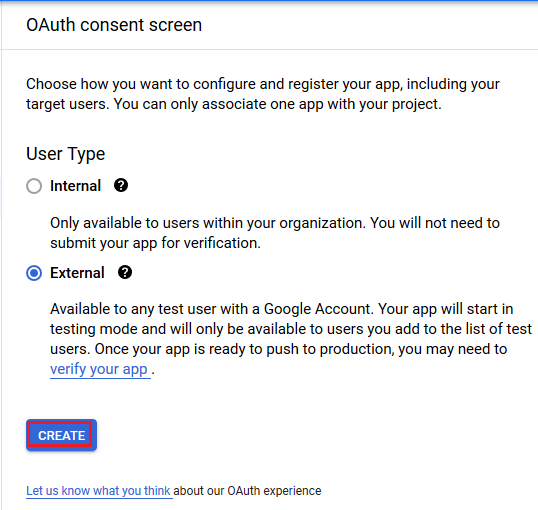
- Open OAuth-consentscherm
- Selecteer het External-vakje en druk op de CREATE-knop
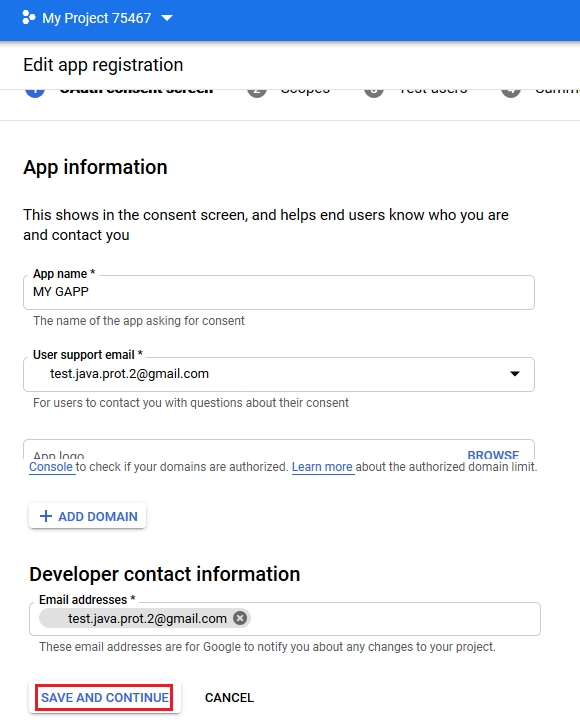
- Bewerk app-registratie en druk op de SAVE AND CONTINUE-knop
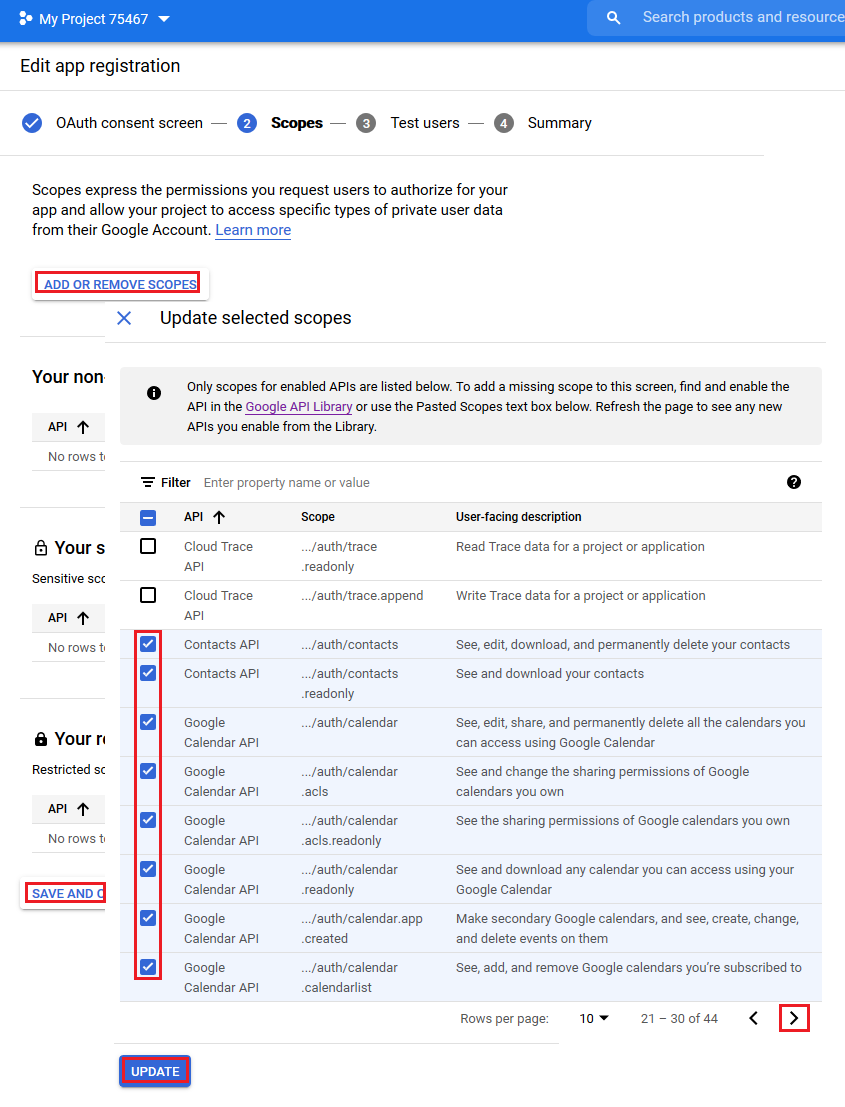
- Voeg scopes toe en druk op de UPDATE-knop
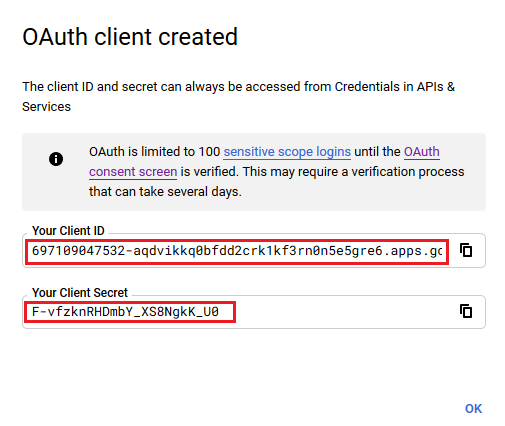
- OAuth-referenties maken
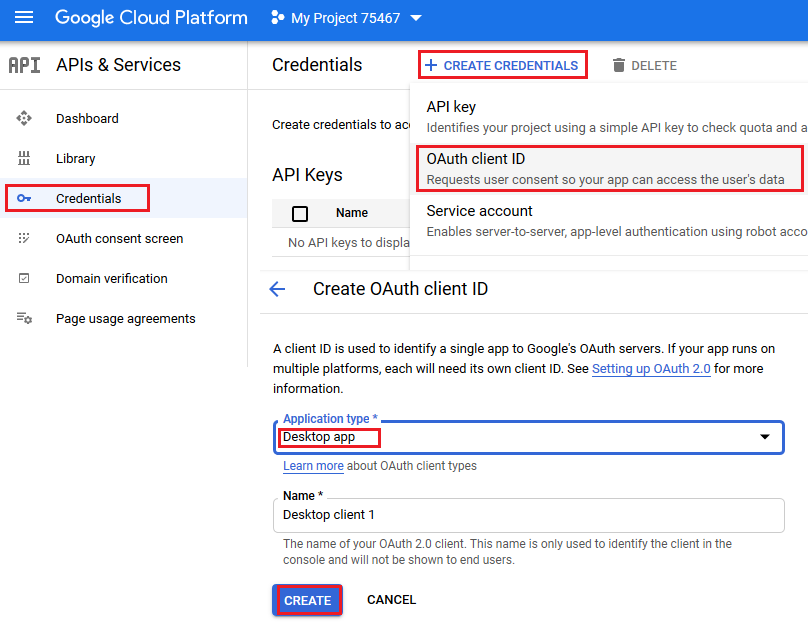
- Client-ID en clientgeheim hier die gebruikt zullen worden in de voorbeeldcode in deze sectie.
Helperklassen
De volgende hulpprogrammaclassen zijn vereist om de codevoorbeelden in deze sectie uit te voeren. Deze klassen GoogleOAuthHelper en OAuthUser zijn slechts ter vereenvoudiging van de demonstratie. De methoden in deze klassen gebruiken een niet‑publieke structuur van webpagina’s die op elk moment kan veranderen.
GoogleOAuthHelper‑klasse
De volgende codefragment laat zien hoe u implementeert GoogleOAuthHelper klasse.
import java.io.BufferedReader;
import java.io.IOException;
import java.io.InputStream;
import java.io.InputStreamReader;
import java.io.OutputStream;
import java.io.UnsupportedEncodingException;
import java.net.HttpURLConnection;
import java.net.URL;
import java.net.URLDecoder;
import java.net.URLEncoder;
import java.nio.charset.StandardCharsets;
import java.security.MessageDigest;
import java.security.NoSuchAlgorithmException;
import java.util.HashMap;
import java.util.Map;
import java.util.UUID;

import javax.xml.bind.DatatypeConverter;

/**
 * <p>
 * Developers console https://console.developers.google.com/projectselector/apis/credentials?pli=1
 * Documentation https://developers.google.com/identity/protocols/OAuth2InstalledApp
 * </p>
 */
class GoogleOAuthHelper {
    public static final String AUTHORIZATION_URL = "https://accounts.google.com/o/oauth2/v2/auth";
    public static final String TOKEN_REQUEST_URL = "https://oauth2.googleapis.com/token";
    public static final String REDIRECT_URI = "urn:ietf:wg:oauth:2.0:oob";
    public static final String REDIRECT_TYPE = "code";
    public static final String SCOPE = "https%3A%2F%2Fwww.googleapis.com%2Fauth%2Fcalendar" // Calendar
            + "+https%3A%2F%2Fwww.google.com%2Fm8%2Ffeeds%2F" // Contacts
            + "+https%3A%2F%2Fmail.google.com%2F"; // IMAP & SMTP

    static class OAuthUser {
        String email;
        String clientId;
        String clientSecret;
        String refreshToken;
    }

    static String createCodeChalange() {
        String verifierStr = UUID.randomUUID().toString() + "-" + UUID.randomUUID().toString();
        System.out.println("Code Verifier: " + verifierStr);

        MessageDigest digest;
        try {
            digest = MessageDigest.getInstance("SHA-256");
        } catch (NoSuchAlgorithmException e) {
            throw new IllegalAccessError(e.getMessage());
        }
        byte[] hash = digest.digest(verifierStr.getBytes(StandardCharsets.UTF_8));
        String base64Hash = DatatypeConverter.printBase64Binary(hash);

        base64Hash = base64Hash.split("=")[0];
        base64Hash = base64Hash.replace('+', '-').replace('/', '_');
        return base64Hash;
    }

    static String getAuthorizationCodeUrl(OAuthUser acc) {
        return getAuthorizationCodeUrl(acc, SCOPE, REDIRECT_URI, REDIRECT_TYPE);
    }

    static String getAuthorizationCodeUrl(OAuthUser acc, String scope, String redirectUri, String responseType) {
        System.out.println("---------------------------------------------------------");
        System.out.println("------------- OAuth 2.0 AuthorizationCodeUrl -------------");
        System.out.println("---------------------------------------------------------");
        System.out.println("Login: " + acc.email);
        String codeChallenge = createCodeChalange();

        String state = urlEncode(UUID.randomUUID().toString());
        String approveUrl = AUTHORIZATION_URL + "?client_id=" + acc.clientId + "&redirect_uri=" + redirectUri + "&response_type=" + responseType + "&scope=" + scope
                + "&code_challenge=" + codeChallenge + "&code_challenge_method=S256&state=" + state;

        System.out.println("Approve Url: " + approveUrl);
        return approveUrl;
    }

    static String urlEncode(String value) {
        try {
            return URLEncoder.encode(value, StandardCharsets.UTF_8.toString());
        } catch (UnsupportedEncodingException e) {
            throw new IllegalAccessError(e.getMessage());
        }
    }

    static String urlDecode(String value) {
        try {
            return URLDecoder.decode(value, StandardCharsets.UTF_8.toString());
        } catch (UnsupportedEncodingException e) {
            throw new IllegalAccessError(e.getMessage());
        }
    }

    static String getAccessTokenByAuthCode(String authorizationCode, String codeVerifier, OAuthUser user) {
        String encodedParameters = "client_id=" + urlEncode(user.clientId) + "&client_secret=" + urlEncode(user.clientSecret) + "&code=" + urlEncode(authorizationCode)
                + "&code_verifier=" + codeVerifier + "&redirect_uri=" + urlEncode(REDIRECT_URI) + "&grant_type=authorization_code";
        System.out.println("---------------------------------------------------------");
        System.out.println("------------- OAuth 2.0 AccessTokenByAuthCode -------------");
        System.out.println("---------------------------------------------------------");
        System.out.println("Authorization code: " + authorizationCode);

        String result = "";
        Map<String, String> token = geToken(encodedParameters);
        for (String key : token.keySet()) {
            System.out.println(key + ": " + token.get(key));
            if (key.equals("refresh_token")) {
                result = token.get(key);
            }
        }

        System.out.println("---------------------------------------------------------");

        return result;
    }

    static String getAccessTokenByRefreshToken(OAuthUser user) {
        String encodedParameters = "client_id=" + urlEncode(user.clientId) + "&client_secret=" + urlEncode(user.clientSecret) + "&refresh_token=" + urlEncode(user.refreshToken)
                + "&grant_type=refresh_token";
        System.out.println("---------------------------------------------------------");
        System.out.println("----------- OAuth 2.0 AccessTokenByRefreshToken -----------");
        System.out.println("---------------------------------------------------------");
        System.out.println("Login: " + user.email);

        String result = "";
        Map<String, String> token = geToken(encodedParameters);
        for (String key : token.keySet()) {
            System.out.println(key + ": " + token.get(key));
            if (key.equals("access_token")) {
                result = token.get(key);
            }
        }

        System.out.println("---------------------------------------------------------");

        return result;
    }

    static Map<String, String> geToken(String encodedParameters) {
        try {
            HttpURLConnection connection = (HttpURLConnection) new URL(TOKEN_REQUEST_URL).openConnection();
            connection.setRequestMethod("POST");

            byte[] requestData = encodedParameters.getBytes(StandardCharsets.UTF_8);

            connection.setUseCaches(false);
            connection.setDoInput(true);
            connection.setDoOutput(true);
            connection.setRequestProperty("Content-Type", "application/x-www-form-urlencoded");
            connection.setRequestProperty("Content-Length", "" + requestData.length);

            final OutputStream st = connection.getOutputStream();
            try {
                st.write(requestData, 0, requestData.length);
            } finally {
                st.flush();
                st.close();
            }

            connection.connect();

            if (connection.getResponseCode() >= HttpURLConnection.HTTP_BAD_REQUEST) {
                throw new IllegalAccessError("Operation failed: " + connection.getResponseCode() + "/" + connection.getResponseMessage() + "\r\nDetails:\r\n{2}"
                        + readInputStream(connection.getErrorStream()));
            }

            String responseText = readInputStream(connection.getInputStream());

            Map<String, String> result = new HashMap<String, String>();
            System.out.println(responseText);
            String[] strs = responseText.replace("{", "").replace("}", "").replace("\"", "").replace("\r", "").replace("\n", "").split(",");
            for (String sPair : strs) {
                String[] pair = sPair.split(":");
                String name = pair[0].trim().toLowerCase();
                String value = urlDecode(pair[1].trim());
                result.put(name, value);
            }

            return result;
        } catch (IOException e) {
            throw new IllegalAccessError(e.getMessage());
        }
    }

    static String readInputStream(InputStream is) {
        if (is == null)
            return "";

        BufferedReader reader = new BufferedReader(new InputStreamReader(is));
        StringBuilder result = new StringBuilder();
        String line;
        try {
            while ((line = reader.readLine()) != null) {
                result.append(line);
            }
        } catch (IOException e) {
            // ignore
        }
        return result.toString();
    }
}
Google OAuth Helper moet als volgt worden gebruikt:
- Er moet eerst een autorisatiecode‑URL worden gegenereerd.
- Open de URL in een browser en voltooi alle handelingen. Als resultaat ontvangt u een autorisatiecode.
- Gebruik de autorisatiecode om een refresh‑token te ontvangen.
- Wanneer het refresh‑token bestaat, kunt u dit gebruiken om toegangstokens op te halen.
static class OAuthUser {
    String email;
    String clientId;
    String clientSecret;
    String refreshToken;
}

static void getRefreshToken() {
    Scanner inputReader = new Scanner(System.in);
    OAuthUser user = new OAuthUser();

    // Set clientId, clientSecret and email
    System.out.println("Set clientId: ");
    user.clientId = inputReader.nextLine();
    System.out.println("Set clientSecret: ");
    user.clientSecret = inputReader.nextLine();
    System.out.println("Set email: ");
    user.email = inputReader.nextLine();

    // Generate AuthorizationCodeUrl
    String authorizationCodeUrl = GoogleOAuthHelper.getAuthorizationCodeUrl(user);

    System.out.println("You have to retrieve AuthorizationCode manually with generated AuthorizationCodeUrl");
    System.out.println("Set authorizationCode: ");
    String authorizationCode = inputReader.nextLine();
    System.out.println("Copy Code Verifier from the previous step output");
    System.out.println("Set codeVerifier: ");
    String codeVerifier = inputReader.nextLine();

    // Get "Refresh Token"
    String refreshToken = GoogleOAuthHelper.getAccessTokenByAuthCode(authorizationCode, codeVerifier, user);
    user.refreshToken = refreshToken;

    // Get "Access Token"
    String accessToken = GoogleOAuthHelper.getAccessTokenByRefreshToken(user);

    // Use "Access Token" in API
    IGmailClient client = GmailClient.getInstance(accessToken, user.email);
}