
OAuth 2.0 API-toegang configureren voor Google-diensten
Maak een Google Developer Console‑project voor API‑toegang
Een project aanmaken in de Google Developer Console is een essentiële stap om toegang te krijgen tot en gebruik te maken van Google‑API’s voor je toepassingen. Dit proces omvat het opzetten van een project, het akkoord gaan met de voorwaarden, het verifiëren van je identiteit en het configureren van API‑instellingen volgens je behoeften. De volgende stappen begeleiden je door het proces van het aanmaken van een project en het verkrijgen van de benodigde referenties voor diensten zoals Calendar‑ en Contacts‑API’s.
Stappen om een project aan te maken in de Google Developer Console
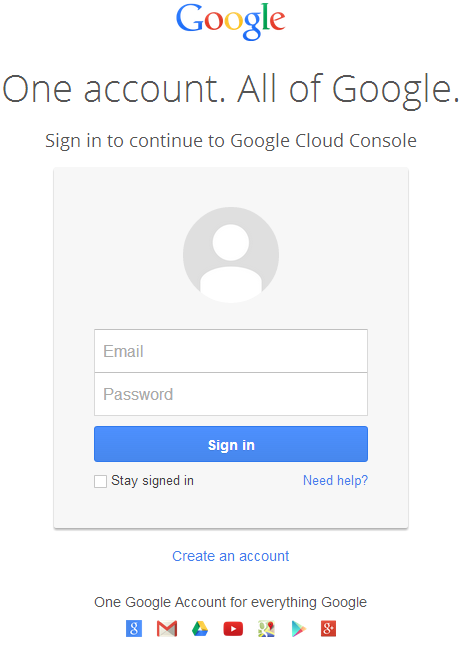
- Ga naar https://cloud.google.com/console/project en log in met je Gmail‑gegevens
 |
|---|
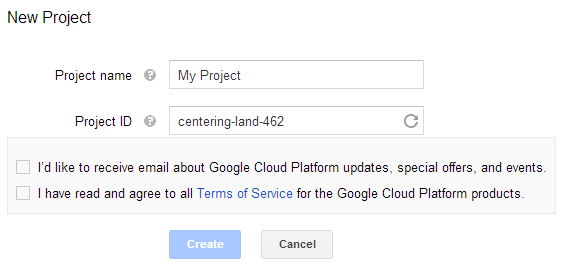
- Selecteer het vakje "I have read and agree to all Terms of Service for the Google Cloud Platform products." en druk op de knop Create
 |
|---|
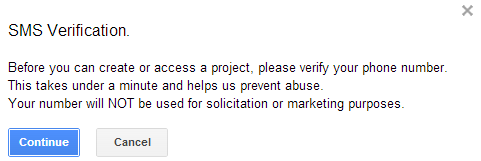
- "SMS‑verificatie" wordt gevraagd. Druk op de knop Doorgaan:
 |
|---|
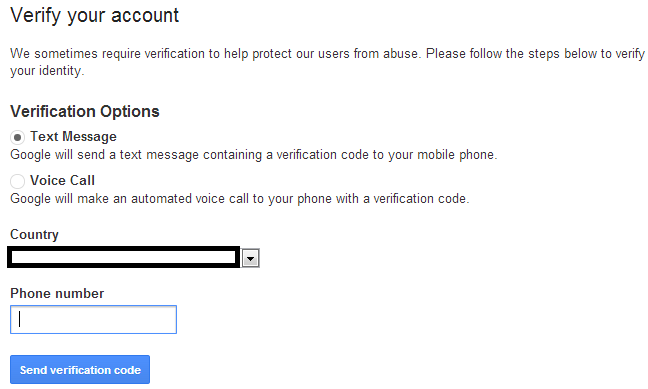
- Voer je landnaam en mobiele nummer in. Druk op de knop: Verzenden verificatiecode
 |
|---|
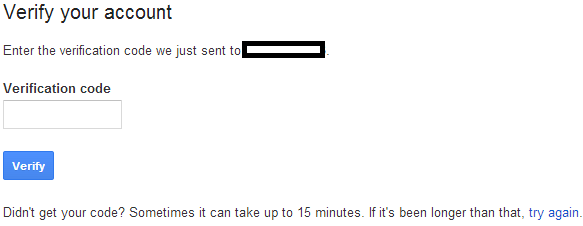
- Voer de verificatiecode in die je op je mobiel hebt ontvangen.
 |
|---|
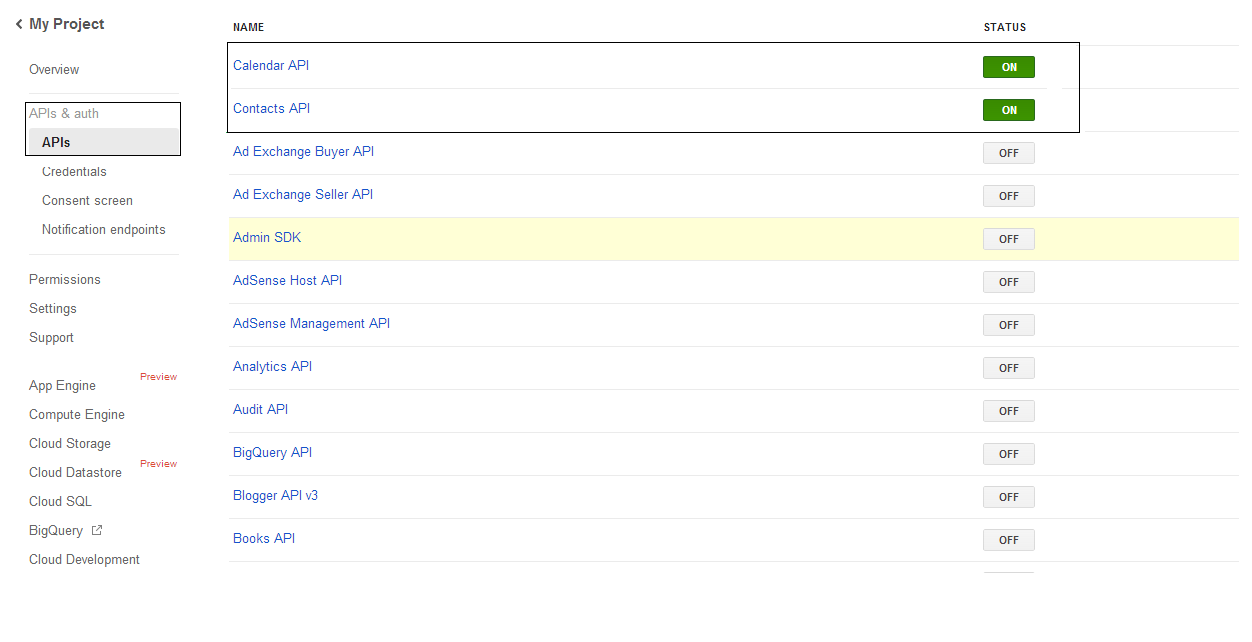
- In de lijst APIs & auth \ APIs schakel je de Calendar API en Contacts API in. Schakel alle andere uit.
 |
|---|
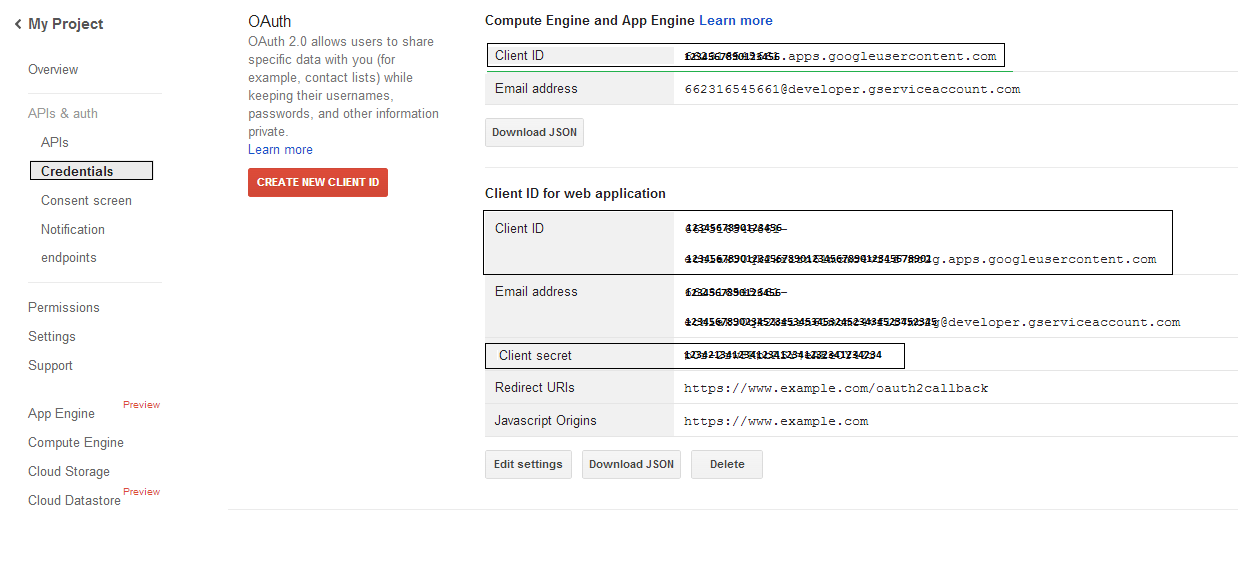
- Ga naar APIs & auth → Credentials, druk op de knop "CREAET NEW CLIENT ID" onder de sectie "OAuth". Selecteer "Installed application" en "Other" uit de beschikbare opties en druk op de knop "Create Client ID". Noteer hier de Client‑ID en Client‑Secret die in de voorbeeldcode in deze sectie worden gebruikt.
 |
|---|
Veilige Google OAuth 2.0-integratie
Wanneer je werkt met Google OAuth 2.0 in Aspose.Email voor .NET, heb je de volgende klassen nodig:
-
GoogleOAuthHelper‑klasse – Vereenvoudigt het proces van het authenticeren van een Google‑gebruiker en het verkrijgen van de benodigde tokens om met Google‑API’s te werken, zoals Agenda, Contacten en Gmail.
-
GoogleUser‑klasse – Deze is ontworpen om de referenties die een gebruiker nodig heeft om zich te authentiseren en met Google‑services te communiceren, specifiek API’s die OAuth 2.0‑authenticatie vereisen zoals Google Agenda, te encapsuleren en te beheren.
-
TokenResponse‑klasse – Het is een model dat is ontworpen om de responsgegevens van een OAuth 2.0‑token‑endpoint te vertegenwoordigen en af te handelen, waarbij toegangstokens worden verkregen in ruil voor autorisatie.
In de volgende artikelen vind je codevoorbeelden die laten zien hoe je deze klassen in een .NET‑omgeving kunt gebruiken om een veilige interactie met OAuth 2.0‑services tot stand te brengen.
OAuth 2.0-authenticatie met de GoogleOAuthHelper-klasse
De klasse behandelt het aanmaken van de autorisatiecode-URL, het genereren van code-uitdagingen en het ophalen van toegang‑ en refresh‑tokens. Door gebruik te maken van GoogleOAuthHelper, ontwikkelaars kunnen de OAuth 2.0-workflow stroomlijnen, waardoor veilige en efficiënte communicatie met Google-diensten wordt gegarandeerd. Het volgende codefragment toont hoe je de GoogleOAuthHelper klasse in een project:
// For complete examples and data files, please go to https://github.com/aspose-email/Aspose.Email-for-.NET

using Newtonsoft.Json;
using System;
using System.Collections.Generic;
using System.IO;
using System.Net;
using System.Security.Cryptography;
using System.Text;

/// <summary>
/// Developer console:
/// https://console.cloud.google.com/projectselector2
/// Documentation:
/// https://developers.google.com/identity/protocols/oauth2/native-app
/// </summary>
internal class GoogleOAuthHelper
{
    public const string AUTHORIZATION_URL = "https://accounts.google.com/o/oauth2/v2/auth";
    public const string TOKEN_REQUEST_URL = "https://oauth2.googleapis.com/token";

    public const string REDIRECT_URI = "urn:ietf:wg:oauth:2.0:oob";
    public const string REDIRECT_TYPE = "code";

    public static string codeVerifier;
    public static string codeChallenge;

    public static CodeChallengeMethod codeChallengeMethod = CodeChallengeMethod.S256;

    public const string SCOPE =
        "https%3A%2F%2Fwww.googleapis.com%2Fauth%2Fcalendar" + // Calendar
        "+" +
        "https%3A%2F%2Fwww.google.com%2Fm8%2Ffeeds%2F" + // Contacts
        "+" +
        "https%3A%2F%2Fmail.google.com%2F"; // IMAP & SMTP

    static GoogleOAuthHelper()
    {
        CreateCodeVerifier();
        CreateCodeChallenge();
    }

    internal static string CreateCodeVerifier()
    {
        string allowedChars = "0123456789AaBbCcDdEeFfGgHhIiJjKkLlMmNnOoPpQqRrSsTtUuVvWwXxYyZz-._~";

        const int minLength = 43;
        const int maxLength = 128;

        Random random = new Random();
        int length = minLength + random.Next(maxLength - minLength);
        List<char> codeVerifierChars = new List<char>();

        for (int i = 0; i < length; i++)
        {
            int index = random.Next(allowedChars.Length);
            codeVerifierChars.Add(allowedChars[index]);
        }

        return codeVerifier = string.Join("", codeVerifierChars.ToArray());
    }

    internal static string CreateCodeChallenge()
    {
        if (codeChallengeMethod == CodeChallengeMethod.Plain)
            return codeChallenge = codeVerifier;

        byte[] hashValue = null;
        using (SHA256 sha256 = SHA256.Create())
            hashValue = sha256.ComputeHash(Encoding.ASCII.GetBytes(codeVerifier));

        string b64 = Convert.ToBase64String(hashValue);
        b64 = b64.Split('=')[0];
        b64 = b64.Replace('+', '-');
        b64 = b64.Replace('/', '_');

        return codeChallenge = b64;
    }

    internal static string GetAuthorizationCodeUrl(GoogleUser user)
    {
        return GetAuthorizationCodeUrl(user, SCOPE, REDIRECT_URI, REDIRECT_TYPE);
    }

    internal static string GetAuthorizationCodeUrl(
        GoogleUser user, string scope, string redirectUri, string responseType)
    {
        string state = System.Web.HttpUtility.UrlEncode(Guid.NewGuid().ToString());

        string approveUrl = AUTHORIZATION_URL +
            $"?client_id={user.ClientId}&redirect_uri={redirectUri}&response_type={responseType}&scope={scope}&" +
            $"code_challenge={codeChallenge}&code_challenge_method={codeChallengeMethod.ToString()}&" +
            $"state={state}";

        return approveUrl;
    }

    internal static TokenResponse GetAccessTokenByRefreshToken(GoogleUser user)
    {
        HttpWebRequest request = (HttpWebRequest)WebRequest.Create(TOKEN_REQUEST_URL);
        request.CookieContainer = new CookieContainer();
        request.Method = "POST";
        request.ContentType = "application/x-www-form-urlencoded";

        string clientId = System.Web.HttpUtility.UrlEncode(user.ClientId);
        string clientSecret = System.Web.HttpUtility.UrlEncode(user.ClientSecret);
        string refreshToken = System.Web.HttpUtility.UrlEncode(user.RefreshToken);
        string grantType = System.Web.HttpUtility.UrlEncode("refresh_token");

        string encodedParameters = $"client_id={clientId}&client_secret={clientSecret}&refresh_token={refreshToken}&grant_type={grantType}";

        byte[] requestData = Encoding.UTF8.GetBytes(encodedParameters);
        request.ContentLength = requestData.Length;
        if (requestData.Length > 0)
            using (Stream stream = request.GetRequestStream())
                stream.Write(requestData, 0, requestData.Length);

        HttpWebResponse response = (HttpWebResponse)request.GetResponse();
        string responseText = null;
        using (TextReader reader = new StreamReader(response.GetResponseStream(), Encoding.ASCII))
            responseText = reader.ReadToEnd();

        TokenResponse tokensResponse = JsonConvert.DeserializeObject<TokenResponse>(responseText);

        return tokensResponse;
    }

    internal static TokenResponse GetAccessTokenByAuthCode(string authorizationCode, GoogleUser user)
    {
        HttpWebRequest request = (HttpWebRequest)WebRequest.Create(TOKEN_REQUEST_URL);
        request.CookieContainer = new CookieContainer();
        request.Method = "POST";
        request.ContentType = "application/x-www-form-urlencoded";

        string clientId = System.Web.HttpUtility.UrlEncode(user.ClientId);
        string clientSecret = System.Web.HttpUtility.UrlEncode(user.ClientSecret);
        string authCode = System.Web.HttpUtility.UrlEncode(authorizationCode);
        string redirectUri = System.Web.HttpUtility.UrlEncode(REDIRECT_URI);
        string grantType = System.Web.HttpUtility.UrlEncode("authorization_code");

        string encodedParameters = $"client_id={clientId}&client_secret={clientSecret}&code={authCode}&code_verifier={codeVerifier}&redirect_uri={redirectUri}&grant_type={grantType}";

        byte[] requestData = Encoding.UTF8.GetBytes(encodedParameters);
        request.ContentLength = requestData.Length;
        if (requestData.Length > 0)
            using (Stream stream = request.GetRequestStream())
                stream.Write(requestData, 0, requestData.Length);

        HttpWebResponse response = (HttpWebResponse)request.GetResponse();
        string responseText = null;
        using (TextReader reader = new StreamReader(response.GetResponseStream(), Encoding.ASCII))
            responseText = reader.ReadToEnd();

        TokenResponse tokensResponse = JsonConvert.DeserializeObject<TokenResponse>(responseText);

        return tokensResponse;
    }

    public enum CodeChallengeMethod
    {
        S256,
        Plain
    }
}
Google OAuth Helper moet als volgt worden gebruikt:
- Er moet eerst een autorisatiecode‑URL worden gegenereerd.
- Open de URL in een browser en voltooi alle handelingen. Als resultaat ontvangt u een autorisatiecode.
- Gebruik de autorisatiecode om een refresh‑token te ontvangen.
- Wanneer het refresh‑token bestaat, kunt u dit gebruiken om toegangstokens op te halen.
GoogleUser user = new GoogleUser(email, password, clientId, clientSecret);

string authUrl = GoogleOAuthHelper.GetAuthorizationCodeUrl(user);

Console.WriteLine("Go to the following URL and get your authorization code:");
Console.WriteLine(authUrl);
Console.WriteLine();

Console.WriteLine("Enter the authorization code:");
string authorizationCode = Console.ReadLine();
Console.WriteLine();

TokenResponse tokenInfo = GoogleOAuthHelper.GetAccessTokenByAuthCode(authorizationCode, user);
Console.WriteLine("The refresh token has been received:");
Console.WriteLine(tokenInfo.RefreshToken);
Console.WriteLine();

user.RefreshToken = tokenInfo.RefreshToken;
tokenInfo = GoogleOAuthHelper.GetAccessTokenByRefreshToken(user);
Console.WriteLine("The new access token has been received:");
Console.WriteLine(tokenInfo.AccessToken);
Console.WriteLine();
GoogleUser-klasse voor OAuth 2.0-authenticatie
Het volgende codefragment toont hoe je de GoogleUser klasse:
// For complete examples and data files, please go to https://github.com/aspose-email/Aspose.Email-for-.NET

public class GoogleUser
{
    public GoogleUser(string email, string password, string clientId, string clientSecret)
        : this(email, password, clientId, clientSecret, null)
    {
    }

    public GoogleUser(string email, string password, string clientId, string clientSecret, string refreshToken)
    {
        Email = email;
        Password = password;
        ClientId = clientId;
        ClientSecret = clientSecret;
        RefreshToken = refreshToken;
    }

    public readonly string Email;
    public readonly string Password;
    public readonly string ClientId;
    public readonly string ClientSecret;

    public string RefreshToken;
}
Verifiëren met OAuth 2.0 via de TokenResponse-klasse
Het volgende codefragment toont hoe de TokenResponse klasse kan worden geïmplementeerd:
// For complete examples and data files, please go to https://github.com/aspose-email/Aspose.Email-for-.NET

using Newtonsoft.Json;

public class TokenResponse
{
    [JsonProperty(NullValueHandling = NullValueHandling.Ignore, PropertyName = "access_token", Required = Required.Default)]
    public string AccessToken { get; set; }

    [JsonProperty(NullValueHandling = NullValueHandling.Ignore, PropertyName = "token_type", Required = Required.Default)]
    public string TokenType { get; set; }

    [JsonProperty(NullValueHandling = NullValueHandling.Ignore, PropertyName = "expires_in", Required = Required.Default)]
    public int ExpiresIn { get; set; }

    [JsonProperty(NullValueHandling = NullValueHandling.Ignore, PropertyName = "refresh_token", Required = Required.Default)]
    public string RefreshToken { get; set; }

    [JsonProperty(NullValueHandling = NullValueHandling.Ignore, PropertyName = "scope", Required = Required.Default)]
    public string Scope { get; set; }
}