
Konfigurowanie dostępu API OAuth 2.0 do usług Google
Utwórz projekt w Google Developer Console do dostępu do API
Utworzenie projektu w Google Developer Console jest niezbędnym krokiem do uzyskania dostępu i wykorzystywania API Google w Twoich aplikacjach. Proces ten obejmuje założenie projektu, akceptację warunków, weryfikację tożsamości oraz skonfigurowanie ustawień API zgodnie z potrzebami. Poniższe kroki poprowadzą Cię przez proces tworzenia projektu i uzyskania wymaganych poświadczeń dla usług takich jak API Kalendarza i Kontakty.
Kroki tworzenia projektu w Google Developer Console
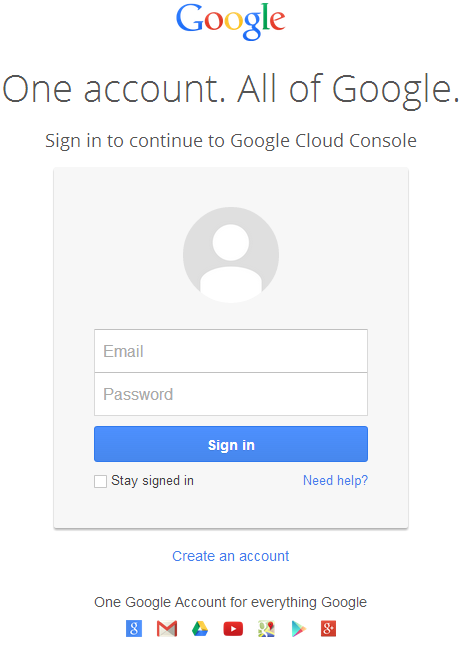
- Przejdź do linku https://cloud.google.com/console/project i zaloguj się używając swoich danych Gmail
 |
|---|
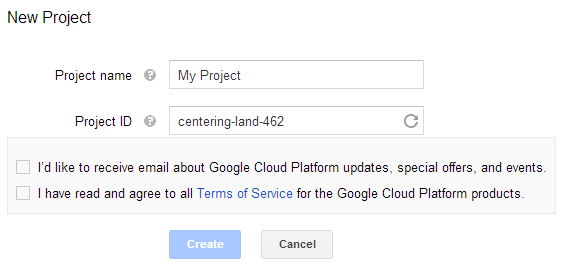
- Zaznacz pole wyboru "Przeczytałem i zgadzam się ze wszystkimi warunkami usługi produktów Google Cloud Platform." i naciśnij przycisk Utwórz
 |
|---|
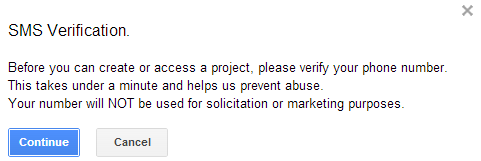
- "Weryfikacja SMS" zostanie wywołana. Naciśnij przycisk kontynuuj:
 |
|---|
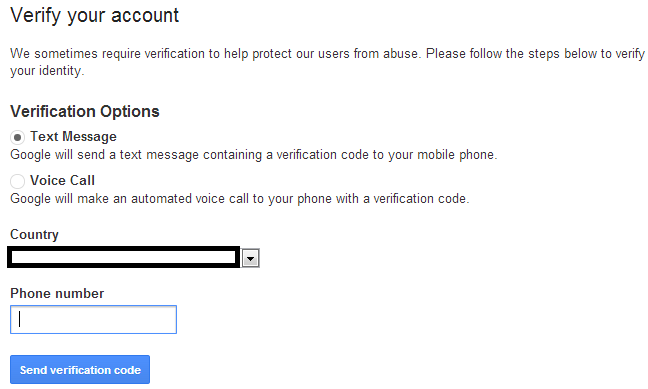
- Wprowadź nazwę swojego kraju i numer telefonu komórkowego. Naciśnij przycisk: Wyślij kod weryfikacyjny
 |
|---|
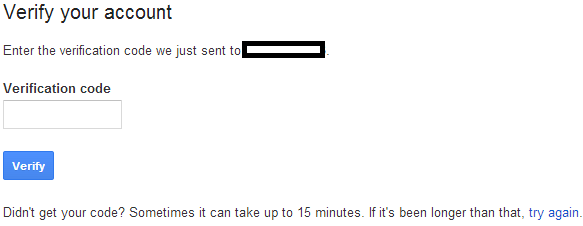
- Wprowadź kod weryfikacyjny otrzymany na telefon.
 |
|---|
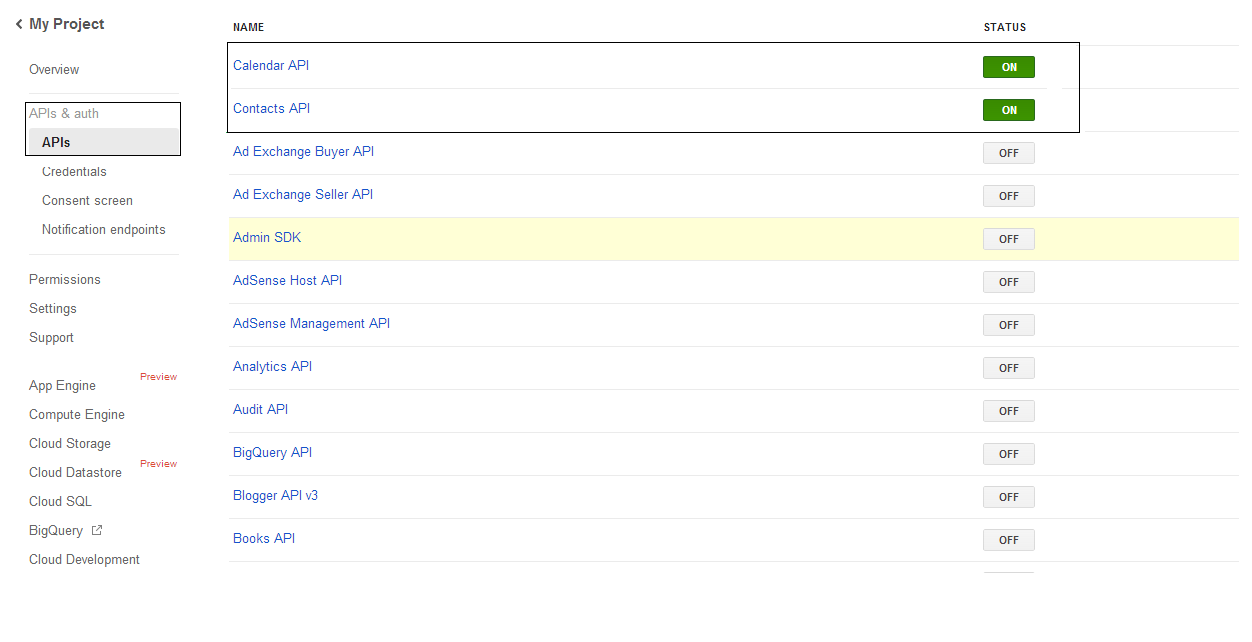
- W sekcji API i uwierzytelnianie \ lista API włącz status Calendar API i Contacts API. Wyłącz wszystkie pozostałe.
 |
|---|
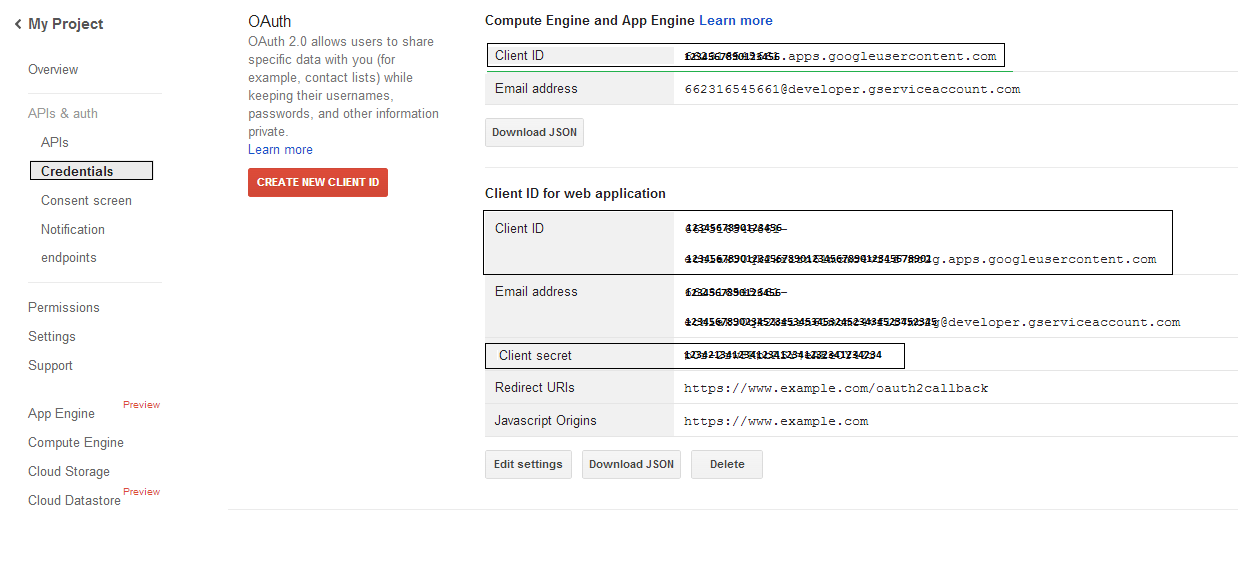
- W sekcji API i uwierzytelnianie -> Poświadczenia, naciśnij przycisk "CREAET NEW CLIENT ID" w sekcji "OAuth". Wybierz "Installed application" oraz "Other" z dostępnych opcji i naciśnij przycisk "Create Client ID". Zanotuj tutaj Client ID oraz Client Secret, które będą użyte w przykładowych kodach w tej sekcji.
 |
|---|
Bezpieczna integracja Google OAuth 2.0
Podczas pracy z Google OAuth 2.0 w Aspose.Email dla .NET będziesz potrzebować następujących klas:
-
Klasa GoogleOAuthHelper - upraszcza proces uwierzytelniania użytkownika Google i uzyskiwania niezbędnych tokenów do interakcji z API Google, takimi jak Calendar, Contacts i Gmail.
-
Klasa GoogleUser - zaprojektowana, aby enkapsulować i zarządzać poświadczeniami wymaganymi dla użytkownika do uwierzytelnienia i interakcji z usługami Google, szczególnie API wymagającymi uwierzytelnienia OAuth 2.0, takimi jak Kalendarz Google.
-
Klasa TokenResponse - to model zaprojektowany do reprezentowania i obsługi danych odpowiedzi z endpointu tokenu OAuth 2.0, gdzie tokeny dostępu są uzyskiwane w zamian za autoryzację.
W poniższych artykułach znajdziesz przykłady kodu demonstrujące, jak używać tych klas w środowisku .NET do ustanowienia bezpiecznej interakcji z usługami OAuth 2.0.
Uwierzytelnianie OAuth 2.0 przy użyciu klasy GoogleOAuthHelper
Klasa obsługuje tworzenie URL kodu autoryzacji, generowanie wyzwań kodowych oraz pobieranie tokenów dostępu i odświeżania. Korzystając z GoogleOAuthHelper, programiści mogą usprawnić przepływ OAuth 2.0, zapewniając bezpieczną i efektywną komunikację z usługami Google. Poniższy fragment kodu pokazuje, jak zaimplementować GoogleOAuthHelper klasę w projekcie:
// For complete examples and data files, please go to https://github.com/aspose-email/Aspose.Email-for-.NET

using Newtonsoft.Json;
using System;
using System.Collections.Generic;
using System.IO;
using System.Net;
using System.Security.Cryptography;
using System.Text;

/// <summary>
/// Developer console:
/// https://console.cloud.google.com/projectselector2
/// Documentation:
/// https://developers.google.com/identity/protocols/oauth2/native-app
/// </summary>
internal class GoogleOAuthHelper
{
    public const string AUTHORIZATION_URL = "https://accounts.google.com/o/oauth2/v2/auth";
    public const string TOKEN_REQUEST_URL = "https://oauth2.googleapis.com/token";

    public const string REDIRECT_URI = "urn:ietf:wg:oauth:2.0:oob";
    public const string REDIRECT_TYPE = "code";

    public static string codeVerifier;
    public static string codeChallenge;

    public static CodeChallengeMethod codeChallengeMethod = CodeChallengeMethod.S256;

    public const string SCOPE =
        "https%3A%2F%2Fwww.googleapis.com%2Fauth%2Fcalendar" + // Calendar
        "+" +
        "https%3A%2F%2Fwww.google.com%2Fm8%2Ffeeds%2F" + // Contacts
        "+" +
        "https%3A%2F%2Fmail.google.com%2F"; // IMAP & SMTP

    static GoogleOAuthHelper()
    {
        CreateCodeVerifier();
        CreateCodeChallenge();
    }

    internal static string CreateCodeVerifier()
    {
        string allowedChars = "0123456789AaBbCcDdEeFfGgHhIiJjKkLlMmNnOoPpQqRrSsTtUuVvWwXxYyZz-._~";

        const int minLength = 43;
        const int maxLength = 128;

        Random random = new Random();
        int length = minLength + random.Next(maxLength - minLength);
        List<char> codeVerifierChars = new List<char>();

        for (int i = 0; i < length; i++)
        {
            int index = random.Next(allowedChars.Length);
            codeVerifierChars.Add(allowedChars[index]);
        }

        return codeVerifier = string.Join("", codeVerifierChars.ToArray());
    }

    internal static string CreateCodeChallenge()
    {
        if (codeChallengeMethod == CodeChallengeMethod.Plain)
            return codeChallenge = codeVerifier;

        byte[] hashValue = null;
        using (SHA256 sha256 = SHA256.Create())
            hashValue = sha256.ComputeHash(Encoding.ASCII.GetBytes(codeVerifier));

        string b64 = Convert.ToBase64String(hashValue);
        b64 = b64.Split('=')[0];
        b64 = b64.Replace('+', '-');
        b64 = b64.Replace('/', '_');

        return codeChallenge = b64;
    }

    internal static string GetAuthorizationCodeUrl(GoogleUser user)
    {
        return GetAuthorizationCodeUrl(user, SCOPE, REDIRECT_URI, REDIRECT_TYPE);
    }

    internal static string GetAuthorizationCodeUrl(
        GoogleUser user, string scope, string redirectUri, string responseType)
    {
        string state = System.Web.HttpUtility.UrlEncode(Guid.NewGuid().ToString());

        string approveUrl = AUTHORIZATION_URL +
            $"?client_id={user.ClientId}&redirect_uri={redirectUri}&response_type={responseType}&scope={scope}&" +
            $"code_challenge={codeChallenge}&code_challenge_method={codeChallengeMethod.ToString()}&" +
            $"state={state}";

        return approveUrl;
    }

    internal static TokenResponse GetAccessTokenByRefreshToken(GoogleUser user)
    {
        HttpWebRequest request = (HttpWebRequest)WebRequest.Create(TOKEN_REQUEST_URL);
        request.CookieContainer = new CookieContainer();
        request.Method = "POST";
        request.ContentType = "application/x-www-form-urlencoded";

        string clientId = System.Web.HttpUtility.UrlEncode(user.ClientId);
        string clientSecret = System.Web.HttpUtility.UrlEncode(user.ClientSecret);
        string refreshToken = System.Web.HttpUtility.UrlEncode(user.RefreshToken);
        string grantType = System.Web.HttpUtility.UrlEncode("refresh_token");

        string encodedParameters = $"client_id={clientId}&client_secret={clientSecret}&refresh_token={refreshToken}&grant_type={grantType}";

        byte[] requestData = Encoding.UTF8.GetBytes(encodedParameters);
        request.ContentLength = requestData.Length;
        if (requestData.Length > 0)
            using (Stream stream = request.GetRequestStream())
                stream.Write(requestData, 0, requestData.Length);

        HttpWebResponse response = (HttpWebResponse)request.GetResponse();
        string responseText = null;
        using (TextReader reader = new StreamReader(response.GetResponseStream(), Encoding.ASCII))
            responseText = reader.ReadToEnd();

        TokenResponse tokensResponse = JsonConvert.DeserializeObject<TokenResponse>(responseText);

        return tokensResponse;
    }

    internal static TokenResponse GetAccessTokenByAuthCode(string authorizationCode, GoogleUser user)
    {
        HttpWebRequest request = (HttpWebRequest)WebRequest.Create(TOKEN_REQUEST_URL);
        request.CookieContainer = new CookieContainer();
        request.Method = "POST";
        request.ContentType = "application/x-www-form-urlencoded";

        string clientId = System.Web.HttpUtility.UrlEncode(user.ClientId);
        string clientSecret = System.Web.HttpUtility.UrlEncode(user.ClientSecret);
        string authCode = System.Web.HttpUtility.UrlEncode(authorizationCode);
        string redirectUri = System.Web.HttpUtility.UrlEncode(REDIRECT_URI);
        string grantType = System.Web.HttpUtility.UrlEncode("authorization_code");

        string encodedParameters = $"client_id={clientId}&client_secret={clientSecret}&code={authCode}&code_verifier={codeVerifier}&redirect_uri={redirectUri}&grant_type={grantType}";

        byte[] requestData = Encoding.UTF8.GetBytes(encodedParameters);
        request.ContentLength = requestData.Length;
        if (requestData.Length > 0)
            using (Stream stream = request.GetRequestStream())
                stream.Write(requestData, 0, requestData.Length);

        HttpWebResponse response = (HttpWebResponse)request.GetResponse();
        string responseText = null;
        using (TextReader reader = new StreamReader(response.GetResponseStream(), Encoding.ASCII))
            responseText = reader.ReadToEnd();

        TokenResponse tokensResponse = JsonConvert.DeserializeObject<TokenResponse>(responseText);

        return tokensResponse;
    }

    public enum CodeChallengeMethod
    {
        S256,
        Plain
    }
}
Google OAuth Helper powinien być używany następująco:
- Najpierw musi zostać wygenerowany URL z kodem autoryzacyjnym.
- Otwórz adres URL w przeglądarce i wykonaj wszystkie operacje. W rezultacie otrzymasz kod autoryzacyjny.
- Użyj kodu autoryzacyjnego, aby otrzymać token odświeżania.
- Gdy istnieje token odświeżania, możesz go użyć do pobrania tokenów dostępu.
GoogleUser user = new GoogleUser(email, password, clientId, clientSecret);

string authUrl = GoogleOAuthHelper.GetAuthorizationCodeUrl(user);

Console.WriteLine("Go to the following URL and get your authorization code:");
Console.WriteLine(authUrl);
Console.WriteLine();

Console.WriteLine("Enter the authorization code:");
string authorizationCode = Console.ReadLine();
Console.WriteLine();

TokenResponse tokenInfo = GoogleOAuthHelper.GetAccessTokenByAuthCode(authorizationCode, user);
Console.WriteLine("The refresh token has been received:");
Console.WriteLine(tokenInfo.RefreshToken);
Console.WriteLine();

user.RefreshToken = tokenInfo.RefreshToken;
tokenInfo = GoogleOAuthHelper.GetAccessTokenByRefreshToken(user);
Console.WriteLine("The new access token has been received:");
Console.WriteLine(tokenInfo.AccessToken);
Console.WriteLine();
Klasa GoogleUser do uwierzytelniania OAuth 2.0
Poniższy fragment kodu pokazuje, jak zaimplementować GoogleUser klasa:
// For complete examples and data files, please go to https://github.com/aspose-email/Aspose.Email-for-.NET

public class GoogleUser
{
    public GoogleUser(string email, string password, string clientId, string clientSecret)
        : this(email, password, clientId, clientSecret, null)
    {
    }

    public GoogleUser(string email, string password, string clientId, string clientSecret, string refreshToken)
    {
        Email = email;
        Password = password;
        ClientId = clientId;
        ClientSecret = clientSecret;
        RefreshToken = refreshToken;
    }

    public readonly string Email;
    public readonly string Password;
    public readonly string ClientId;
    public readonly string ClientSecret;

    public string RefreshToken;
}
Uwierzytelnianie przy użyciu OAuth 2.0 z klasą TokenResponse
Poniższy fragment kodu pokazuje, jak TokenResponse klasę można zaimplementować:
// For complete examples and data files, please go to https://github.com/aspose-email/Aspose.Email-for-.NET

using Newtonsoft.Json;

public class TokenResponse
{
    [JsonProperty(NullValueHandling = NullValueHandling.Ignore, PropertyName = "access_token", Required = Required.Default)]
    public string AccessToken { get; set; }

    [JsonProperty(NullValueHandling = NullValueHandling.Ignore, PropertyName = "token_type", Required = Required.Default)]
    public string TokenType { get; set; }

    [JsonProperty(NullValueHandling = NullValueHandling.Ignore, PropertyName = "expires_in", Required = Required.Default)]
    public int ExpiresIn { get; set; }

    [JsonProperty(NullValueHandling = NullValueHandling.Ignore, PropertyName = "refresh_token", Required = Required.Default)]
    public string RefreshToken { get; set; }

    [JsonProperty(NullValueHandling = NullValueHandling.Ignore, PropertyName = "scope", Required = Required.Default)]
    public string Scope { get; set; }
}