
Настройка доступа к API Google Services через OAuth 2.0
Создание проекта в Google Developer Console для доступа к API
Создание проекта в Google Developer Console — важный шаг для доступа к API Google и их использования в ваших приложениях. Этот процесс включает настройку проекта, согласие с условиями, проверку личности и конфигурацию параметров API в соответствии с вашими потребностями. Ниже приведены шаги, которые помогут вам создать проект и получить необходимые учётные данные для сервисов, таких как Calendar и Contacts API.
Шаги по созданию проекта в Google Developer Console
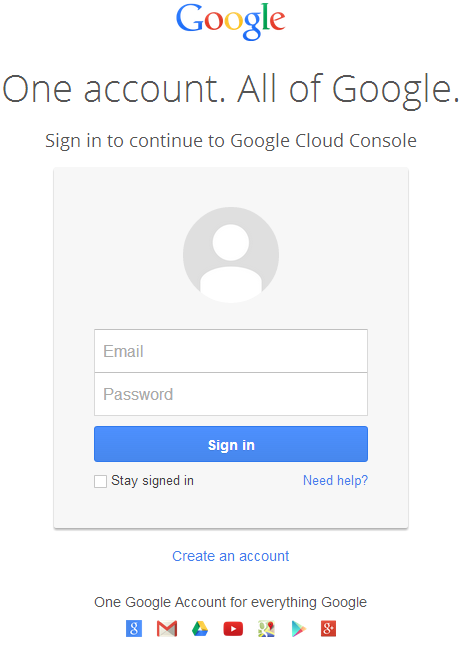
- Перейдите по ссылке https://cloud.google.com/console/project и войдите, используя учетные данные Gmail
 |
|---|
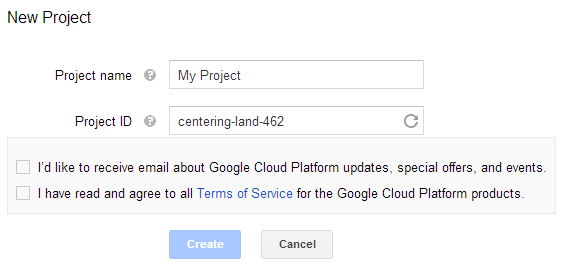
- Установите флажок "I have read and agree to all Terms of Service for the Google Cloud Platform products." и нажмите кнопку Create
 |
|---|
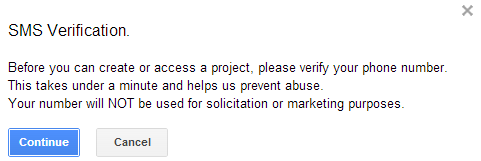
- "SMS Verification" будет запрошена. Нажмите кнопку Continue:
 |
|---|
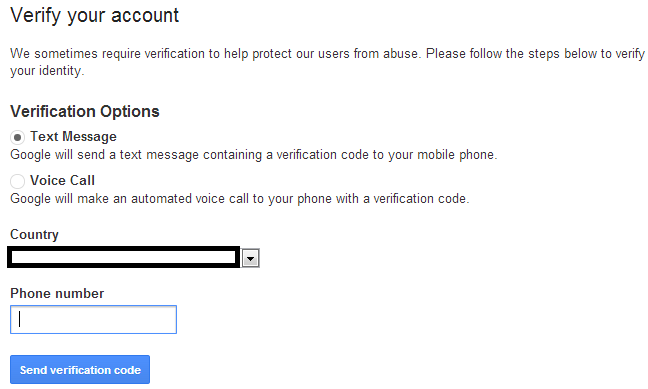
- Укажите название страны и номер мобильного телефона. Нажмите кнопку: Send Verification Code
 |
|---|
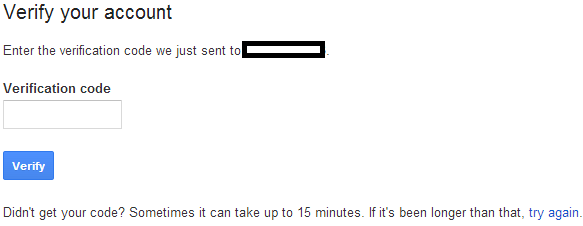
- Введите код подтверждения, полученный на ваш мобильный телефон.
 |
|---|
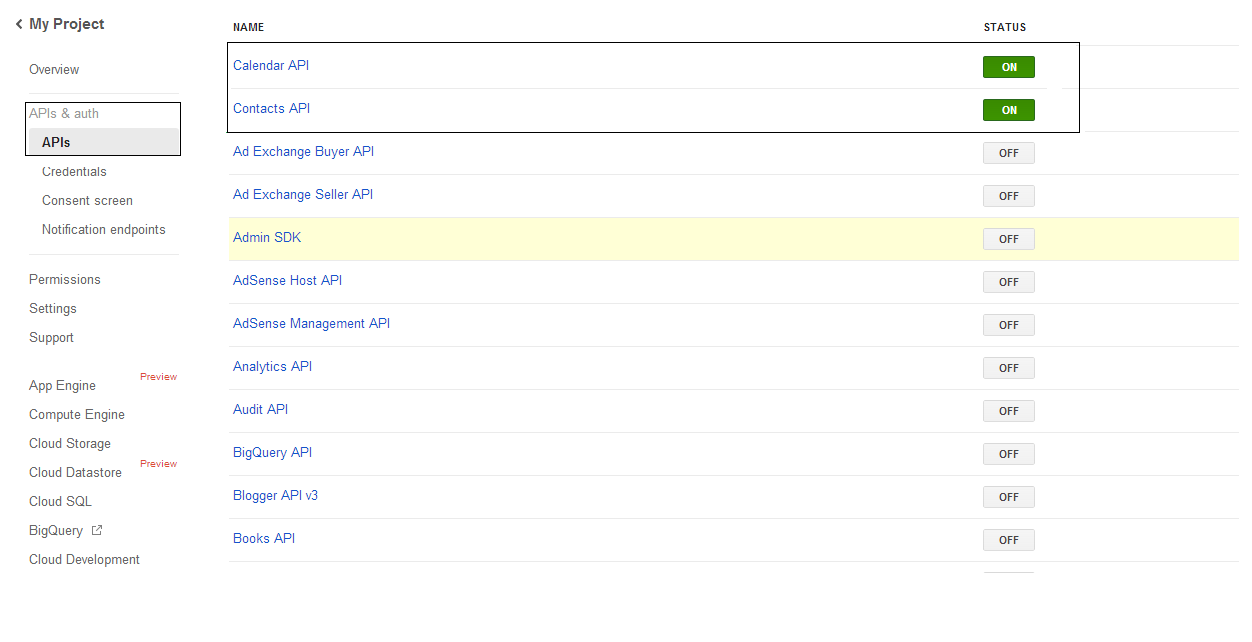
- В списке APIs & auth \ APIs включите статус Calendar API и Contacts API. Отключите все остальные.
 |
|---|
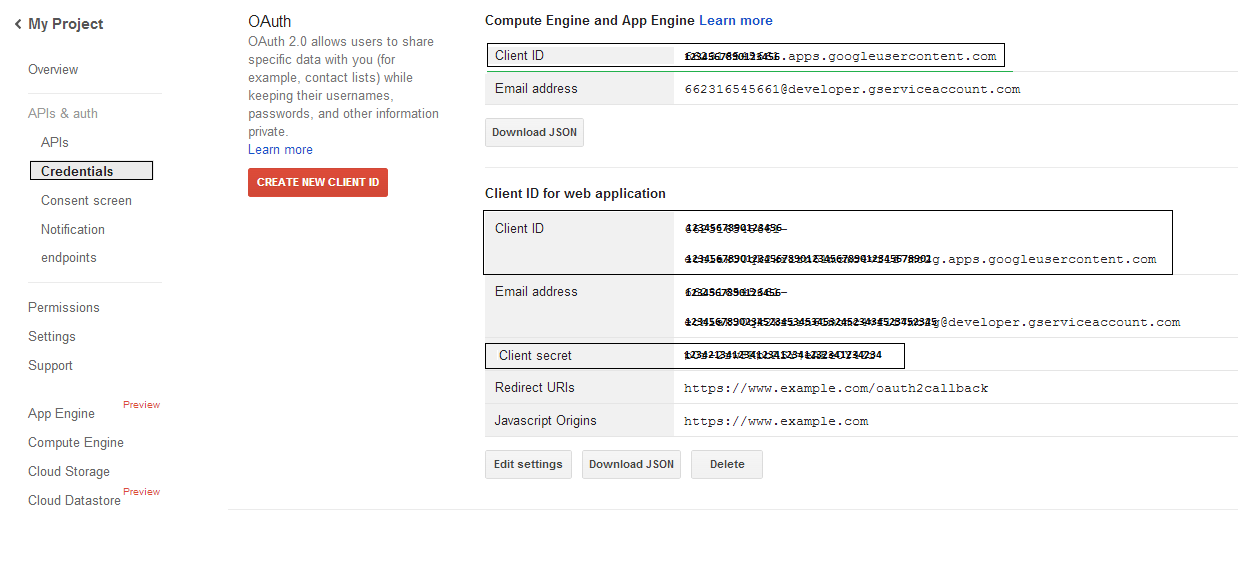
- На странице APIs & auth → Credentials нажмите кнопку "CREAET NEW CLIENT ID" в разделе "OAuth". Выберите "Installed application" и "Other" из предложенных вариантов и нажмите кнопку "Create Client ID". Запомните здесь Client ID и Client Secret, которые будут использоваться в примерах кода в этом разделе.
 |
|---|
Безопасная интеграция Google OAuth 2.0
При работе с Google OAuth 2.0 в Aspose.Email для .NET вам потребуются следующие классы:
-
Класс GoogleOAuthHelper — упрощает процесс аутентификации пользователя Google и получения необходимых токенов для взаимодействия с API Google, такими как Calendar, Contacts и Gmail.
-
Класс GoogleUser — предназначен для инкапсуляции и управления учётными данными, необходимыми пользователю для аутентификации и взаимодействия с сервисами Google, в частности с API, требующими аутентификации OAuth 2.0, такими как Google Calendar.
-
Класс TokenResponse — модель, предназначенная для представления и обработки данных ответа от токен-эндпоинта OAuth 2.0, где access‑токены получаются в обмен на авторизацию.
В следующих статьях вы найдёте примеры кода, демонстрирующие, как использовать эти классы в среде .NET для установления безопасного взаимодействия с сервисами OAuth 2.0.
Аутентификация OAuth 2.0 с классом GoogleOAuthHelper
Класс управляет созданием URL кода авторизации, генерацией challenges и получением access и refresh токенов. С помощью GoogleOAuthHelper, разработчики могут упростить поток OAuth 2.0, обеспечивая безопасную и эффективную связь с сервисами Google. Ниже приведён фрагмент кода, показывающий, как реализовать GoogleOAuthHelper класс в проекте:
// For complete examples and data files, please go to https://github.com/aspose-email/Aspose.Email-for-.NET

using Newtonsoft.Json;
using System;
using System.Collections.Generic;
using System.IO;
using System.Net;
using System.Security.Cryptography;
using System.Text;

/// <summary>
/// Developer console:
/// https://console.cloud.google.com/projectselector2
/// Documentation:
/// https://developers.google.com/identity/protocols/oauth2/native-app
/// </summary>
internal class GoogleOAuthHelper
{
    public const string AUTHORIZATION_URL = "https://accounts.google.com/o/oauth2/v2/auth";
    public const string TOKEN_REQUEST_URL = "https://oauth2.googleapis.com/token";

    public const string REDIRECT_URI = "urn:ietf:wg:oauth:2.0:oob";
    public const string REDIRECT_TYPE = "code";

    public static string codeVerifier;
    public static string codeChallenge;

    public static CodeChallengeMethod codeChallengeMethod = CodeChallengeMethod.S256;

    public const string SCOPE =
        "https%3A%2F%2Fwww.googleapis.com%2Fauth%2Fcalendar" + // Calendar
        "+" +
        "https%3A%2F%2Fwww.google.com%2Fm8%2Ffeeds%2F" + // Contacts
        "+" +
        "https%3A%2F%2Fmail.google.com%2F"; // IMAP & SMTP

    static GoogleOAuthHelper()
    {
        CreateCodeVerifier();
        CreateCodeChallenge();
    }

    internal static string CreateCodeVerifier()
    {
        string allowedChars = "0123456789AaBbCcDdEeFfGgHhIiJjKkLlMmNnOoPpQqRrSsTtUuVvWwXxYyZz-._~";

        const int minLength = 43;
        const int maxLength = 128;

        Random random = new Random();
        int length = minLength + random.Next(maxLength - minLength);
        List<char> codeVerifierChars = new List<char>();

        for (int i = 0; i < length; i++)
        {
            int index = random.Next(allowedChars.Length);
            codeVerifierChars.Add(allowedChars[index]);
        }

        return codeVerifier = string.Join("", codeVerifierChars.ToArray());
    }

    internal static string CreateCodeChallenge()
    {
        if (codeChallengeMethod == CodeChallengeMethod.Plain)
            return codeChallenge = codeVerifier;

        byte[] hashValue = null;
        using (SHA256 sha256 = SHA256.Create())
            hashValue = sha256.ComputeHash(Encoding.ASCII.GetBytes(codeVerifier));

        string b64 = Convert.ToBase64String(hashValue);
        b64 = b64.Split('=')[0];
        b64 = b64.Replace('+', '-');
        b64 = b64.Replace('/', '_');

        return codeChallenge = b64;
    }

    internal static string GetAuthorizationCodeUrl(GoogleUser user)
    {
        return GetAuthorizationCodeUrl(user, SCOPE, REDIRECT_URI, REDIRECT_TYPE);
    }

    internal static string GetAuthorizationCodeUrl(
        GoogleUser user, string scope, string redirectUri, string responseType)
    {
        string state = System.Web.HttpUtility.UrlEncode(Guid.NewGuid().ToString());

        string approveUrl = AUTHORIZATION_URL +
            $"?client_id={user.ClientId}&redirect_uri={redirectUri}&response_type={responseType}&scope={scope}&" +
            $"code_challenge={codeChallenge}&code_challenge_method={codeChallengeMethod.ToString()}&" +
            $"state={state}";

        return approveUrl;
    }

    internal static TokenResponse GetAccessTokenByRefreshToken(GoogleUser user)
    {
        HttpWebRequest request = (HttpWebRequest)WebRequest.Create(TOKEN_REQUEST_URL);
        request.CookieContainer = new CookieContainer();
        request.Method = "POST";
        request.ContentType = "application/x-www-form-urlencoded";

        string clientId = System.Web.HttpUtility.UrlEncode(user.ClientId);
        string clientSecret = System.Web.HttpUtility.UrlEncode(user.ClientSecret);
        string refreshToken = System.Web.HttpUtility.UrlEncode(user.RefreshToken);
        string grantType = System.Web.HttpUtility.UrlEncode("refresh_token");

        string encodedParameters = $"client_id={clientId}&client_secret={clientSecret}&refresh_token={refreshToken}&grant_type={grantType}";

        byte[] requestData = Encoding.UTF8.GetBytes(encodedParameters);
        request.ContentLength = requestData.Length;
        if (requestData.Length > 0)
            using (Stream stream = request.GetRequestStream())
                stream.Write(requestData, 0, requestData.Length);

        HttpWebResponse response = (HttpWebResponse)request.GetResponse();
        string responseText = null;
        using (TextReader reader = new StreamReader(response.GetResponseStream(), Encoding.ASCII))
            responseText = reader.ReadToEnd();

        TokenResponse tokensResponse = JsonConvert.DeserializeObject<TokenResponse>(responseText);

        return tokensResponse;
    }

    internal static TokenResponse GetAccessTokenByAuthCode(string authorizationCode, GoogleUser user)
    {
        HttpWebRequest request = (HttpWebRequest)WebRequest.Create(TOKEN_REQUEST_URL);
        request.CookieContainer = new CookieContainer();
        request.Method = "POST";
        request.ContentType = "application/x-www-form-urlencoded";

        string clientId = System.Web.HttpUtility.UrlEncode(user.ClientId);
        string clientSecret = System.Web.HttpUtility.UrlEncode(user.ClientSecret);
        string authCode = System.Web.HttpUtility.UrlEncode(authorizationCode);
        string redirectUri = System.Web.HttpUtility.UrlEncode(REDIRECT_URI);
        string grantType = System.Web.HttpUtility.UrlEncode("authorization_code");

        string encodedParameters = $"client_id={clientId}&client_secret={clientSecret}&code={authCode}&code_verifier={codeVerifier}&redirect_uri={redirectUri}&grant_type={grantType}";

        byte[] requestData = Encoding.UTF8.GetBytes(encodedParameters);
        request.ContentLength = requestData.Length;
        if (requestData.Length > 0)
            using (Stream stream = request.GetRequestStream())
                stream.Write(requestData, 0, requestData.Length);

        HttpWebResponse response = (HttpWebResponse)request.GetResponse();
        string responseText = null;
        using (TextReader reader = new StreamReader(response.GetResponseStream(), Encoding.ASCII))
            responseText = reader.ReadToEnd();

        TokenResponse tokensResponse = JsonConvert.DeserializeObject<TokenResponse>(responseText);

        return tokensResponse;
    }

    public enum CodeChallengeMethod
    {
        S256,
        Plain
    }
}
Google OAuth Helper следует использовать следующим образом:
- Сначала необходимо сгенерировать URL кода авторизации.
- Откройте URL в браузере и выполните все операции. В результате вы получите код авторизации.
- Используйте код авторизации, чтобы получить токен обновления.
- Когда токен обновления существует, вы можете использовать его для получения токенов доступа.
GoogleUser user = new GoogleUser(email, password, clientId, clientSecret);

string authUrl = GoogleOAuthHelper.GetAuthorizationCodeUrl(user);

Console.WriteLine("Go to the following URL and get your authorization code:");
Console.WriteLine(authUrl);
Console.WriteLine();

Console.WriteLine("Enter the authorization code:");
string authorizationCode = Console.ReadLine();
Console.WriteLine();

TokenResponse tokenInfo = GoogleOAuthHelper.GetAccessTokenByAuthCode(authorizationCode, user);
Console.WriteLine("The refresh token has been received:");
Console.WriteLine(tokenInfo.RefreshToken);
Console.WriteLine();

user.RefreshToken = tokenInfo.RefreshToken;
tokenInfo = GoogleOAuthHelper.GetAccessTokenByRefreshToken(user);
Console.WriteLine("The new access token has been received:");
Console.WriteLine(tokenInfo.AccessToken);
Console.WriteLine();
Класс GoogleUser для аутентификации OAuth 2.0
Ниже приведён фрагмент кода, показывающий, как реализовать GoogleUser класс:
// For complete examples and data files, please go to https://github.com/aspose-email/Aspose.Email-for-.NET

public class GoogleUser
{
    public GoogleUser(string email, string password, string clientId, string clientSecret)
        : this(email, password, clientId, clientSecret, null)
    {
    }

    public GoogleUser(string email, string password, string clientId, string clientSecret, string refreshToken)
    {
        Email = email;
        Password = password;
        ClientId = clientId;
        ClientSecret = clientSecret;
        RefreshToken = refreshToken;
    }

    public readonly string Email;
    public readonly string Password;
    public readonly string ClientId;
    public readonly string ClientSecret;

    public string RefreshToken;
}
Аутентификация с OAuth 2.0 с использованием класса TokenResponse
Ниже приведён фрагмент кода, показывающий, как TokenResponse класс может быть реализован:
// For complete examples and data files, please go to https://github.com/aspose-email/Aspose.Email-for-.NET

using Newtonsoft.Json;

public class TokenResponse
{
    [JsonProperty(NullValueHandling = NullValueHandling.Ignore, PropertyName = "access_token", Required = Required.Default)]
    public string AccessToken { get; set; }

    [JsonProperty(NullValueHandling = NullValueHandling.Ignore, PropertyName = "token_type", Required = Required.Default)]
    public string TokenType { get; set; }

    [JsonProperty(NullValueHandling = NullValueHandling.Ignore, PropertyName = "expires_in", Required = Required.Default)]
    public int ExpiresIn { get; set; }

    [JsonProperty(NullValueHandling = NullValueHandling.Ignore, PropertyName = "refresh_token", Required = Required.Default)]
    public string RefreshToken { get; set; }

    [JsonProperty(NullValueHandling = NullValueHandling.Ignore, PropertyName = "scope", Required = Required.Default)]
    public string Scope { get; set; }
}