
Konfigurera OAuth 2.0 API‑åtkomst till Google‑tjänster
Skapa ett Google Developer Console‑projekt för API‑åtkomst
Att skapa ett projekt i Google Developer Console är ett nödvändigt steg för att få åtkomst till och utnyttja Google‑API:er i dina applikationer. Processen innebär att sätta upp ett projekt, godkänna villkor, verifiera din identitet och konfigurera API‑inställningar efter dina behov. Följande steg guidar dig genom att skapa ett projekt och erhålla de nödvändiga autentiseringsuppgifterna för tjänster som Calendar‑ och Contacts‑API:er.
Steg för att skapa ett projekt i Google Developer Console
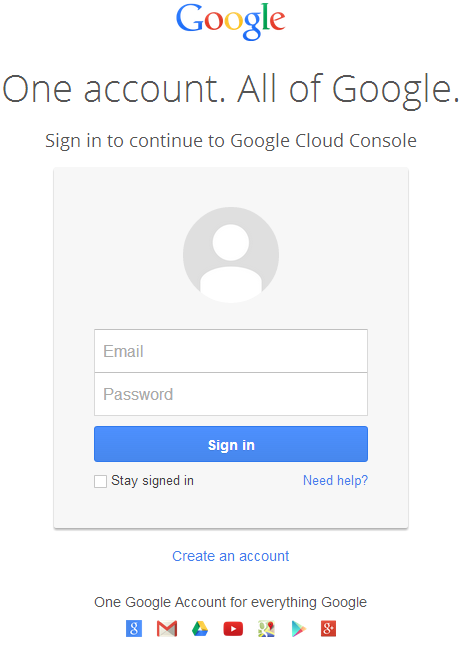
- Gå till länken https://cloud.google.com/console/project och logga in med dina Gmail‑uppgifter
 |
|---|
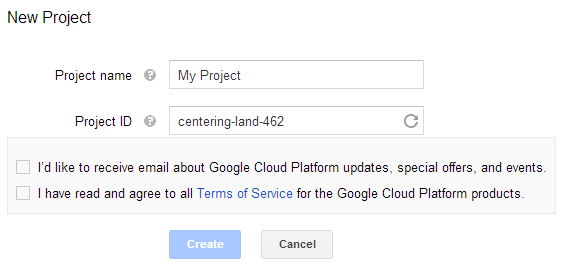
- Markera kryssrutan "I have read and agree to all Terms of Service for the Google Cloud Platform products." och tryck på Skapa‑knappen
 |
|---|
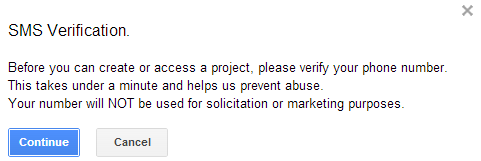
- "SMS Verification" kommer att begäras. Tryck på fortsätt‑knappen:
 |
|---|
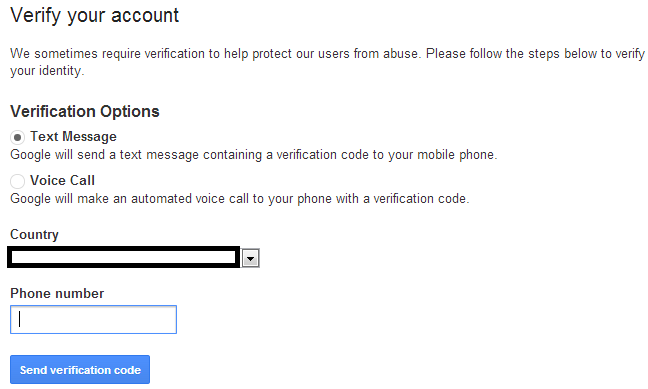
- Ange ditt landsnamn och mobilnummer. Tryck på knappen: Send Verification Code
 |
|---|
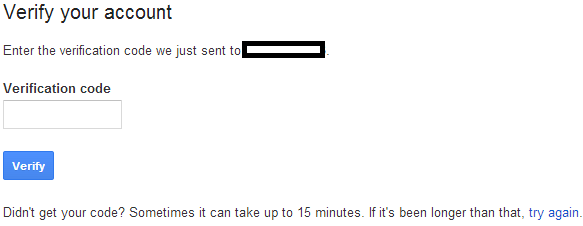
- Ange verifieringskoden du mottagit på din mobil.
 |
|---|
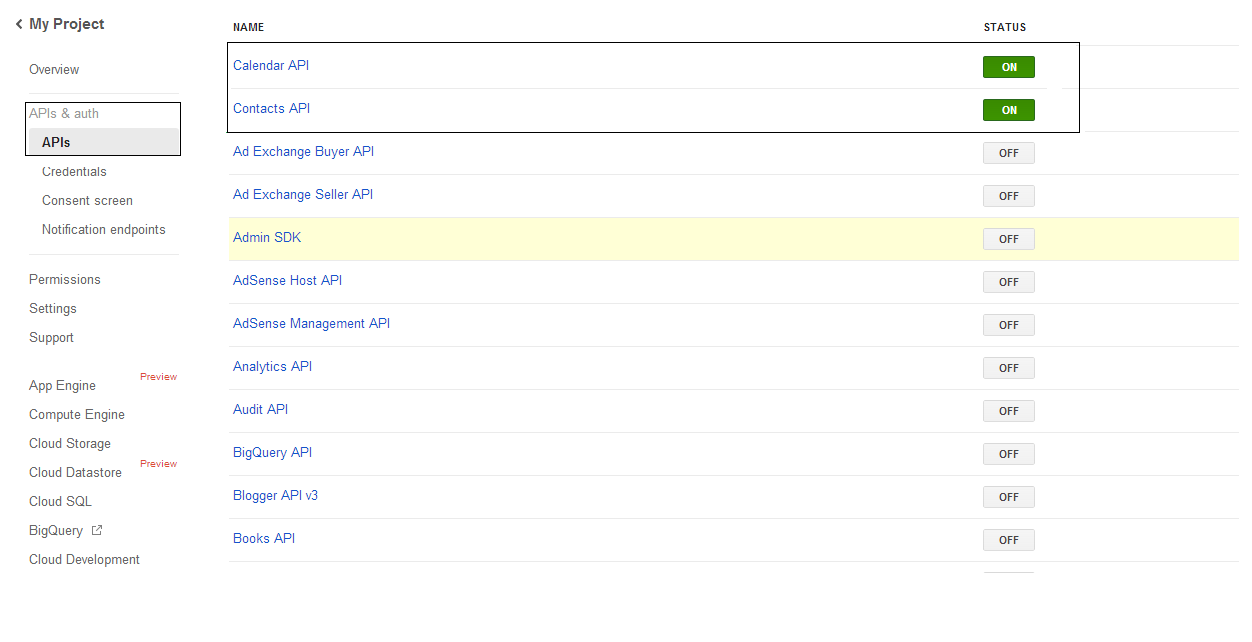
- I API‑ och auth‑listan \ APIs slå på status för Calendar API och Contacts API. Stäng av alla andra.
 |
|---|
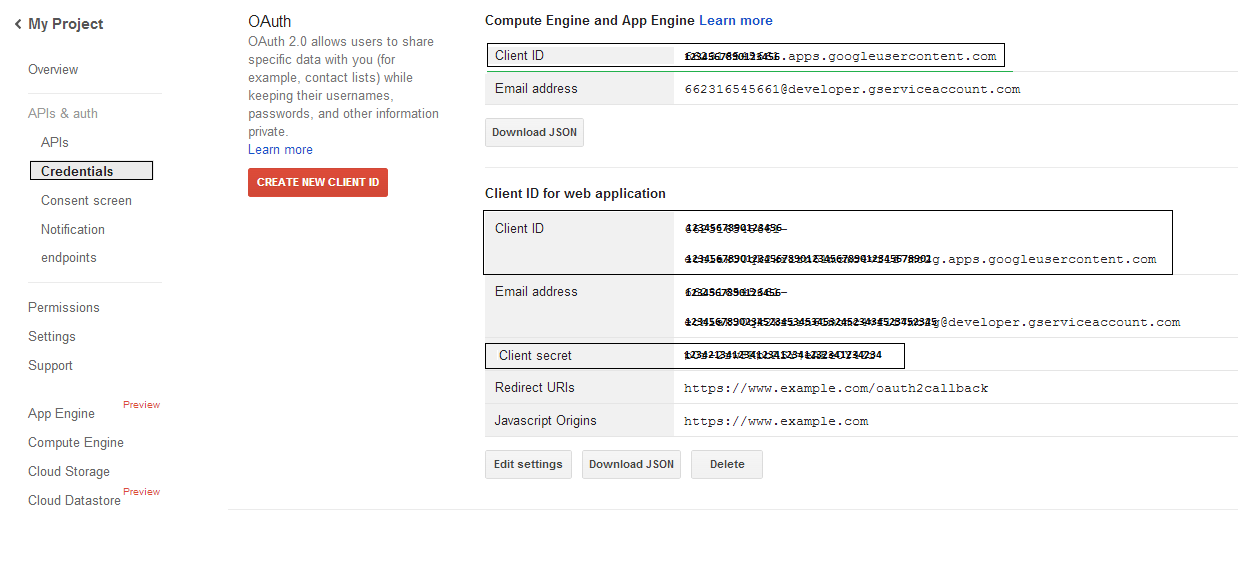
- På APIs & auth → Credentials, tryck på knappen "CREAET NEW CLIENT ID" under "OAuth"‑sektionen. Välj "Installed application" och "Other" från de givna valen och tryck på knappen "Create Client ID". Notera Client ID och Client Secret här som kommer att användas i exempelkoderna i detta avsnitt.
 |
|---|
Säker Google OAuth 2.0‑integration
När du arbetar med Google OAuth 2.0 i Aspose.Email för .NET behöver du följande klasser:
-
GoogleOAuthHelper‑klass – Förenklar processen att autentisera en Google‑användare och erhålla de nödvändiga token‑erna för att interagera med Google‑API:er, såsom Kalender, Kontakter och Gmail.
-
GoogleUser‑klass – Avsedd att kapsla in och hantera de credentialer som krävs för att en användare ska autentisera och interagera med Google‑tjänster, specifikt API:er som kräver OAuth 2.0‑autentisering såsom Google Kalender.
-
TokenResponse‑klass – En modell utformad för att representera och hantera svarsdatan från en OAuth 2.0‑token‑endpoint, där åtkomst‑token erhålls i utbyte mot auktorisation.
I de följande artiklarna hittar du kodexempel som demonstrerar hur man använder dessa klasser i .NET‑miljön för att etablera en säker interaktion med OAuth 2.0‑tjänster.
OAuth 2.0‑autentisering med GoogleOAuthHelper‑klassen
Klassen hanterar skapandet av auktoriserings‑URL, genereringen av kodutmaningar och hämtning av åtkomst‑ och uppdateringstoken. Genom att använda GoogleOAuthHelper, utvecklare kan effektivisera OAuth 2.0‑flödet, vilket säkerställer säker och effektiv kommunikation med Google‑tjänster. Följande kodsnutt visar hur du implementerar GoogleOAuthHelper klassen i ett projekt:
// For complete examples and data files, please go to https://github.com/aspose-email/Aspose.Email-for-.NET

using Newtonsoft.Json;
using System;
using System.Collections.Generic;
using System.IO;
using System.Net;
using System.Security.Cryptography;
using System.Text;

/// <summary>
/// Developer console:
/// https://console.cloud.google.com/projectselector2
/// Documentation:
/// https://developers.google.com/identity/protocols/oauth2/native-app
/// </summary>
internal class GoogleOAuthHelper
{
    public const string AUTHORIZATION_URL = "https://accounts.google.com/o/oauth2/v2/auth";
    public const string TOKEN_REQUEST_URL = "https://oauth2.googleapis.com/token";

    public const string REDIRECT_URI = "urn:ietf:wg:oauth:2.0:oob";
    public const string REDIRECT_TYPE = "code";

    public static string codeVerifier;
    public static string codeChallenge;

    public static CodeChallengeMethod codeChallengeMethod = CodeChallengeMethod.S256;

    public const string SCOPE =
        "https%3A%2F%2Fwww.googleapis.com%2Fauth%2Fcalendar" + // Calendar
        "+" +
        "https%3A%2F%2Fwww.google.com%2Fm8%2Ffeeds%2F" + // Contacts
        "+" +
        "https%3A%2F%2Fmail.google.com%2F"; // IMAP & SMTP

    static GoogleOAuthHelper()
    {
        CreateCodeVerifier();
        CreateCodeChallenge();
    }

    internal static string CreateCodeVerifier()
    {
        string allowedChars = "0123456789AaBbCcDdEeFfGgHhIiJjKkLlMmNnOoPpQqRrSsTtUuVvWwXxYyZz-._~";

        const int minLength = 43;
        const int maxLength = 128;

        Random random = new Random();
        int length = minLength + random.Next(maxLength - minLength);
        List<char> codeVerifierChars = new List<char>();

        for (int i = 0; i < length; i++)
        {
            int index = random.Next(allowedChars.Length);
            codeVerifierChars.Add(allowedChars[index]);
        }

        return codeVerifier = string.Join("", codeVerifierChars.ToArray());
    }

    internal static string CreateCodeChallenge()
    {
        if (codeChallengeMethod == CodeChallengeMethod.Plain)
            return codeChallenge = codeVerifier;

        byte[] hashValue = null;
        using (SHA256 sha256 = SHA256.Create())
            hashValue = sha256.ComputeHash(Encoding.ASCII.GetBytes(codeVerifier));

        string b64 = Convert.ToBase64String(hashValue);
        b64 = b64.Split('=')[0];
        b64 = b64.Replace('+', '-');
        b64 = b64.Replace('/', '_');

        return codeChallenge = b64;
    }

    internal static string GetAuthorizationCodeUrl(GoogleUser user)
    {
        return GetAuthorizationCodeUrl(user, SCOPE, REDIRECT_URI, REDIRECT_TYPE);
    }

    internal static string GetAuthorizationCodeUrl(
        GoogleUser user, string scope, string redirectUri, string responseType)
    {
        string state = System.Web.HttpUtility.UrlEncode(Guid.NewGuid().ToString());

        string approveUrl = AUTHORIZATION_URL +
            $"?client_id={user.ClientId}&redirect_uri={redirectUri}&response_type={responseType}&scope={scope}&" +
            $"code_challenge={codeChallenge}&code_challenge_method={codeChallengeMethod.ToString()}&" +
            $"state={state}";

        return approveUrl;
    }

    internal static TokenResponse GetAccessTokenByRefreshToken(GoogleUser user)
    {
        HttpWebRequest request = (HttpWebRequest)WebRequest.Create(TOKEN_REQUEST_URL);
        request.CookieContainer = new CookieContainer();
        request.Method = "POST";
        request.ContentType = "application/x-www-form-urlencoded";

        string clientId = System.Web.HttpUtility.UrlEncode(user.ClientId);
        string clientSecret = System.Web.HttpUtility.UrlEncode(user.ClientSecret);
        string refreshToken = System.Web.HttpUtility.UrlEncode(user.RefreshToken);
        string grantType = System.Web.HttpUtility.UrlEncode("refresh_token");

        string encodedParameters = $"client_id={clientId}&client_secret={clientSecret}&refresh_token={refreshToken}&grant_type={grantType}";

        byte[] requestData = Encoding.UTF8.GetBytes(encodedParameters);
        request.ContentLength = requestData.Length;
        if (requestData.Length > 0)
            using (Stream stream = request.GetRequestStream())
                stream.Write(requestData, 0, requestData.Length);

        HttpWebResponse response = (HttpWebResponse)request.GetResponse();
        string responseText = null;
        using (TextReader reader = new StreamReader(response.GetResponseStream(), Encoding.ASCII))
            responseText = reader.ReadToEnd();

        TokenResponse tokensResponse = JsonConvert.DeserializeObject<TokenResponse>(responseText);

        return tokensResponse;
    }

    internal static TokenResponse GetAccessTokenByAuthCode(string authorizationCode, GoogleUser user)
    {
        HttpWebRequest request = (HttpWebRequest)WebRequest.Create(TOKEN_REQUEST_URL);
        request.CookieContainer = new CookieContainer();
        request.Method = "POST";
        request.ContentType = "application/x-www-form-urlencoded";

        string clientId = System.Web.HttpUtility.UrlEncode(user.ClientId);
        string clientSecret = System.Web.HttpUtility.UrlEncode(user.ClientSecret);
        string authCode = System.Web.HttpUtility.UrlEncode(authorizationCode);
        string redirectUri = System.Web.HttpUtility.UrlEncode(REDIRECT_URI);
        string grantType = System.Web.HttpUtility.UrlEncode("authorization_code");

        string encodedParameters = $"client_id={clientId}&client_secret={clientSecret}&code={authCode}&code_verifier={codeVerifier}&redirect_uri={redirectUri}&grant_type={grantType}";

        byte[] requestData = Encoding.UTF8.GetBytes(encodedParameters);
        request.ContentLength = requestData.Length;
        if (requestData.Length > 0)
            using (Stream stream = request.GetRequestStream())
                stream.Write(requestData, 0, requestData.Length);

        HttpWebResponse response = (HttpWebResponse)request.GetResponse();
        string responseText = null;
        using (TextReader reader = new StreamReader(response.GetResponseStream(), Encoding.ASCII))
            responseText = reader.ReadToEnd();

        TokenResponse tokensResponse = JsonConvert.DeserializeObject<TokenResponse>(responseText);

        return tokensResponse;
    }

    public enum CodeChallengeMethod
    {
        S256,
        Plain
    }
}
Google OAuth Helper bör användas enligt följande:
- En URL för auktoriseringskod måste genereras först.
- Öppna URL:en i en webbläsare och slutför alla steg. Som resultat får du en auktoriseringskod.
- Använd auktoriseringskoden för att få en refresh-token.
- När refresh-token finns kan du använda den för att hämta åtkomsttoken.
GoogleUser user = new GoogleUser(email, password, clientId, clientSecret);

string authUrl = GoogleOAuthHelper.GetAuthorizationCodeUrl(user);

Console.WriteLine("Go to the following URL and get your authorization code:");
Console.WriteLine(authUrl);
Console.WriteLine();

Console.WriteLine("Enter the authorization code:");
string authorizationCode = Console.ReadLine();
Console.WriteLine();

TokenResponse tokenInfo = GoogleOAuthHelper.GetAccessTokenByAuthCode(authorizationCode, user);
Console.WriteLine("The refresh token has been received:");
Console.WriteLine(tokenInfo.RefreshToken);
Console.WriteLine();

user.RefreshToken = tokenInfo.RefreshToken;
tokenInfo = GoogleOAuthHelper.GetAccessTokenByRefreshToken(user);
Console.WriteLine("The new access token has been received:");
Console.WriteLine(tokenInfo.AccessToken);
Console.WriteLine();
GoogleUser‑klass för OAuth 2.0‑autentisering
Följande kodsnutt visar hur du implementerar GoogleUser klass:
// For complete examples and data files, please go to https://github.com/aspose-email/Aspose.Email-for-.NET

public class GoogleUser
{
    public GoogleUser(string email, string password, string clientId, string clientSecret)
        : this(email, password, clientId, clientSecret, null)
    {
    }

    public GoogleUser(string email, string password, string clientId, string clientSecret, string refreshToken)
    {
        Email = email;
        Password = password;
        ClientId = clientId;
        ClientSecret = clientSecret;
        RefreshToken = refreshToken;
    }

    public readonly string Email;
    public readonly string Password;
    public readonly string ClientId;
    public readonly string ClientSecret;

    public string RefreshToken;
}
Autentisera med OAuth 2.0 med TokenResponse‑klassen
Följande kodsnutt visar hur TokenResponse klassen kan implementeras:
// For complete examples and data files, please go to https://github.com/aspose-email/Aspose.Email-for-.NET

using Newtonsoft.Json;

public class TokenResponse
{
    [JsonProperty(NullValueHandling = NullValueHandling.Ignore, PropertyName = "access_token", Required = Required.Default)]
    public string AccessToken { get; set; }

    [JsonProperty(NullValueHandling = NullValueHandling.Ignore, PropertyName = "token_type", Required = Required.Default)]
    public string TokenType { get; set; }

    [JsonProperty(NullValueHandling = NullValueHandling.Ignore, PropertyName = "expires_in", Required = Required.Default)]
    public int ExpiresIn { get; set; }

    [JsonProperty(NullValueHandling = NullValueHandling.Ignore, PropertyName = "refresh_token", Required = Required.Default)]
    public string RefreshToken { get; set; }

    [JsonProperty(NullValueHandling = NullValueHandling.Ignore, PropertyName = "scope", Required = Required.Default)]
    public string Scope { get; set; }
}