
Microsoft Graph Yardımcı Özellikleri
Azure Active Directory Yönetim Merkezinde Proje Oluşturma
MS Office hesabı olan bir kullanıcı için Azure Active Directory yönetim merkezinde bir proje oluşturulacaktır.
Azure Active Directory Yönetim Merkezinde Proje Oluşturma Adımları
Aşağıda, Azure Active Directory yönetim merkezinde bir proje oluşturmak için adım adım bir öğretici bulunmaktadır.
1. Azure Active Directory’ye gidin ve MS Office kimlik bilgilerinizle oturum açın.
Azure Active Directory Bağlantısı - https://aad.portal.azure.com/
2. Kiracınızda bir Azure AD Uygulaması oluşturun.
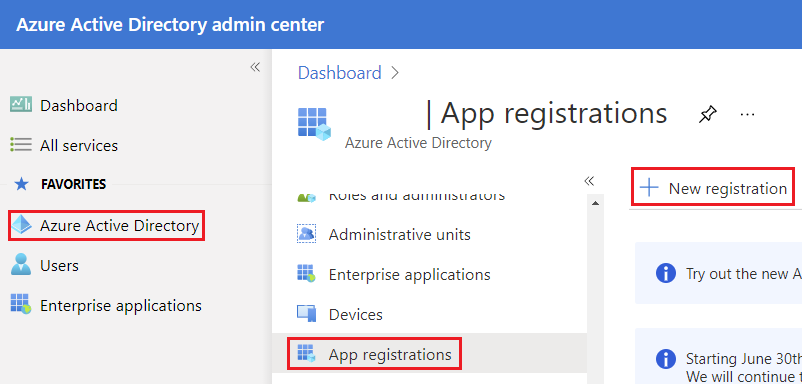
Sol taraftaki bölmede Azure Active Directory etiketine tıklayın. Bu, Azure Active Directory bölmesini açacaktır. Ekranda App registrations etiketini görmelisiniz. Bu, bir Azure AD Uygulaması kaydetmenin başlangıç noktasıdır. Bu bölme, Azure AD için yeni bir uygulama oluşturmanıza izin verir.
New registration butonuna tıklayarak yeni bir uygulama oluşturun.
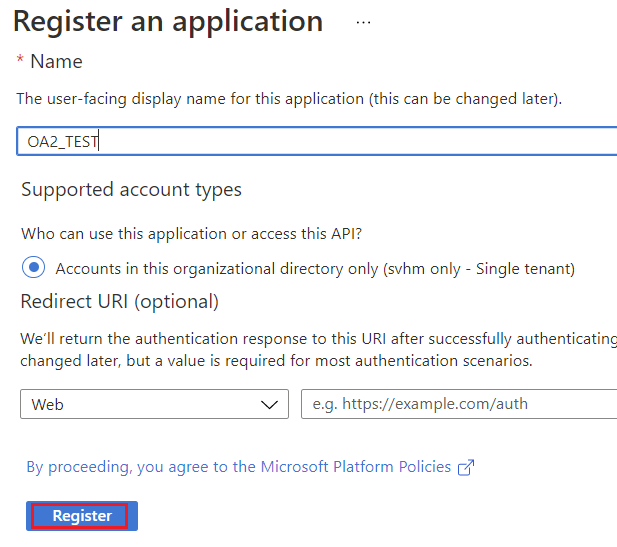
3. Şimdi yeni uygulama kaydı bölmesini göreceksiniz.
- Name Bu, uygulamanızın adı olacaktır.
- Supported account types Bu bölüm erişimi sınırlayacaktır.
Register butonuna tıklayın.
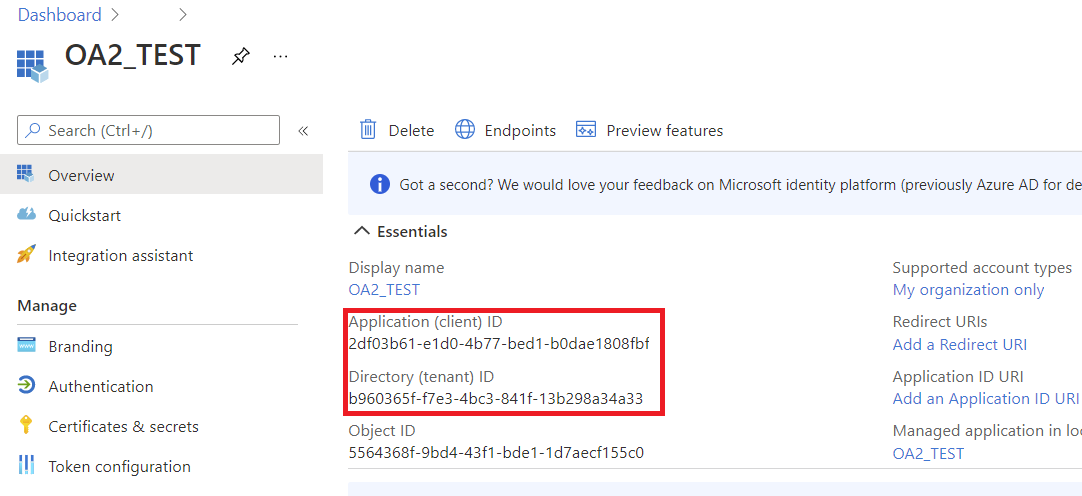
4. Yeni kaydedilen uygulamalar bölmesini görmelisiniz.
- Application (client) ID Uygulamanızın kimliği.
- Directory (tenant) ID Azure AD kiracı kimliği.
5. Microsoft Graph API için izin vermek.
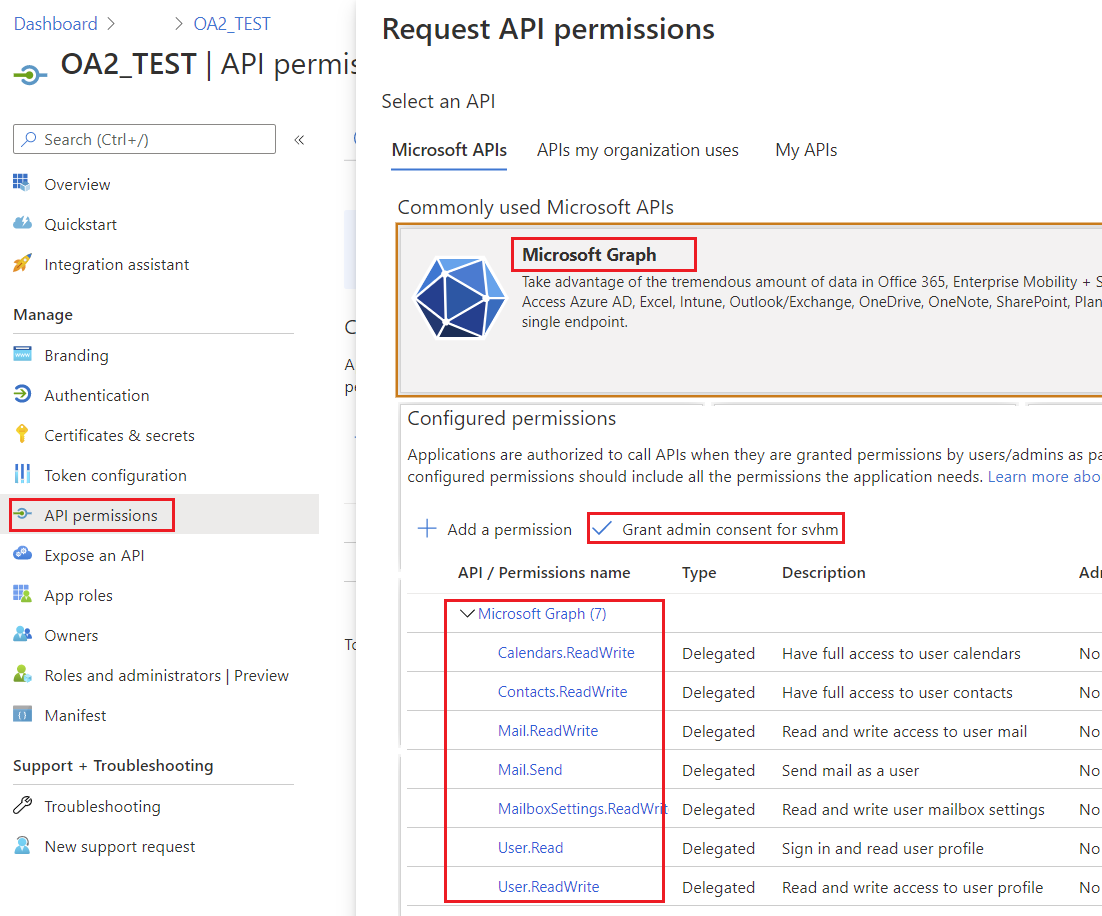
API permissions etiketine tıklayın.
Azure, uygulamanız için zaten User.Read delegeli izinlerini verdi. Bu izin, oturum açmış bir kullanıcının bilgilerini okumamızı sağlar. Bunlar Microsoft Graph API izinleridir; diğer bir deyişle Kapsamlar olarak da adlandırabiliriz.
Microsoft Graph API için kapsamların tam listesi - https://docs.microsoft.com/en-us/graph/permissions-reference.
+ Add a permission butonuna tıklayın ve Microsoft Graph‘ı seçin.
Delegated permissions üzerine tıklayın. Şimdi Microsoft Graph API için mevcut izinlerin bir listesini görüyorsunuz.
Gerekli izinleri seçin, Add permissions butonuna tıklayın.
Grant admin consent butonuna tıklayın.
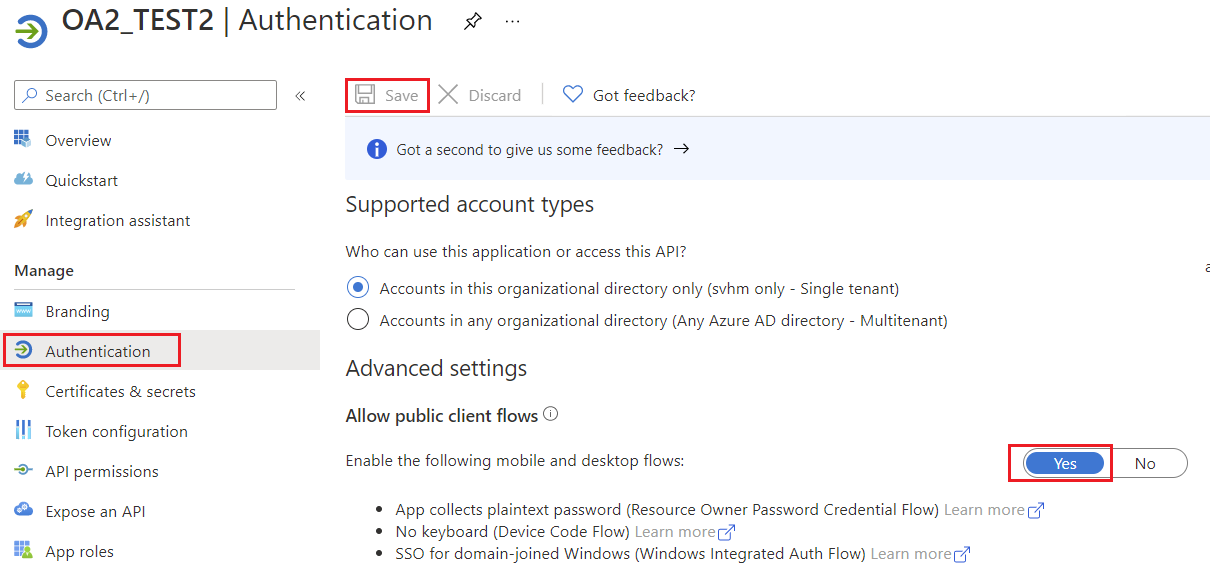
6. Genel istemci akışına izin ver.
Uygulamanın genel bir istemci olup olmadığını belirtir. Yönlendirme URI’sı kullanmayan token verme akışları kullanan uygulamalar için uygundur.
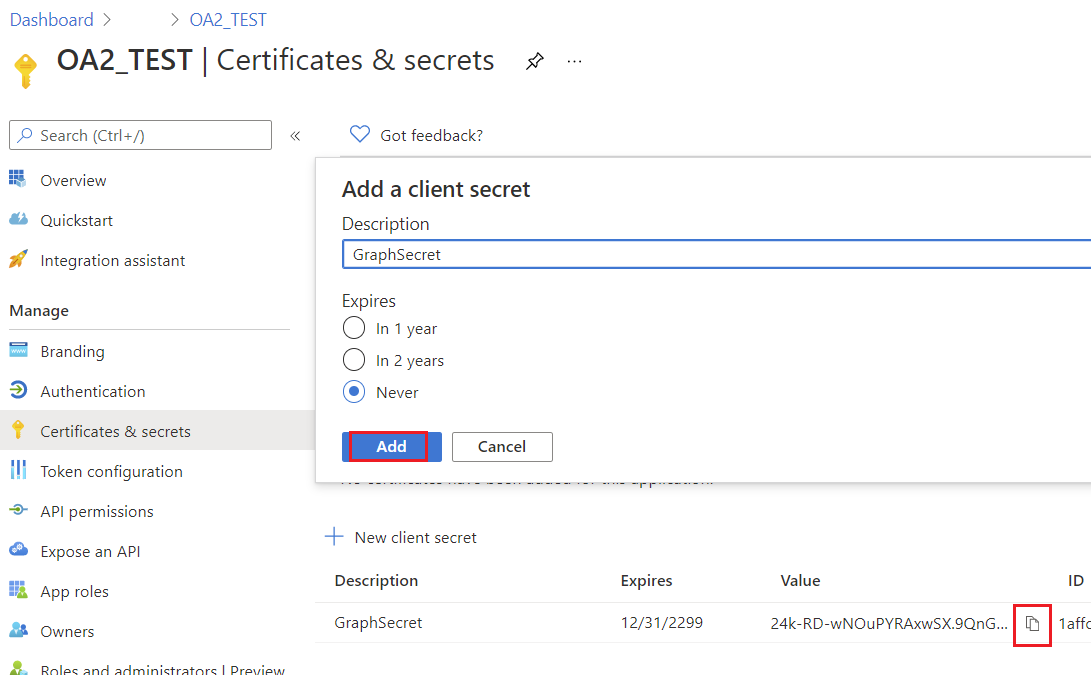
7. Uygulama için bir anahtar oluşturun
Yardımcı Sınıflar
Bu bölümdeki kodları çalıştırmak için aşağıdaki yardımcı sınıflar gereklidir. Bu sınıflar sadece gösterimi basitleştirmek içindir.
AzureROPCTokenProvider Sınıfı
Şunun bir örneği IGraphClient sınıf, istekleri oluşturma, Microsoft Graph API’ye gönderme ve yanıtları işleme işlemlerini yönetir. Bu sınıfın yeni bir örneğini oluşturmak için, bir örnek sağlamalısınız ITokenProvider, Microsoft Graph isteklerini kimlik doğrulayabilir.
import java.io.BufferedReader;
import java.io.IOException;
import java.io.InputStream;
import java.io.InputStreamReader;
import java.io.OutputStream;
import java.io.UnsupportedEncodingException;
import java.net.HttpURLConnection;
import java.net.URL;
import java.net.URLDecoder;
import java.net.URLEncoder;
import java.nio.charset.StandardCharsets;
import java.util.HashMap;
import java.util.Map;

/**
 * <p>
 * Azure resource owner password credential (ROPC) token provider
 * https://docs.microsoft.com/en-us/azure/active-directory/develop/v2-oauth-ropc
 * https://docs.microsoft.com/en-us/exchange/client-developer/exchange-web-services/how-to-authenticate-an-ews-application-by-using-oauth
 * https://portal.azure.com
 * https://developer.microsoft.com/en-us/graph/graph-explorer/#
 * token parser https://jwt.io
 * </p>
 */
class AzureROPCTokenProvider implements ITokenProvider {

    private static final String GRANT_TYPE = "password";

    private final String clientId;
    private final String clientSecret;
    private final String userName;
    private final String password;
    private final String tenant;
    private final String scope;

    private OAuthToken token;

    public AzureROPCTokenProvider(String tenant, String clientId, String clientSecret,
                                  String userName, String password, String[] scopeAr) {
        this.tenant = tenant;
        this.clientId = clientId;
        this.clientSecret = clientSecret;
        this.userName = userName;
        this.password = password;
        this.scope = joinToStr(scopeAr, " ");
    }

    public synchronized OAuthToken getAccessToken(boolean ignoreExistingToken) {
        if (this.token != null && !this.token.getExpired() && !ignoreExistingToken)
            return this.token;
        token = null;

        Map<String, String> tokenArgs = geToken();

        java.util.Calendar c = java.util.Calendar.getInstance();
        c.add(java.util.Calendar.SECOND, Integer.parseInt(tokenArgs.get("expires_in")));
        token = new OAuthToken(tokenArgs.get("access_token"), TokenType.AccessToken, c.getTime());
        return token;
    }

    public final OAuthToken getAccessToken() {
        return getAccessToken(false);
    }

    public void dispose() {
    }

    private String getEncodedParameters() {
        return "client_id=" + urlEncode(clientId) + "&scope=" + urlEncode(scope) + "&username=" + urlEncode(userName)
                + "&password=" + urlEncode(password) + "&grant_type="
                + urlEncode(GRANT_TYPE);
    }

    private String getUri() {
        if (tenant == null || tenant.trim().isEmpty())
            return "https://login.microsoftonline.com/common/oauth2/v2.0/token";
        else
            return "https://login.microsoftonline.com/" + tenant + "/oauth2/v2.0/token";
    }

    private Map<String, String> geToken() {
        try {
            HttpURLConnection connection = (HttpURLConnection) new URL(getUri()).openConnection();
            connection.setRequestMethod("POST");

            byte[] requestData = getEncodedParameters().getBytes(StandardCharsets.UTF_8);

            connection.setUseCaches(false);
            connection.setDoInput(true);
            connection.setDoOutput(true);
            connection.setRequestProperty("Content-Type", "application/x-www-form-urlencoded");
            connection.setRequestProperty("Content-Length", "" + requestData.length);

            final OutputStream st = connection.getOutputStream();
            try {
                st.write(requestData, 0, requestData.length);
            } finally {
                st.flush();
                st.close();
            }

            connection.connect();

            if (connection.getResponseCode() >= HttpURLConnection.HTTP_BAD_REQUEST) {
                throw new IllegalAccessError("Operation failed: " + connection.getResponseCode() + "/" +
                        connection.getResponseMessage() + "\r\nDetails:\r\n{2}"
                        + readInputStream(connection.getErrorStream()));
            }

            String responseText = readInputStream(connection.getInputStream());

            Map<String, String> result = new HashMap<>();
            String[] fromJsonToKeyValue = responseText.replace("{", "").replace("}", "")
                    .replace("\"", "").replace("\r", "")
                    .replace("\n", "").split(",");
            for (String keyValue : fromJsonToKeyValue) {
                String[] pair = keyValue.split(":");
                String name = pair[0].trim().toLowerCase();
                String value = urlDecode(pair[1].trim());
                result.put(name, value);
            }

            return result;
        } catch (IOException e) {
            throw new IllegalAccessError(e.getMessage());
        }
    }

    static String urlEncode(String value) {
        try {
            return URLEncoder.encode(value, StandardCharsets.UTF_8.toString());
        } catch (UnsupportedEncodingException e) {
            throw new IllegalAccessError(e.getMessage());
        }
    }

    static String urlDecode(String value) {
        try {
            return URLDecoder.decode(value, StandardCharsets.UTF_8.toString());
        } catch (UnsupportedEncodingException e) {
            throw new IllegalAccessError(e.getMessage());
        }
    }

    static String readInputStream(InputStream is) {
        if (is == null)
            return "";

        BufferedReader reader = new BufferedReader(new InputStreamReader(is));
        StringBuilder result = new StringBuilder();
        String line;
        try {
            while ((line = reader.readLine()) != null) {
                result.append(line);
            }
        } catch (IOException e) {
            // ignore
        }
        return result.toString();
    }

    static String joinToStr(String[] arr, String sep) {
        StringBuilder sb = new StringBuilder();
        for (int i = 0; i < arr.length; i++) {
            if (i > 0)
                sb.append(sep);
            sb.append(arr[i]);
        }
        return sb.toString();
    }
}