
Posta Hizmetlerine Erişmek için OAuth Kullanımı
OAuth 2.0 desteği Aspose.Email’e eklenmiştir ve SMTP, POP3, IMAP ve EWS sunucularına erişmek için kullanılabilir. Genel olarak, OAuth 2.0 taşıyıcı tokenlarını destekleyen tüm sunucular Aspose.Email ile kullanılabilir, ancak e-posta istemcilerimiz Google mail sunucuları ve Microsoft Office 365 sunucularıyla test edilmiştir. Sunucuya erişim SmtpClient, Pop3Client, ImapClient ve EWSClient OAuth ile 2 şekilde uygulanabilir.
- Erişim tokenını doğrudan e-posta istemcisinin yapıcısına (constructor) sağlayın. Bu durumda, kullanıcı erişim tokenlarının ömrünün sınırlı olduğunu anlamalıdır. Token süresi dolduğunda, e-posta istemcisi sunucuya erişmek için kullanılamaz.
- Üzerine dayalı bir token sağlayıcı için özel bir implementasyon sağlayın ITokenProvider arayüzü, e-posta istemcisinin yapıcısına (constructor) ekler. Bu durumda, istemci token süresinin dolup dolmadığını kontrol eder ve istek yapar ITokenProvider önceki geçersiz olduğunda yeni bir erişim tokenı için. Bu şekilde, istemci tokenları periyodik olarak yeniler ve sunucuyla sınırsız süre çalışabilir. Çoğu hizmet, erişim tokenlarını yenilemek için basit bir yol sunar. Örneğin, Google hizmetlerinde yenileme tokenları kullanmak veya Microsoft kimlik platformunda ROPC kimlik doğrulama akışı, token sağlayıcı implementasyonu için kullanılabilir.
Uygun Sunucuda Bir Hesap Yapılandırın
Aşağıdaki makaleler, posta hizmetlerine erişmek için hesapları yapılandırmanıza yardımcı olur.
- İçin Office 365
- İçin Gmail
Erişim Tokenlarıyla Posta Hizmetlerine Erişim
Aşağıdaki kod örnekleri, erişim tokenları kullanarak posta hizmetlerine nasıl bağlanılacağını gösterir.
// Connecting to SMTP server
try (SmtpClient client = new SmtpClient(
        "smtp.gmail.com",
        587,
        "user1@gmail.com",
        "accessToken",
        true,
        SecurityOptions.SSLExplicit)) {

}

// Connecting to IMAP server
try (ImapClient client = new ImapClient(
        "imap.gmail.com",
        993,
        "user1@gmail.com",
        "accessToken",
        true,
        SecurityOptions.SSLImplicit)) {

}

// Connecting to POP3 server
try (Pop3Client client = new Pop3Client(
        "pop.gmail.com",
        995,
        "user1@gmail.com",
        "accessToken",
        true,
        SecurityOptions.Auto)) {

}
Token Sağlayıcılarıyla Posta Hizmetlerine Erişim
Aşağıdaki kod örnekleri, bir token sağlayıcı kullanarak posta hizmetlerine nasıl bağlanılacağını gösterir.
ITokenProvider tokenProvider = TokenProvider.Google.getInstance(
        "ClientId",
        "ClientSecret",
        "RefreshToken");

// Connecting to SMTP server
try (SmtpClient client = new SmtpClient(
        "smtp.gmail.com",
        587,
        "user1@gmail.com",
        tokenProvider,
        SecurityOptions.SSLExplicit)) {

}

// Connecting to IMAP server
try (ImapClient client = new ImapClient(
        "imap.gmail.com",
        993,
        "user1@gmail.com",
        tokenProvider,
        SecurityOptions.SSLImplicit)) {

}

// Connecting to POP3 server
try (Pop3Client client = new Pop3Client(
        "pop.gmail.com",
        995,
        "user1@gmail.com",
        tokenProvider,
        SecurityOptions.Auto)) {

}
Office 365 için Özel ITokenProvider Implementasyonu
Office 365 posta hizmetlerine erişmek için aşağıdaki token sağlayıcı uygulamasını kullanabilirsiniz.
import java.io.BufferedReader;
import java.io.IOException;
import java.io.InputStream;
import java.io.InputStreamReader;
import java.io.OutputStream;
import java.io.UnsupportedEncodingException;
import java.net.HttpURLConnection;
import java.net.URL;
import java.net.URLDecoder;
import java.net.URLEncoder;
import java.nio.charset.StandardCharsets;
import java.util.HashMap;
import java.util.Map;

/**
 * <p>
 * Azure resource owner password credential (ROPC) token provider
 * https://docs.microsoft.com/en-us/azure/active-directory/develop/v2-oauth-ropc
 * https://docs.microsoft.com/en-us/exchange/client-developer/exchange-web-services/how-to-authenticate-an-ews-application-by-using-oauth
 * https://portal.azure.com
 * https://developer.microsoft.com/en-us/graph/graph-explorer/#
 * token parser https://jwt.io
 * </p>
 */
class AzureROPCTokenProvider implements ITokenProvider {

    private static final String GRANT_TYPE = "password";

    private final String clientId;
    private final String clientSecret;
    private final String userName;
    private final String password;
    private final String tenant;
    private final String scope;

    private OAuthToken token;

    public AzureROPCTokenProvider(String tenant, String clientId, String clientSecret,
                                  String userName, String password, String[] scopeAr) {
        this.tenant = tenant;
        this.clientId = clientId;
        this.clientSecret = clientSecret;
        this.userName = userName;
        this.password = password;
        this.scope = joinToStr(scopeAr, " ");
    }

    public synchronized OAuthToken getAccessToken(boolean ignoreExistingToken) {
        if (this.token != null && !this.token.getExpired() && !ignoreExistingToken)
            return this.token;
        token = null;

        Map<String, String> tokenArgs = geToken();

        java.util.Calendar c = java.util.Calendar.getInstance();
        c.add(java.util.Calendar.SECOND, Integer.parseInt(tokenArgs.get("expires_in")));
        token = new OAuthToken(tokenArgs.get("access_token"), TokenType.AccessToken, c.getTime());
        return token;
    }

    public final OAuthToken getAccessToken() {
        return getAccessToken(false);
    }

    public void dispose() {
    }

    private String getEncodedParameters() {
        return "client_id=" + urlEncode(clientId) + "&scope=" + urlEncode(scope) + "&username=" + urlEncode(userName)
                + "&password=" + urlEncode(password) + "&grant_type="
                + urlEncode(GRANT_TYPE);
    }

    private String getUri() {
        if (tenant == null || tenant.trim().isEmpty())
            return "https://login.microsoftonline.com/common/oauth2/v2.0/token";
        else
            return "https://login.microsoftonline.com/" + tenant + "/oauth2/v2.0/token";
    }

    private Map<String, String> geToken() {
        try {
            HttpURLConnection connection = (HttpURLConnection) new URL(getUri()).openConnection();
            connection.setRequestMethod("POST");

            byte[] requestData = getEncodedParameters().getBytes(StandardCharsets.UTF_8);

            connection.setUseCaches(false);
            connection.setDoInput(true);
            connection.setDoOutput(true);
            connection.setRequestProperty("Content-Type", "application/x-www-form-urlencoded");
            connection.setRequestProperty("Content-Length", "" + requestData.length);

            final OutputStream st = connection.getOutputStream();
            try {
                st.write(requestData, 0, requestData.length);
            } finally {
                st.flush();
                st.close();
            }

            connection.connect();

            if (connection.getResponseCode() >= HttpURLConnection.HTTP_BAD_REQUEST) {
                throw new IllegalAccessError("Operation failed: " + connection.getResponseCode() + "/" +
                        connection.getResponseMessage() + "\r\nDetails:\r\n{2}"
                        + readInputStream(connection.getErrorStream()));
            }

            String responseText = readInputStream(connection.getInputStream());

            Map<String, String> result = new HashMap<>();
            String[] fromJsonToKeyValue = responseText.replace("{", "").replace("}", "")
                    .replace("\"", "").replace("\r", "")
                    .replace("\n", "").split(",");
            for (String keyValue : fromJsonToKeyValue) {
                String[] pair = keyValue.split(":");
                String name = pair[0].trim().toLowerCase();
                String value = urlDecode(pair[1].trim());
                result.put(name, value);
            }

            return result;
        } catch (IOException e) {
            throw new IllegalAccessError(e.getMessage());
        }
    }

    static String urlEncode(String value) {
        try {
            return URLEncoder.encode(value, StandardCharsets.UTF_8.toString());
        } catch (UnsupportedEncodingException e) {
            throw new IllegalAccessError(e.getMessage());
        }
    }

    static String urlDecode(String value) {
        try {
            return URLDecoder.decode(value, StandardCharsets.UTF_8.toString());
        } catch (UnsupportedEncodingException e) {
            throw new IllegalAccessError(e.getMessage());
        }
    }

    static String readInputStream(InputStream is) {
        if (is == null)
            return "";

        BufferedReader reader = new BufferedReader(new InputStreamReader(is));
        StringBuilder result = new StringBuilder();
        String line;
        try {
            while ((line = reader.readLine()) != null) {
                result.append(line);
            }
        } catch (IOException e) {
            // ignore
        }
        return result.toString();
    }

    static String joinToStr(String[] arr, String sep) {
        StringBuilder sb = new StringBuilder();
        for (int i = 0; i < arr.length; i++) {
            if (i > 0)
                sb.append(sep);
            sb.append(arr[i]);
        }
        return sb.toString();
    }
}
Aşağıdaki kod örnekleri, özel token sağlayıcı kullanarak Office 365 hizmetlerine nasıl bağlanılacağını gösterir.
ITokenProvider tokenProvider = new AzureROPCTokenProvider(
        "Tenant",
        "ClientId",
        "ClientSecret",
        "EMail",
        "Password",
        scopes);

// Connecting to SMTP server
try (SmtpClient client = new SmtpClient(
        "smtp.office365.com",
        587,
        "Test1@test.onmicrosoft.com",
        tokenProvider,
        SecurityOptions.SSLExplicit)) {

}

// Connecting to IMAP server
try (ImapClient client = new ImapClient(
        "outlook.office365.com",
        993,
        "Test1@test.onmicrosoft.com",
        tokenProvider,
        SecurityOptions.SSLImplicit)) {

}

// Connecting to POP3 server
try (Pop3Client client = new Pop3Client(
        "outlook.office365.com",
        995,
        "Test1@test.onmicrosoft.com",
        tokenProvider,
        SecurityOptions.Auto)) {

}

// Connecting to EWS server
final String mailboxUri = "https://outlook.office365.com/ews/exchange.asmx";
ICredentials credentials = new OAuthNetworkCredential(tokenProvider);
try (IEWSClient ewsClient = EWSClient.getEWSClient(mailboxUri, credentials)) {

}
IMAP, POP3 veya SMTP üzerinden Office 365’e erişim izinleri
Office 365 posta hizmetlerine erişmek için doğru API izinlerini uygulamamız ve yönetici onayını vermemiz gerekiyor:
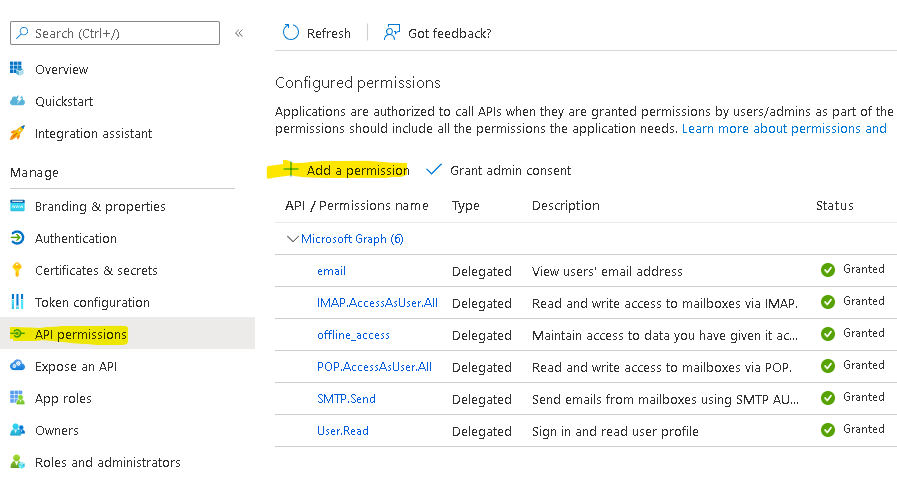
API izinleri / İzin ekle sihirbazında, Microsoft Graph’i seçin ve ardından Delegated (Yetkilendirilmiş) izinleri seçerek aşağıdaki izin kapsamlarını bulun:
offline_access
IMAP.AccessAsUser.All
POP.AccessAsUser.All
SMTP.Send
Token sağlayıcı Örneği:
ITokenProvider tokenProvider = new AzureROPCTokenProvider(OAuth.Tenant, OAuth.ClientId, OAuth.ClientSecret, User.EMail, User.Password,
        new String[] {
                "offline_access",
                "https://outlook.office.com/IMAP.AccessAsUser.All", // IMAP scope
                "https://outlook.office.com/POP.AccessAsUser.All",  // POP3 scope
                "https://outlook.office.com/SMTP.Send"              // SMTP scope
        });