
Google Servislerine OAuth 2.0 API Erişimini Yapılandırma
API Erişimi için Google Geliştirici Konsolunda Proje Oluştur
Google Geliştirici Konsolunda bir proje oluşturmak, uygulamalarınız için Google API’lerine erişim ve kullanımı sağlamak adına temel bir adımdır. Bu süreç, bir proje kurmayı, şartları kabul etmeyi, kimliğinizi doğrulamayı ve API ayarlarını ihtiyaçlarınıza göre yapılandırmayı içerir. Aşağıdaki adımlar, bir proje oluşturma ve Calendar ve Contacts API gibi hizmetler için gerekli kimlik bilgilerini alma sürecinde size rehberlik edecektir.
Google Geliştirici Konsolunda Proje Oluşturma Adımları
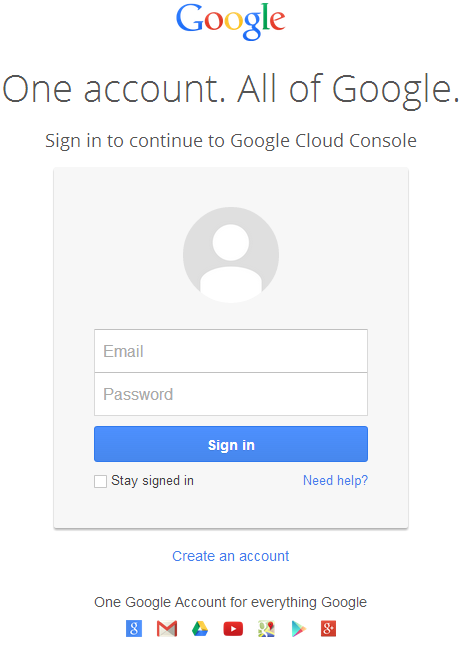
- Bağlantıya gidin https://cloud.google.com/console/project ve Gmail kimlik bilgilerinizle oturum açın
 |
|---|
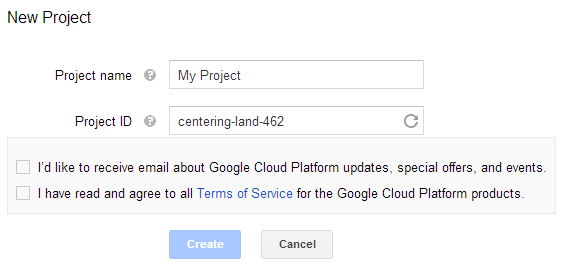
- "Google Cloud Platform ürünlerinin tüm hizmet şartlarını okudum ve kabul ediyorum." kutusunu işaretleyin ve Oluştur düğmesine basın.
 |
|---|
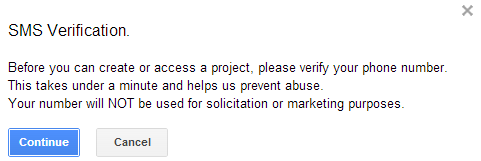
- "SMS Doğrulaması" istenecektir. Devam düğmesine basın:
 |
|---|
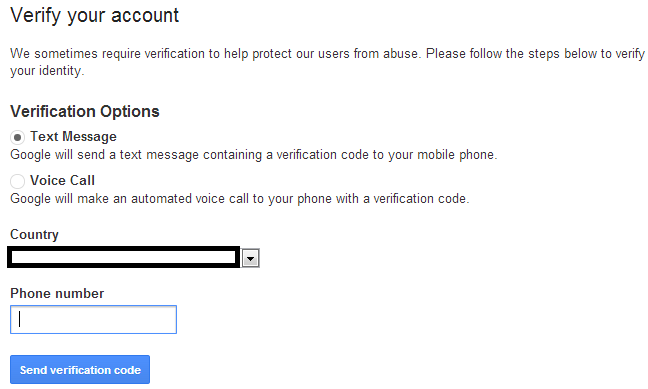
- Ülke adınızı girin ve telefon numaranızı girin. Düğmeye basın: Doğrulama Kodu Gönder
 |
|---|
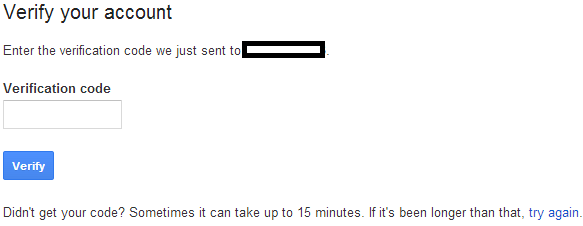
- Mobil telefonunuza gelen doğrulama kodunu girin.
 |
|---|
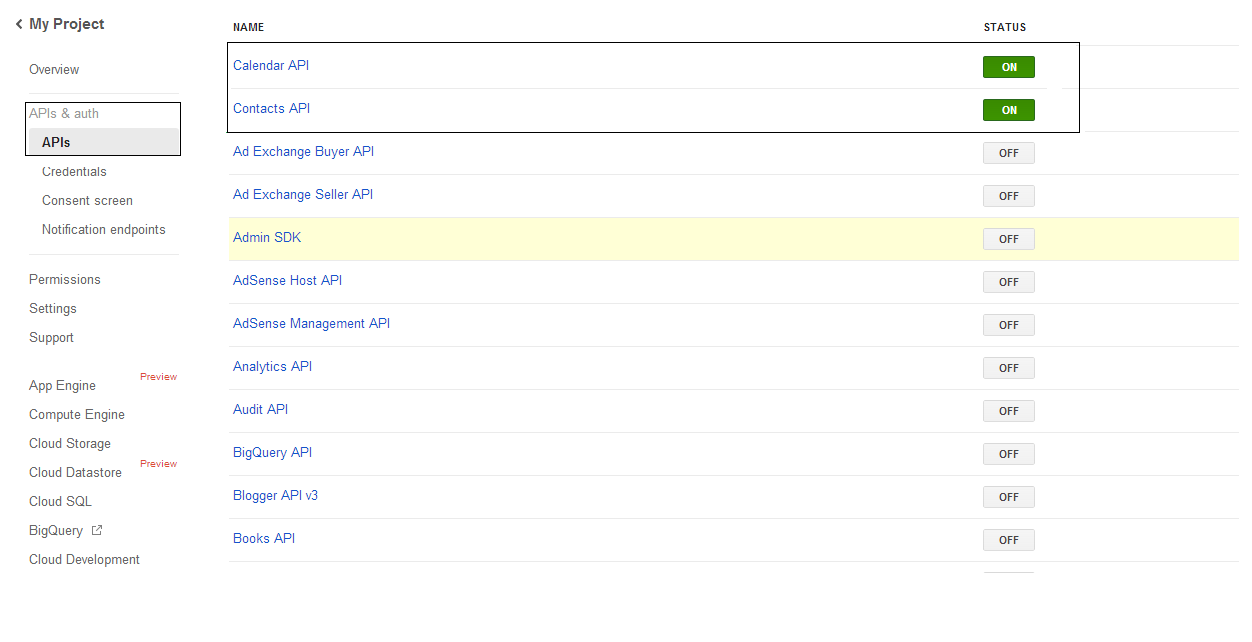
- API’ler ve kimlik doğrulama \ API’ler listesinde Calendar API ve Contacts API durumunu açın. Diğer tümlerini KAPATIN.
 |
|---|
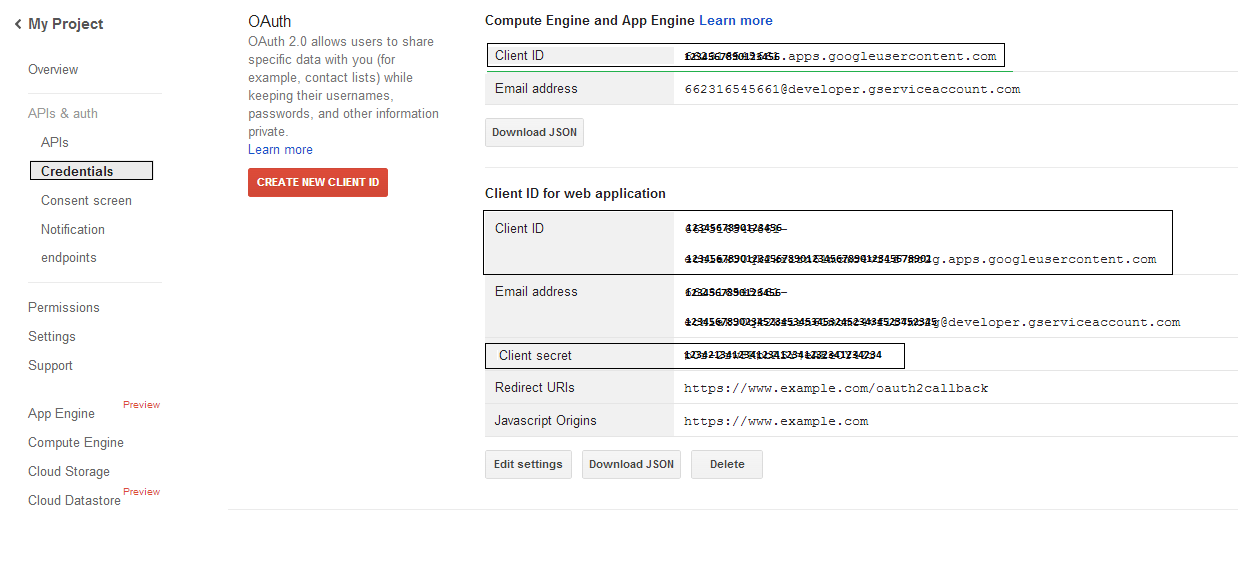
- API’ler ve kimlik doğrulama -> Kimlik Bilgileri bölümünde, "CREAET NEW CLIENT ID" düğmesine basın. "OAuth" bölümünde "Installed application" ve "Other" seçeneklerini seçin ve "Create Client ID" düğmesine basın. Burada örnek kodlarda kullanılacak olan İstemci Kimliği ve İstemci Sırrını not edin.
 |
|---|
Güvenli Google OAuth 2.0 Entegrasyonu
Aspose.Email for .NET içinde Google OAuth 2.0 ile çalışırken aşağıdaki sınıflara ihtiyacınız olacaktır:
-
GoogleOAuthHelper sınıfı - Google kullanıcısının kimlik doğrulamasını ve Google API’larıyla (Calendar, Contacts ve Gmail gibi) etkileşim için gerekli token’ları elde etme sürecini basitleştirir.
-
GoogleUser sınıfı - Kullanıcının Google hizmetleriyle kimlik doğrulaması yapması ve etkileşimde bulunması için gereken kimlik bilgilerini kapsüllemek ve yönetmek üzere tasarlanmıştır; özellikle Google Takvim gibi OAuth 2.0 kimlik doğrulaması gerektiren API’ler için.
-
TokenResponse sınıfı - Yetkilendirme karşılığında erişim token’larının alındığı OAuth 2.0 token uç noktasından gelen yanıt verilerini temsil etmek ve işlemek için tasarlanmış bir modeldir.
Aşağıdaki makalelerde, bu sınıfların .NET ortamında OAuth 2.0 hizmetleriyle güvenli bir etkileşim kurmak için nasıl kullanılacağını gösteren kod örneklerini bulacaksınız.
GoogleOAuthHelper Sınıfı ile OAuth 2.0 Kimlik Doğrulaması
Sınıf, yetkilendirme kodu URL’si oluşturmayı, kod meydan okumalarını üretmeyi ve erişim ve yenileme token’larını almaya yönelik işlemleri yönetir. Kullanarak GoogleOAuthHelper, geliştiriciler OAuth 2.0 akışını basitleştirebilir, Google servisleriyle güvenli ve verimli iletişim sağlayabilir. Aşağıdaki kod parçacığı, nasıl uygulanacağını gösterir GoogleOAuthHelper sınıfını bir projeye ekleyin:
// For complete examples and data files, please go to https://github.com/aspose-email/Aspose.Email-for-.NET

using Newtonsoft.Json;
using System;
using System.Collections.Generic;
using System.IO;
using System.Net;
using System.Security.Cryptography;
using System.Text;

/// <summary>
/// Developer console:
/// https://console.cloud.google.com/projectselector2
/// Documentation:
/// https://developers.google.com/identity/protocols/oauth2/native-app
/// </summary>
internal class GoogleOAuthHelper
{
    public const string AUTHORIZATION_URL = "https://accounts.google.com/o/oauth2/v2/auth";
    public const string TOKEN_REQUEST_URL = "https://oauth2.googleapis.com/token";

    public const string REDIRECT_URI = "urn:ietf:wg:oauth:2.0:oob";
    public const string REDIRECT_TYPE = "code";

    public static string codeVerifier;
    public static string codeChallenge;

    public static CodeChallengeMethod codeChallengeMethod = CodeChallengeMethod.S256;

    public const string SCOPE =
        "https%3A%2F%2Fwww.googleapis.com%2Fauth%2Fcalendar" + // Calendar
        "+" +
        "https%3A%2F%2Fwww.google.com%2Fm8%2Ffeeds%2F" + // Contacts
        "+" +
        "https%3A%2F%2Fmail.google.com%2F"; // IMAP & SMTP

    static GoogleOAuthHelper()
    {
        CreateCodeVerifier();
        CreateCodeChallenge();
    }

    internal static string CreateCodeVerifier()
    {
        string allowedChars = "0123456789AaBbCcDdEeFfGgHhIiJjKkLlMmNnOoPpQqRrSsTtUuVvWwXxYyZz-._~";

        const int minLength = 43;
        const int maxLength = 128;

        Random random = new Random();
        int length = minLength + random.Next(maxLength - minLength);
        List<char> codeVerifierChars = new List<char>();

        for (int i = 0; i < length; i++)
        {
            int index = random.Next(allowedChars.Length);
            codeVerifierChars.Add(allowedChars[index]);
        }

        return codeVerifier = string.Join("", codeVerifierChars.ToArray());
    }

    internal static string CreateCodeChallenge()
    {
        if (codeChallengeMethod == CodeChallengeMethod.Plain)
            return codeChallenge = codeVerifier;

        byte[] hashValue = null;
        using (SHA256 sha256 = SHA256.Create())
            hashValue = sha256.ComputeHash(Encoding.ASCII.GetBytes(codeVerifier));

        string b64 = Convert.ToBase64String(hashValue);
        b64 = b64.Split('=')[0];
        b64 = b64.Replace('+', '-');
        b64 = b64.Replace('/', '_');

        return codeChallenge = b64;
    }

    internal static string GetAuthorizationCodeUrl(GoogleUser user)
    {
        return GetAuthorizationCodeUrl(user, SCOPE, REDIRECT_URI, REDIRECT_TYPE);
    }

    internal static string GetAuthorizationCodeUrl(
        GoogleUser user, string scope, string redirectUri, string responseType)
    {
        string state = System.Web.HttpUtility.UrlEncode(Guid.NewGuid().ToString());

        string approveUrl = AUTHORIZATION_URL +
            $"?client_id={user.ClientId}&redirect_uri={redirectUri}&response_type={responseType}&scope={scope}&" +
            $"code_challenge={codeChallenge}&code_challenge_method={codeChallengeMethod.ToString()}&" +
            $"state={state}";

        return approveUrl;
    }

    internal static TokenResponse GetAccessTokenByRefreshToken(GoogleUser user)
    {
        HttpWebRequest request = (HttpWebRequest)WebRequest.Create(TOKEN_REQUEST_URL);
        request.CookieContainer = new CookieContainer();
        request.Method = "POST";
        request.ContentType = "application/x-www-form-urlencoded";

        string clientId = System.Web.HttpUtility.UrlEncode(user.ClientId);
        string clientSecret = System.Web.HttpUtility.UrlEncode(user.ClientSecret);
        string refreshToken = System.Web.HttpUtility.UrlEncode(user.RefreshToken);
        string grantType = System.Web.HttpUtility.UrlEncode("refresh_token");

        string encodedParameters = $"client_id={clientId}&client_secret={clientSecret}&refresh_token={refreshToken}&grant_type={grantType}";

        byte[] requestData = Encoding.UTF8.GetBytes(encodedParameters);
        request.ContentLength = requestData.Length;
        if (requestData.Length > 0)
            using (Stream stream = request.GetRequestStream())
                stream.Write(requestData, 0, requestData.Length);

        HttpWebResponse response = (HttpWebResponse)request.GetResponse();
        string responseText = null;
        using (TextReader reader = new StreamReader(response.GetResponseStream(), Encoding.ASCII))
            responseText = reader.ReadToEnd();

        TokenResponse tokensResponse = JsonConvert.DeserializeObject<TokenResponse>(responseText);

        return tokensResponse;
    }

    internal static TokenResponse GetAccessTokenByAuthCode(string authorizationCode, GoogleUser user)
    {
        HttpWebRequest request = (HttpWebRequest)WebRequest.Create(TOKEN_REQUEST_URL);
        request.CookieContainer = new CookieContainer();
        request.Method = "POST";
        request.ContentType = "application/x-www-form-urlencoded";

        string clientId = System.Web.HttpUtility.UrlEncode(user.ClientId);
        string clientSecret = System.Web.HttpUtility.UrlEncode(user.ClientSecret);
        string authCode = System.Web.HttpUtility.UrlEncode(authorizationCode);
        string redirectUri = System.Web.HttpUtility.UrlEncode(REDIRECT_URI);
        string grantType = System.Web.HttpUtility.UrlEncode("authorization_code");

        string encodedParameters = $"client_id={clientId}&client_secret={clientSecret}&code={authCode}&code_verifier={codeVerifier}&redirect_uri={redirectUri}&grant_type={grantType}";

        byte[] requestData = Encoding.UTF8.GetBytes(encodedParameters);
        request.ContentLength = requestData.Length;
        if (requestData.Length > 0)
            using (Stream stream = request.GetRequestStream())
                stream.Write(requestData, 0, requestData.Length);

        HttpWebResponse response = (HttpWebResponse)request.GetResponse();
        string responseText = null;
        using (TextReader reader = new StreamReader(response.GetResponseStream(), Encoding.ASCII))
            responseText = reader.ReadToEnd();

        TokenResponse tokensResponse = JsonConvert.DeserializeObject<TokenResponse>(responseText);

        return tokensResponse;
    }

    public enum CodeChallengeMethod
    {
        S256,
        Plain
    }
}
Google OAuth Yardımcısı şu şekilde kullanılmalıdır:
- Öncelikle bir yetkilendirme kodu URL’si oluşturulmalıdır.
- URL’yi bir tarayıcıda açın ve tüm işlemleri tamamlayın. Sonuç olarak bir yetkilendirme kodu alacaksınız.
- Bir yenileme belirteci almak için yetkilendirme kodunu kullan.
- Yenileme belirteci mevcut olduğunda, erişim belirteçlerini almak için kullanılabilir.
GoogleUser user = new GoogleUser(email, password, clientId, clientSecret);

string authUrl = GoogleOAuthHelper.GetAuthorizationCodeUrl(user);

Console.WriteLine("Go to the following URL and get your authorization code:");
Console.WriteLine(authUrl);
Console.WriteLine();

Console.WriteLine("Enter the authorization code:");
string authorizationCode = Console.ReadLine();
Console.WriteLine();

TokenResponse tokenInfo = GoogleOAuthHelper.GetAccessTokenByAuthCode(authorizationCode, user);
Console.WriteLine("The refresh token has been received:");
Console.WriteLine(tokenInfo.RefreshToken);
Console.WriteLine();

user.RefreshToken = tokenInfo.RefreshToken;
tokenInfo = GoogleOAuthHelper.GetAccessTokenByRefreshToken(user);
Console.WriteLine("The new access token has been received:");
Console.WriteLine(tokenInfo.AccessToken);
Console.WriteLine();
OAuth 2.0 Kimlik Doğrulaması için GoogleUser Sınıfı
Aşağıdaki kod parçacığı, nasıl uygulanacağını gösterir GoogleUser sınıf:
// For complete examples and data files, please go to https://github.com/aspose-email/Aspose.Email-for-.NET

public class GoogleUser
{
    public GoogleUser(string email, string password, string clientId, string clientSecret)
        : this(email, password, clientId, clientSecret, null)
    {
    }

    public GoogleUser(string email, string password, string clientId, string clientSecret, string refreshToken)
    {
        Email = email;
        Password = password;
        ClientId = clientId;
        ClientSecret = clientSecret;
        RefreshToken = refreshToken;
    }

    public readonly string Email;
    public readonly string Password;
    public readonly string ClientId;
    public readonly string ClientSecret;

    public string RefreshToken;
}
TokenResponse Sınıfını Kullanarak OAuth 2.0 ile Kimlik Doğrulama
Aşağıdaki kod parçacığı, nasıl olduğunu gösterir TokenResponse sınıf uygulanabilir:
// For complete examples and data files, please go to https://github.com/aspose-email/Aspose.Email-for-.NET

using Newtonsoft.Json;

public class TokenResponse
{
    [JsonProperty(NullValueHandling = NullValueHandling.Ignore, PropertyName = "access_token", Required = Required.Default)]
    public string AccessToken { get; set; }

    [JsonProperty(NullValueHandling = NullValueHandling.Ignore, PropertyName = "token_type", Required = Required.Default)]
    public string TokenType { get; set; }

    [JsonProperty(NullValueHandling = NullValueHandling.Ignore, PropertyName = "expires_in", Required = Required.Default)]
    public int ExpiresIn { get; set; }

    [JsonProperty(NullValueHandling = NullValueHandling.Ignore, PropertyName = "refresh_token", Required = Required.Default)]
    public string RefreshToken { get; set; }

    [JsonProperty(NullValueHandling = NullValueHandling.Ignore, PropertyName = "scope", Required = Required.Default)]
    public string Scope { get; set; }
}