
在 PST 文件中使用日历项目
Contents
[
Hide
]
向 PST 添加 MapiCalendar
《创建新 PST 文件并添加子文件夹》展示了如何创建 PST 文件并添加子文件夹。使用 Aspose.Email,您可以将 MapiCalendar 添加到已创建或已加载的 PST 文件的 Calendar 子文件夹中。以下是向 PST 添加 MapiCalendar 的步骤:
- 创建一个 MapiCalendar 对象。
- 使用构造函数和方法设置 MapiCalendar 属性。
- 使用 PersonalStorage.create() 方法创建 PST。
- 通过访问根文件夹并调用 add_mapi_message_item() 方法,在 PST 文件根目录创建预定义文件夹(Calendar)。
以下代码片段展示了如何创建 MapiCalendar 并将其添加到新建 PST 文件的 calendar 文件夹中。
以 ICS 格式将 PST 中的日历项保存到磁盘
本文展示了如何从 Outlook PST 文件中获取日历项并以 ICS 格式保存到磁盘。使用 PersonalStorage 和 MapiCalendar 类获取日历信息。以下是保存日历项的步骤:
- 在 PersonalStorage 类中加载 PST 文件。
- 浏览 Calendar 文件夹。
- 获取 Calendar 文件夹的内容以获取邮件集合。
- 遍历邮件集合。
- 调用 PersonalStorage.extract_message() 方法获取 MapiCalendar 类中的联系人信息。
- 调用 MapiCalendar.save() 方法将日历项以 ICS 格式保存到磁盘。
下面的程序从磁盘加载 PST 文件并将所有日历项保存为 ICS 格式。ICS 文件随后可在任何能够加载标准 ICS 日历文件的程序中使用。在 Microsoft Outlook 中打开时,ICS 文件的外观如下面的截图所示。
|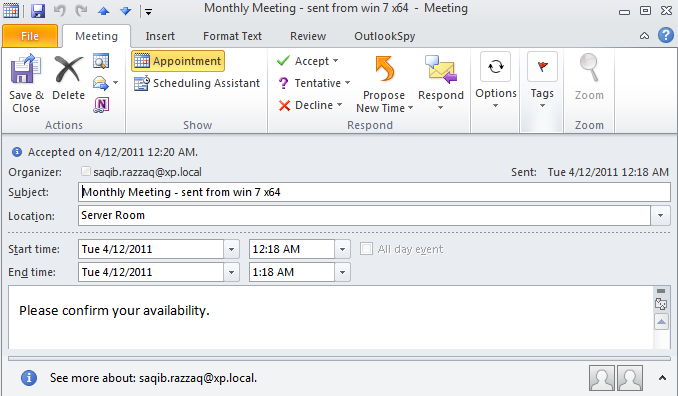 | | :- | 以下代码片段展示了如何将 Outlook PST 中的日历项导出为 ICS 格式。
以原始时间戳保存为ICS
该类的 keep_original_date_time_stamp 方法 MapiCalendarIcsSaveOptions 类在将日历项保存为 ICS(iCalendar)文件时,允许保留原始的日期和时间戳。以下代码示例演示了该方法的实现:
import aspose.email as ae

pst = ae.storage.pst.PersonalStorage.from_file("my.pst")

calendar_folder = pst.get_predefined_folder(ae.storage.pst.StandardIpmFolder.APPOINTMENTS)

for msg_info in calendar_folder.enumerate_messages():
    cal = pst.extract_message(msg_info).to_mapi_message_item()

    save_options = ae.mapi.MapiCalendarIcsSaveOptions()
    save_options.keep_original_date_time_stamp = True

    if not (cal is None):
      cal.save("cal.ics", save_options)
修改/删除重复项中的实例
可以使用 Aspose.Email for .NET API 为已有的循环添加例外。以下代码示例说明了此功能的用法。
from datetime import datetime, timedelta
from aspose.email.storage.pst import PersonalStorage, StandardIpmFolder, FileFormatVersion
from aspose.email.mapi import MapiCalendar, MapiCalendarEventRecurrence, \
    MapiCalendarDailyRecurrencePattern, MapiCalendarRecurrenceEndType, \
    MapiCalendarExceptionInfo, MapiCalendarRecurrencePatternType, \
    MapiRecipientCollection, MapiRecipientType

start_date = datetime.now().date()

recurrence = MapiCalendarEventRecurrence()
pattern = MapiCalendarDailyRecurrencePattern()
pattern.pattern_type = MapiCalendarRecurrencePatternType.DAY
pattern.period = 1
pattern.end_type = MapiCalendarRecurrenceEndType.NEVER_END
recurrence.recurrence_pattern = pattern

exception_date = start_date + timedelta(days=1)

# adding one exception
exception_info = MapiCalendarExceptionInfo()
exception_info.location = "London"
exception_info.subject = "Subj"
exception_info.original_start_date = exception_date
exception_info.start_date_time = exception_date
exception_info.end_date_time = exception_date + timedelta(hours=5)
pattern.exceptions.append(exception_info)
pattern.modified_instance_dates.append(exception_date)
# every modified instance also has to have an entry in the DeletedInstanceDates field with the original instance date.
pattern.deleted_instance_dates.append(exception_date)

# adding one deleted instance
pattern.deleted_instance_dates.append(exception_date + timedelta(days=2))

rec_coll = MapiRecipientCollection()
rec_coll.add("receiver@domain.com", "receiver", MapiRecipientType.TO)
new_cal = MapiCalendar(
    "This is Location",
    "This is Summary",
    "This is recurrence test",
    start_date,
    start_date + timedelta(hours=3),
    "organizer@domain.com",
    rec_coll
)
new_cal.recurrence = recurrence

with PersonalStorage.create("output.pst", FileFormatVersion.UNICODE) as pst:
    calendar_folder = pst.create_predefined_folder("Calendar", StandardIpmFolder.APPOINTMENTS)
    calendar_folder.add_message(new_cal)