
Analyzing your prompt, please hold on...
An error occurred while retrieving the results. Please refresh the page and try again.
Use the
AccessibilityRules class to access WCAG 2.0 principles, guidelines, success criteria, and techniques in Java. Retrieve rules by code and pass the selected list to WebAccessibility.createValidator() to run focused accessibility checks.
Accessibility rules describe requirements and techniques for making websites, applications, and digital content usable by people with visual, auditory, motor, and cognitive disabilities. Aspose.HTML for Java provides its WCAG 2.0 rules through the com.aspose.html.accessibility package.
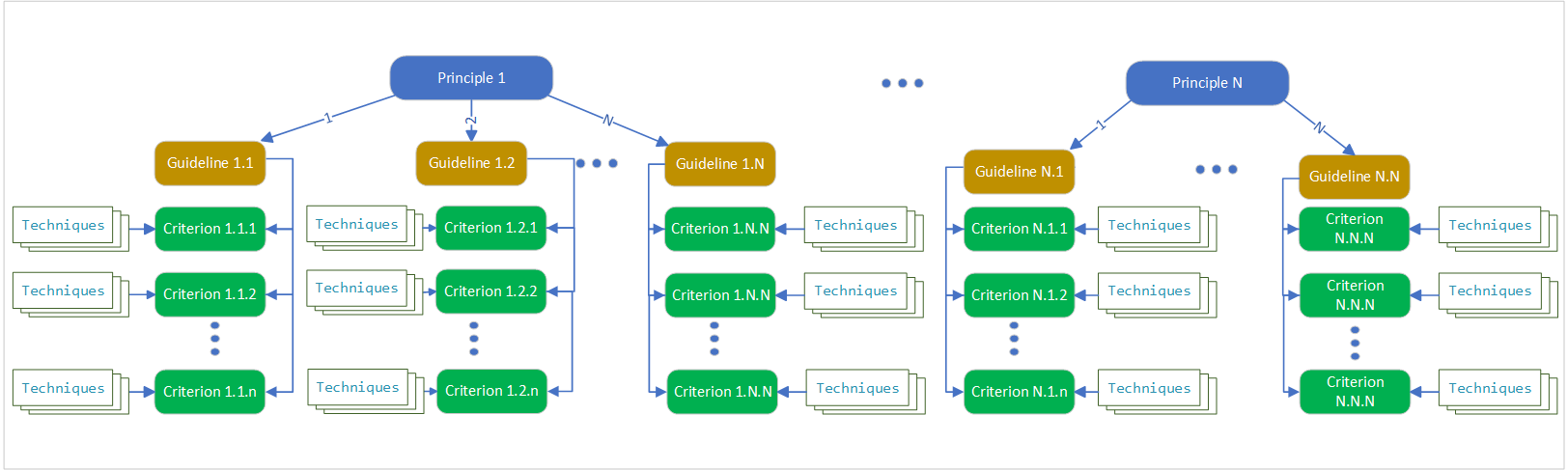
WCAG 2.0 organizes its rules as principles, guidelines, and testable success criteria. Techniques describe ways to meet a criterion or identify common failures. The four top-level principles are Perceivable, Operable, Understandable, and Robust.
Create a
WebAccessibility instance and call getRules() to obtain an AccessibilityRules object. Its hierarchy corresponds to the
WCAG 2.0 Quick Reference.
The AccessibilityRules class provides methods for retrieving the complete collection or individual entries by code:
| Method | Description |
|---|---|
| getPrinciple(String code) | Returns a Principle with the specified WCAG code. |
| getPrinciples() | Returns the collection of principles. |
| getRules(String[] codes) | Returns a List<IRule> for the specified rule codes. |
The rules are organized into four related types:
All entries implement the IRule interface and inherit their shared behavior from the abstract Rule class.
| Method | Description |
|---|---|
| getCode() | Returns the rule code used in the WCAG quick reference. |
| getDescription() | Returns the rule description. |
Use AccessibilityRules.getRules() to retrieve different rule types in one list. The example requests three techniques, one guideline, and one success criterion, then prints each code and description.
 1// Retrieve and list accessibility rules by code with their descriptions from the rules repository
 2
 3// Create a WebAccessibility instance
 4WebAccessibility webAccessibility = new WebAccessibility();
 5
 6// List of rule codes can contain both technique codes and principles,
 7// guidelines and criteria - all rules that implement the interface IRule
 8String[] rulesCodes = new String[]{"H2", "H37", "H30", "1.1", "1.2.1"};
 9
10// Get a list of IRule objects; if a rule with the specified code is not found,
11// it will not be in the list
12List<IRule> rules = webAccessibility.getRules().getRules(rulesCodes);
13
14// Get code and description of rule
15for (IRule rule : rules) {
16    System.out.println(String.format("%s: %s",
17            rule.getCode(),
18            rule.getDescription()
19    ));
20}The program writes the following values to the console:
1H2: Combining adjacent image and text links for the same resource
2H37: Using alt attributes on img elements
3H30: Providing link text that describes the purpose of a link for anchor elements
41.1: Text Alternatives
51.2.1: Audio-only and Video-only (Prerecorded)The Principle class represents the top level of the WCAG hierarchy and contains a collection of guidelines.
| Method | Description |
|---|---|
| getGuideline(String code) | Returns the guideline with the specified code from this principle. |
| getGuidelines() | Returns the principle’s guidelines. |
The example retrieves principle 1, Perceivable, and prints its code and description:
 1// Get accessibility principle by code from WCAG rules in Aspose.HTML for Java
 2
 3// Create a WebAccessibility instance
 4WebAccessibility webAccessibility = new WebAccessibility();
 5
 6// Get the principle by code
 7Principle rule = webAccessibility.getRules().getPrinciple("1");
 8
 9// Get code and description of principle
10System.out.println(String.format("%s: %s",
11        rule.getCode(),
12        rule.getDescription()
13));
14// @output: 1: PerceivableThe Guideline class represents the level below a principle and contains success criteria. Guidelines describe general accessibility goals; the criteria provide testable requirements.
| Method | Description |
|---|---|
| getCriterion(String code) | Returns the success criterion with the specified code from this guideline. |
| getCriterions() | Returns the guideline’s collection of criteria. |
The example obtains principle 1 and retrieves guideline 1.1, Text Alternatives:
 1// Get accessibility guideline by code from WCAG principle in Aspose.HTML for Java
 2
 3// Initialize a webAccessibility container
 4WebAccessibility webAccessibility = new WebAccessibility();
 5
 6// Get the principle by code
 7Principle principle = webAccessibility.getRules().getPrinciple("1");
 8
 9// Get guideline 1.1
10Guideline guideline = principle.getGuideline("1.1");
11if (guideline != null) {
12    System.out.println(String.format("%s: %s, %s",
13            guideline.getCode(),
14            guideline.getDescription(),
15            guideline
16    ));
17    // @output: 1.1: Text Alternatives
18}The Criterion class represents a testable WCAG 2.0 success criterion. A criterion includes a conformance level and collections of sufficient techniques, advisory techniques, and failures.
| Method | Description |
|---|---|
getLevel() | Returns the criterion’s A, AA, or AAA conformance level. |
getSufficientTechniques() | Returns techniques that describe sufficient ways to meet the criterion. |
getAdvisoryTechniques() | Returns additional techniques that can improve accessibility. |
getFailures() | Returns documented failures associated with the criterion. |
WCAG conformance is determined by its success criteria, not by requiring authors to use a particular published technique. See Understanding Techniques for WCAG Success Criteria for that distinction.
The example retrieves criterion 1.1.1, prints its level, and lists its sufficient techniques:
 1// Get accessibility criterion and its sufficient techniques in Java
 2
 3// Create a WebAccessibility instance
 4WebAccessibility webAccessibility = new WebAccessibility();
 5
 6// Get the principle by code
 7Principle principle = webAccessibility.getRules().getPrinciple("1");
 8
 9// Get guideline
10Guideline guideline = principle.getGuideline("1.1");
11
12// Get criterion by code
13Criterion criterion = guideline.getCriterion("1.1.1");
14if (criterion != null) {
15    System.out.println(String.format("%s: %s - %s",
16            criterion.getCode(),
17            criterion.getDescription(),
18            criterion.getLevel()
19    ));
20    // @output: 1.1.1: Non-text Content - A
21
22    // Get all Sufficient Techniques and write to console
23    for (IRule technique : criterion.getSufficientTechniques())
24        System.out.println(String.format("%s: %s",
25                technique.getCode(),
26                technique.getDescription()
27        ));
28}The following Java workflow validates an HTML document against a selected set of WCAG technique codes:
WebAccessibility instance to access the rules and validator factory.List<IRule>.AccessibilityValidator with the selected rules and ValidationBuilder.getAll() settings.ValidationResult with
saveToString(). 1// Validate an HTML document using specific rule codes with Java
2
3String htmlPath = "input.html";
4
5// Create a WebAccessibility instance
6WebAccessibility webAccessibility = new WebAccessibility();
7
8// List of necessary rules for checking (rule code according to the specification)
9String[] rulesCode = new String[]{"H2", "H37", "H67", "H86"};
10
11// Get the required IList<IRule> rules from the rules reference
12List<IRule> rules = webAccessibility.getRules().getRules(rulesCode);
13
14// Create an accessibility validator, pass the found rules as parameters,
15// and specify the full validation settings
16AccessibilityValidator validator = webAccessibility.createValidator(
17 rules, ValidationBuilder.getAll());
18
19// Initialize an object of the HTMLDocument
20final HTMLDocument document = new HTMLDocument(htmlPath);
21// Check the document
22ValidationResult validationResult = validator.validate(document);
23
24// Return the result in string format
25// SaveToString - return only errors and warnings
26System.out.println(validationResult.saveToString());The example prints the formatted validation result to the console. Selecting rule codes is useful for targeted checks; use the complete rule set when the workflow requires a broader automated audit.
Pass one or more codes to AccessibilityRules.getRules(String[]). To retrieve a top-level principle directly, use getPrinciple(String).
A success criterion is a testable WCAG requirement. A technique describes a documented way to meet that criterion, while a failure describes a pattern that does not satisfy it.
Yes. Retrieve the required rules by code and pass the resulting List<IRule> to WebAccessibility.createValidator() together with the validation settings.
Use the free online Web Accessibility Checker for a quick page scan before selecting rules for a Java validation workflow. Automated results do not replace manual accessibility testing.


Analyzing your prompt, please hold on...
An error occurred while retrieving the results. Please refresh the page and try again.