
Analyzing your prompt, please hold on...
An error occurred while retrieving the results. Please refresh the page and try again.
AI-powered chat assistants have become an essential tool for millions of users: students, content creators, customer support teams, researchers, etc. As a result, many developers are building applications that use AI-generated responses to deliver dynamic and interactive content. In most cases, the AI assistant API returns a text response in JSON, MD, or plain text format, but in any case, the response requires conversion to be presented on a web page.
AI chat assistants often provide responses formatted in Markdown. Although Markdown is a lightweight and readable format, it cannot be directly used for display on the web. To present AI-generated responses as a well-styled web page, we can convert Markdown to HTML using Aspose.HTML for .NET.
In this article, we will show how to develop an application that takes AI-generated Markdown responses and converts them into a properly styled HTML web page.
AI assistants use Markdown because of its readability, structured formatting, and cross-platform compatibility. Markdown supports headings, bold text, code snippets, and links, making it easy to organize AI-generated content. It is lightweight, easy to convert to formats like HTML or PDF, and ideal for automation in APIs. These benefits make Markdown an ideal choice for preserving text structure and formatting in AI-generated responses.
However, web browsers do not support Markdown natively, so AI-generated responses need to be converted into HTML. HTML allows for custom styling and CSS formatting, which improves the overall presentation of AI responses, making the content more accessible and visually appealing.
To convert an AI-generated Markdown response into an HTML page, follow these steps:
The following C# example shows how to convert an AI-generated Markdown response into an HTML page:
 1// Convert Markdown to styled HTML with injected CSS and semantic head structure using stream input
 2
 3// AI response in Markdown format with the text, code example and link
 4string markdownContent = "# How to Convert a Markdown File to HTML\n" +
 5                     "Markdown is a lightweight markup language used for formatting text. If you need to convert a Markdown file to an HTML document, you can use **Aspose.HTML for .NET**.\n\n" +
 6                     "## Steps to Convert\n" +
 7                     "1. Load the Markdown file.\n" +
 8                     "2. Convert it to an HTML document.\n" +
 9                     "3. Save the output file.\n\n" +
10                     "## Example Code\n" +
11                     "```csharp\n" +
12                     "// Convert a Markdown file to HTML\n" +
13                     "Converter.ConvertMarkdown(\"input.md\", \"output.html\");\n" +
14                     "```\n\n" +
15                     "For more details, refer to the [official documentation](https://docs.aspose.com/html/net/convert-markdown-to-html/).\n";
16
17// Create a memory stream from the Markdown string
18using (MemoryStream stream = new MemoryStream(System.Text.Encoding.UTF8.GetBytes(markdownContent)))
19{
20    // Convert Markdown to HTML
21    HTMLDocument document = Converter.ConvertMarkdown(stream, "");
22
23    // Ensure the document has a <head> element
24    HTMLHeadElement head = document.QuerySelector("head") as HTMLHeadElement;
25    if (head == null)
26    {
27        head = document.CreateElement("head") as HTMLHeadElement;
28        document.DocumentElement.InsertBefore(head, document.Body);
29    }
30
31    // Create a <style> element with CSS styles
32    string cssStyles = "body { font-family: Open Sans, sans-serif; max-width: 800px; margin: auto; padding: 20px; background-color: #f9f9f9; }\n" +
33                   "h1, h2 { color: #333; }\n" +
34                   "p, li { font-size: 14px; }\n" +
35                   "code, pre { font-family: Consolas, monospace; color: #f8f8f2; background-color: #272822; padding: 10px; border-radius: 5px; display: block; }\n";
36
37    HTMLStyleElement styleElement = document.CreateElement("style") as HTMLStyleElement;
38    styleElement.TextContent = cssStyles;
39
40    // Append the <style> element to the <head>
41    head.AppendChild(styleElement);
42
43    // Save the resulting HTML file
44    string outputPath = Path.Combine(OutputDir, "chartAnswer.html");
45    document.Save(outputPath);
46
47    // Print the HTML content to the console
48    Console.WriteLine(document.DocumentElement.OuterHTML);
49
50    Console.WriteLine("Conversion completed. HTML saved at " + outputPath);
51}Let’s take a closer look at how to convert an AI-generated Markdown response into an HTML web page:
HTMLDocument by passing a MemoryStream containing the Markdown data. Use the
ConvertMarkdown(stream, baseUri) method from the Aspose.Html.Converters namespace.<head> element using
QuerySelector("head") method. If the <head> element is missing, create it using
CreateElement("head") and insert it before the <body> using the
AppendChild(node) method.<style> element using CreateElement("style"). Define CSS styles for body text, headings, lists, and code blocks. Append the <style> element to the <head> of the HTML document.path) method to save the generated HTML file. Use the
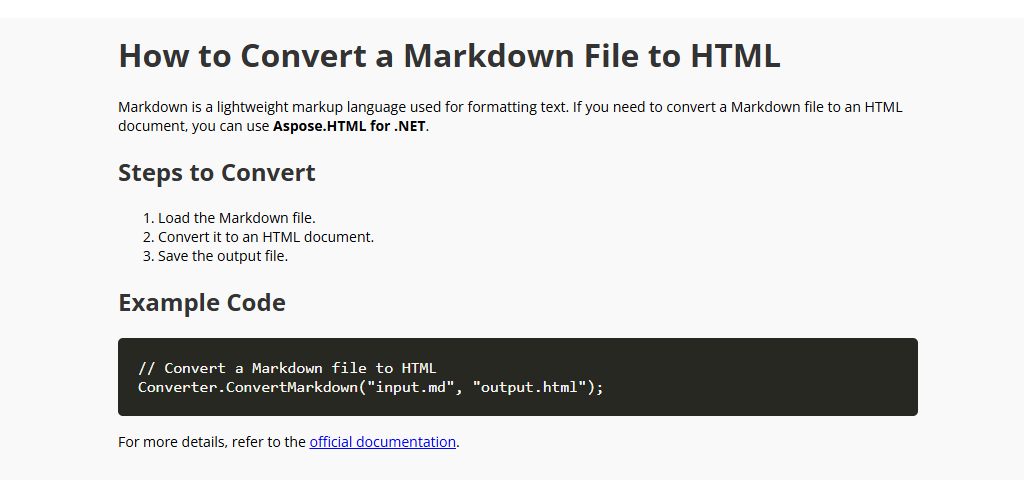
OuterHTML property to print the resulting HTML structure to the console for verification.The figure illustrates the rendered result of the conversion of AI Markdown response to an HTML web page.
Converter.ConvertMarkdown method, you can easily convert AI-generated Markdown responses into well-structured HTML. Additionally, by integrating CSS directly into the document, the output can be customized to match the design of any website.In the article Convert Markdown to HTML, you will learn about the supported Markdown to HTML conversion scenarios and consider C# examples to illustrate them. Also, you can try an Online Markdown Converter to test the Aspose.HTML API functionality and convert Markdown on the fly.
Download the Aspose.HTML for .NET library, which allows you to successfully, quickly, and easily convert your HTML, MHTML, EPUB, SVG, and Markdown documents to the most popular formats.
You can check the quality of Markdown to HTML conversion with our online MD to HTML Converter. Upload, convert your files and get results in a few seconds. Try our forceful Markdown to HTML Converter for free now!


Analyzing your prompt, please hold on...
An error occurred while retrieving the results. Please refresh the page and try again.