
Analyzing your prompt, please hold on...
An error occurred while retrieving the results. Please refresh the page and try again.
AI chat assistants often return answers as Markdown because it keeps headings, lists, links, code blocks, and emphasis readable in plain text. A web application, however, usually needs HTML output that can be styled, embedded, saved, or passed to another workflow.
Use Aspose.HTML for .NET to convert an AI-generated Markdown response to an HTML document in C#. Pass the Markdown stream to Converter.ConvertMarkdown(), add CSS to the generated document when needed, and save the result as an HTML page.
The example below converts a Markdown string that represents an AI chat response into an HTML page. After conversion, the code adds a <style> element to the document so the generated answer can be displayed with readable typography, spacing, and code formatting.
To build the AI Markdown to HTML workflow:
HTMLDocument with
Converter.ConvertMarkdown(stream, baseUri).<head> element in the generated HTML document.path). 1// Convert Markdown to styled HTML with injected CSS and semantic head structure using stream input
2
3// AI response in Markdown format with the text, code example and link
4string markdownContent = "# How to Convert a Markdown File to HTML\n" +
5 "Markdown is a lightweight markup language used for formatting text. If you need to convert a Markdown file to an HTML document, you can use **Aspose.HTML for .NET**.\n\n" +
6 "## Steps to Convert\n" +
7 "1. Load the Markdown file.\n" +
8 "2. Convert it to an HTML document.\n" +
9 "3. Save the output file.\n\n" +
10 "## Example Code\n" +
11 "```csharp\n" +
12 "// Convert a Markdown file to HTML\n" +
13 "Converter.ConvertMarkdown(\"input.md\", \"output.html\");\n" +
14 "```\n\n" +
15 "For more details, refer to the [official documentation](https://docs.aspose.com/html/net/convert-markdown-to-html/).\n";
16
17// Create a memory stream from the Markdown string
18using (MemoryStream stream = new MemoryStream(System.Text.Encoding.UTF8.GetBytes(markdownContent)))
19{
20 // Convert Markdown to HTML
21 HTMLDocument document = Converter.ConvertMarkdown(stream, "");
22
23 // Ensure the document has a <head> element
24 HTMLHeadElement head = document.QuerySelector("head") as HTMLHeadElement;
25 if (head == null)
26 {
27 head = document.CreateElement("head") as HTMLHeadElement;
28 document.DocumentElement.InsertBefore(head, document.Body);
29 }
30
31 // Create a <style> element with CSS styles
32 string cssStyles = "body { font-family: Open Sans, sans-serif; max-width: 800px; margin: auto; padding: 20px; background-color: #f9f9f9; }\n" +
33 "h1, h2 { color: #333; }\n" +
34 "p, li { font-size: 14px; }\n" +
35 "code, pre { font-family: Consolas, monospace; color: #f8f8f2; background-color: #272822; padding: 10px; border-radius: 5px; display: block; }\n";
36
37 HTMLStyleElement styleElement = document.CreateElement("style") as HTMLStyleElement;
38 styleElement.TextContent = cssStyles;
39
40 // Append the <style> element to the <head>
41 head.AppendChild(styleElement);
42
43 // Save the resulting HTML file
44 string outputPath = Path.Combine(OutputDir, "chartAnswer.html");
45 document.Save(outputPath);
46
47 // Print the HTML content to the console
48 Console.WriteLine(document.DocumentElement.OuterHTML);
49
50 Console.WriteLine("Conversion completed. HTML saved at " + outputPath);
51}The C# example treats the AI response as source content rather than as a static Markdown file. This is useful for chat, support, documentation, and knowledge-base applications where the Markdown text is created dynamically by an AI service.
MemoryStream.Converter.ConvertMarkdown() parses the Markdown stream and returns an HTMLDocument.QuerySelector("head") checks whether the document already contains a <head> element.CreateElement("style") creates a CSS block that can be appended to the generated HTML document.OuterHTML can be used for inspection, while Save() writes the final HTML page to disk.This approach keeps the Markdown-to-HTML conversion separate from presentation styling. The AI response remains plain Markdown at input time, and the generated HTML receives CSS only after the document structure exists.
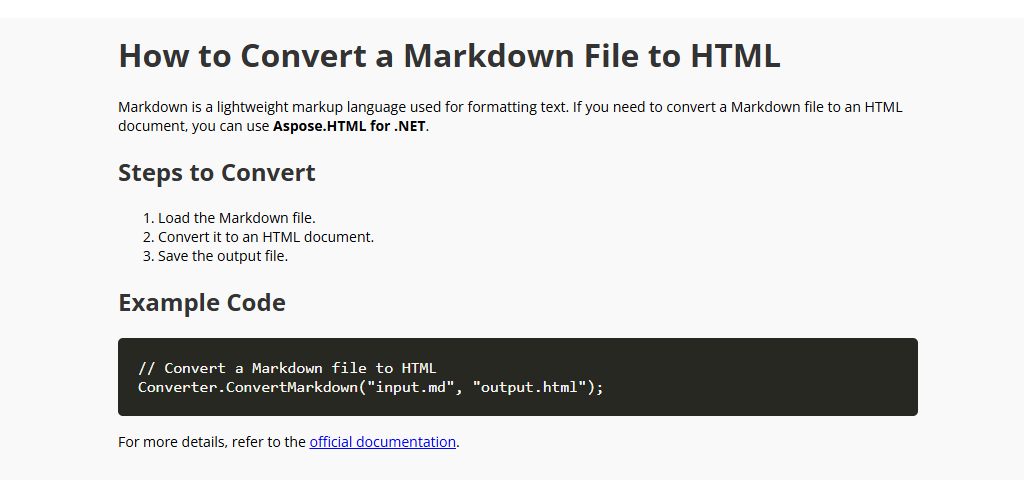
The result is a styled HTML page that preserves the structure of the AI response, including headings, paragraphs, lists, links, and code snippets. The following image shows an example of the converted AI Markdown response rendered as an HTML web page.
| Mistake | How to fix it |
|---|---|
| Rendering raw Markdown directly in the browser | Convert Markdown to HTML before displaying it in a web page. |
| Trusting AI output without validation | Review generated links, code blocks, and HTML-sensitive content before publishing or storing the result. |
| Applying CSS before conversion | Convert the Markdown first, then add CSS to the generated HTMLDocument. |
| Ignoring code block styling | Add CSS for pre and code elements if AI responses include examples or command snippets. |
| Mixing conversion and sanitization | Markdown conversion creates HTML output, but application-level safety rules should still be handled by your web application. |
The complete C# examples and data files are available in the Aspose.HTML for .NET GitHub repository. You can also test Markdown conversion with the online MD to HTML Converter.

You can evaluate Aspose.HTML for .NET before purchasing a license. For unrestricted testing, request a free 30-day Temporary License. For occasional manual conversions, use the free online MD to HTML Converter.
See Licensing Aspose.HTML for .NET for evaluation limitations and license setup.
No. Conversion changes Markdown into HTML structure; it does not verify factual claims, validate links, or apply your application’s content-security policy. Treat AI output as untrusted input and validate or sanitize it according to the context in which the generated HTML will be displayed.

Analyzing your prompt, please hold on...
An error occurred while retrieving the results. Please refresh the page and try again.