
Analyzing your prompt, please hold on...
An error occurred while retrieving the results. Please refresh the page and try again.
The HTML DOM represents an HTML document as a tree of nodes. With Aspose.HTML for .NET, you can load an HTML document in C#, navigate the DOM tree, read or update elements, and save the modified document.
Aspose.HTML for .NET is a .NET library that allows you to access and manipulate the HTML DOM in C# and other .NET languages. It provides classes and methods that enable you to load and parse HTML documents, navigate the DOM tree, and access and modify document elements, attributes, and content. For practical editing workflows, see Edit HTML Document in C#.
The Document Object Model, or DOM for short, is a standard cross-platform programming API that helps programmers access and modify parts of a document. DOM defines the structure of a document as a tree with a hierarchy of nodes, where nodes can represent the document itself, elements, text, comments, and other document parts. Elements can also have attributes. A DOM tree is the structure used to represent a document in memory. In other words, the Document Object Model creates a logical document structure and defines objects, properties, events, and methods to access and modify it.
The HTML DOM is an API for representing an HTML document that allows you to access and manipulate the content of an HTML document. It provides a tree structure of the document, where each element is represented as a tree node. Each branch of the tree ends with a node, and each node contains objects. The HTML DOM is implemented as a standard by the World Wide Web Consortium (W3C) and is supported by all modern web browsers. It provides a consistent and standardized way to access and manipulate HTML elements, making it an effective tool for creating dynamic and interactive web pages.
The HTML DOM is a document model loaded in the browser and representing the document as a node tree, where each node represents part of the document, such as an element, text string, or comment. We describe the elements in the tree in the same way as would a family tree – there are ancestors, descendants, parents, and children. For example, an HTML document with the following structure (fig. 1) will be represented by a DOM tree with a document object at the top, child nodes for the <html> element, a child node for the <head> element, and so on.
1<html>
2    <head>
3        <title>HTML document tree</title>
4    </head>
5    <body>
6        <h1>HTML DOM</h1>
7        <p>HTML DOM is a programming interface for HTML documents.</p>
8    </body>
9</html>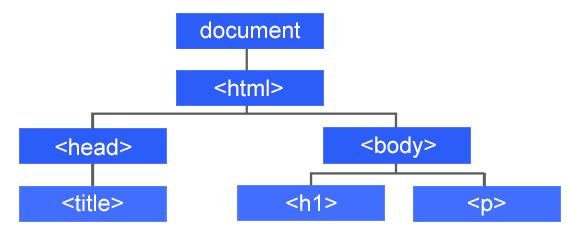
Let’s point out a few aspects of why DOM is needed:
Thus, the HTML DOM is a standard way to get, change, add, or delete HTML elements. The DOM allows web pages to be dynamic and interactive while making it possible for search engines and accessibility tools to understand and interact with them.
HTML DOM defines HTML elements as objects, providing a set of properties and methods that you can use to access and manage them. Each element in an HTML document is represented by a node in the DOM tree, and each node has its own set of properties and methods. As an object-oriented representation of a web page, it can be modified using the Aspose.HTML C# library.
Aspose.HTML for .NET provides a set of classes and methods that allow you to access and manipulate the HTML DOM in C#. You can use the
HTMLDocument class to load and parse an HTML document. For example, you can use the following code to load an HTML file and access the <body> element of the document:
To access the HTML DOM in C#:
HTMLDocument instance from that source.Body to access document nodes.1using Aspose.Html;
2...
3
4 using (HTMLDocument document = new HTMLDocument(documentPath))
5 {
6 HTMLElement body = document.Body;
7 }Let’s look at a C# example of how to use the HTMLDocument class to access the DOM and modify the content of an HTML file. In the following C# example, the document.Body.InnerHTML property is used to access the <body> element. It represents the content of the document’s <body> element, and you can use the
InnerHtml property, for example, to get or set the element’s inner HTML.
 1using Aspose.Html;
 2using Aspose.Html.Dom;
 3using System.IO;
 4...
 5
 6    // Prepare a path to a source HTML file
 7    string documentPath = Path.Combine(DataDir, "document.html");
 8
 9    // Prepare a path for edited file saving
10    string savePath = Path.Combine(OutputDir, "document-edited.html");
11
12    // Initialize an HTML document from the file
13    using (HTMLDocument document = new HTMLDocument(documentPath))
14    {
15
16        // Write the content of the HTML document into the console output
17        Console.WriteLine(document.DocumentElement.OuterHTML); // output: <html><head></head><body>Hello, World!</body></html>
18
19        // Edit the content of the body element
20        document.Body.InnerHTML = "<p>HTML is the standard markup language for Web pages.</p>";
21
22        // Write the content of the HTML document into the console output
23        Console.WriteLine(document.DocumentElement.OuterHTML); // output: <html><head></head><body><p>HTML is the standard markup language for Web pages.</p></body></html>
24
25        // Save the edited HTML file
26        document.Save(savePath);
27    }
In the C# example above, we take the following steps:
documentPath and savePath that set the path to a source and final HTML file.HTMLDocument class using the HTMLDocument(documentPath) constructor and open the document for editing.WriteLine() method to output the
OuterHTML of the DocumentElement property, which represents the <html> element.document.Body.InnerHTML property, which represents the content of the <body> element.OuterHTML property after the change, using the WriteLine() method.HTML DOM defines a set of methods that can be used to access and control all HTML elements. You can use these methods to perform various tasks, such as creating, modifying, and deleting elements, and managing their properties and events. For example, the most commonly used methods are:
Let’s look at the C# example that demonstrates how to use the HTMLDocument class to create new elements and text nodes, and how to use the AppendChild() method to add them to an HTML document.
 1using Aspose.Html;
 2using Aspose.Html.Dom;
 3using System.IO;
 4...
 5
 6    // Prepare a path for edited file saving
 7    string savePath = Path.Combine(OutputDir, "dom.html");
 8
 9    // Initialize an empty HTML document
10    using (HTMLDocument document = new HTMLDocument())
11    {
12
13        // Declare a variable body that references the <body> element
14        HTMLElement body = document.Body;
15
16        // Create an <h1> element with text content
17        Element h1 = document.CreateElement("h1");
18        Text text1 = document.CreateTextNode("HTML DOM");
19        h1.AppendChild(text1);
20
21        // Create a <p> element with text content
22        Element p = document.CreateElement("p");
23        Text text2 = document.CreateTextNode("HTML Document Object Model is a programming interface for HTML documents.");
24        p.AppendChild(text2);
25
26        // Add new elements into <body>
27        body.AppendChild(h1);
28        body.AppendChild(p);
29
30        // Save the document to a file
31        document.Save(savePath);
32    }
The
HTMLDocument class provides the main entry point for working with the DOM. It allows you to load and parse HTML documents and access nodes of the DOM tree. In the example, we used the HTMLDocument class to create a new HTML document, and the CreateElement() and CreateTextNode() methods to create new elements and text nodes.
HTML DOM is the Document Object Model for HTML documents. It represents a page as a tree of nodes, including elements, text, comments, and attributes, so code can read and modify the document.
Create or load an HTMLDocument, then use properties and methods such as Body, DocumentElement, GetElementById(), QuerySelector(), CreateElement(), and AppendChild() to navigate or change the DOM.
InnerHTML gets or sets the markup inside an element. OuterHTML represents the element itself together with its attributes and inner markup.
InnerHTML, and OuterHTML.
Analyzing your prompt, please hold on...
An error occurred while retrieving the results. Please refresh the page and try again.