
Analyzing your prompt, please hold on...
An error occurred while retrieving the results. Please refresh the page and try again.
Specify colors in HTML through CSS using a color name such as teal, a HEX code such as #008080, or an RGB or HSL function. Add transparency with modern syntax such as rgb(0 128 128 / 50%), the legacy rgba() or hsla() aliases, or an eight-digit HEX code such as #00808080. To get dominant HEX color codes from an image, upload it to the free online
Aspose.HTML Color Palette Generator.
In modern web pages, colors are normally applied through CSS. A CSS <color> value can use a named color or a numeric notation such as HEX, RGB, RGBA, HSL, or HSLA.
Colors play an essential role in forming the perceived value of web content and the emotions a person experiences when viewing it. In HTML and XHTML, colors can be used for text, background, frame borders, tables, and individual table cells.
HTML Color Names are familiar to anyone who works with web development. The CSS Color specification defines
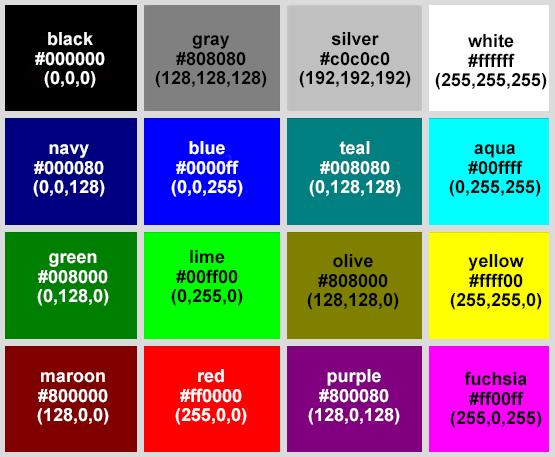
named colors that can be used wherever a CSS <color> value is accepted. The original basic set included 16 VGA color names: aqua, black, blue, fuchsia, gray, green, lime, maroon, navy, olive, purple, red, silver, teal, white, and yellow. Modern CSS also includes orange, so many basic color charts show 17 color names.
The figure illustrates 16 basic colors with HEX and RGB codes:
HTML color codes are a means of representing a color format that a computer can read and display. Color codes are used in HTML and CSS to create web design color schemes. They are mainly used by web designers, front-end developers, programmers and digital illustrators.
The table below summarizes when each common HTML and CSS color format is most useful:
| Color format | Example | Use it when |
|---|---|---|
| Color name | teal | You need a readable value for a common color and exact design-system precision is not required. |
| HEX | #008080 | You need a compact, widely supported color value for CSS, design tokens, or copied palette values. |
| RGB | rgb(0, 128, 128) | You want to control red, green, and blue channels directly or match values from graphics tools. |
| RGBA | rgba(0, 128, 128, 0.5) | You need the same channel-based control as RGB plus transparency. |
| HSL | hsl(180, 100%, 25%) | You want to adjust hue, saturation, or lightness more intuitively than with RGB channels. |
| HSLA | hsla(180, 100%, 25%, 0.5) | You need HSL-style adjustments plus transparency. |
Use the free online Aspose.HTML Color Palette Generator to extract dominant colors from an image and get their HEX codes. The tool works in a browser, so you do not need to install software or write code.
The generator identifies the dominant colors across the image, making it useful for creating a website palette from a photo, illustration, or existing design. To inspect the color of one specific pixel or screen element instead, use an eyedropper in browser developer tools or an image editor.
RGB (Red, Green, Blue) is an additive color model that describes how any color is encoded using three basic ones. It is the basis of the color displayed by light on TV screens, computers, image scanners, video projectors, digital cameras, and mobile devices.

The values R, G, and B define the intensity of the red, green, and blue components in a range from 0 to 255. A bright blue color can be defined as rgb(0, 0, 255), red as rgb(255, 0, 0), bright green as rgb(0, 255, 0), black as rgb(0, 0, 0), and white as rgb(255, 255, 255). RGB is a popular color model in photography, television, and computer graphics. Since each component has 256 possible values, RGB can represent 256^3 = 16,777,216 colors. Mixing these three components gives an RGB color value, for example, rgb(125, 50, 210).
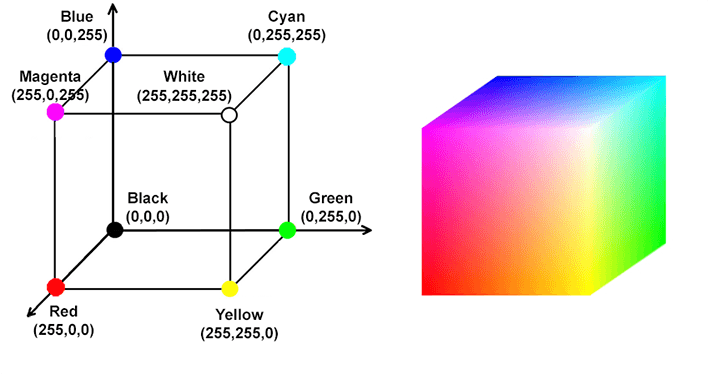
One of the most typical ways to convey color is through visual systems such as diagrams or graphical models, where each color has its own individual set of coordinates. For example, the RGB color system can be represented as a cube with 256 discrete points on each side:
Historically, the RGB model has been chosen as the primary model for web development because it is directly related to the operation of screens, which use red, green and blue pixels to display colors.
HEX is one of the most widely used CSS color formats. The six-digit form #RRGGBB contains three pairs of hexadecimal digits that specify the red, green, and blue channels. Each pair ranges from 00 to FF, giving 256 possible values per channel and more than 16 million color combinations.
For example, #00FF00 produces green because the green channel is set to its maximum value, FF, while the red and blue channels are 00. CSS also supports the three-digit shorthand #RGB; each digit is duplicated, so #0F0 is equivalent to #00FF00.
RGBA (Red, Green, Blue, Alpha) color values add an alpha channel that controls opacity. The alpha value can be a number from 0 (fully transparent) to 1 (fully opaque) or a percentage. For example, rgba(255, 0, 0, 1) produces opaque red, while rgba(255, 0, 0, 0.5) produces red with 50% opacity.
Modern CSS also supports space-separated RGB syntax with a slash before the alpha value, such as rgb(255 0 0 / 50%). The rgba() function remains supported as a legacy alias for rgb().
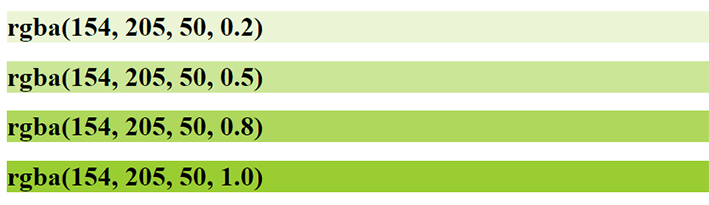
The figure shows RGBA values of the color name “Yellow-Green” with different transparency:
Transparency can also be represented in HEX notation. The eight-digit form #RRGGBBAA adds an alpha pair to #RRGGBB, and the four-digit shorthand is #RGBA. For example, #FF000080 represents red at approximately 50% opacity.
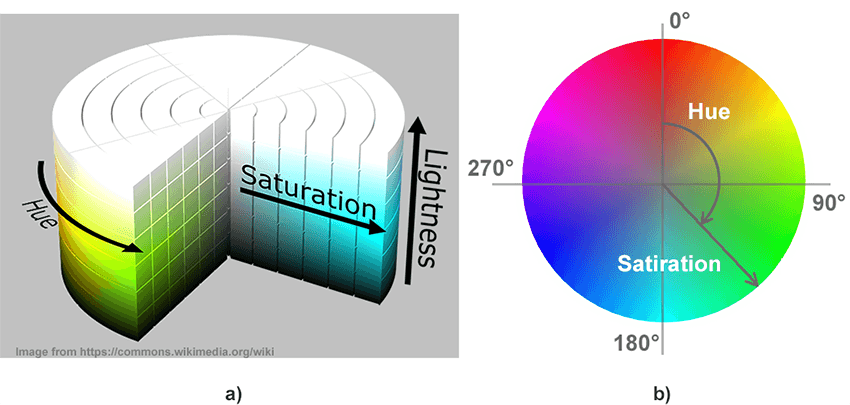
Many people consider the RGB color code non-intuitive and hardware-oriented. The HSL (Hue, Saturation, Lightness) color model was developed in the 1970s by computer graphics researchers to more closely match how human vision perceives color-producing attributes. In the HSL model, the colors of each hue are arranged in a radial slice around a central axis of neutral colors, ranging from black at the bottom to white at the top. The HSL representation rearranges the colors to make them more intuitive than the RGB representation. It is often used for computer graphics applications such as color pickers and image analysis.
The figure shows a 3D graphical interpretation of the HSL model (a) and a 2D interpretation for a lightness value of 50% (b).
HSL represents sRGB colors using cylindrical coordinates. Hue is an angle on the color wheel, where 0 degrees is red, 120 degrees is green, and 240 degrees is blue. Saturation controls color intensity; 0% produces a shade of gray, while 100% produces the most saturated color available for that hue and lightness. Lightness ranges from 0% for black to 100% for white, with 50% at the midpoint. Colors with the same HSL lightness can still have different perceived brightness.
HSL Color Examples
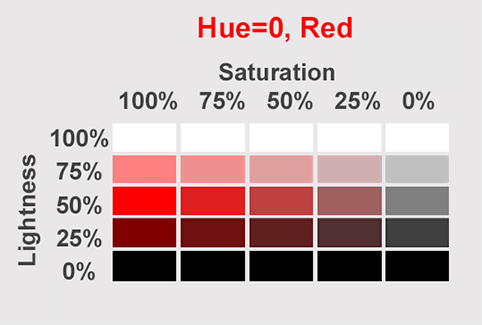
The table below represents one hue. Red was chosen from the circle of colors. Hue=0. The X-axis of the table represents the saturation (100%, 75%, 50%, 25%, 0%). The Y-axis represents lightness. 50% is “normal”.
HSLA (Hue, Saturation, Lightness, Alpha) notation adds an alpha value that controls opacity. As with RGB, alpha can be a number from 0 to 1 or a percentage. For example, hsla(0, 100%, 50%, 1) produces opaque red, while hsla(0, 100%, 50%, 0.5) produces red with 50% opacity:

In modern CSS, the alpha value can be included directly in hsl() with slash syntax, for example, hsl(0 100% 50% / 50%). The hsla() function remains supported as a legacy alias for hsl().
HTML documents usually apply colors through CSS, and web content is displayed on screens that use the RGB (Red, Green, Blue) color model. This is why RGB, RGBA, HEX, HSL, and HSLA remain the most common color formats for everyday HTML and CSS work.
Other color models exist, but they are not always equally useful for basic web styling:
CSS Color Module Level 4 defines newer color functions such as lab(), lch(), oklab(), oklch(), and color(). Browser and rendering support can vary by environment, so use these advanced formats when your target platform supports them and when the extra color precision is worth the added complexity.
A valid color code does not guarantee that text and interface elements will be easy to perceive. Provide sufficient contrast between foreground and background colors, and do not use color as the only way to communicate important information. For a C# workflow that validates HTML against WCAG contrast criteria, see Color Contrast Accessibility. You can also test a color pair in the free online Aspose.HTML Contrast Checker.
HTML colors can be defined by a name, RGB, RGBA, HEX, HSL, or HSLA values and applied to the background or text in HTML documents.
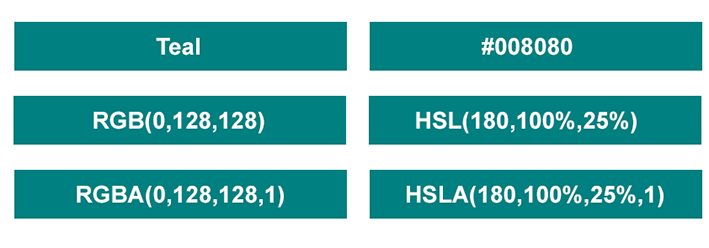
The figure below illustrates how to specify a teal color by name, RGB, RGBA, HEX, HSL, and HSLA values:
RGB and its common derivatives are still the practical foundation of color on the web. Use color names when readability is more important than precision, HEX for compact CSS notation, RGB or RGBA when you need channel-based control or transparency, and HSL or HSLA when you want to adjust hue, saturation, and lightness more intuitively.
HEX is one of the most common formats because it is compact and supported everywhere in CSS. RGB and HSL are also common when developers need channel values or easier color adjustments.
Use RGBA or HSLA when the color needs transparency. The alpha value controls opacity, where 0 is fully transparent and 1 is fully opaque.
Color names are readable, but they are limited and not always precise. HEX, RGB, and HSL values give developers more control and are better for consistent design systems.

Analyzing your prompt, please hold on...
An error occurred while retrieving the results. Please refresh the page and try again.