

Analyzing your prompt, please hold on...
An error occurred while retrieving the results. Please refresh the page and try again.
To convert SVG to PDF in Python, load the source with
SVGDocument, create
PdfSaveOptions, and call
Converter.convert_svg(). Use PdfSaveOptions to control the PDF page, background, metadata, and other output settings.
PDF is a fixed-layout document format suitable for sharing, printing, and archiving SVG artwork. During conversion, the SVG is rendered on one or more PDF pages. The SVG viewport and the PDF page settings therefore determine the size, placement, and surrounding space of the result.
The following example loads the existing flower.svg file and converts it to PDF with the default save options.
SVGDocument.PdfSaveOptions object.Converter.convert_svg() with the document, options, and output path. 1import os
2import aspose.html.dom.svg as ahsvg
3import aspose.html.converters as conv
4import aspose.html.saving as sav
5
6data_dir = "data"
7output_dir = "output"
8os.makedirs(output_dir, exist_ok=True)
9
10input_path = os.path.join(data_dir, "flower.svg")
11output_path = os.path.join(output_dir, "flower.pdf")
12
13# Load the SVG file and convert it to PDF
14with ahsvg.SVGDocument(input_path) as document:
15 conv.Converter.convert_svg(document, sav.PdfSaveOptions(), output_path)The default settings create a PDF page around the rendered SVG content. Configure the page explicitly when the output requires particular dimensions or margins.
Converter.convert_svg() can also convert SVG markup held in a Python string. This is useful when an application generates SVG dynamically and does not need to save an intermediate .svg file.
The string overload accepts the SVG markup, a base URI, PdfSaveOptions, and the output path. The base URI is used to resolve relative resources referenced by the SVG. The following self-contained example uses "." to represent the current directory.
 1# Convert SVG to PDF in Python from code
 2
 3import os
 4import aspose.html.converters as conv
 5import aspose.html.saving as sav
 6
 7# Prepare the output path
 8output_dir = "output"
 9if not os.path.exists(output_dir):
10    os.makedirs(output_dir)
11save_path = os.path.join(output_dir, "circles.pdf")
12
13# Define the SVG code
14svg_code = """
15<svg xmlns="http://www.w3.org/2000/svg">
16    <circle id="base" cx="100" cy="100" r="80" fill="teal" stroke="salmon" stroke-width="10" />
17    <g>
18        <use href="#base" transform="translate(120, 10) scale(0.9)" />
19        <use href="#base" transform="translate(240, 20) scale(0.8)" />
20        <use href="#base" transform="translate(360, 30) scale(0.7)" />
21        <use href="#base" transform="translate(480, 40) scale(0.6)" />
22        <use href="#base" transform="translate(600, 50) scale(0.5)" />
23    </g>
24</svg>
25"""
26
27# Configure PDF output
28options = sav.PdfSaveOptions()
29
30# Convert SVG to PDF
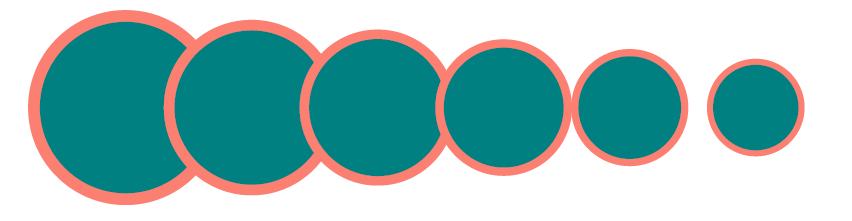
31conv.Converter.convert_svg(svg_code, ".", options, save_path)The example generates a group of SVG circles and writes the rendered result to circles.pdf. The following illustration shows a fragment of that PDF page.
The next example sets a 600 × 500 CSS-pixel page with custom margins, adds document metadata, and requests a tagged PDF structure.
 1import os
 2import aspose.html.dom.svg as ahsvg
 3import aspose.html.converters as conv
 4import aspose.html.drawing as dr
 5import aspose.html.saving as sav
 6
 7data_dir = "data"
 8output_dir = "output"
 9os.makedirs(output_dir, exist_ok=True)
10
11input_path = os.path.join(data_dir, "flower.svg")
12output_path = os.path.join(output_dir, "flower-options.pdf")
13
14# Configure the PDF page
15options = sav.PdfSaveOptions()
16options.page_setup.any_page = dr.Page(
17    dr.Size(600, 500),
18    dr.Margin(20, 20, 10, 10)
19)
20
21# Add PDF metadata and create a tagged structure
22options.document_info.title = "SVG Flower"
23options.document_info.subject = "SVG to PDF conversion"
24options.is_tagged_pdf = True
25
26# Convert SVG to PDF with custom PDF settings
27with ahsvg.SVGDocument(input_path) as document:
28    conv.Converter.convert_svg(document, options, output_path)
page_setup controls the fixed PDF page and its margins. document_info stores metadata in the generated PDF. Setting is_tagged_pdf to True creates a tag structure, but this option alone does not guarantee that the document is accessible or compliant with an accessibility standard.
| Property | What it controls |
|---|---|
| page_setup | PDF page dimensions and margins. |
| background_color | The color that fills each PDF page. The default is transparent. |
| document_info | PDF metadata such as title, author, subject, and keywords. |
| jpeg_quality | JPEG compression quality when JPEG compression is used for images. It does not increase SVG or source-image resolution. |
| horizontal_resolution and vertical_resolution | Resolution of internal images produced during processing, including SVG filter processing. These settings do not change the PDF page size. |
| is_tagged_pdf | Whether a tagged structure is created in the output PDF. |
Vector shapes and text in an SVG can remain sharp when viewed or printed from PDF. Embedded raster images and rasterized effects remain dependent on their source resolution. Increasing jpeg_quality does not improve vector elements, and changing the horizontal or vertical resolution does not change the PDF page dimensions.
If the PDF contains too much empty space or clips part of the SVG, compare the source width, height, and viewBox with the dimensions and margins in page_setup.
| Problem | Likely cause and solution |
|---|---|
| The PDF contains excessive empty space | The PDF page is larger than the rendered SVG. Set a more suitable page size and margins. |
| Part of the SVG is clipped | The SVG viewport or PDF page is too small for the visible artwork. Check the source viewBox and increase the page dimensions when necessary. |
| Text uses a different font | A font referenced by the SVG is unavailable in the conversion environment. Install the font or embed an appropriate font in the SVG. |
| Linked images or styles are missing | Relative resource paths cannot be resolved. Load the SVG from its original location and keep linked resources at the expected relative paths. |
| A filter effect looks less sharp than vector shapes | Some filter results are processed as internal images. Review the source effect and the horizontal and vertical resolution settings. |
Vector shapes and text can remain scalable in the PDF, while embedded bitmap images and rasterized effects remain resolution-dependent. Check the generated PDF when the SVG uses filters or external images.
The SVG is rendered within a fixed PDF page. Set PdfSaveOptions.page_setup when the default page dimensions or margins do not match the source artwork.
Aspose.HTML for Python via .NET is a commercial library. See Licensing to evaluate the library, or use the free online SVG to PDF Converter for occasional manual conversion.
Use the free online SVG to PDF Converter for quick manual conversion without writing Python code.


Analyzing your prompt, please hold on...
An error occurred while retrieving the results. Please refresh the page and try again.