
Analyzing your prompt, please hold on...
An error occurred while retrieving the results. Please refresh the page and try again.
To convert SVG to PNG in Python, load the source with SVGDocument, create ImageSaveOptions for PNG, and call Converter.convert_svg(). PNG creates lossless raster output and can preserve transparent areas of the SVG.
SVG stores vector shapes, paths, and text, whereas PNG stores a fixed grid of pixels. SVG to PNG conversion is useful for previews, thumbnails, web graphics, and applications that do not display SVG content. The output size and resolution should be selected for the image’s intended display or print size.
The following example loads the existing
tulips.svg file and converts it to PNG. ImageFormat.PNG is specified explicitly so that the selected output format is clear in the code.
SVGDocument.ImageSaveOptions and select PNG as the output format.Converter.convert_svg() with the document, options, and output path. 1import os
2import aspose.html.dom.svg as ahsvg
3import aspose.html.converters as conv
4import aspose.html.saving as sav
5import aspose.html.rendering.image as rim
6
7data_dir = "data"
8output_dir = "output"
9os.makedirs(output_dir, exist_ok=True)
10
11input_path = os.path.join(data_dir, "tulips.svg")
12output_path = os.path.join(output_dir, "tulips-default.png")
13
14# Select PNG as the output format
15options = sav.ImageSaveOptions(rim.ImageFormat.PNG)
16
17# Load the SVG file and convert it to PNG
18with ahsvg.SVGDocument(input_path) as document:
19 conv.Converter.convert_svg(document, options, output_path)The resulting tulips-default.png is a raster image. Scaling it beyond its generated pixel dimensions can reduce apparent sharpness, unlike scaling the original vector SVG.
Use ImageSaveOptions when the PNG needs a specific canvas size, margins, resolution, or background. The next example uses the same SVG file but places its rendered content on a 500 × 500 CSS-pixel page with 10 CSS-pixel margins.
 1import os
 2import aspose.html.dom.svg as ahsvg
 3import aspose.html.converters as conv
 4import aspose.html.drawing as dr
 5import aspose.html.rendering.image as rim
 6import aspose.html.saving as sav
 7
 8data_dir = "data"
 9output_dir = "output"
10os.makedirs(output_dir, exist_ok=True)
11
12input_path = os.path.join(data_dir, "tulips.svg")
13output_path = os.path.join(output_dir, "tulips.png")
14
15# Configure PNG output and the first output page
16options = sav.ImageSaveOptions(rim.ImageFormat.PNG)
17options.page_setup.first_page = dr.Page(
18    dr.Size(500, 500),
19    dr.Margin(10, 10, 10, 10)
20)
21
22# Convert SVG to PNG with custom page settings
23with ahsvg.SVGDocument(input_path) as document:
24    conv.Converter.convert_svg(document, options, output_path)
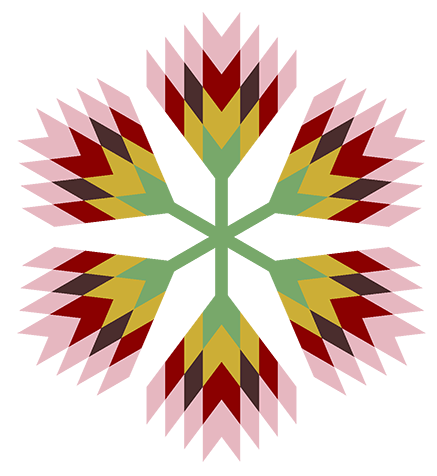
The custom page size changes the canvas and the space available for the rendered SVG. The final bitmap dimensions also depend on the output resolution. At the default 300 dpi, a 500 × 500 CSS-pixel page produces a PNG of approximately 1562 × 1562 pixels. The following illustration shows the generated tulips.png image.
| Property | What it controls |
|---|---|
| format | Selects PNG or another supported raster format. PNG is also the default format. |
| page_setup | Sets the page dimensions and margins in CSS pixels when plain numeric values are used. |
| horizontal_resolution and vertical_resolution | Set the output and internal image resolution in pixels per inch. |
| background_color | Fills the output page with a color. The default background is transparent. |
The SVG width, height, and viewBox define the source coordinate system and visible region. page_setup defines the output page, while the resolution determines how many bitmap pixels are generated for that page. If the page is too small for the rendered content, the PNG can be clipped; a larger page can introduce additional space around it.
| Problem | Likely cause and solution |
|---|---|
| The PNG is cropped | The SVG viewport or output page is smaller than the visible content. Check the SVG viewBox, width, and height, or increase the page size in page_setup. |
| The PNG has unexpected empty space | The output canvas is larger than the rendered SVG. Adjust the page dimensions and margins. |
| Text uses a different font | A font referenced by the SVG is unavailable in the conversion environment. Install the font or embed a suitable font in the SVG. |
| Linked images or styles are missing | Relative resource paths cannot be resolved. Load the SVG from its original location and keep linked resources at the expected relative paths. |
Yes. PNG supports transparent pixels, and ImageSaveOptions uses a transparent background by default. Setting background_color fills the output page and replaces that transparent page background with the selected color.
No. The SVG source is vector-based, but the PNG result is a raster image with fixed pixel dimensions. Keep the original SVG when later editing or unrestricted scaling is required.
Use convert_svg() for a standalone SVG document or SVG markup string. If the SVG is part of an HTML page and you need the rendered page, load the HTML document and use Converter.convert_html() with PNG image options.
Use the free online SVG to PNG Converter for quick manual conversion without writing Python code.


Analyzing your prompt, please hold on...
An error occurred while retrieving the results. Please refresh the page and try again.