
Analyzing your prompt, please hold on...
An error occurred while retrieving the results. Please refresh the page and try again.
Aspose.HTML for Python via .NET represents HTML as a Document Object Model (DOM) tree. After creating or loading an HTMLDocument, you can create or remove nodes, update attributes and text, replace element markup, and change inline or internal CSS.
To edit HTML in Python, create or load an HTMLDocument, locate or create the required DOM node, modify it with methods such as create_element(), append_child(), or set_attribute(), and call save() to persist the result. Use inner_html when trusted markup should replace an element’s child content.
The DOM represents a document as a tree of nodes. The document is the root, elements define the structure, attributes describe elements, and text nodes hold character data. These concepts and operations are defined by the WHATWG DOM Standard. The aspose.html.dom module provides the core types used to inspect and modify that tree.
| API | Purpose |
|---|---|
| Document | Represents the complete document tree and provides methods for creating nodes. |
| Node | Represents one node and provides tree operations such as appending, inserting, and removing children. |
| Element | Represents an element and provides access to attributes and serialized markup. |
| Attr | Represents an attribute associated with an element. |
Common editing methods and properties include:
| API | Use it to |
|---|---|
| create_element() | Create an element with the specified tag name. |
| create_text_node() | Create text that is not parsed as HTML markup. |
| query_selector() | Return the first element that matches a CSS selector. |
| append_child() | Add a node as the last child of another node. |
| insert_before() | Insert a node before an existing child. |
| remove_child() | Remove a child node from its parent. |
| set_attribute() | Add an attribute or replace its value. |
| get_attribute() | Read an attribute value. |
| inner_html | Get or replace the markup inside an element. |
| outer_html | Get the element’s own markup together with its descendants. |
You can apply the same DOM operations to a newly created document or an existing HTML file. To edit an existing file, pass its path to HTMLDocument, modify the loaded DOM, and save the document to the required output path. See
Create and Load HTML Documents for loading examples.
The following example loads
edit-document.html from the data directory, updates existing elements, and saves the edited document as output/edited-document.html:
HTMLDocument.query_selector().output/edited-document.html. 1# Edit an existing HTML file in Python
2
3import os
4import aspose.html as ah
5
6# Prepare input and output paths
7data_dir = "data"
8output_dir = "output"
9os.makedirs(output_dir, exist_ok=True)
10
11input_path = os.path.join(data_dir, "edit-document.html")
12output_path = os.path.join(output_dir, "edited-document.html")
13
14# Load and edit the HTML document
15with ah.HTMLDocument(input_path) as document:
16 heading = document.query_selector("h1")
17 status = document.query_selector("#status")
18
19 document.title = "Final Project Status"
20 heading.text_content = "Final Project Status"
21 status.text_content = "Approved"
22 status.set_attribute("class", "approved")
23
24 # Save the edited HTML document
25 document.save(output_path)The saved file contains the updated <title> and <h1> text. The status changes from Draft to Approved, and the existing .approved CSS rule displays it in bold green text.
The next example builds a document with an internal CSS rule and a styled paragraph:
HTMLDocument.<style> element containing a .col color rule and append it to <head>.col class, and append a text node.<body>.output/edit-document.html. 1# Create HTML elements using the DOM in Python
2
3import os
4import aspose.html as ah
5
6# Prepare the output path
7output_dir = "output"
8save_path = os.path.join(output_dir, "edit-document.html")
9os.makedirs(output_dir, exist_ok=True)
10
11# Create an HTML document and add new elements
12with ah.HTMLDocument() as document:
13 style = document.create_element("style")
14 style.text_content = ".col { color: teal }"
15 head = document.get_elements_by_tag_name("head")[0]
16 head.append_child(style)
17
18 paragraph = document.create_element("p")
19 paragraph.class_name = "col"
20 paragraph.append_child(document.create_text_node("Edit HTML document"))
21 document.body.append_child(paragraph)
22
23 # Save the HTML document
24 document.save(save_path)This example saves HTML only. The two CSS examples later on the page additionally render their edited documents to PDF.
Creating an element does not insert it into the document automatically. The element becomes part of the saved DOM only after it is appended to a parent node, as shown when the example adds <style> to <head> and <p> to <body>.
Use inner_html to get or replace the markup inside an element. Use outer_html to read the serialized markup of the element itself together with its descendants.
The following example:
document.body.inner_html.inner_html.document.document_element.outer_html. 1# Edit HTML with innerHTML and outerHTML in Python
2
3import aspose.html as ah
4
5# Create an HTML document and inspect its markup
6with ah.HTMLDocument() as document:
7 print(document.document_element.outer_html)
8
9 # Replace the body content using innerHTML
10 document.body.inner_html = "<p>HTML is the standard markup language for Web pages.</p>"
11 paragraph = document.get_elements_by_tag_name("p")[0]
12
13 # Print the element content and updated document markup
14 print(paragraph.inner_html)
15 print(document.document_element.outer_html)Assigning inner_html parses the supplied string as markup and replaces all existing child nodes of the target element. Use text_content or create_text_node() when a value must remain plain text. This example prints the result to the console and does not save a file.
Use an element’s style attribute for declarations that apply to one element. Add a <style> element to the document <head> when CSS rules should target elements through selectors or class names.
The inline CSS example sets font size, font family, and text color on a paragraph, saves the edited HTML, and renders the same document to PDF:
HTMLDocument containing a paragraph.style attribute.output/edit-inline-css.html.render_to() to produce output/edit-inline-css.pdf. 1# Add inline CSS to HTML in Python
2
3import os
4import aspose.html as ah
5import aspose.html.rendering.pdf as rp
6
7# Define the HTML content
8content = "<p>Edit inline CSS using Aspose.HTML for Python via .NET</p>"
9
10# Prepare output paths
11output_dir = "output"
12os.makedirs(output_dir, exist_ok=True)
13html_path = os.path.join(output_dir, "edit-inline-css.html")
14pdf_path = os.path.join(output_dir, "edit-inline-css.pdf")
15
16# Add inline CSS, then save and render the document
17with ah.HTMLDocument(content, ".") as document:
18 paragraph = document.get_elements_by_tag_name("p")[0]
19 paragraph.set_attribute("style", "font-size: 150%; font-family: arial; color: teal")
20 document.save(html_path)
21
22 with rp.PdfDevice(pdf_path) as device:
23 document.render_to(device)The rendered paragraph uses a 150% font size, Arial when that font is available, and teal text:

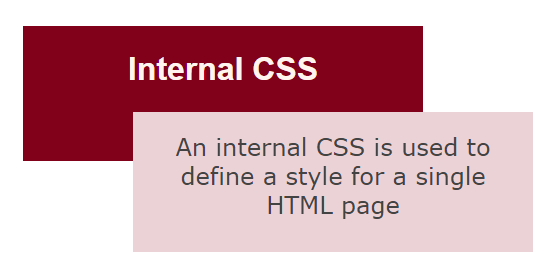
The final example combines class rules in a <style> element with inline declarations on individual elements:
HTMLDocument containing a heading and paragraph.<style> element with .frame1 and .frame2 rules and append it to <head>.output/edit-internal-css.html and render output/edit-internal-css.pdf. 1# Add internal CSS to HTML in Python
2
3import os
4import aspose.html as ah
5import aspose.html.rendering.pdf as rp
6
7# Define the HTML content
8content = "<div><h1>Internal CSS</h1><p>An internal CSS is used to define a style for a single HTML page</p></div>"
9
10# Prepare output paths
11output_dir = "output"
12os.makedirs(output_dir, exist_ok=True)
13html_path = os.path.join(output_dir, "edit-internal-css.html")
14pdf_path = os.path.join(output_dir, "edit-internal-css.pdf")
15
16# Add internal CSS, then save and render the document
17with ah.HTMLDocument(content, ".") as document:
18 style = document.create_element("style")
19 style.text_content = (
20 ".frame1 { margin-top:50px; margin-left:50px; padding:25px; width:360px; height:90px; "
21 "background-color:#82011a; font-family:arial; color:#fff5ee;} \r\n"
22 ".frame2 { margin-top:-70px; margin-left:160px; text-align:center; padding:20px; width:360px; "
23 "height:100px; background-color:#ebd2d7;}"
24 )
25 head = document.get_elements_by_tag_name("head")[0]
26 head.append_child(style)
27
28 header = document.get_elements_by_tag_name("h1")[0]
29 header.class_name = "frame1"
30 header.set_attribute("style", "font-size: 200%; text-align: center;")
31
32 paragraph = document.get_elements_by_tag_name("p")[0]
33 paragraph.class_name = "frame2"
34 paragraph.set_attribute("style", "color: #434343; font-size: 150%; font-family: verdana;")
35
36 document.save(html_path)
37 with rp.PdfDevice(pdf_path) as device:
38 document.render_to(device)The rendered PDF applies the internal class rules together with the inline font size, alignment, color, and font-family declarations:
| Issue | Likely Cause | Recommended Action |
|---|---|---|
| A created element is missing from the output | The element was created but not attached to the document tree. | Append it to document.body or another parent node before saving. |
Existing children disappear after assigning inner_html | Setting inner_html replaces all current child markup. | Use append_child() when existing children must be preserved. |
| HTML tags appear as visible text | The value was assigned as text content rather than parsed markup. | Use inner_html only when trusted markup should become DOM nodes. |
| A CSS class rule is not applied | The <style> element is not in the document, the class name does not match, or an inline declaration overrides the rule. | Check the DOM location, selector, class name, and CSS cascade. |
| Changes are missing from the output file | The document was changed in memory but not saved afterward. | Call save() after completing all DOM and CSS changes. |

Analyzing your prompt, please hold on...
An error occurred while retrieving the results. Please refresh the page and try again.