
Analyzing your prompt, please hold on...
An error occurred while retrieving the results. Please refresh the page and try again.
To change an HTML border color in Python, load the file with
HTMLDocument, select the target element, define a visible border-style and the required border-color with inline or internal CSS, and save the updated document.
The CSS border-color property controls color but does not create a visible border by itself. Define a style such as solid and, when necessary, a border width. Border colors can use named, HEX, RGB, RGBA, HSL, or HSLA values.
This article demonstrates one border color, four side-specific colors, reusable internal CSS, and two ways to change an HTML table border.
Inline CSS stores declarations directly in an element’s style attribute. The first example loads file.html, selects its first <h1> element, sets a solid rgb(220, 30, 100) border and dark-red text, and saves change-border-color.html.
HTMLDocument. 1# Change H1 border color in HTML in Python
2
3import os
4import aspose.html as ah
5
6# Prepare input and output paths
7output_dir = "output"
8os.makedirs(output_dir, exist_ok=True)
9save_path = os.path.join(output_dir, "change-border-color.html")
10
11data_dir = "data"
12document_path = os.path.join(data_dir, "file.html")
13
14# Change the heading text and border colors
15with ah.HTMLDocument(document_path) as document:
16 header = document.get_elements_by_tag_name("h1")[0]
17
18 # Set inline CSS properties
19 header.set_attribute("style", "color: #8B0000; border-style: solid; border-color: rgb(220,30,100);")
20
21 document.save(save_path)The image compares the source document a) and the saved document b). The output heading has both a new border color and a new text color because the example sets both CSS properties.

Calling set_attribute("style", value) replaces the complete inline style. Preserve any existing declarations that the element still needs, or update only the required CSS properties.
The border-color shorthand accepts one to four values. With four values, the order is top, right, bottom, and left.
| Number of values | Applied to |
|---|---|
| One | All four sides |
| Two | Top and bottom; right and left |
| Three | Top; right and left; bottom |
| Four | Top; right; bottom; left |
The next example loads file.html, selects the first heading, assigns red, blue, green, and gray to its four border sides, and saves change-four-border-color.html.
HTMLDocument.border-color values in top, right, bottom, and left order. 1# Change CSS border colors for all four sides in Python
2
3import os
4import aspose.html as ah
5
6# Prepare input and output paths
7data_dir = "data"
8output_dir = "output"
9os.makedirs(output_dir, exist_ok=True)
10document_path = os.path.join(data_dir, "file.html")
11save_path = os.path.join(output_dir, "change-four-border-color.html")
12
13# Change the border color on each side of the heading
14with ah.HTMLDocument(document_path) as document:
15 header = document.get_elements_by_tag_name("h1")[0]
16
17 # Set inline CSS for border style and different border colors on each side
18 header.set_attribute("style", "border-style: solid; border-color: red blue green gray;")
19
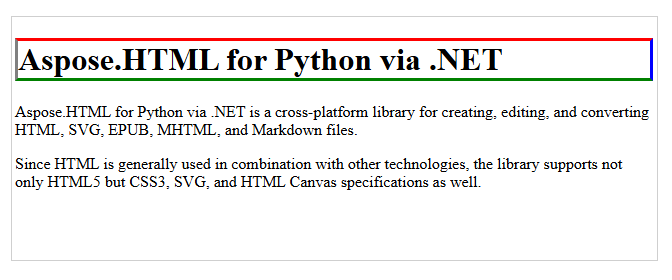
20 document.save(save_path)The output heading has a red top border, blue right border, green bottom border, and gray left border:
Internal CSS places reusable rules in a <style> element inside the document <head>. The following rule gives every paragraph a solid rgb(220, 30, 100) border:
1<head>
2<style>
3    p {
4        border-style: solid;
5        border-color: rgb(220, 30, 100);
6    }
7</style>
8</head>
The next example adds this rule to file.html and saves change-border-color-internal-css.html.
HTMLDocument.<style> element with
create_element().<style> element to the document <head>. 1# Change HTML border color with internal CSS in Python
2
3import os
4import aspose.html as ah
5
6# Prepare input and output paths
7data_dir = "data"
8output_dir = "output"
9os.makedirs(output_dir, exist_ok=True)
10document_path = os.path.join(data_dir, "file.html")
11save_path = os.path.join(output_dir, "change-border-color-internal-css.html")
12
13# Add an internal CSS rule for paragraph borders
14with ah.HTMLDocument(document_path) as document:
15 # Create a <style> element and set CSS for <p> elements
16 style = document.create_element("style")
17 style.text_content = "p {border-style: solid; border-color: rgb(220,30,100); }"
18
19 head = document.get_elements_by_tag_name("head")[0]
20 head.append_child(style)
21
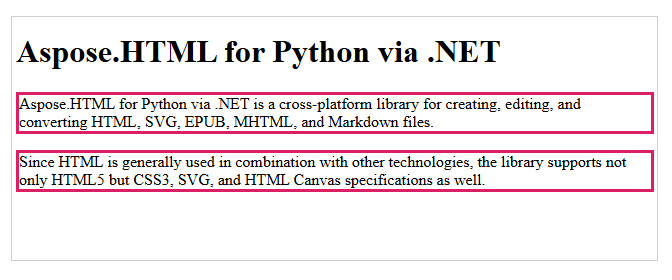
22 document.save(save_path)The internal rule applies the same border to both paragraphs. A normal inline declaration on a paragraph can take precedence over this normal internal rule.
The source
table.html already defines a visible table grid with the legacy border and bordercolor attributes. Both examples select only the <table> element and change its border color. With this source markup, the saved document displays the complete table grid in blue.
For new HTML, prefer CSS instead of legacy presentational attributes. If a table does not already define cell borders, apply CSS rules to table, th, and td when both the outer frame and individual cell borders must be visible.
The inline example loads table.html, finds the first table with
query_selector(), sets the shorthand border: 2px #0000ff solid, and saves change-table-border-color-inline-css.html.
 1# Change table border color with inline CSS in Python
 2
 3import os
 4import aspose.html as ah
 5
 6# Prepare input and output paths
 7output_dir = "output"
 8os.makedirs(output_dir, exist_ok=True)
 9save_path = os.path.join(output_dir, "change-table-border-color-inline-css.html")
10
11data_dir = "data"
12document_path = os.path.join(data_dir, "table.html")
13
14# Change the first table border color
15with ah.HTMLDocument(document_path) as document:
16    # Create a CSS selector to select the first table element
17    element = document.query_selector("table")
18
19    # Set inline style for the selected element
20    element.set_attribute("style", "border: 2px #0000ff solid;")
21
22 document.save(save_path)The internal CSS example creates a <style> element containing a rule for table, appends it to <head>, and saves change-table-border-color-internal-css.html. It produces the same blue table grid without writing an inline declaration on the table.
<style> element and define the required table border rule.<head>. 1# Change table border color with internal CSS in Python
2
3import os
4import aspose.html as ah
5
6# Prepare input and output paths
7output_dir = "output"
8os.makedirs(output_dir, exist_ok=True)
9data_dir = "data"
10document_path = os.path.join(data_dir, "table.html")
11save_path = os.path.join(output_dir, "change-table-border-color-internal-css.html")
12
13# Add an internal CSS rule for the table border
14with ah.HTMLDocument(document_path) as document:
15 # Create a <style> element and set CSS for the <table> element
16 style = document.create_element("style")
17 style.text_content = "table { border-style:solid; border-color:rgb(0, 0, 255) }"
18
19 head = document.get_elements_by_tag_name("head")[0]
20 head.append_child(style)
21
22 document.save(save_path)The image compares the source table a) and the blue table grid after the inline CSS update b):

| Issue | Cause and recommended action |
|---|---|
| The border color is not visible | border-color does not create a border. Set a visible border-style and, when needed, an appropriate width. |
| Internal CSS does not change the border | An inline declaration or another rule may take precedence. Inspect the target element and matching CSS rules. |
| Existing inline styles disappear | Replacing the complete style attribute removes its previous declarations. Preserve them or update individual CSS properties. |
| Four colors appear on unexpected sides | Use the clockwise order top, right, bottom, and left. |
| Changes are missing from the file | DOM changes remain in memory until save() is called. Verify the output path and open the saved file. |
border-color controls only color. Define a visible border-style, such as solid, and set a suitable border-width when the default width is not appropriate.
Use a declaration such as border: 1px solid #000 when width, style, and color can be set together. Use separate properties when application code must update only one border characteristic or side.
Supply four border-color values in top, right, bottom, and left order, or set properties such as border-top-color and border-left-color individually.
The initial border color is currentColor, which uses the element’s computed foreground color. A visible border style is still required.
Set border: none or border-style: none. Avoid clearing the complete style attribute unless every inline declaration should be removed.


Analyzing your prompt, please hold on...
An error occurred while retrieving the results. Please refresh the page and try again.