
Analyzing your prompt, please hold on...
An error occurred while retrieving the results. Please refresh the page and try again.
To change HTML text color in Python, load the file with
HTMLDocument, select the target element, set the CSS color property through its style attribute or an internal <style> element, and save the updated document.
Use inline CSS when one element needs a different text color. Use internal CSS when one selector should apply the same rule to several elements. Aspose.HTML for Python via .NET modifies the HTML DOM, so the updated styles can be saved to HTML or included in a later conversion.
The CSS color property accepts named colors, HEX, RGB, and HSL syntaxes, including values with alpha transparency. The examples below use #8B0000, the HEX value for dark red.
Inline CSS stores declarations directly in an element’s style attribute. The following example loads an HTML file, changes the first paragraph to dark red, and saves the result as change-text-color-inline-css.html.
HTMLDocument.color value through the element’s inline style attribute. 1# Change HTML text color with inline CSS in Python
2
3import os
4import aspose.html as ah
5
6# Prepare input and output paths
7data_dir = "data"
8output_dir = "output"
9os.makedirs(output_dir, exist_ok=True)
10save_path = os.path.join(output_dir, "change-text-color-inline-css.html")
11document_path = os.path.join(data_dir, "text-color.html")
12
13# Change the first paragraph text color
14with ah.HTMLDocument(document_path) as document:
15 paragraph = document.get_elements_by_tag_name("p")[0]
16
17 # Set the style attribute with color property
18 paragraph.set_attribute("style", "color: #8B0000;")
19
20 document.save(save_path)The saved document contains dark-red text in its first paragraph. Because the example replaces the complete style attribute, any existing inline declarations on that paragraph would be removed. Preserve the required declarations if the source element already has inline styles.
Internal CSS is stored in a <style> element, normally inside the document <head>. A single rule can therefore apply the same text color to every element that matches its selector. The next example adds a dark-red rule for all paragraphs and saves change-text-color-internal-css.html.
HTMLDocument.<style> element with
create_element().<style> element to the document <head>. 1# Change paragraph text color with internal CSS in Python
2
3import os
4import aspose.html as ah
5
6# Prepare input and output paths
7output_dir = "output"
8os.makedirs(output_dir, exist_ok=True)
9save_path = os.path.join(output_dir, "change-text-color-internal-css.html")
10
11data_dir = "data"
12document_path = os.path.join(data_dir, "text-color.html")
13
14# Add an internal CSS rule for paragraph text
15with ah.HTMLDocument(document_path) as document:
16 style = document.create_element("style")
17 style.text_content = "p { color: #8B0000 }"
18
19 head = document.get_elements_by_tag_name("head")[0]
20 head.append_child(style)
21
22 document.save(save_path)The same approach works with text elements such as <h1>, <h2>, <span>, and <div>. Change the selector when an internal rule should target another group of elements. A normal inline declaration generally takes precedence over normal declarations from internal or external stylesheets, although the complete CSS cascade still determines the final value.
The following image compares the saved results. The inline CSS example changes only the first paragraph, while the internal CSS rule changes both paragraphs.

Text color can also be assigned according to an element’s content. The following example loads
paragraphs.html, measures the trimmed text in each paragraph, applies one of three colors according to its length, and saves the result as colored-paragraphs.html.
HTMLDocument. 1# Change HTML text color based on text length in Python
2
3import os
4import aspose.html as ah
5
6# Prepare input and output paths
7data_dir = "data"
8output_dir = "output"
9os.makedirs(output_dir, exist_ok=True)
10
11input_path = os.path.join(data_dir, "paragraphs.html")
12output_path = os.path.join(output_dir, "colored-paragraphs.html")
13
14# Set paragraph colors according to their text length
15with ah.HTMLDocument(input_path) as document:
16 paragraphs = document.get_elements_by_tag_name("p")
17
18 for paragraph in paragraphs:
19 length = len(paragraph.text_content.strip())
20
21 if length < 40:
22 color = "#003F8F"
23 elif length < 120:
24 color = "#1F613C"
25 else:
26 color = "#8B0000"
27
28 paragraph.set_attribute("style", f"color: {color};")
29
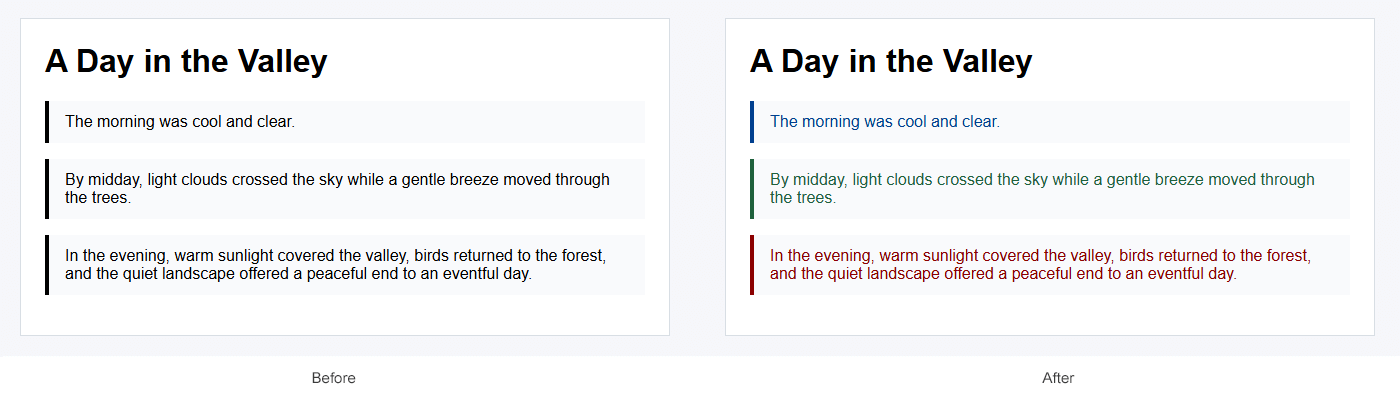
30 document.save(output_path)The image compares the original paragraphs with the saved result. Each paragraph receives the color assigned to its text-length range:
style attribute.| Issue | Cause and recommended action |
|---|---|
| The text color does not change | Verify that the selector matches the intended element and that another declaration does not take precedence in the CSS cascade. |
| Only the first paragraph changes | get_elements_by_tag_name("p")[0] selects the first paragraph. Iterate over the collection or add an internal p rule to change all paragraphs. |
| Existing inline styles disappear | set_attribute("style", ...) replaces the complete attribute. Include the existing declarations or update only the required CSS property. |
| A child element retains another color | A declaration applied directly to the child can override the color inherited from its parent. Inspect styles on the child element. |
| Changes are missing from the output | DOM changes remain in memory until save() is called. Verify the output path and open the saved file. |
Select the element and set its inline CSS with set_attribute("style", "color: #8B0000;"). Then save the modified HTMLDocument.
Create a <style> element containing p { color: #8B0000; } and append it to the document <head>. The rule applies to every paragraph unless another declaration takes precedence.
Yes. The CSS color property accepts named colors, HEX, RGB, and HSL syntaxes. RGB and HSL values can also include an alpha component.
No. color controls the foreground text color. Use the background-color property to change the background behind an element.


Analyzing your prompt, please hold on...
An error occurred while retrieving the results. Please refresh the page and try again.