
Analyzing your prompt, please hold on...
An error occurred while retrieving the results. Please refresh the page and try again.
Aspose.HTML for Python via .NET 允许您用 Python 语言访问和操作 HTML DOM(文档对象模型)。Aspose.html.dom 命名空间 提供了与 HTML、XML 和 SVG 文档交互的 API。它将文档表示为节点树,每个节点代表文档的一部分,如元素、文本字符串或注释。该命名空间包括 Attr、 CharacterData、 Comment 等类,每个类在文档模型中都有特定的用途。
Document 类代表整个 HTML、XML 或 SVG 文档,是文档树的根。其他类,如 Element、 Node、 DocumentFragment 和 EventTarget 提供了对文档不同部分的访问,并允许对文档数据进行操作和交互。该 API 基于 WHATWG DOM标准。因此,只要具备 HTML 和 JavaScript 语言的基础知识,就可以通过 .NET 轻松使用 Aspose.HTML for Python。
要使用 DOM 树编辑 HTML 文档,请使用 HTMLDocument 类,它代表整个文档。使用我们的 Python 库,您可以通过多种方式编辑 HTML。您可以通过插入新节点、删除或编辑现有节点的内容来修改文档。如果需要创建新元素或节点,需要调用以下方法:
<style> 和 <p>;要操作元素属性,请使用方法:
value 的值;创建新节点后,DOM 中有几种方法可以帮助您在文档树中插入节点。下面列出了插入或删除节点的最常用方法:
node, child)](https://reference.aspose.com/html/python-net/aspose.html.dom/node/insert_before/) 方法会将 node插入现有的子节点child之前。如果child为空,则在子节点列表的末尾插入一个node` 。有关 DOM 命名空间中代表的类和方法的完整列表,请访问 API 参考源。
Aspose.HTML Python API 支持 HTML 标准中定义的一系列 HTML 元素,以及元素嵌套规则。考虑使用简单的步骤从头开始创建 HTML 并使用 DOM 树和上述功能对其进行编辑。文档将包含一个带有 id 属性的文本段落:
body 属性指向文档的 元素。HTMLDocument 的
create_element() 方法创建段落元素 <p>。id 属性。append_child() 方法将段落元素添加到文档的 <body> 中。这段代码演示了如何以编程方式创建一个基本的 HTML 文档,添加一个带有属性和文本的段落,并将生成的 HTML 保存到文件中:
 1# Edit HTML document using DOM Tree in Python
 2
 3import os
 4import aspose.html as ah
 5
 6# Define the output directory and file path
 7output_dir = "output/"
 8output_path = os.path.join(output_dir, "edit-document-tree.html")
 9
10# Ensure the output directory exists
11os.makedirs(output_dir, exist_ok=True)
12
13# Create an instance of an HTML document
14document = ah.HTMLDocument()
15
16# Access the document <body> element
17body = document.body
18
19# Create a paragraph element <p>
20p = document.create_element("p")
21
22# Set a custom attribute
23p.set_attribute("id", "my-paragraph")
24
25# Create a text node
26text = document.create_text_node("The Aspose.Html.Dom namespace provides an API for representing and interfacing with HTML, XML, or SVG documents.")
27
28# Add the text to the paragraph
29p.append_child(text)
30
31# Attach the paragraph to the document body
32body.append_child(p)
33
34# Save the HTML document to a file
35document.save(output_path)让我们来创建一个更复杂的 HTML 文档。在下面的代码片段中,我们将从头开始构建一个 HTML 文档,创建新元素,为它们填充内容,并将它们添加到 HTML 文档结构中。HTML DOM 模型和上述功能将帮助我们完成这项工作。
HTMLDocument() 构造函数初始化一个新的
HTMLDocument 对象,它代表 HTML 文档。HTMLDocument 的
create_element() 方法生成一个 <style> 元素。<head> 元素。<style> 元素追加到 <head> 元素。<p> 段落元素。class_name 属性,以应用所需的 CSS 样式。append_child() 方法将此文本节点附加到段落元素。body 属性上的 append_child() 方法,将段落元素添加到文档的 <body> 中。HTMLDocument 的 save() 方法,将文档保存到指定的 HTML 文件路径。 1# Create and add new HTML elements using Python
2
3import os
4import aspose.html as ah
5
6# Define output directory and file paths
7output_dir = "output/"
8save_path = os.path.join(output_dir, "edit-document.html")
9
10# Ensure the output directory exists
11os.makedirs(output_dir, exist_ok=True)
12
13# Create an instance of an HTML document
14document = ah.HTMLDocument()
15
16# Create a style element and set the teal color for elements with class "col"
17style = document.create_element("style")
18style.text_content = ".col { color: teal }"
19
20# Find the document <head> element and append the <style> element
21head = document.get_elements_by_tag_name("head")[0]
22head.append_child(style)
23
24# Create a paragraph <p> element with class "col"
25p = document.create_element("p")
26p.class_name = "col"
27
28# Create a text node
29text = document.create_text_node("Edit HTML document")
30
31# Append the text node to the paragraph
32p.append_child(text)
33
34# Append the paragraph to the document <body>
35document.body.append_child(p)
36
37# Save the HTML document to a file
38document.save(save_path)API Reference Source 提供了 DOM 命名空间中类和方法的完整列表。
inner_html 和 outer_html 属性使用 DOM 对象为在 Python 中操作 HTML 文档提供了一种强大的方法。然而,在某些情况下,直接使用字符串会更方便。inner_html “和 “outer_html “属性用于访问和操作文档中的 HTML 内容,但它们在表示的内容和使用的方式上有所不同:
以下代码片段演示了如何使用
Element 类的 inner_html 和 outer_html 属性编辑 HTML。
 1# Edit HTML body content and get modified document as a string using Python
 2
 3import aspose.html as ah
 4
 5# Create an instance of an HTML document
 6document = ah.HTMLDocument()
 7
 8# Write the content of the HTML document to the console
 9print(document.document_element.outer_html)  # output: <html><head></head><body></body></html>
10
11# Set the content of the body element
12document.body.inner_html = "<p>HTML is the standard markup language for Web pages.</p>"
13
14# Find the document <p> element
15p = document.get_elements_by_tag_name("p")[0]
16
17# Write the updated content of the HTML document to the console
18print(p.inner_html)  # output: HTML is the standard markup language for Web pages.
19
20# Write the updated content of the HTML document to the console
21print(document.document_element.outer_html) # output: <html><head></head><body><p>HTML is the standard markup language for Web pages.</p></body></html>层叠样式表(CSS)是一种样式表语言,用于描述网页在浏览器中的显示方式。CSS 可以通过内联、内部和外部方式添加到 HTML 文档中。因此,您可以使用内联 CSS 为单个 HTML 元素定义独特的样式,也可以通过在单独的 .css 文件中指定相关 CSS 来为多个网页共享格式。Aspose.HTML for Python via .NET不仅支持开箱即用的CSS,而且在将HTML文档转换为其他格式之前,还为您提供了即时处理文档样式的工具,如下所示。
在 HTML 标签内使用 style 属性编写 CSS 时,称为 “内联 CSS”。内联 CSS 可让你一次对一个 HTML 元素应用一个单独的样式。您可以使用 style 属性为 HTML 元素设置 CSS,并在其中定义 CSS 属性。
在下面的代码片段中,你可以看到如何为 HTML <p> 元素指定 CSS 样式属性。
 1# How to set inline CSS styles in an HTML element using Python
 2
 3import os
 4import aspose.html as ah
 5import aspose.html.rendering.pdf as rp
 6
 7# Define the content of the HTML document
 8content = "<p>Edit inline CSS using Aspose.HTML for Python via .NET</p>"
 9
10# Create an instance of an HTML document with specified content
11document = ah.HTMLDocument(content, ".")
12
13# Find the paragraph element and set a style attribute
14paragraph = document.get_elements_by_tag_name("p")[0]
15paragraph.set_attribute("style", "font-size: 150%; font-family: arial; color: teal")
16
17# Save the HTML document to a file
18output_dir = "output/"
19os.makedirs(output_dir, exist_ok=True)
20html_path = os.path.join(output_dir, "edit-inline-css.html")
21document.save(html_path)
22
23# Create an instance of the PDF output device and render the document to this device
24pdf_path = os.path.join(output_dir, "edit-inline-css.pdf")
25with rp.PdfDevice(pdf_path) as device:
26 document.render_to(device)在本例中,颜色、字体大小和字体家族适用于 <p> 元素。呈现的 pdf 页面片段如下:

内部 CSS 样式选项通过将所有样式封装在 HTML 文档的<head> 中的<style>元素中,将属性应用于单个页面,因此很受欢迎。
 1# Edit HTML with internal CSS using Python
 2
 3import os
 4import aspose.html as ah
 5import aspose.html.rendering.pdf as rp
 6
 7
 8# Define the content of the HTML document
 9content = "<div><h1>Internal CSS</h1><p>An internal CSS is used to define a style for a single HTML page</p></div>"
10
11# Create an instance of an HTML document with specified content
12document = ah.HTMLDocument(content, ".")
13
14# Create a <style> element and define internal CSS rules
15style = document.create_element("style")
16style.text_content = (
17    ".frame1 { margin-top:50px; margin-left:50px; padding:25px; width:360px; height:90px; "
18    "background-color:#82011a; font-family:arial; color:#fff5ee;} \r\n"
19    ".frame2 { margin-top:-70px; margin-left:160px; text-align:center; padding:20px; width:360px; "
20    "height:100px; background-color:#ebd2d7;}"
21)
22
23# Find the <head> element and append the style element
24head = document.get_elements_by_tag_name("head")[0]
25head.append_child(style)
26
27# Find the first paragraph element and apply styles
28header = document.get_elements_by_tag_name("h1")[0]
29header.class_name = "frame1"
30
31# Update the style using the style attribute directly
32header.set_attribute("style", "font-size: 200%; text-align: center;")
33
34# Find the last paragraph element and apply styles
35paragraph = document.get_elements_by_tag_name("p")[0]
36paragraph.class_name = "frame2"
37paragraph.set_attribute("style", "color: #434343; font-size: 150%; font-family: verdana;")
38
39# Save the HTML document to a file
40output_dir = "output/"
41os.makedirs(output_dir, exist_ok=True)
42html_path = os.path.join(output_dir, "edit-internal-css.html")
43document.save(html_path)
44
45# Create an instance of the PDF output device and render the document to this device
46pdf_path = os.path.join(output_dir, "edit-internal-css.pdf")
47with rp.PdfDevice(pdf_path) as device:
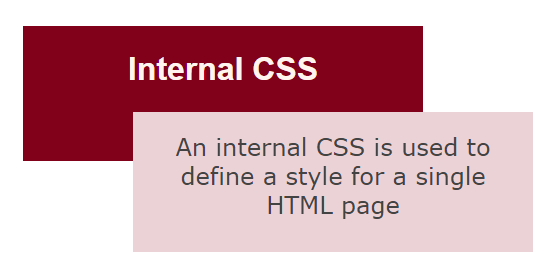
48 document.render_to(device)在本例中,我们使用了内部 CSS,并在 <h1> 和 <p> 标记内使用 style 属性为单个元素声明了额外的样式属性。下图展示了 “edit-internal-css.pdf “文件的渲染片段:
您可以从 GitHub 下载完整的示例和数据文件。
下载 Aspose.HTML for Python via .NET 库,即可成功、快速、轻松地处理 HTML 文档。Python 库可以创建、修改、提取数据、转换和渲染 HTML 文档,而无需外部软件。它支持 EPUB、MHTML、XML、SVG 和 Markdown 等流行文件格式,并可渲染为 PDF、DOCX、XPS 和图像文件格式。

Analyzing your prompt, please hold on...
An error occurred while retrieving the results. Please refresh the page and try again.