
Analyzing your prompt, please hold on...
An error occurred while retrieving the results. Please refresh the page and try again.
使用 Aspose.HTML for Python via .NET 编程更改 HTML 元素的边框颜色是文档处理和样式自动化中的常见任务。通过该库,您可以轻松加载 HTML 文档、应用 CSS 规则并保存修改后的文件,而无需手动编辑源代码。
本文解释了如何使用 CSS border-color 属性通过内联或内部样式在 Python 中更改 HTML 元素的边框颜色。颜色值可以使用标准的
颜色名称 或 HEX、RGB、RGBA、HSL、HSLA 格式。
您可以通过 style 属性直接设置或更改边框颜色。border-color 仅在定义了 border-style 时生效,因为它控制边框的可见性。若未设置 border-style,边框颜色将不会显示,且可能继承元素的文本颜色。border-color 支持颜色名称、RGB、RGBA、HEX、HSL 和 HSLA 值。要在 Python 中使用 Aspose.HTML for Python via .NET 更改 HTML 元素的边框颜色,请按以下步骤操作:
<p>、<h1>、<div> 或 <table>),并找到该元素以设置 style 属性。使用 Element 类的
get_elements_by_tag_name(name) 方法获取指定标签的元素。style 属性设置 border-style 和 border-color。下面的 Python 示例展示了如何为 <h1> 元素更改边框颜色:
 1# Change H1 border color in HTML in Python
 2
 3import os
 4import aspose.html as ah
 5
 6# Prepare input and output paths
 7output_dir = "output"
 8os.makedirs(output_dir, exist_ok=True)
 9save_path = os.path.join(output_dir, "change-border-color.html")
10
11data_dir = "data"
12document_path = os.path.join(data_dir, "file.html")
13
14# Change the heading text and border colors
15with ah.HTMLDocument(document_path) as document:
16    header = document.get_elements_by_tag_name("h1")[0]
17
18    # Set inline CSS properties
19    header.set_attribute("style", "color: #8B0000; border-style: solid; border-color: rgb(220,30,100);")
20
21 document.save(save_path)值得注意的是,此示例不仅更改了 <h1> 元素的边框颜色,还为该元素添加了文本颜色(color 属性)。

注意:border-style 是必需的。 单独的 border-color 不会显示,除非元素已有 border-style(如 solid、dashed、double)。请始终设置 border-style(或使用简写 border: 1px solid #000;)以确保边框可见。
border-color 属性可以为元素的四条边设置颜色。如果只提供一个值,所有边框将使用相同颜色;提供两个值时,上/下使用第一个,左/右使用第二个;提供三个值时,上使用第一个,左/右使用第二个,底部使用第三个;提供四个值时分别对应上、右、下、左。
 1# Change CSS border colors for all four sides in Python
 2
 3import os
 4import aspose.html as ah
 5
 6# Prepare input and output paths
 7data_dir = "data"
 8output_dir = "output"
 9os.makedirs(output_dir, exist_ok=True)
10document_path = os.path.join(data_dir, "file.html")
11save_path = os.path.join(output_dir, "change-four-border-color.html")
12
13# Change the border color on each side of the heading
14with ah.HTMLDocument(document_path) as document:
15    header = document.get_elements_by_tag_name("h1")[0]
16
17    # Set inline CSS for border style and different border colors on each side
18    header.set_attribute("style", "border-style: solid; border-color: red blue green gray;")
19
20 document.save(save_path)提示:border-color 值的顺序。 一个值适用于所有边,两个值 → 上/下 与 左/右,三个值 → 上、左/右、下,四个值 → 上、右、下、左。
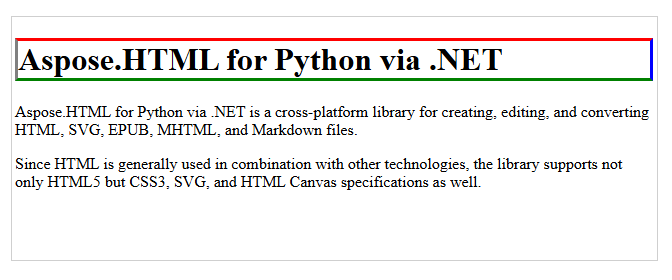
下图展示了使用内联 CSS 为 <h1> 元素的四个边分别设置不同颜色的效果:
通过内部 CSS 也可以实现相同的效果,以下 HTML 示例为所有段落元素设置边框样式:
1<head>
2<style>
3  p {
4    border-style: solid;
5    border-color: rgb(220,30,100);
6  }
7</style>
8</head>
注意: 使用 style 属性会覆盖 HTML <style> 标签或外部样式表中定义的任何样式。
下面的 Python 示例演示如何使用内部 CSS 为所有 <p> 元素更改边框颜色:
 1# Change HTML border color with internal CSS in Python
 2
 3import os
 4import aspose.html as ah
 5
 6# Prepare input and output paths
 7data_dir = "data"
 8output_dir = "output"
 9os.makedirs(output_dir, exist_ok=True)
10document_path = os.path.join(data_dir, "file.html")
11save_path = os.path.join(output_dir, "change-border-color-internal-css.html")
12
13# Add an internal CSS rule for paragraph borders
14with ah.HTMLDocument(document_path) as document:
15    # Create a <style> element and set CSS for <p> elements
16    style = document.create_element("style")
17    style.text_content = "p {border-style: solid; border-color: rgb(220,30,100); }"
18
19    head = document.get_elements_by_tag_name("head")[0]
20    head.append_child(style)
21
22    document.save(save_path)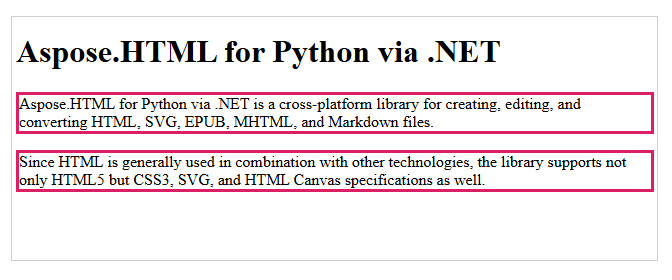
若要更改表格的边框颜色,可使用内联或内部 CSS。以下示例展示了如何使用内联 CSS 为 <table> 元素设置边框颜色:
使用内联 CSS 更改表格边框颜色的 Python 示例
 1# Change table border color with inline CSS in Python
 2
 3import os
 4import aspose.html as ah
 5
 6# Prepare input and output paths
 7output_dir = "output"
 8os.makedirs(output_dir, exist_ok=True)
 9save_path = os.path.join(output_dir, "change-table-border-color-inline-css.html")
10
11data_dir = "data"
12document_path = os.path.join(data_dir, "table.html")
13
14# Change the first table border color
15with ah.HTMLDocument(document_path) as document:
16    # Create a CSS selector to select the first table element
17    element = document.query_selector("table")
18
19    # Set inline style for the selected element
20    element.set_attribute("style", "border: 2px #0000ff solid;")
21
22    document.save(save_path)
同样的效果也可以通过内部 CSS 实现,以下 Python 示例演示了如何使用内部 CSS 更改表格边框颜色:
使用内部 CSS 更改表格边框颜色的 Python 示例
 1# Change table border color with internal CSS in Python
 2
 3import os
 4import aspose.html as ah
 5
 6# Prepare input and output paths
 7output_dir = "output"
 8os.makedirs(output_dir, exist_ok=True)
 9data_dir = "data"
10document_path = os.path.join(data_dir, "table.html")
11save_path = os.path.join(output_dir, "change-table-border-color-internal-css.html")
12
13# Add an internal CSS rule for the table border
14with ah.HTMLDocument(document_path) as document:
15    # Create a <style> element and set CSS for the <table> element
16    style = document.create_element("style")
17    style.text_content = "table { border-style:solid; border-color:rgb(0, 0, 255) }"
18
19    head = document.get_elements_by_tag_name("head")[0]
20    head.append_child(style)
21
22 document.save(save_path)所有更改边框颜色的方法遵循相同的基本工作流:
ah.HTMLDocument 加载源 HTML。create_element、get_elements_by_tag_name 或 query_selector 定位目标元素。style.text_content 或 set_attribute("style", …) 设置所需的 CSS。1. 使用 border: 1px solid #000; 与单独设置 border-style 和 border-color 哪个更好?
两者都可行,但用途不同。简写形式 border: 1px solid #000; 更简洁,能一次性设置宽度、样式和颜色,确保边框可见。若需在代码中动态修改样式,单独设置 border-style 和 border-color 更灵活。
2. 为什么设置 border-color 后仍未显示?border-color 仅在已定义 border-style 时生效。请先设置 border-style(如 solid、dashed),或使用简写形式 border。
3. 如何一次性为多个元素应用相同的边框样式?
可在 <head> 中添加 <style> 块,或为多个元素分配同一 CSS 类,然后在样式表中统一定义。
4. 如何移除或重置 HTML 中的边框颜色?
使用 border: none; 或 border-style: none; 移除边框。若仅想重置颜色,可使用 border-color: initial;,或通过 set_attribute("style", "") 清除内联样式。
另见
HTML 表格生成器 是一个在线工具,可创建带有自定义选项的表格,免费且易于使用。


Analyzing your prompt, please hold on...
An error occurred while retrieving the results. Please refresh the page and try again.