
Analyzing your prompt, please hold on...
An error occurred while retrieving the results. Please refresh the page and try again.
在网页自动化、报告和文档生成中,动态更改文本颜色是常见需求。使用 Aspose.HTML for Python via .NET,您可以安全地加载、修改并保存 HTML 文件,而无需手动编辑。当您需要:
在网页上更改文本颜色很容易,只需使用 CSS color 属性。可以使用内联、内部或外部 CSS,颜色值可以是标准英文颜色名称或 HEX、RGB、RGBA、HSL、HSLA 等格式。
本文展示了如何使用 Aspose.HTML for Python via .NET 通过内联和内部 CSS 编程更改文本颜色。
在此示例中,我们直接在 HTML 元素的 style 属性中设置文本颜色。这称为内联 CSS,适用于快速为单个元素设置样式。
下面的代码片段展示了如何为 HTML <p> 元素指定 CSS color 属性。请按以下步骤操作:
HTMLDocument() 加载现有的 HTML 文档。<p> 元素,以便为其设置 style 属性。使用
get_elements_by_tag_name(name) 方法获取文档中第一个匹配的元素。style 属性设置 color。 1# Change HTML text color using Python
2
3import os
4import aspose.html as ah
5
6# Setup directories and define paths
7data_dir = "data"
8output_dir = "output"
9os.makedirs(output_dir, exist_ok=True)
10save_path = os.path.join(output_dir, "change-text-color-inline-css.html")
11document_path = os.path.join(data_dir, "file.html")
12
13# Create an instance of an HTML document
14with ah.HTMLDocument(document_path) as doc:
15 # Find the first paragraph element
16 paragraph = doc.get_elements_by_tag_name("p")[0]
17
18 # Set the style attribute with color property
19 paragraph.set_attribute("style", "color: #8B0000;")
20
21 # Save the modified HTML document to a file
22 doc.save(save_path)内联 CSS 最适合单独更改特定元素的样式。结果是 HTML 文件中第一个段落的文本将被重新着色为 #8B0000(深红色),请滚动页面查看图 (a)。
内部 CSS 适用于为多个元素统一设置样式,例如所有段落或标题。我们将在 HTML 文档的 <head> 部分添加一个 <style> 块。此方法更整洁,适合需要一致样式的场景。
<style> 元素,并为所有 <p> 元素指定文本颜色。使用
create_element(local_name) 方法创建元素。get_elements_by_tag_name() 找到文档的 <head> 元素,并将 <style> 元素插入其中。 1# Change color for all paragraphs in HTML using Python
2
3import os
4import aspose.html as ah
5
6# Prepare an output path for saving the document
7output_dir = "output"
8os.makedirs(output_dir, exist_ok=True)
9save_path = os.path.join(output_dir, "change-text-color-internal-css.html")
10
11# Prepare a path to the source HTML file
12data_dir = "data"
13document_path = os.path.join(data_dir, "file.html")
14
15# Create an instance of an HTML document
16with ah.HTMLDocument(document_path) as doc:
17 # Create a <style> element and set CSS for the all <p> elements
18 style = doc.create_element("style")
19 style.text_content = "p { color: #8B0000 }"
20
21 # Find the <head> element and append the <style> element
22 head = doc.get_elements_by_tag_name("head")[0]
23 head.append_child(style)
24
25 # Save the modified HTML document to a file
26 doc.save(save_path)要更改文本颜色,您可以使用本文提供的 Python 示例,对 <p>、<h1>、<h2> 等 HTML 元素进行操作。请注意,使用 style 属性(内联 CSS)会覆盖 <style> 标签或外部样式表中定义的任何样式。
以下图示展示了使用内联 CSS(a)和内部 CSS(b)两种示例的文本颜色更改效果:

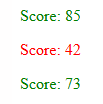
在某些情况下,您可能需要根据数据动态更改文本颜色,例如突出显示分数、警报或警告。使用 Aspose.HTML for Python via .NET,您可以轻松读取元素内容并根据条件更改样式。以下示例演示如何根据数值设置文本颜色:
 1# Change text color based on data in HTML using Python
 2
 3import os
 4import aspose.html as ah
 5
 6output_dir = "output"
 7os.makedirs(output_dir, exist_ok=True)
 8save_path = os.path.join(output_dir, "conditional-text-color.html")
 9
10html_content = """
11<html>
12<body>
13<p>Score: 85</p>
14<p>Score: 42</p>
15<p>Score: 73</p>
16</body>
17</html>
18"""
19
20# Initialize the HTML document
21with ah.HTMLDocument(html_content, ".") as doc:
22    paragraphs = doc.get_elements_by_tag_name("p")
23
24    for p in paragraphs:
25        text = p.text_content
26        score = int(text.split(":")[1].strip())
27
28        # Apply color conditionally
29        color = "green" if score >= 70 else "red"
30        p.set_attribute("style", f"color: {color};")
31
32    # Save the modified document
33 doc.save(save_path)代码读取段落的文本值,提取数值并与参考值比较。每个 <p> 元素根据条件动态应用样式。此技术在生成报告或数据可视化时非常有用,可提升可读性。
1. 内联 CSS 与内部 CSS 有何区别?
内联 CSS 直接在单个元素的 style 属性中设置,而内部 CSS 通过 <head> 中的 <style> 块一次性为多个元素设置样式。
2. 为什么输出中没有更改文本颜色?
请确保正确指定了元素选择器(例如 p 表示段落)。同时检查文档结构是否包含目标元素,以及是否有更高优先级的样式覆盖了您的设置。
3. 我可以使用 RGB 或 HSL 而不是 HEX 吗?
可以。color 属性接受所有 CSS 颜色格式:颜色名称、HEX(#8B0000)、RGB(rgb(139,0,0))、RGBA、HSL、HSLA。
另见
您可以从 GitHub 下载完整示例和数据文件。


Analyzing your prompt, please hold on...
An error occurred while retrieving the results. Please refresh the page and try again.