
Lavorare con il gradiente in un file XPS | Python
Un gradiente è una transizione graduale tra due o più colori o tonalità. Nelle arti visive, nella grafica e nel design, i gradienti vengono spesso utilizzati per creare transizioni fluide da un colore all’altro, aggiungendo profondità, dimensione e interesse visivo a un oggetto o a un’immagine. I gradienti possono variare in complessità, da semplici gradienti a due colori a miscele più complesse che coinvolgono più colori o persino livelli di trasparenza.
Qui scoprirai come aggiungere diversi tipi di gradienti ai file XPS in Python.
Aggiungere un gradiente in un documento XPS
Aggiungere un gradiente orizzontale
Aspose.Page per Python tramite .NET fornisce la classe XpsGradientBrush, creata per incorporare i gradienti nei documenti XPS. Per ottenere ciò, è necessario specificare XpsGradientStop e aggiungere XpsPath all’oggetto della classe XpsDocument. Il seguente frammento di codice illustra la funzionalità completa per aggiungere un gradiente orizzontale a un documento XPS:
Il risultato

 1from aspose.page.xps import *
 2from aspose.page.xps.xpsmodel import *
 3import aspose.pydrawing
 4from util import Util
 5# The path to the documents directory.
 6data_dir = Util.get_data_dir_working_with_gradient()
 7# Create a new XPS Document
 8doc = XpsDocument()
 9# Initialize a List of XpsGradentStop
10stops = []
11stops.append(doc.create_gradient_stop(doc.create_color(255, 244, 253, 225), 0.0673828))
12stops.append(doc.create_gradient_stop(doc.create_color(255, 251, 240, 23), 0.314453))
13stops.append(doc.create_gradient_stop(doc.create_color(255, 252, 209, 0), 0.482422))
14stops.append(doc.create_gradient_stop(doc.create_color(255, 241, 254, 161), 0.634766))
15stops.append(doc.create_gradient_stop(doc.create_color(255, 53, 253, 255), 0.915039))
16stops.append(doc.create_gradient_stop(doc.create_color(255, 12, 91, 248), 1))
17# Create a new path by defining geometery in an abbreviation form
18path = doc.add_path(doc.create_path_geometry("M 10,210 L 228,210 228,300 10,300"))
19path.render_transform = doc.create_matrix(1, 0, 0, 1, 20, 70)
20gradient: XpsLinearGradientBrush = doc.create_linear_gradient_brush(aspose.pydrawing.PointF(10, 0), aspose.pydrawing.PointF(228, 0))
21path.fill = gradient
22gradient.gradient_stops.extend(stops)
23# Save the resultant XPS document
24doc.save(data_dir + "AddHorizontalGradient_outXPS.xps")
Aggiungi sfumatura verticale
Aspose.Page per Python tramite .NET include la classe XpsGradientBrush, per incorporare sfumature nei documenti XPS. Per farlo, è necessario specificare XpsGradientStop e aggiungere XpsPath all’oggetto della classe XpsDocument. Il seguente frammento di codice illustra la funzionalità completa per aggiungere una sfumatura verticale a un documento XPS:
Il risultato

 1from aspose.page.xps import *
 2from aspose.page.xps.xpsmodel import *
 3import aspose.pydrawing
 4from util import Util
 5# The path to the documents directory.
 6data_dir = Util.get_data_dir_working_with_gradient()
 7# Create a new XPS Document
 8doc = XpsDocument()
 9# Initialize a List of XpsGradentStop
10stops = []
11stops.append(doc.create_gradient_stop(doc.create_color(253, 255, 12, 0), 0))
12stops.append(doc.create_gradient_stop(doc.create_color(252, 255, 154, 0), 0.359375))
13stops.append(doc.create_gradient_stop(doc.create_color(252, 255, 56, 0), 0.424805))
14stops.append(doc.create_gradient_stop(doc.create_color(253, 255, 229, 0), 0.879883))
15stops.append(doc.create_gradient_stop(doc.create_color(252, 255, 255, 234), 1))
16# Create a new path by defining geometery in an abbreviation form
17path = doc.add_path(doc.create_path_geometry("M 10,110 L 228,110 228,200 10,200"))
18path.render_transform = doc.create_matrix(1, 0, 0, 1, 20, 70)
19gradient: XpsLinearGradientBrush = doc.create_linear_gradient_brush(aspose.pydrawing.PointF(10, 110), aspose.pydrawing.PointF(10, 200))
20path.fill = gradient
21gradient.gradient_stops.extend(stops)
22# Save the resultant XPS document
23doc.save(data_dir + "AddVerticalGradient_outXPS.xps")
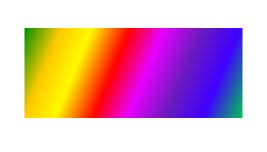
Aggiungi sfumatura diagonale
Il seguente frammento di codice mostra la funzionalità completa di come aggiungere una sfumatura lineare a un documento XPS:
 1from aspose.page.xps import *
 2from aspose.page.xps.xpsmodel import *
 3import aspose.pydrawing
 4from util import Util
 5# The path to the documents directory.
 6data_dir = Util.get_data_dir_working_with_gradient()
 7# Create a new XPS Document
 8doc = XpsDocument()
 9# Initialize a List of XpsGradentStop
10stops = []
11# Add Colors to Gradient
12stops.append(doc.create_gradient_stop(doc.create_color(0, 142, 4), 0))
13stops.append(doc.create_gradient_stop(doc.create_color(255, 202, 0), 0.144531))
14stops.append(doc.create_gradient_stop(doc.create_color(255, 250, 0), 0.264648))
15stops.append(doc.create_gradient_stop(doc.create_color(255, 0, 0), 0.414063))
16stops.append(doc.create_gradient_stop(doc.create_color(233, 0, 255), 0.544922))
17stops.append(doc.create_gradient_stop(doc.create_color(107, 27, 190), 0.694336))
18stops.append(doc.create_gradient_stop(doc.create_color(63, 0, 255), 0.844727))
19stops.append(doc.create_gradient_stop(doc.create_color(0, 199, 80), 1))
20# Create a new path by defining geometery in an abbreviation form
21path = doc.add_path(doc.create_path_geometry("M 10,10 L 228,10 228,100 10,100"))
22path.render_transform = doc.create_matrix(1, 0, 0, 1, 20, 70)
23gradient: XpsLinearGradientBrush = doc.create_linear_gradient_brush(aspose.pydrawing.PointF(10, 10), aspose.pydrawing.PointF(228, 100))
24path.fill = gradient
25gradient.gradient_stops.extend(stops)
26# Save the resultant XPS document
27doc.save(data_dir + "AddDiagonalGradient_outXPS.xps")Il risultato
È possibile scaricare esempi e file di dati da GitHub.