
PSファイルでのハッチパターンの操作 | Java
PSドキュメントにハッチパターンを追加する
ハッチパターンは、通常、小さな2色(通常は白黒)のシンプルな画像で表されるテクスチャタイリングパターンです。これらの小さな画像の主な内容は、様々なハッチです。
Javaプラットフォームには、図形やテキストをハッチで描画するための独立したクラスはありません。しかし、Aspose.Page for Javaライブラリには、 com.aspose.eps.HatchPaintLibrary クラスが用意されており、このクラスを使用することで、 com.aspose.eps.HatchStyle が提供する55種類のスタイルのいずれかで定義されたハッチで塗りつぶされたjava.awt.TexturePaintを作成できます。
Aspose.Page for Java ライブラリでグラフィック オブジェクトをハッチ パターンで ペイント するには、ハッチ スタイルが割り当てられたハッチ java.awt.TexturePaint を作成し、それを setPaint() または java.awt.Paint をパラメーターとして受け取る fillText() や fillAndStrokeText() メソッドのいずれかに渡す必要があります。
Aspose.Page for Java ライブラリでグラフィック オブジェクトをハッチ パターンで アウトライン するには、PsDocument でハッチ パターンを現在のペイントとして設定し、新しい java.awt.BasicStroke を作成し、それを setStroke() または java.awt.Stroke をパラメーターとして受け取る outlineText() や fillAndStrokeText() メソッドのいずれかに渡す必要があります。
以下の例では、まずハッチパターンで図形を塗りつぶす方法、次にJavaで様々なハッチスタイルを使用する方法、最後にハッチパターンでテキストを塗りつぶしてアウトライン化する方法を説明します。
新しいPSドキュメントでグラフィックオブジェクトをハッチパターンでペイントするアルゴリズムは、以下の手順で構成されます。
- 結果のPSファイル用の出力ストリームを作成します。
- PsSaveOptions を作成します。
- 既に作成した出力ストリームと保存オプションを使用して、 PsDocument を作成します。
- 塗りつぶすオブジェクトまたはアウトライン化するオブジェクトに応じて、図形またはフォントを作成します。
- com.aspose.eps.HatchPaintLibrary を使用して、希望するスタイルの java.awt.TexturePaint オブジェクトを作成します。
- PsDocument でハッチペイントを現在のペイントとして設定します。
- 現在のペイントで図形を塗りつぶすか、テキストを塗りつぶします。java.awt.Paint をパラメータとして受け入れるテキスト塗りつぶしメソッドのいずれかを使用する場合は、前の手順は無視できます。
- ページを閉じます。
- ドキュメントを保存します。
最後の4点の代わりに、ハッチパターンでグラフィックオブジェクトを*ストローク(アウトライン)*する必要がある場合は、以下の手順に従います。
- PsDocument でハッチペイントを現在のペイントとして設定します。
- java.awt.BasicStroke オブジェクトを作成します。
- このストロークを PsDocument で現在のストロークとして設定します。
- 現在のペイントとストロークで図形のアウトラインを作成するか、テキストのアウトラインを作成します。java.awt.Stroke をパラメータとして受け入れるテキストのアウトライン化メソッドのいずれかを使用する場合は、前の手順は無視されます。
- ページを閉じます。
- ドキュメントを保存します。
 1  // Demonstrates all embedded hatch patterns that can be used to paint or outline shapes or text in PS document.
 2
 3  String outputFileName = "AddHatchPattern_outPS.ps";
 4
 5  //Create save options with A4 size
 6  PsSaveOptions options = new PsSaveOptions();
 7
 8  // Create new 1-paged PS Document
 9  PsDocument document = new PsDocument(getOutputDir() + outputFileName, options, false);
10
11  int x0 = 20;
12  int y0 = 100;
13  int squareSide = 32;
14  int width = 500;
15  int sumX = 0;
16
17//Restore graphics state
18  document.writeGraphicsSave();
19
20  //Translate to initial point
21  document.translate(x0, y0);
22
23  //Create a square for every pattern
24  Rectangle2D.Float square = new Rectangle2D.Float(0, 0, squareSide, squareSide);
25
26  //Create pen for outlining pattern square
27  BasicStroke stroke = new BasicStroke(2);
28
29  HatchStyle [] hatchStyles = HatchStyle.values();
30
31  //For every hatch pattern style
32  for (int i = 0; i < hatchStyles.length; i++) {
33  	//Create a hatch texture pattern by hatch style, foreground and background colors
34  	TexturePaint paint = HatchPaintLibrary.getHatchTexturePaint(hatchStyles[i], Color.BLACK, Color.WHITE);
35  	//Set paint with the current hatch pattern
36      document.setPaint(paint);
37
38      //Calculate a displacement in order to don't go beyond the page bounds
39      int x = squareSide;
40      int y = 0;
41      if (sumX >= width) {
42          x = -(sumX - squareSide);
43          y += squareSide;
44      }
45
46      //Translate current graphics state
47      document.translate(x, y);
48      //Fill pattern square
49      document.fill(square);
50
51      //Set current paint
52      document.setPaint(Color.BLACK);
53      //Set current stroke
54      document.setStroke(stroke);
55      //Draw square outline
56      document.draw(square);
57
58      //Calculate distance from X0
59      if (sumX >= width)
60          sumX = squareSide;
61      else
62          sumX += x;
63  }
64
65  //Restore graphics state
66  document.writeGraphicsRestore();
67
68  //Fill a text with the hatch pattern
69  TexturePaint paint = HatchPaintLibrary.getHatchTexturePaint(HatchStyle.DiagonalCross, Color.RED, Color.YELLOW);
70  Font font = new Font("Arial", Font.BOLD, 96);
71  document.fillAndStrokeText("ABC", font, 200, 320, paint, Color.BLACK, stroke);
72
73  //Outline the text with the hatch pattern
74  paint = HatchPaintLibrary.getHatchTexturePaint(HatchStyle.Percent70, Color.BLUE, Color.WHITE);
75  document.outlineText("ABC", font, 200, 420, paint, new BasicStroke(5));
76
77  //Close current page
78  document.closePage();
79
80  //Save the document
81 document.save();.NET の PS ドキュメントでハッチ パターンを操作する方法を参照してください。
このコードを実行した結果は次のように表示されます。
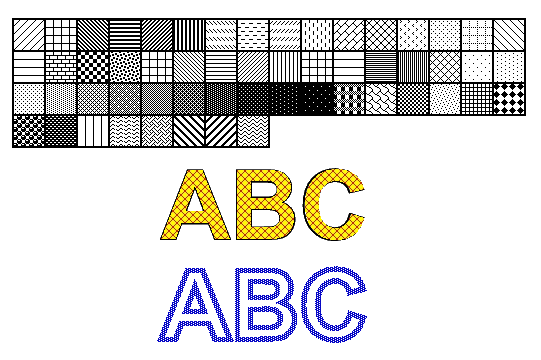
サンプルとデータファイルは以下からダウンロードできます。 GitHub.