# Convert PowerPoint Presentations to HTML in C++
> Convert PowerPoint presentations to HTML in C++. Use Aspose.Slides to export PPT and PPTX files, selected slides, notes, fonts, images, SVG, and media.
Source: https://docs.aspose.com/slides/cpp/convert-powerpoint-to-html/
Updated: 2026-08-05
## **Overview**
Aspose.Slides for C++ can save PowerPoint presentations as HTML without Microsoft PowerPoint. The basic conversion is a single [Presentation](https://reference.aspose.com/slides/cpp/aspose.slides/presentation/) load and a `Save` call with [SaveFormat](https://reference.aspose.com/slides/cpp/aspose.slides.export/saveformat/). Use [HtmlOptions](https://reference.aspose.com/slides/cpp/aspose.slides.export/htmloptions/) when you need to control the exported layout, fonts, images, notes, comments, SVG output, or linked resources.
This guide focuses on practical HTML export scenarios:
- Export a whole presentation or selected slides.
- Generate fixed-layout, responsive, or SVG-based HTML.
- Include speaker notes and comments.
- Control image quality and cropped image data.
- Embed fonts or save font files separately.
- Choose how external resources and media files are written and referenced.
By default, HTML export produces a self-contained HTML document where most resources are embedded. This is convenient for sharing one file, but it can increase output size. For web publishing, consider external resources, lower image DPI, and only embedding fonts that are not reliably available in the target environment.
## **Convert a Presentation to HTML**
To export a presentation to HTML, load it with [Presentation](https://reference.aspose.com/slides/cpp/aspose.slides/presentation/) and save it with `SaveFormat::Html`.
```cpp
#include
#include
using namespace Aspose::Slides;
using namespace Aspose::Slides::Export;
auto presentation = System::MakeObject(u"presentation.pptx");
presentation->Save(u"presentation.html", SaveFormat::Html);
presentation->Dispose();
```
This example writes one HTML file. The call to `Dispose` releases file handles and rendering resources after export.
## **Use HtmlOptions**
[HtmlOptions](https://reference.aspose.com/slides/cpp/aspose.slides.export/htmloptions/) is the main configuration class for HTML export. Common settings include:
- `SlidesLayoutOptions`: adds notes, comments, handouts, or other layout information.
- `HtmlFormatter`: changes the HTML document structure or delegates formatting to a controller.
- `SlideImageFormat`: changes how slides are represented, for example as SVG.
- `PicturesCompression`: controls image DPI and output size.
- `DeletePicturesCroppedAreas`: keeps or removes cropped image data.
- `SvgResponsiveLayout`: makes exported SVG content adapt to its container.
- `ShowHiddenSlides`: includes hidden slides when required.
The following sections show the most common options separately so you can combine only the ones your workflow needs.
## **Convert Selected Slides to HTML**
The `Presentation::Save` overload that accepts slide numbers uses 1-based slide positions. The loop below saves every slide to a separate HTML file.
```cpp
#include
#include
#include
using namespace Aspose::Slides;
using namespace Aspose::Slides::Export;
auto presentation = System::MakeObject(u"presentation.pptx");
auto slideCount = presentation->get_Slides()->get_Count();
for (int slideIndex = 0; slideIndex < slideCount; slideIndex++)
{
auto slideNumber = slideIndex + 1;
auto slideNumbers = System::MakeArray({ slideNumber });
auto htmlFileName = System::String::Format(u"slide-{0}.html", slideNumber);
presentation->Save(htmlFileName, slideNumbers, SaveFormat::Html);
}
presentation->Dispose();
```
Use this pattern when a website or application needs one HTML page per slide. If each slide should have the same layout, create one [HtmlOptions](https://reference.aspose.com/slides/cpp/aspose.slides.export/htmloptions/) instance and pass it to each `Save` call.
## **Create Responsive HTML**
[ResponsiveHtmlController](https://reference.aspose.com/slides/cpp/aspose.slides.export/responsivehtmlcontroller/) provides responsive HTML output through [HtmlFormatter](https://reference.aspose.com/slides/cpp/aspose.slides.export/htmlformatter/). Use it when the exported page should adapt better to browser width.
```cpp
#include
#include
#include
#include
#include
using namespace Aspose::Slides;
using namespace Aspose::Slides::Export;
auto presentation = System::MakeObject(u"presentation.pptx");
auto controller = System::MakeObject();
auto formatter = HtmlFormatter::CreateCustomFormatter(controller);
auto htmlOptions = System::MakeObject();
htmlOptions->set_HtmlFormatter(formatter);
presentation->Save(u"presentation-responsive.html", SaveFormat::Html, htmlOptions);
presentation->Dispose();
```
For SVG-based responsive layout, set `SvgResponsiveLayout` on [HtmlOptions](https://reference.aspose.com/slides/cpp/aspose.slides.export/htmloptions/). This is useful when the slide content is exported as scalable SVG markup.
```cpp
#include
#include
#include
using namespace Aspose::Slides;
using namespace Aspose::Slides::Export;
auto presentation = System::MakeObject(u"presentation.pptx");
auto htmlOptions = System::MakeObject();
htmlOptions->set_SvgResponsiveLayout(true);
presentation->Save(u"presentation-svg-responsive.html", SaveFormat::Html, htmlOptions);
presentation->Dispose();
```
## **Include Speaker Notes and Comments**
Use [NotesCommentsLayoutingOptions](https://reference.aspose.com/slides/cpp/aspose.slides.export/notescommentslayoutingoptions/) through `HtmlOptions.SlidesLayoutOptions` to include speaker notes or comments. Notes and comments are hidden by default unless you choose their positions.
Suppose the source presentation contains speaker notes:
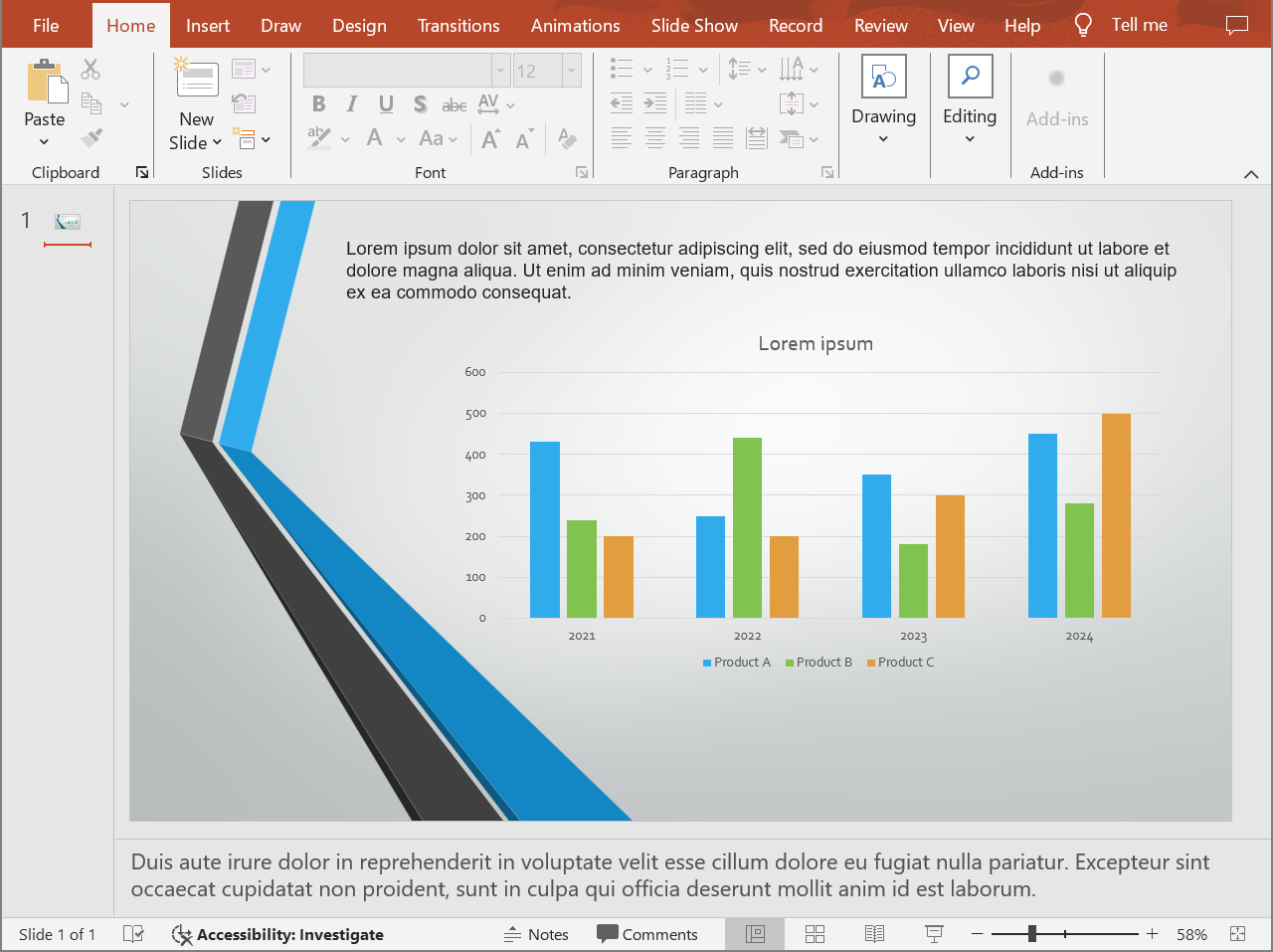
The following code exports the slide content with speaker notes below the slide.
```cpp
#include
#include
#include
#include
#include
using namespace Aspose::Slides;
using namespace Aspose::Slides::Export;
auto presentation = System::MakeObject(u"presentation.pptx");
auto layoutOptions = System::MakeObject();
layoutOptions->set_NotesPosition(NotesPositions::BottomFull);
auto htmlOptions = System::MakeObject();
htmlOptions->set_SlidesLayoutOptions(layoutOptions);
presentation->Save(u"presentation-with-notes.html", SaveFormat::Html, htmlOptions);
presentation->Dispose();
```
The exported HTML includes the notes area:
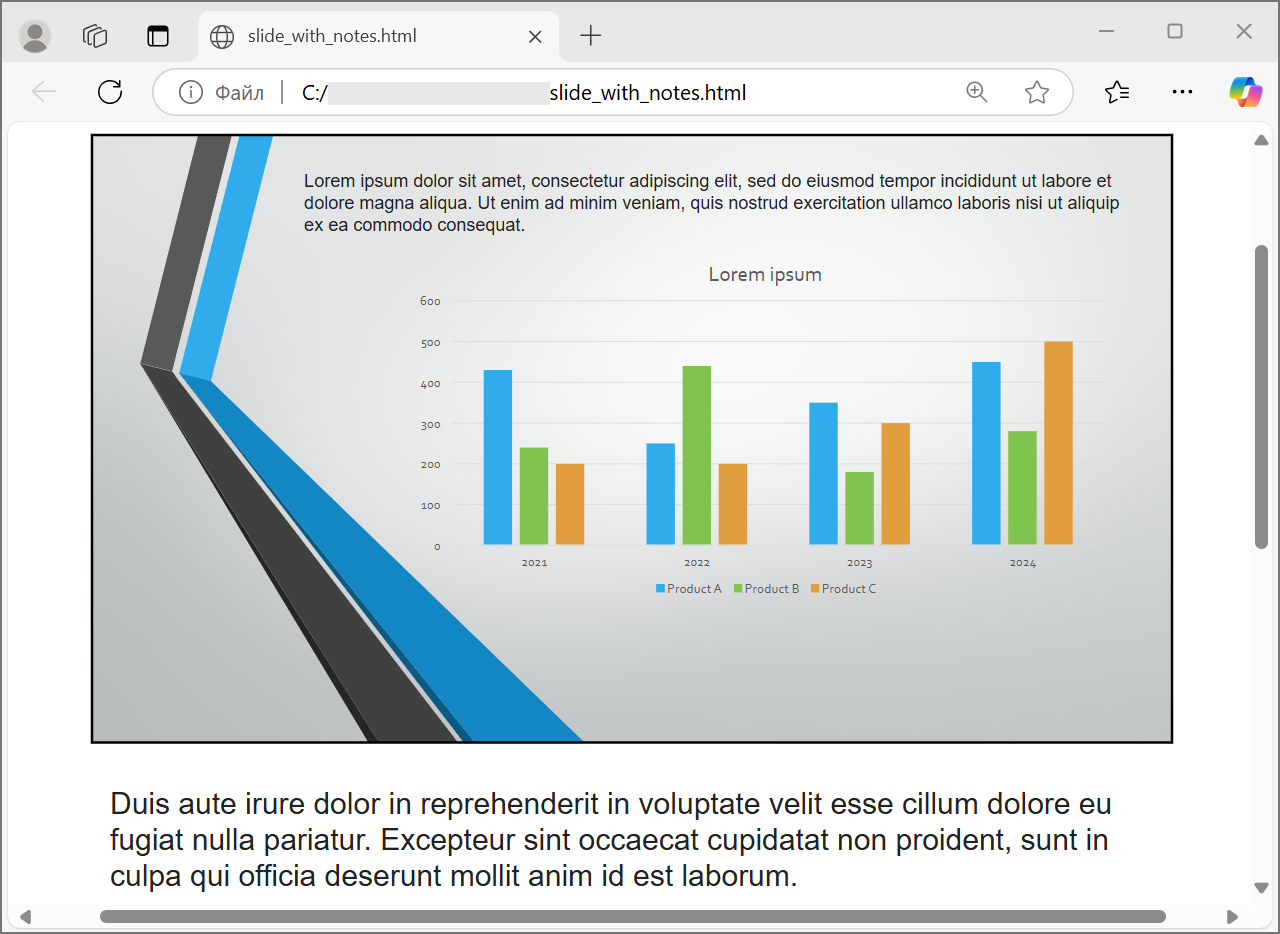
To export comments, set `CommentsPosition`, for example to `CommentsPositions::Right` or `CommentsPositions::Bottom`. If you need only comments, omit `NotesPosition`. If you need both notes and comments, set both properties.
## **Control Image Quality and Cropped Areas**
HTML export can compress slide images to reduce output size. Set `PicturesCompression` to a value from [PicturesCompression](https://reference.aspose.com/slides/cpp/aspose.slides.export/picturescompression/) when you need higher image quality.
```cpp
#include
#include
#include
#include
using namespace Aspose::Slides;
using namespace Aspose::Slides::Export;
auto presentation = System::MakeObject(u"presentation.pptx");
auto htmlOptions = System::MakeObject();
htmlOptions->set_PicturesCompression(PicturesCompression::Dpi150);
presentation->Save(u"presentation-dpi-150.html", SaveFormat::Html, htmlOptions);
presentation->Dispose();
```
By default, cropped areas of images may be removed from the exported output. Keep cropped data only when users must be able to recover or inspect those hidden image parts. Keeping it can increase the HTML size.
```cpp
#include
#include
#include
using namespace Aspose::Slides;
using namespace Aspose::Slides::Export;
auto presentation = System::MakeObject(u"presentation.pptx");
auto htmlOptions = System::MakeObject();
htmlOptions->set_DeletePicturesCroppedAreas(false);
presentation->Save(u"presentation-with-cropped-areas.html", SaveFormat::Html, htmlOptions);
presentation->Dispose();
```
## **Add CSS**
For simple styling, pass a CSS string to `HtmlFormatter::CreateDocumentFormatter`. This changes the surrounding HTML document while Aspose.Slides continues to render the slide content.
```cpp
#include
#include
#include
#include
using namespace Aspose::Slides;
using namespace Aspose::Slides::Export;
auto presentation = System::MakeObject(u"presentation.pptx");
auto cssRules = u"body { margin: 0; background: #f7f7f7; } .slide { margin: 24px auto; }";
auto formatter = HtmlFormatter::CreateDocumentFormatter(cssRules, true);
auto htmlOptions = System::MakeObject();
htmlOptions->set_HtmlFormatter(formatter);
presentation->Save(u"presentation-styled.html", SaveFormat::Html, htmlOptions);
presentation->Dispose();
```
For a custom document header, a linked CSS file, or custom markup around slides and shapes, implement [IHtmlFormattingController](https://reference.aspose.com/slides/cpp/aspose.slides.export/ihtmlformattingcontroller/) and pass it to [HtmlFormatter](https://reference.aspose.com/slides/cpp/aspose.slides.export/htmlformatter/) with `CreateCustomFormatter`.
## **Embed Fonts**
If the target environment may not have the presentation fonts installed, embed fonts in the HTML with [EmbedAllFontsHtmlController](https://reference.aspose.com/slides/cpp/aspose.slides.export/embedallfontshtmlcontroller/). Embedding improves visual fidelity but increases output size.
```cpp
#include
#include
#include
#include
#include
using namespace Aspose::Slides;
using namespace Aspose::Slides::Export;
auto presentation = System::MakeObject(u"presentation.pptx");
auto fontNamesToExclude = System::MakeArray({ u"Arial" });
auto fontController = System::MakeObject(fontNamesToExclude);
auto formatter = HtmlFormatter::CreateCustomFormatter(fontController);
auto htmlOptions = System::MakeObject();
htmlOptions->set_HtmlFormatter(formatter);
presentation->Save(u"presentation-embedded-fonts.html", SaveFormat::Html, htmlOptions);
presentation->Dispose();
```
Exclude fonts only when you are confident that the target browsers or systems already provide them. For brand fonts or less common fonts, embedding is usually safer.
## **Link Font Files Instead of Embedding Them**
To reduce the HTML file size, you can write font data to separate WOFF files and add `@font-face` rules to the HTML. The helper below extends [EmbedAllFontsHtmlController](https://reference.aspose.com/slides/cpp/aspose.slides.export/embedallfontshtmlcontroller/) and overrides `WriteFont`.
```cpp
#include
#include
#include
#include
#include
#include
#include
#include
#include
#include
#include
#include
using namespace Aspose::Slides;
using namespace Aspose::Slides::Export;
using namespace System;
using namespace System::IO;
class LinkedFontsHtmlController : public EmbedAllFontsHtmlController
{
public:
LinkedFontsHtmlController(
System::String fontOutputDirectory,
System::String fontUrlPrefix)
: EmbedAllFontsHtmlController(System::MakeArray(0)),
m_fontOutputDirectory(fontOutputDirectory),
m_fontUrlPrefix(fontUrlPrefix.TrimEnd(u'/') + u"/")
{
System::IO::Directory::CreateDirectory_(m_fontOutputDirectory);
}
void WriteFont(
System::SharedPtr generator,
System::SharedPtr originalFont,
System::SharedPtr substitutedFont,
System::String fontStyle,
System::String fontWeight,
System::ArrayPtr fontData) override
{
auto font = substitutedFont == nullptr ? originalFont : substitutedFont;
auto safeFontName = MakeSafeFileName(font->get_FontName());
auto safeFontStyle = System::String::IsNullOrWhiteSpace(fontStyle) ? u"normal" : fontStyle;
auto safeFontWeight = System::String::IsNullOrWhiteSpace(fontWeight) ? u"normal" : fontWeight;
auto fontFileName = System::String::Format(u"{0}-{1}-{2}.woff", safeFontName, safeFontStyle, safeFontWeight);
auto fontFilePath = System::IO::Path::Combine(m_fontOutputDirectory, fontFileName);
System::IO::File::WriteAllBytes(fontFilePath, fontData);
auto fontUrl = m_fontUrlPrefix + System::Uri::EscapeDataString(fontFileName);
auto fontFamily = font->get_FontName().Replace(u"\\", u"\\\\").Replace(u"'", u"\\'");
generator->AddHtml(u"");
}
private:
System::String m_fontOutputDirectory;
System::String m_fontUrlPrefix;
System::String MakeSafeFileName(System::String fileName)
{
auto invalidCharacters = System::IO::Path::GetInvalidFileNameChars();
auto safeCharacters = fileName.ToCharArray();
for (int characterIndex = 0; characterIndex < safeCharacters->get_Length(); characterIndex++)
{
if (System::Array::IndexOf(invalidCharacters, safeCharacters[characterIndex]) >= 0)
{
safeCharacters[characterIndex] = u'_';
}
}
return System::String(safeCharacters);
}
};
auto outputDirectory = System::IO::Path::Combine(System::Environment::get_CurrentDirectory(), u"html-output");
auto fontsDirectory = System::IO::Path::Combine(outputDirectory, u"fonts");
System::IO::Directory::CreateDirectory_(outputDirectory);
auto presentation = System::MakeObject(u"presentation.pptx");
auto fontController = System::MakeObject(fontsDirectory, u"fonts");
auto formatter = HtmlFormatter::CreateCustomFormatter(fontController);
auto htmlOptions = System::MakeObject();
htmlOptions->set_HtmlFormatter(formatter);
auto htmlFilePath = System::IO::Path::Combine(outputDirectory, u"presentation.html");
presentation->Save(htmlFilePath, SaveFormat::Html, htmlOptions);
presentation->Dispose();
```
In this example, font files are saved to `html-output/fonts`, and the HTML references them with URLs such as `fonts/BrandFont-normal-400.woff`. If the HTML file and fonts are deployed to another location, choose `fontUrlPrefix` so that it matches the deployed URL path.
## **Save Resources Externally**
Self-contained HTML is easy to move around, but embedded Base64 resources can make the file large. If your application needs external image files, implement [ILinkEmbedController](https://reference.aspose.com/slides/cpp/aspose.slides.export/ilinkembedcontroller/) and pass it to the [HtmlOptions](https://reference.aspose.com/slides/cpp/aspose.slides.export/htmloptions/) constructor.
When you externalize resources, choose two paths deliberately:
- The file system output path, where your application writes generated images, fonts, audio, or video.
- The URL path, which is what the browser uses from the HTML document to load those files.
## **Export Media Files**
[VideoPlayerHtmlController](https://reference.aspose.com/slides/cpp/aspose.slides.export/videoplayerhtmlcontroller/) exports video and audio files and writes HTML that can play them in a browser. Its constructor takes:
- `path`: the directory where generated media files will be written.
- `fileName`: the HTML file name being generated.
- `baseUri`: the absolute URI prefix used in the HTML links to media files.
If the HTML file is `html-output/presentation.html` and media files are saved in `html-output/media`, `path` should point to the media directory on disk, while `baseUri` should point to the same directory from the browser's point of view. For local preview, you can build a `file:///` URI from the media directory. For a deployed application, use the absolute URL of the published media directory.
```cpp
#include
#include
#include
#include
#include
#include
#include
#include
#include
#include
#include
#include
#include
#include
#include
#include
#include
using namespace Aspose::Slides;
using namespace Aspose::Slides::Export;
using namespace System;
using namespace System::IO;
auto outputDirectory = System::IO::Path::Combine(System::Environment::get_CurrentDirectory(), u"html-output");
auto mediaDirectory = System::IO::Path::Combine(outputDirectory, u"media");
System::IO::Directory::CreateDirectory_(outputDirectory);
System::IO::Directory::CreateDirectory_(mediaDirectory);
auto htmlFileName = u"presentation.html";
auto mediaBaseUri = System::MakeObject(mediaDirectory + System::IO::Path::DirectorySeparatorChar)->get_AbsoluteUri();
auto presentation = System::MakeObject();
auto videoStream = System::MakeObject(u"intro.mp4", System::IO::FileMode::Open, System::IO::FileAccess::Read);
auto video = presentation->get_Videos()->AddVideo(videoStream, LoadingStreamBehavior::ReadStreamAndRelease);
auto slide = presentation->get_Slide(0);
slide->get_Shapes()->AddVideoFrame(20.0f, 20.0f, 480.0f, 270.0f, video);
auto controller = System::MakeObject(mediaDirectory, htmlFileName, mediaBaseUri);
auto formatter = HtmlFormatter::CreateCustomFormatter(controller);
auto svgOptions = System::MakeObject(controller);
auto slideImageFormat = SlideImageFormat::Svg(svgOptions);
auto htmlOptions = System::MakeObject(controller);
htmlOptions->set_HtmlFormatter(formatter);
htmlOptions->set_SlideImageFormat(slideImageFormat);
auto htmlFilePath = System::IO::Path::Combine(outputDirectory, htmlFileName);
presentation->Save(htmlFilePath, SaveFormat::Html, htmlOptions);
videoStream->Dispose();
presentation->Dispose();
```
Use output directories that are unique per export job, especially in server applications. Shared output paths can cause files from different conversions to overwrite each other.
## **Performance and Resource Management**
HTML conversion is a rendering operation, so processing time and memory use depend on slide count, image resolution, fonts, effects, charts, and embedded media. Higher `PicturesCompression` DPI values, embedded fonts, SVG output, and retained cropped image areas can improve fidelity but usually increase output size.
For batch conversion:
- Dispose every [Presentation](https://reference.aspose.com/slides/cpp/aspose.slides/presentation/) instance promptly.
- Use separate output directories for separate jobs.
- Avoid embedding common fonts unless fidelity requires it.
- Lower image DPI when the HTML is for preview or thumbnails.
- Keep the source presentation, generated HTML, and external resources together until deployment paths are final.
## **FAQ**
### Are hyperlinks preserved in HTML output?
Yes. Presentation hyperlinks are exported to HTML and remain clickable when the target URL is valid.
### Can I convert presentations to HTML in parallel?
Yes, but do not share one [Presentation](https://reference.aspose.com/slides/cpp/aspose.slides/presentation/) instance across threads. Process different files with separate presentation instances, separate streams, and separate output directories. See the [multithreading guidance](/slides/cpp/multithreading/) for details.
### Is a Presentation object thread-safe?
No. A single [Presentation](https://reference.aspose.com/slides/cpp/aspose.slides/presentation/) instance should be loaded, modified, saved, and disposed on one thread. For parallel work, create an independent instance per thread or process.
### Why is the generated HTML file large?
The default export can embed resources directly in the HTML. Embedded fonts, high-DPI images, media, SVG content, and retained cropped image areas also increase size. Use external resources, exclude common fonts from embedding, and lower `PicturesCompression` when smaller output is more important than maximum fidelity.
### Why does a PowerPoint font size such as 24 pt appear as 17.999819 pt in HTML?
This can happen because PowerPoint and HTML use different DPI models. PowerPoint stores text sizes in typographic points based on 72 DPI, while HTML layout is based on CSS pixels in a 96 DPI model. When Aspose.Slides exports a presentation to HTML, the font size is translated between these systems, and the conversion may introduce small rounding differences.
These values do not indicate a real visual font-size change. They are only a mathematical side effect of converting text metrics between PowerPoint and HTML.
### How should I choose baseUri for media export?
Choose `baseUri` from the browser's point of view and pass it as an absolute URI. For local preview, you can derive it from the output directory with `System::MakeObject(mediaDirectory + System::IO::Path::DirectorySeparatorChar)->get_AbsoluteUri()`. For deployment, use the absolute URL of the published media directory. The file system `path` and browser `baseUri` do not have to be the same string, but they must describe the same resource location.
### Can I include hidden slides?
Yes. Set `ShowHiddenSlides` to `true` on [HtmlOptions](https://reference.aspose.com/slides/cpp/aspose.slides.export/htmloptions/) when hidden slides must be exported.
## Related articles
- [Export Presentations to HTML with Externally Linked Images](https://docs.aspose.com/slides/cpp/exporting-presentations-to-html-with-externally-linked-images/)