# Apply Shape Effects in Presentations Using C++
> Transform your PPT and PPTX files with advanced shape effects using Aspose.Slides for C++ — create striking, professional slides in seconds.
Source: https://docs.aspose.com/slides/cpp/shape-effect/
Updated: 2026-08-05
## **Introduction**
While effects in PowerPoint can be used to make a shape stand out, they differ from [fills](/slides/cpp/shape-formatting/#gradient-fill) or outlines. Using PowerPoint effects, you can create convincing reflections on a shape, spread a shape's glow, etc.
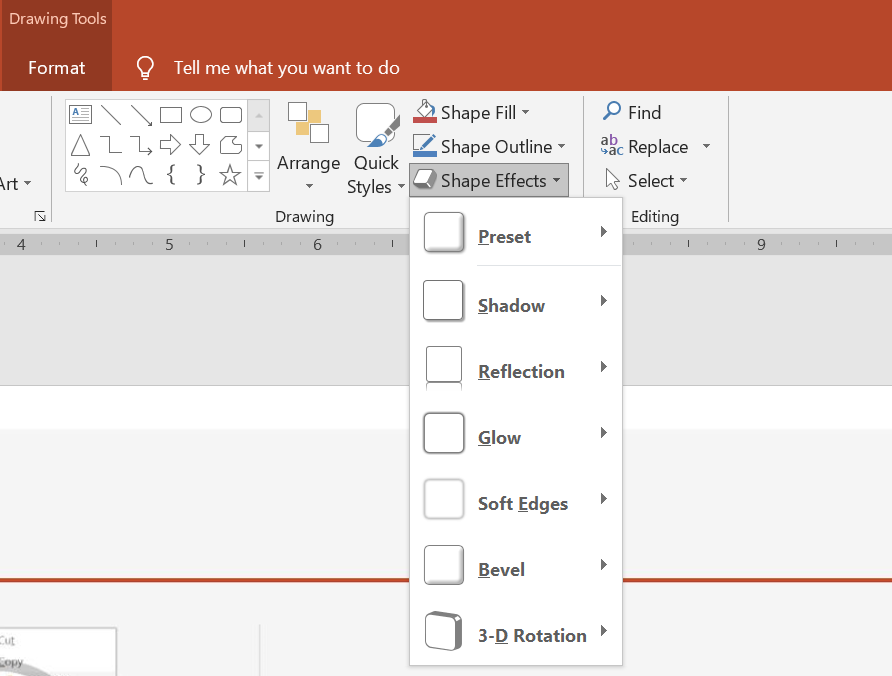 * PowerPoint provides six effects that can be applied to shapes. You can apply one or more effects to a shape.
* Some combinations of effects look better than others. For this reason, PowerPoint options under **Preset**. The Preset options are essentially a known good-looking combination of two or more effects. This way, by selecting a preset, you won't have to waste time testing or combining different effects to find a nice combination.
Aspose.Slides provides properties and methods under the [EffectFormat](https://reference.aspose.com/slides/cpp/class/aspose.slides.effect_format/) class that allow you to apply the same effects to shapes in PowerPoint presentations.
## **Apply a Shadow Effect**
This C++ code shows you how to apply the outer shadow effect ([OuterShadowEffect](https://reference.aspose.com/slides/cpp/class/aspose.slides.effect_format#aea1a48246d3240e29092498f648bc028)) to a rectangle:
```c++
#include
#include
#include
#include
#include
#include
#include
#include
#include
#include
#include
using namespace Aspose::Slides;
using namespace Aspose::Slides::Effects;
using namespace Aspose::Slides::Export;
using namespace System::Drawing;
auto pres = System::MakeObject();
auto slide = pres->get_Slides()->idx_get(0);
auto shape = slide->get_Shapes()->AddAutoShape(ShapeType::RoundCornerRectangle, 20.0f, 20.0f, 200.0f, 150.0f);
auto effectFormat = shape->get_EffectFormat();
effectFormat->EnableOuterShadowEffect();
auto outerShadowEffect = effectFormat->get_OuterShadowEffect();
outerShadowEffect->get_ShadowColor()->set_Color(System::Drawing::Color::get_DarkGray());
outerShadowEffect->set_Distance(10);
outerShadowEffect->set_Direction(45.0f);
pres->Save(u"output.pptx", SaveFormat::Pptx);
```
## **Apply a Reflection Effect**
This C++ code shows you how to apply the reflection effect to a shape:
```c++
#include
#include
#include
#include
#include
#include
#include
#include
#include
#include
using namespace Aspose::Slides;
using namespace Aspose::Slides::Effects;
using namespace Aspose::Slides::Export;
auto pres = System::MakeObject();
auto slide = pres->get_Slides()->idx_get(0);
auto shape = slide->get_Shapes()->AddAutoShape(ShapeType::RoundCornerRectangle, 20.0f, 20.0f, 200.0f, 150.0f);
auto effectFormat = shape->get_EffectFormat();
effectFormat->EnableReflectionEffect();
auto reflectionEffect = effectFormat->get_ReflectionEffect();
reflectionEffect->set_RectangleAlign(RectangleAlignment::Bottom);
reflectionEffect->set_Direction(90.0f);
reflectionEffect->set_Distance(55);
reflectionEffect->set_BlurRadius(4);
pres->Save(u"reflection.pptx", SaveFormat::Pptx);
```
## **Apply a Glow Effect**
This C++ code shows you how to apply the glow effect to a shape:
```c++
#include
#include
#include
#include
#include
#include
#include
#include
#include
#include
#include
using namespace Aspose::Slides;
using namespace Aspose::Slides::Effects;
using namespace Aspose::Slides::Export;
using namespace System::Drawing;
auto pres = System::MakeObject();
auto slide = pres->get_Slides()->idx_get(0);
auto shape = slide->get_Shapes()->AddAutoShape(ShapeType::RoundCornerRectangle, 20.0f, 20.0f, 200.0f, 150.0f);
auto effectFormat = shape->get_EffectFormat();
effectFormat->EnableGlowEffect();
auto glowEffect = effectFormat->get_GlowEffect();
glowEffect->get_Color()->set_Color(System::Drawing::Color::get_Magenta());
glowEffect->set_Radius(15);
pres->Save(u"glow.pptx", SaveFormat::Pptx);
```
## **Apply a Soft Edges Effect**
This C++ code shows you how to apply the soft edges to a shape:
```c++
#include
#include
#include
#include
#include
#include
#include
#include
#include
using namespace Aspose::Slides;
using namespace Aspose::Slides::Effects;
using namespace Aspose::Slides::Export;
auto pres = System::MakeObject();
auto slide = pres->get_Slides()->idx_get(0);
auto shape = slide->get_Shapes()->AddAutoShape(ShapeType::RoundCornerRectangle, 20.0f, 20.0f, 200.0f, 150.0f);
auto effectFormat = shape->get_EffectFormat();
effectFormat->EnableSoftEdgeEffect();
auto softEdgeEffect = effectFormat->get_SoftEdgeEffect();
softEdgeEffect->set_Radius(15);
pres->Save(u"softEdges.pptx", SaveFormat::Pptx);
```
## **FAQ**
### Can I apply multiple effects to the same shape?
Yes, you can combine different effects, such as shadow, reflection, and glow, on a single shape to create a more dynamic appearance.
### What shapes can I apply effects to?
You can apply effects to various shapes, including autoshapes, charts, tables, pictures, SmartArt objects, OLE objects, and more.
### Can I apply effects to grouped shapes?
Yes, you can apply effects to grouped shapes. The effect will apply to the entire group.
* PowerPoint provides six effects that can be applied to shapes. You can apply one or more effects to a shape.
* Some combinations of effects look better than others. For this reason, PowerPoint options under **Preset**. The Preset options are essentially a known good-looking combination of two or more effects. This way, by selecting a preset, you won't have to waste time testing or combining different effects to find a nice combination.
Aspose.Slides provides properties and methods under the [EffectFormat](https://reference.aspose.com/slides/cpp/class/aspose.slides.effect_format/) class that allow you to apply the same effects to shapes in PowerPoint presentations.
## **Apply a Shadow Effect**
This C++ code shows you how to apply the outer shadow effect ([OuterShadowEffect](https://reference.aspose.com/slides/cpp/class/aspose.slides.effect_format#aea1a48246d3240e29092498f648bc028)) to a rectangle:
```c++
#include
#include
#include
#include
#include
#include
#include
#include
#include
#include
#include
using namespace Aspose::Slides;
using namespace Aspose::Slides::Effects;
using namespace Aspose::Slides::Export;
using namespace System::Drawing;
auto pres = System::MakeObject();
auto slide = pres->get_Slides()->idx_get(0);
auto shape = slide->get_Shapes()->AddAutoShape(ShapeType::RoundCornerRectangle, 20.0f, 20.0f, 200.0f, 150.0f);
auto effectFormat = shape->get_EffectFormat();
effectFormat->EnableOuterShadowEffect();
auto outerShadowEffect = effectFormat->get_OuterShadowEffect();
outerShadowEffect->get_ShadowColor()->set_Color(System::Drawing::Color::get_DarkGray());
outerShadowEffect->set_Distance(10);
outerShadowEffect->set_Direction(45.0f);
pres->Save(u"output.pptx", SaveFormat::Pptx);
```
## **Apply a Reflection Effect**
This C++ code shows you how to apply the reflection effect to a shape:
```c++
#include
#include
#include
#include
#include
#include
#include
#include
#include
#include
using namespace Aspose::Slides;
using namespace Aspose::Slides::Effects;
using namespace Aspose::Slides::Export;
auto pres = System::MakeObject();
auto slide = pres->get_Slides()->idx_get(0);
auto shape = slide->get_Shapes()->AddAutoShape(ShapeType::RoundCornerRectangle, 20.0f, 20.0f, 200.0f, 150.0f);
auto effectFormat = shape->get_EffectFormat();
effectFormat->EnableReflectionEffect();
auto reflectionEffect = effectFormat->get_ReflectionEffect();
reflectionEffect->set_RectangleAlign(RectangleAlignment::Bottom);
reflectionEffect->set_Direction(90.0f);
reflectionEffect->set_Distance(55);
reflectionEffect->set_BlurRadius(4);
pres->Save(u"reflection.pptx", SaveFormat::Pptx);
```
## **Apply a Glow Effect**
This C++ code shows you how to apply the glow effect to a shape:
```c++
#include
#include
#include
#include
#include
#include
#include
#include
#include
#include
#include
using namespace Aspose::Slides;
using namespace Aspose::Slides::Effects;
using namespace Aspose::Slides::Export;
using namespace System::Drawing;
auto pres = System::MakeObject();
auto slide = pres->get_Slides()->idx_get(0);
auto shape = slide->get_Shapes()->AddAutoShape(ShapeType::RoundCornerRectangle, 20.0f, 20.0f, 200.0f, 150.0f);
auto effectFormat = shape->get_EffectFormat();
effectFormat->EnableGlowEffect();
auto glowEffect = effectFormat->get_GlowEffect();
glowEffect->get_Color()->set_Color(System::Drawing::Color::get_Magenta());
glowEffect->set_Radius(15);
pres->Save(u"glow.pptx", SaveFormat::Pptx);
```
## **Apply a Soft Edges Effect**
This C++ code shows you how to apply the soft edges to a shape:
```c++
#include
#include
#include
#include
#include
#include
#include
#include
#include
using namespace Aspose::Slides;
using namespace Aspose::Slides::Effects;
using namespace Aspose::Slides::Export;
auto pres = System::MakeObject();
auto slide = pres->get_Slides()->idx_get(0);
auto shape = slide->get_Shapes()->AddAutoShape(ShapeType::RoundCornerRectangle, 20.0f, 20.0f, 200.0f, 150.0f);
auto effectFormat = shape->get_EffectFormat();
effectFormat->EnableSoftEdgeEffect();
auto softEdgeEffect = effectFormat->get_SoftEdgeEffect();
softEdgeEffect->set_Radius(15);
pres->Save(u"softEdges.pptx", SaveFormat::Pptx);
```
## **FAQ**
### Can I apply multiple effects to the same shape?
Yes, you can combine different effects, such as shadow, reflection, and glow, on a single shape to create a more dynamic appearance.
### What shapes can I apply effects to?
You can apply effects to various shapes, including autoshapes, charts, tables, pictures, SmartArt objects, OLE objects, and more.
### Can I apply effects to grouped shapes?
Yes, you can apply effects to grouped shapes. The effect will apply to the entire group.