# Converter apresentações para HTML5 em PHP
> Exporte apresentações PowerPoint e OpenDocument para HTML5 responsivo com Aspose.Slides para PHP via Java. Preserve formatação, animações e interatividade.
Source: https://docs.aspose.com/slides/pt/php-java/export-to-html5/
Updated: 2026-06-10
## **Visão geral**
Este artigo explica como converter apresentações do PowerPoint para HTML5 usando Aspose.Slides. Ele aborda a exportação básica para HTML5 sem extensões web ou dependências adicionais, bem como opções para controlar animações de formas e transições de slides. O artigo também mostra o processo padrão de exportação de PowerPoint para HTML, explica como gerar saída HTML5 no modo de visualização de slides e demonstra como incluir comentários no documento exportado configurando seu layout.
## **Exportar PowerPoint para HTML5**
Este código PHP mostra como exportar uma apresentação para HTML5 sem extensões web e dependências:
```php
$pres = new Presentation("pres.pptx");
try {
$pres->save("pres.html", SaveFormat::Html5);
} finally {
if (!java_is_null($pres)) {
$pres->dispose();
}
}
```
{{% alert color="primary" %}}
Neste caso, você obtém HTML limpo.
{{% /alert %}}
Você pode querer especificar configurações para animações de formas e transições de slides desta forma:
```php
$pres = new Presentation("pres.pptx");
try {
$html5Options = new Html5Options();
$html5Options->setAnimateShapes(false);
$html5Options->setAnimateTransitions(false);
$pres->save("pres5.html", SaveFormat::Html5, $html5Options);
} finally {
if (!java_is_null($pres)) {
$pres->dispose();
}
}
```
## **Exportar PowerPoint para HTML**
Este Java demonstra o processo padrão de exportação de PowerPoint para HTML:
```php
$pres = new Presentation("pres.pptx");
try {
$pres->save("pres.html", SaveFormat::Html);
} finally {
if (!java_is_null($pres)) {
$pres->dispose();
}
}
```
Neste caso, o conteúdo da apresentação é renderizado através de SVG de forma semelhante a esta:
```html
```php
```
{{% alert title="Note" color="warning" %}}
When you use this method to export PowerPoint to HTML, due to the SVG rendering, you will not be to apply styles or animate specific elements.
{{% /alert %}}
## **Export PowerPoint to HTML5 Slide View**
**Aspose.Slides** allows you to convert a PowerPoint presentation to an HTML5 document in which the slides are presented in a slide view mode. In this case, when you open the resulting HTML5 file in a browser, you see the presentation in slide view mode on a web page.
This PHP code demonstrates the PowerPoint to HTML5 Slide View export process:
```php
$pres = new Presentation("pres.pptx");
try {
$html5Options = new Html5Options();
$html5Options->setAnimateShapes(true);
$html5Options->setAnimateTransitions(true);
$pres->save("HTML5-slide-view.html", SaveFormat::Html5, $html5Options);
} finally {
if (!java_is_null($pres)) {
$pres->dispose();
}
}
```
## **Convert Presentations to HTML5 Documents with Comments**
Comments in PowerPoint are a tool that allows users to leave notes or feedback on presentation slides. They are especially useful in collaborative projects, where multiple people can add their suggestions or remarks to specific slide elements without altering the main content. Each comment shows the author's name, making it easy to track who left the remark.
Let's say we have the following PowerPoint presentation saved in the "sample.pptx" file.
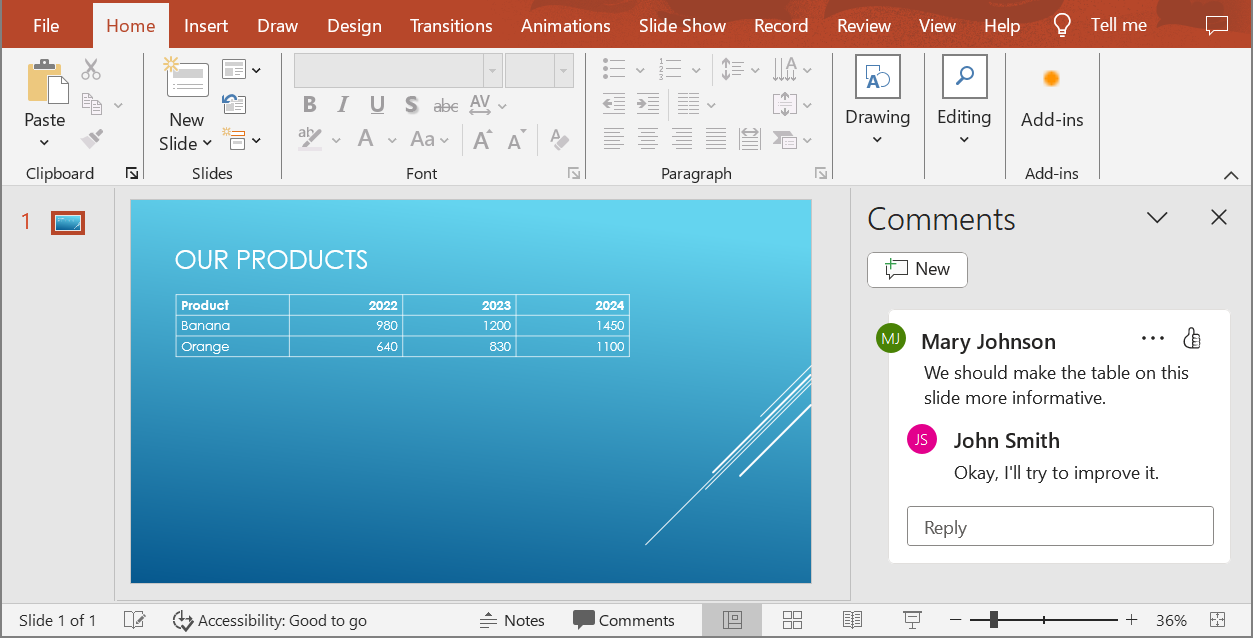
When you convert a PowerPoint presentation to an HTML5 document, you can easily specify whether to include comments from the presentation in the output document. To do this, you need to specify the display parameters for comments in the `getNotesCommentsLayouting` method of the `Html5Options` class.
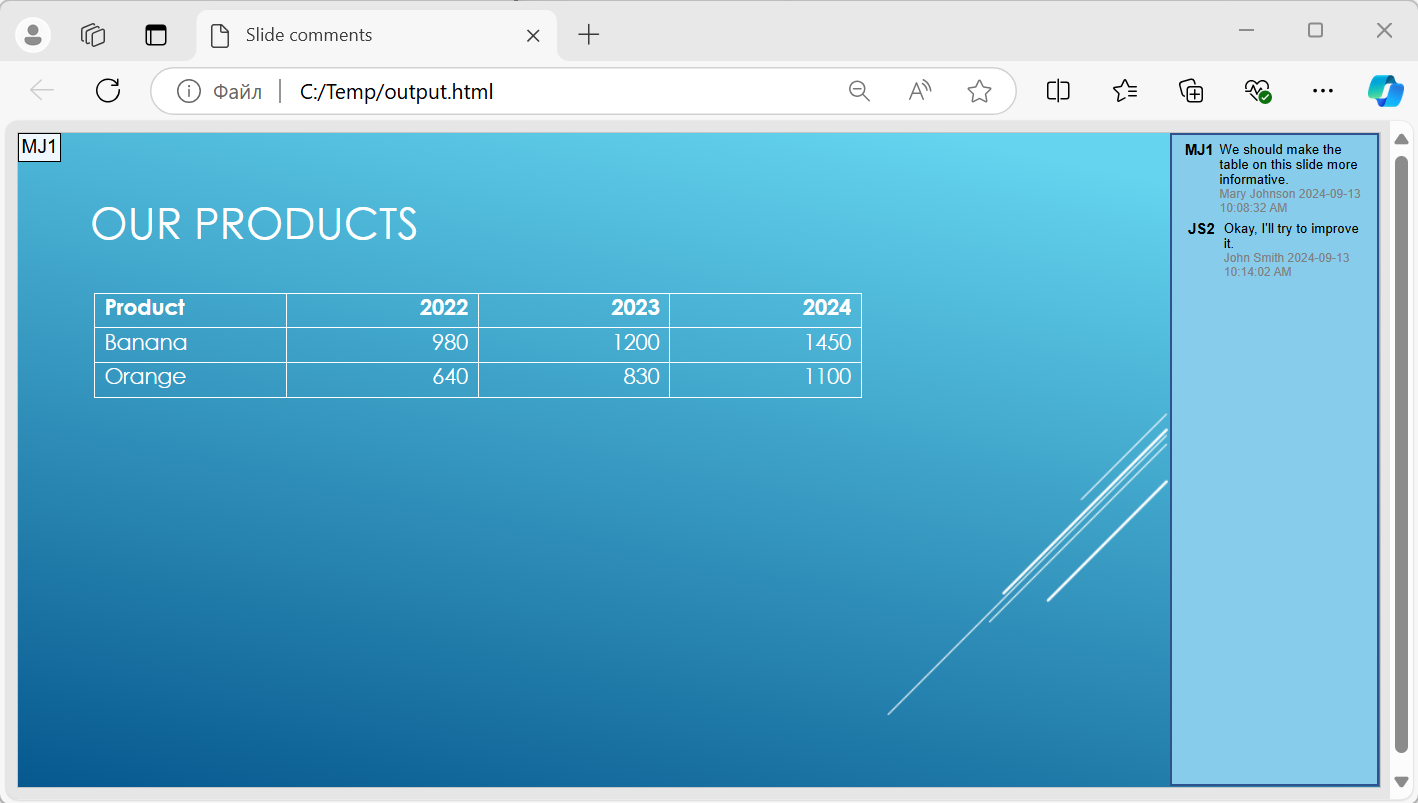
The following code example converts a presentation to an HTML5 document with comments displayed to the right of the slides.
```php
$html5Options = new Html5Options();
$html5Options->getNotesCommentsLayouting()->setCommentsPosition(CommentsPositions::Right);
$presentation = new Presentation("sample.pptx");
$presentation->save("output.html", SaveFormat::Html5, $html5Options);
$presentation->dispose();
```
O documento "output.html" é mostrado na imagem abaixo.
## **Perguntas frequentes**
**Posso controlar se animações de objetos e transições de slides serão reproduzidas em HTML5?**
Sim, o HTML5 oferece opções separadas para habilitar ou desabilitar [animações de formas](https://reference.aspose.com/slides/pt/php-java/aspose.slides/html5options/setanimateshapes/) e [transições de slides](https://reference.aspose.com/slides/pt/php-java/aspose.slides/html5options/setanimatetransitions/).
**O suporte à saída de comentários está disponível e onde eles podem ser posicionados em relação ao slide?**
Sim, comentários podem ser adicionados em HTML5 e posicionados (por exemplo, à direita do slide) através das [configurações de layout](https://reference.aspose.com/slides/pt/php-java/aspose.slides/html5options/#setSlidesLayoutOptions) de anotações e comentários.
**Posso ignorar links que invocam JavaScript por motivos de segurança ou CSP?**
Sim, existe uma [configuração](https://reference.aspose.com/slides/pt/php-java/aspose.slides/saveoptions/#setSkipJavaScriptLinks) que permite ignorar hiperlinks com chamadas JavaScript durante a gravação. Isso ajuda a cumprir políticas de segurança rigorosas.