# แปลงงานนำเสนอ PowerPoint เป็น HTML ด้วย C++
> แปลงงานนำเสนอ PowerPoint เป็น HTML ด้วย C++. ใช้ Aspose.Slides เพื่อส่งออกไฟล์ PPT และ PPTX, สไลด์ที่เลือก, หมายเหตุ, ฟอนต์, ภาพ, SVG และสื่อ.
Source: https://docs.aspose.com/slides/th/cpp/convert-powerpoint-to-html/
Updated: 2026-06-13
## **ภาพรวม**
Aspose.Slides for C++ สามารถบันทึกงานนำเสนอ PowerPoint เป็น HTML ได้โดยไม่ต้องใช้ Microsoft PowerPoint การแปลงพื้นฐานคือการโหลด [Presentation](https://reference.aspose.com/slides/th/cpp/aspose.slides/presentation/) หนึ่งครั้งและเรียก `Save` ด้วย [SaveFormat](https://reference.aspose.com/slides/th/cpp/aspose.slides.export/saveformat/)。เมื่อจำเป็นต้องควบคุมการจัดรูปแบบที่ส่งออก, ฟอนต์, ภาพ, หมายเหตุ, คอมเมนต์, ผลลัพธ์ SVG หรือทรัพยากรที่เชื่อมโยง ให้ใช้ [HtmlOptions](https://reference.aspose.com/slides/th/cpp/aspose.slides.export/htmloptions/)
คู่มือนี้มุ่งเน้นที่สถานการณ์การส่งออก HTML ที่ใช้งานได้จริง:
- ส่งออกงานนำเสนอทั้งหมดหรือสไลด์ที่เลือก
- สร้าง HTML แบบเลย์เอาต์คงที่, รองรับการตอบสนอง, หรืออิง SVG
- รวมหมายเหตุและคอมเมนต์ของผู้พูด
- ควบคุมคุณภาพของภาพและข้อมูลภาพที่ถูกตัด
- ฝังฟอนต์หรือบันทึกไฟล์ฟอนต์แยกต่างหาก
- เลือกวิธีการเขียนและอ้างอิงทรัพยากรและไฟล์สื่อภายนอก
โดยค่าเริ่มต้น การส่งออก HTML จะสร้างเอกสาร HTML ที่มีทรัพยากรฝังไว้ในตัว ทำให้แชร์ไฟล์เดียวได้ง่าย แต่ขนาดไฟล์อาจเพิ่มขึ้น สำหรับการเผยแพร่บนเว็บ ควรพิจารณาใช้ทรัพยากรภายนอก, ลด DPI ของภาพ, และฝังฟอนต์เฉพาะที่ไม่มีในสภาพแวดล้อมเป้าหมายเท่านั้น
## **แปลง Presentation เป็น HTML**
เพื่อส่งออกงานนำเสนอเป็น HTML ให้โหลดด้วย [Presentation](https://reference.aspose.com/slides/th/cpp/aspose.slides/presentation/) แล้วบันทึกด้วย `SaveFormat::Html`
```cpp
auto presentation = System::MakeObject(u"presentation.pptx");
presentation->Save(u"presentation.html", SaveFormat::Html);
presentation->Dispose();
```
ตัวอย่างนี้จะเขียนไฟล์ HTML หนึ่งไฟล์ การเรียก `Dispose` จะปลดปล่อยตัวจัดการไฟล์และทรัพยากรการเรนเดอร์หลังการส่งออก
## **ใช้ HtmlOptions**
[HtmlOptions](https://reference.aspose.com/slides/th/cpp/aspose.slides.export/htmloptions/) คือคลาสการกำหนดค่าหลักสำหรับการส่งออก HTML การตั้งค่าที่พบบ่อยประกอบด้วย:
- `SlidesLayoutOptions`: เพิ่มหมายเหตุ, คอมเมนต์, คู่มือพิมพ์หรือข้อมูลเลย์เอาต์อื่น
- `HtmlFormatter`: เปลี่ยนโครงสร้างเอกสาร HTML หรือมอบหมายการจัดรูปแบบให้กับคอนโทรลเลอร์
- `SlideImageFormat`: เปลี่ยนวิธีการแสดงสไลด์ เช่น เป็น SVG
- `PicturesCompression`: ควบคุม DPI ของภาพและขนาดผลลัพธ์
- `DeletePicturesCroppedAreas`: เก็บหรือเอาข้อมูลส่วนที่ถูกตัดของภาพออก
- `SvgResponsiveLayout`: ทำให้เนื้อหา SVG ที่ส่งออกปรับให้เข้ากับคอนเทนเนอร์
- `ShowHiddenSlides`: รวมสไลด์ที่ซ่อนเมื่อจำเป็น
ส่วนต่อไปนี้จะแสดงตัวเลือกที่ใช้บ่อยอย่างแยกกัน เพื่อให้คุณเลือกใช้เฉพาะที่ต้องการในเวิร์กโฟลว์ของคุณ
## **แปลงสไลด์ที่เลือกเป็น HTML**
การ overload `Presentation::Save` ที่รับหมายเลขสไลด์ใช้ตำแหน่งสไลด์ที่เริ่มจาก 1 วนลูปด้านล่างจะบันทึกแต่ละสไลด์เป็นไฟล์ HTML แยกไฟล์
```cpp
auto presentation = System::MakeObject(u"presentation.pptx");
auto slideCount = presentation->get_Slides()->get_Count();
for (int slideIndex = 0; slideIndex < slideCount; slideIndex++)
{
auto slideNumber = slideIndex + 1;
auto slideNumbers = System::MakeArray({ slideNumber });
auto htmlFileName = System::String::Format(u"slide-{0}.html", slideNumber);
presentation->Save(htmlFileName, slideNumbers, SaveFormat::Html);
}
presentation->Dispose();
```
ใช้รูปแบบนี้เมื่อเว็บไซต์หรือแอปพลิเคชันต้องการหนึ่งหน้า HTML ต่อสไลด์ หากสไลด์ทั้งหมดต้องการเลย์เอาต์เดียวกัน ให้สร้างอินสแตนซ์ของ [HtmlOptions](https://reference.aspose.com/slides/th/cpp/aspose.slides.export/htmloptions/) หนึ่งตัวและส่งต่อให้กับการเรียก `Save` แต่ละครั้ง
## **สร้าง Responsive HTML**
[ResponsiveHtmlController](https://reference.aspose.com/slides/th/cpp/aspose.slides.export/responsivehtmlcontroller/) ให้ผลลัพธ์ HTML ที่ตอบสนองผ่าน [HtmlFormatter](https://reference.aspose.com/slides/th/cpp/aspose.slides.export/htmlformatter/) ใช้มันเมื่อหน้าที่ส่งออกควรปรับให้เข้ากับความกว้างของเบราว์เซอร์
```cpp
auto presentation = System::MakeObject(u"presentation.pptx");
auto controller = System::MakeObject();
auto formatter = HtmlFormatter::CreateCustomFormatter(controller);
auto htmlOptions = System::MakeObject();
htmlOptions->set_HtmlFormatter(formatter);
presentation->Save(u"presentation-responsive.html", SaveFormat::Html, htmlOptions);
presentation->Dispose();
```
สำหรับเลย์เอาต์ที่ตอบสนองแบบอิง SVG ให้ตั้งค่า `SvgResponsiveLayout` บน [HtmlOptions](https://reference.aspose.com/slides/th/cpp/aspose.slides.export/htmloptions/) ซึ่งเป็นประโยชน์เมื่อเนื้อหาของสไลด์ถูกส่งออกเป็น markup SVG ที่ปรับขนาดได้
```cpp
auto presentation = System::MakeObject(u"presentation.pptx");
auto htmlOptions = System::MakeObject();
htmlOptions->set_SvgResponsiveLayout(true);
presentation->Save(u"presentation-svg-responsive.html", SaveFormat::Html, htmlOptions);
presentation->Dispose();
```
## **รวมหมายเหตุผู้พูดและคอมเมนต์**
ใช้ [NotesCommentsLayoutingOptions](https://reference.aspose.com/slides/th/cpp/aspose.slides.export/notescommentslayoutingoptions/) ผ่าน `HtmlOptions.SlidesLayoutOptions` เพื่อรวมหมายเหตุผู้พูดหรือคอมเมนต์ หมายเหตุและคอมเมนต์จะถูกซ่อนโดยค่าเริ่มต้นจนกว่าคุณจะกำหนดตำแหน่งของมัน
สมมติว่าภาพนำเสนอมีหมายเหตุผู้พูด:
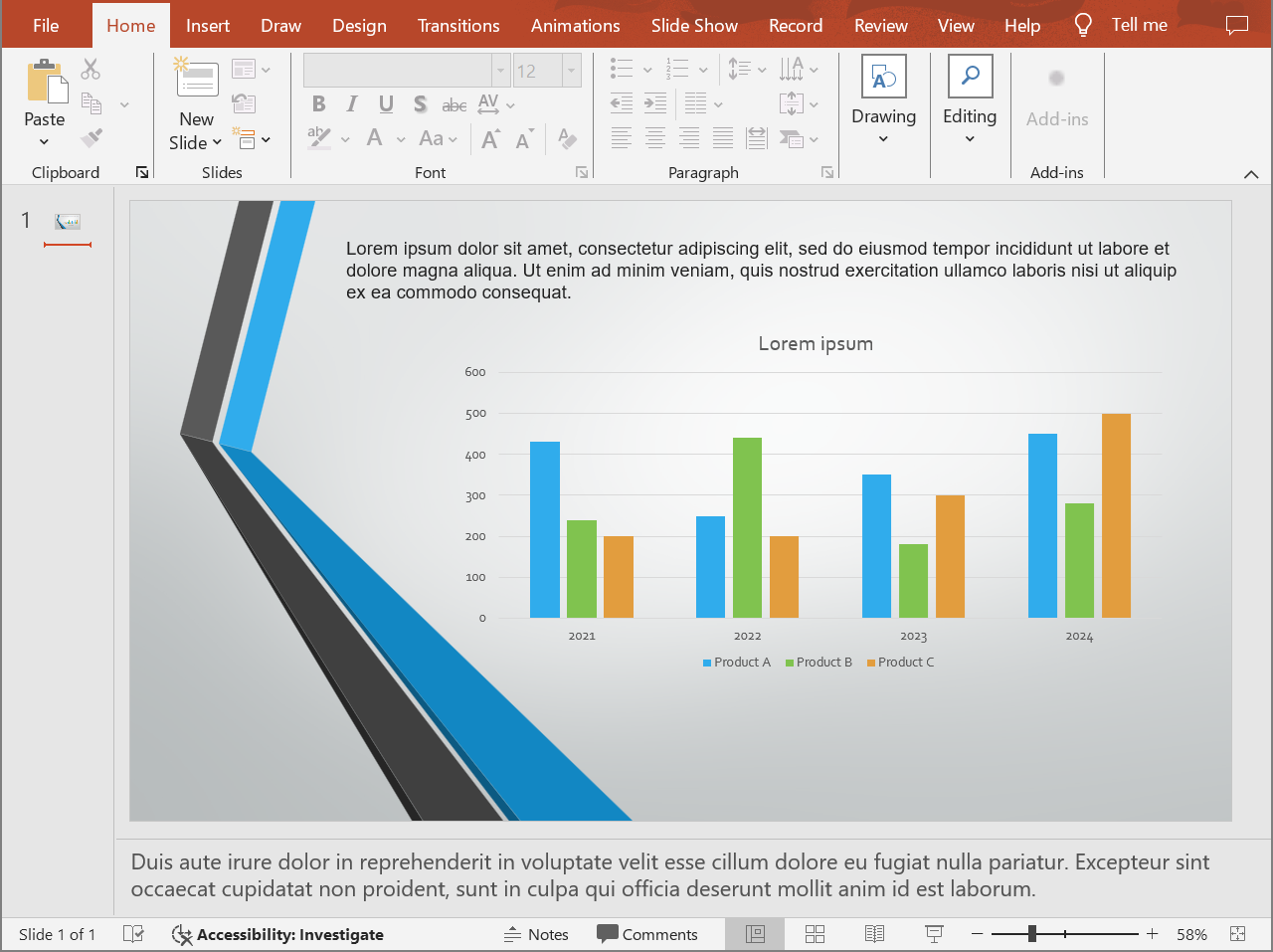
โค้ดต่อไปนี้ส่งออกเนื้อหาสไลด์พร้อมหมายเหตุผู้พูดด้านล่างสไลด์
```cpp
auto presentation = System::MakeObject(u"presentation.pptx");
auto layoutOptions = System::MakeObject();
layoutOptions->set_NotesPosition(NotesPositions::BottomFull);
auto htmlOptions = System::MakeObject();
htmlOptions->set_SlidesLayoutOptions(layoutOptions);
presentation->Save(u"presentation-with-notes.html", SaveFormat::Html, htmlOptions);
presentation->Dispose();
```
HTML ที่ส่งออกจะมีพื้นที่หมายเหตุแสดงดังนี้:
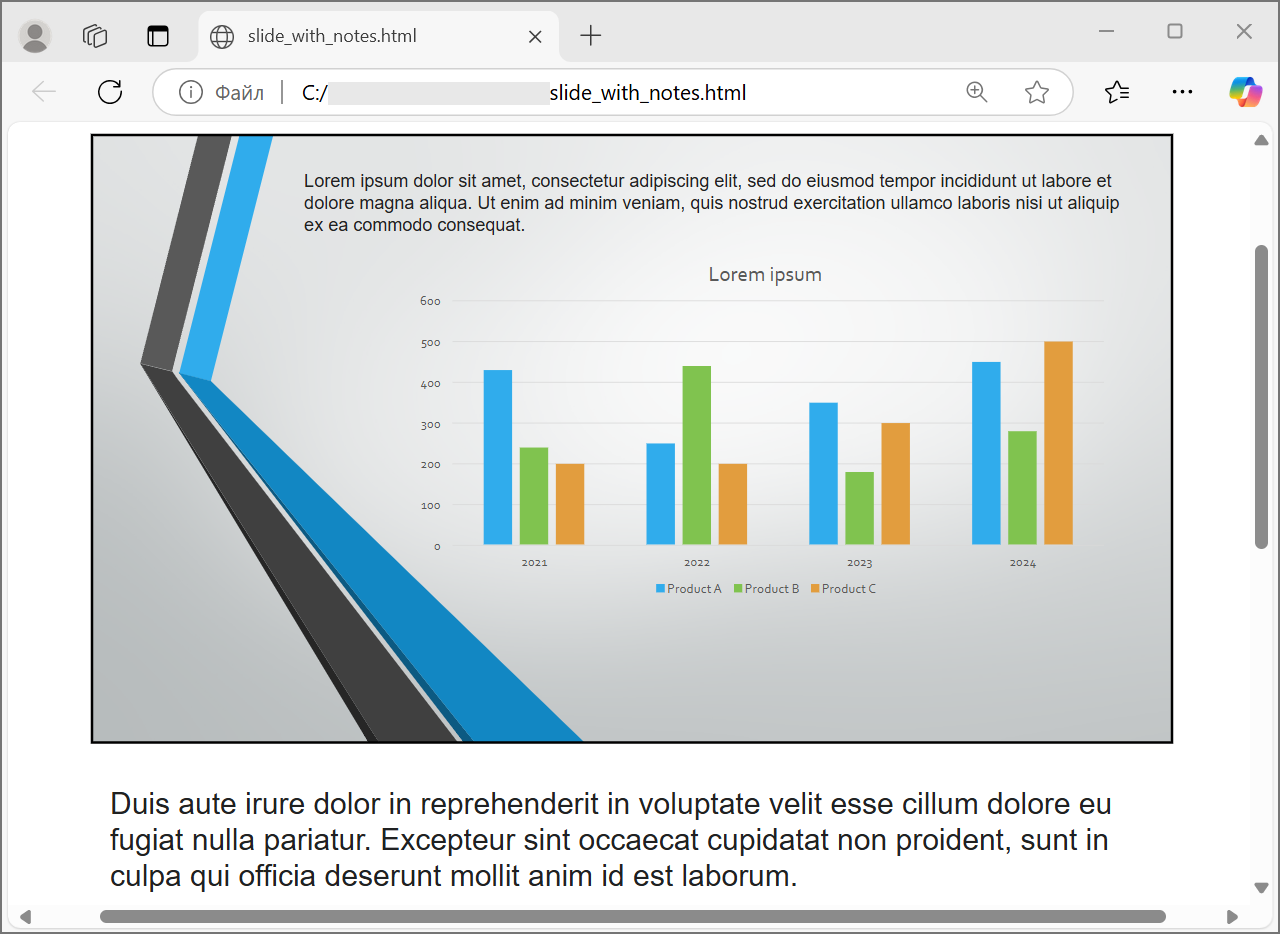
เพื่อส่งออกคอมเมนต์ ให้ตั้งค่า `CommentsPosition` เช่น `CommentsPositions::Right` หรือ `CommentsPositions::Bottom` หากต้องการคอมเมนต์เท่านั้นให้ละเว้น `NotesPosition` หากต้องการทั้งหมายเหตุและคอมเมนต์ให้ตั้งค่าทั้งสองคุณสมบัติ
## **ควบคุมคุณภาพภาพและส่วนที่ถูกตัด**
การส่งออก HTML สามารถบีบอัดภาพสไลด์เพื่อลดขนาดผลลัพธ์ได้ ตั้งค่า `PicturesCompression` ให้เป็นค่าจาก [PicturesCompression](https://reference.aspose.com/slides/th/cpp/aspose.slides.export/picturescompression/) เมื่อคุณต้องการคุณภาพภาพที่สูงขึ้น
```cpp
auto presentation = System::MakeObject(u"presentation.pptx");
auto htmlOptions = System::MakeObject();
htmlOptions->set_PicturesCompression(PicturesCompression::Dpi150);
presentation->Save(u"presentation-dpi-150.html", SaveFormat::Html, htmlOptions);
presentation->Dispose();
```
โดยค่าเริ่มต้น ส่วนที่ถูกตัดของภาพอาจถูกลบออกจากผลลัพธ์ที่ส่งออก เก็บข้อมูลส่วนที่ถูกตัดไว้เฉพาะเมื่อผู้ใช้ต้องการกู้คืนหรือตรวจสอบส่วนที่ซ่อนอยู่ของภาพ การเก็บไว้จะทำให้ขนาด HTML เพิ่มขึ้น
```cpp
auto presentation = System::MakeObject(u"presentation.pptx");
auto htmlOptions = System::MakeObject();
htmlOptions->set_DeletePicturesCroppedAreas(false);
presentation->Save(u"presentation-with-cropped-areas.html", SaveFormat::Html, htmlOptions);
presentation->Dispose();
```
## **เพิ่ม CSS**
สำหรับการสไตล์อย่างง่าย ให้ส่งสตริง CSS ไปยัง `HtmlFormatter::CreateDocumentFormatter` ซึ่งจะเปลี่ยนเอกสาร HTML รอบด้านในขณะที่ Aspose.Slides ยังคงเรนเดอร์เนื้อหาสไลด์
```cpp
auto presentation = System::MakeObject(u"presentation.pptx");
auto cssRules = u"body { margin: 0; background: #f7f7f7; } .slide { margin: 24px auto; }";
auto formatter = HtmlFormatter::CreateDocumentFormatter(cssRules, true);
auto htmlOptions = System::MakeObject();
htmlOptions->set_HtmlFormatter(formatter);
presentation->Save(u"presentation-styled.html", SaveFormat::Html, htmlOptions);
presentation->Dispose();
```
หากต้องการส่วนหัวของเอกสารแบบกำหนดเอง, ไฟล์ CSS เชื่อมโยง, หรือ markup ธรรมดาที่ล้อมรอบสไลด์และรูปร่าง ให้ทำการใช้งาน [IHtmlFormattingController](https://reference.aspose.com/slides/th/cpp/aspose.slides.export/ihtmlformattingcontroller/) แล้วส่งต่อให้กับ [HtmlFormatter](https://reference.aspose.com/slides/th/cpp/aspose.slides.export/htmlformatter/) ด้วย `CreateCustomFormatter`
## **ฝังฟอนต์**
หากสภาพแวดล้อมเป้าหมายอาจไม่มีฟอนต์ที่ใช้ในงานนำเสนอ ให้ฝังฟอนต์ใน HTML ด้วย [EmbedAllFontsHtmlController](https://reference.aspose.com/slides/th/cpp/aspose.slides.export/embedallfontshtmlcontroller/) การฝังฟอนต์ช่วยรักษาความเที่ยงตรงของการแสดงผลแต่เพิ่มขนาดไฟล์
```cpp
auto presentation = System::MakeObject(u"presentation.pptx");
auto fontNamesToExclude = System::MakeArray({ u"Arial" });
auto fontController = System::MakeObject(fontNamesToExclude);
auto formatter = HtmlFormatter::CreateCustomFormatter(fontController);
auto htmlOptions = System::MakeObject();
htmlOptions->set_HtmlFormatter(formatter);
presentation->Save(u"presentation-embedded-fonts.html", SaveFormat::Html, htmlOptions);
presentation->Dispose();
```
ให้ละเว้นฟอนต์เฉพาะเมื่อคุณมั่นใจว่าผู้ใช้มีฟอนต์เหล่านั้นในเบราว์เซอร์หรือระบบอยู่แล้ว ฟอนต์ของแบรนด์หรือฟอนต์ที่ไม่เป็นที่รู้จักทั่วไป ควรฝังเพื่อความปลอดภัย
## **ลิงก์ไฟล์ฟอนต์แทนการฝัง**
เพื่อลดขนาดไฟล์ HTML คุณสามารถบันทึกข้อมูลฟอนต์แยกเป็นไฟล์ WOFF แล้วเพิ่มกฎ `@font-face` ลงใน HTML ตัวช่วยด้านล่างขยาย [EmbedAllFontsHtmlController](https://reference.aspose.com/slides/th/cpp/aspose.slides.export/embedallfontshtmlcontroller/) และทำการ overriding `WriteFont`
```cpp
class LinkedFontsHtmlController : public EmbedAllFontsHtmlController
{
public:
LinkedFontsHtmlController(
System::String fontOutputDirectory,
System::String fontUrlPrefix)
: EmbedAllFontsHtmlController(System::MakeArray(0)),
m_fontOutputDirectory(fontOutputDirectory),
m_fontUrlPrefix(fontUrlPrefix.TrimEnd(u'/') + u"/")
{
System::IO::Directory::CreateDirectory_(m_fontOutputDirectory);
}
void WriteFont(
System::SharedPtr generator,
System::SharedPtr originalFont,
System::SharedPtr substitutedFont,
System::String fontStyle,
System::String fontWeight,
System::ArrayPtr fontData) override
{
auto font = substitutedFont == nullptr ? originalFont : substitutedFont;
auto safeFontName = MakeSafeFileName(font->get_FontName());
auto safeFontStyle = System::String::IsNullOrWhiteSpace(fontStyle) ? u"normal" : fontStyle;
auto safeFontWeight = System::String::IsNullOrWhiteSpace(fontWeight) ? u"normal" : fontWeight;
auto fontFileName = System::String::Format(u"{0}-{1}-{2}.woff", safeFontName, safeFontStyle, safeFontWeight);
auto fontFilePath = System::IO::Path::Combine(m_fontOutputDirectory, fontFileName);
System::IO::File::WriteAllBytes(fontFilePath, fontData);
auto fontUrl = m_fontUrlPrefix + System::Uri::EscapeDataString(fontFileName);
auto fontFamily = font->get_FontName().Replace(u"\\", u"\\\\").Replace(u"'", u"\\'");
generator->AddHtml(u"");
}
private:
System::String m_fontOutputDirectory;
System::String m_fontUrlPrefix;
System::String MakeSafeFileName(System::String fileName)
{
auto invalidCharacters = System::IO::Path::GetInvalidFileNameChars();
auto safeCharacters = fileName.ToCharArray();
for (int characterIndex = 0; characterIndex < safeCharacters->get_Length(); characterIndex++)
{
if (System::Array::IndexOf(invalidCharacters, safeCharacters[characterIndex]) >= 0)
{
safeCharacters[characterIndex] = u'_';
}
}
return System::String(safeCharacters);
}
};
auto outputDirectory = System::IO::Path::Combine(System::Environment::get_CurrentDirectory(), u"html-output");
auto fontsDirectory = System::IO::Path::Combine(outputDirectory, u"fonts");
System::IO::Directory::CreateDirectory_(outputDirectory);
auto presentation = System::MakeObject(u"presentation.pptx");
auto fontController = System::MakeObject(fontsDirectory, u"fonts");
auto formatter = HtmlFormatter::CreateCustomFormatter(fontController);
auto htmlOptions = System::MakeObject();
htmlOptions->set_HtmlFormatter(formatter);
auto htmlFilePath = System::IO::Path::Combine(outputDirectory, u"presentation.html");
presentation->Save(htmlFilePath, SaveFormat::Html, htmlOptions);
presentation->Dispose();
```
ในตัวอย่างนี้ไฟล์ฟอนต์จะถูกบันทึกลงใน `html-output/fonts` และ HTML จะอ้างอิงโดย URL เช่น `fonts/BrandFont-normal-400.woff` หากไฟล์ HTML และฟอนต์ถูกปรับใช้ในตำแหน่งอื่น ให้ตั้งค่า `fontUrlPrefix` ให้ตรงกับเส้นทาง URL ที่ปรับใช้
## **บันทึกทรัพยากรเป็นไฟล์ภายนอก**
HTML ที่บรรจุทรัพยากรทั้งหมดในไฟล์เดียวง่ายต่อการย้าย แต่ทรัพยากร Base64 ที่ฝังอยู่ทำให้ไฟล์ใหญ่ หากแอปพลิเคชันของคุณต้องการไฟล์รูปภาพแยก ให้ทำการใช้งาน [ILinkEmbedController](https://reference.aspose.com/slides/th/cpp/aspose.slides.export/ilinkembedcontroller/) แล้วส่งต่อให้กับคอนสตรักเตอร์ของ [HtmlOptions](https://reference.aspose.com/slides/th/cpp/aspose.slides.export/htmloptions/)
เมื่อทำให้ทรัพยากรเป็นภายนอก ควรกำหนดสองเส้นทางอย่างชัดเจน:
- เส้นทางระบบไฟล์ที่แอปพลิเคชันจะเขียนภาพ, ฟอนต์, audio หรือ video ที่สร้างขึ้น
- เส้นทาง URL ที่เบราว์เซอร์ใช้จากเอกสาร HTML เพื่อโหลดไฟล์เหล่านั้น
## **ส่งออกไฟล์สื่อ**
[VideoPlayerHtmlController](https://reference.aspose.com/slides/th/cpp/aspose.slides.export/videoplayerhtmlcontroller/) ส่งออกไฟล์วิดีโอและออดิโอ พร้อมเขียน HTML ที่สามารถเล่นสื่อเหล่านั้นในเบราว์เซอร์ ตัวคอนสตรักเตอร์รับค่า:
- `path`: โฟลเดอร์ที่ไฟล์สื่อที่สร้างจะถูกเขียน
- `fileName`: ชื่อไฟล์ HTML ที่กำลังสร้าง
- `baseUri`: ค่าพรีฟิกซ์ URI แบบ absolute ที่ใช้ในลิงก์ HTML ไปยังไฟล์สื่อ
หากไฟล์ HTML อยู่ที่ `html-output/presentation.html` และไฟล์สื่อบันทึกใน `html-output/media` `path` ควรชี้ไปยังโฟลเดอร์สื่อบนดิสก์ ส่วน `baseUri` ควรชี้ไปยังโฟลเดอร์เดียวกันจากมุมมองของเบราว์เซอร์ สำหรับการพรีวิวแบบโลคัล คุณสามารถสร้าง URI `file:///` จากโฟลเดอร์สื่อได้ สำหรับแอปที่ปรับใช้แล้ว ให้ใช้ URL absolute ของโฟลเดอร์สื่อที่เผยแพร่
```cpp
auto outputDirectory = System::IO::Path::Combine(System::Environment::get_CurrentDirectory(), u"html-output");
auto mediaDirectory = System::IO::Path::Combine(outputDirectory, u"media");
System::IO::Directory::CreateDirectory_(outputDirectory);
System::IO::Directory::CreateDirectory_(mediaDirectory);
auto htmlFileName = u"presentation.html";
auto mediaBaseUri = System::MakeObject(mediaDirectory + System::IO::Path::DirectorySeparatorChar)->get_AbsoluteUri();
auto presentation = System::MakeObject();
auto videoStream = System::MakeObject(u"intro.mp4", System::IO::FileMode::Open, System::IO::FileAccess::Read);
auto video = presentation->get_Videos()->AddVideo(videoStream, LoadingStreamBehavior::ReadStreamAndRelease);
auto slide = presentation->get_Slide(0);
slide->get_Shapes()->AddVideoFrame(20.0f, 20.0f, 480.0f, 270.0f, video);
auto controller = System::MakeObject(mediaDirectory, htmlFileName, mediaBaseUri);
auto formatter = HtmlFormatter::CreateCustomFormatter(controller);
auto svgOptions = System::MakeObject(controller);
auto slideImageFormat = SlideImageFormat::Svg(svgOptions);
auto htmlOptions = System::MakeObject(controller);
htmlOptions->set_HtmlFormatter(formatter);
htmlOptions->set_SlideImageFormat(slideImageFormat);
auto htmlFilePath = System::IO::Path::Combine(outputDirectory, htmlFileName);
presentation->Save(htmlFilePath, SaveFormat::Html, htmlOptions);
videoStream->Dispose();
presentation->Dispose();
```
ควรใช้ไดเรกทอรีผลลัพธ์ที่เป็นเอกลักษณ์ต่อแต่ละงานส่งออก โดยเฉพาะในแอปเซิร์ฟเวอร์ หากใช้ไดเรกทอรีร่วมกันอาจทำให้ไฟล์จากการแปลงต่าง ๆ เขียนทับกันได้
## **ประสิทธิภาพและการจัดการทรัพยากร**
การแปลงเป็น HTML เป็นกระบวนการเรนเดอร์ ดังนั้นเวลาในการประมวลผลและการใช้หน่วยความจำจะขึ้นกับจำนวนสไลด์, ความละเอียดของภาพ, ฟอนต์, เอฟเฟกต์, ชาร์ต และสื่อที่ฝังอยู่ ค่า DPI ของ `PicturesCompression` ที่สูงขึ้น, การฝังฟอนต์, ผลลัพธ์ SVG และการเก็บส่วนที่ถูกตัดของภาพจะเพิ่มความเที่ยงตรงแต่มักทำให้ขนาดไฟล์เพิ่มขึ้น
สำหรับการแปลงเป็นชุด:
- ให้ Dispose อินสแตนซ์ของ [Presentation](https://reference.aspose.com/slides/th/cpp/aspose.slides/presentation/) ทุกครั้งโดยเร็ว
- ใช้ไดเรกทอรีผลลัพธ์แยกสำหรับแต่ละงาน
- อย่าฝังฟอนต์ที่เป็นที่ใช้ทั่วไปจนกว่าจะต้องการความเที่ยงตรงสูง
- ลด DPI ของภาพเมื่อ HTML ใช้สำหรับพรีวิวหรือรูปย่อ
- เก็บงานนำเสนอต้นฉบับ, HTML ที่สร้างและทรัพยากรภายนอกไว้ด้วยกันจนกว่าจะกำหนดเส้นทางการปรับใช้ขั้นสุดท้าย
## **FAQ**
**ลิงก์ใน HTML ถูกเก็บรักษาไว้หรือไม่?**
ใช่ ลิงก์ในงานนำเสนอจะถูกส่งออกเป็น HTML และยังคลิกได้เมื่อ URL เป้าหมายถูกต้อง
**ฉันสามารถแปลงงานนำเสนอเป็น HTML แบบขนานได้หรือไม่?**
ได้ แต่ห้ามแชร์อินสแตนซ์ของ [Presentation](https://reference.aspose.com/slides/th/cpp/aspose.slides/presentation/) ระหว่างเธรด การประมวลผลไฟล์ต่าง ๆ ควรทำด้วยอินสแตนซ์แยก, สตรีมแยก, และไดเรกทอรีผลลัพธ์แยก ดูคำแนะนำเกี่ยวกับ [multithreading guidance](/slides/th/cpp/multithreading/) สำหรับรายละเอียด
**อ็อบเจกต์ Presentation ปลอดภัยต่อเธรดหรือไม่?**
ไม่ อินสแตนซ์ของ [Presentation](https://reference.aspose.com/slides/th/cpp/aspose.slides/presentation/) ควรโหลด, แก้ไข, บันทึกและ Dispose บนเธรดเดียว สำหรับงานแบบขนานให้สร้างอินสแตนซ์แยกสำหรับแต่ละเธรดหรือแต่ละกระบวนการ
**ทำไมไฟล์ HTML ที่สร้างออกมามีขนาดใหญ่?**
การส่งออกค่าเริ่มต้นจะฝังทรัพยากรไว้ใน HTML โดยตรง ฟอนต์ที่ฝัง, ภาพ DPI สูง, สื่อ, เนื้อหา SVG และการเก็บส่วนที่ถูกตัดของภาพทั้งหมดทำให้ขนาดเพิ่มขึ้น ให้ใช้ทรัพยากรภายนอก, ไม่ฝังฟอนต์ทั่วไป, และลด `PicturesCompression` เมื่อขนาดไฟล์สำคัญกว่าความเที่ยงตรงสูงสุด
**ทำไมขนาดฟอนต์ใน PowerPoint เช่น 24 pt ถึงแสดงเป็น 17.999819 pt ใน HTML?**
เนื่องจาก PowerPoint และ HTML ใช้โมเดล DPI ที่ต่างกัน PowerPoint เก็บขนาดตัวอักษรเป็นจุดตาม 72 DPI ส่วนการจัดวางของ HTML ใช้พิกเซล CSS ในโมเดล 96 DPI เมื่อ Aspose.Slides ส่งออกเป็น HTML การแปลงขนาดฟอนต์ระหว่างระบบเหล่านี้อาจทำให้เกิดการปัดเศษเล็กน้อย ค่านี้ไม่หมายถึงการเปลี่ยนแปลงขนาดฟอนต์จริง ๆ แต่เป็นผลลัพธ์ทางคณิตศาสตร์จากการแปลงเมตริกซ์ข้อความระหว่าง PowerPoint และ HTML
**ควรเลือก baseUri สำหรับการส่งออกสื่ออย่างไร?**
ตั้งค่า `baseUri` ให้เป็น URI แบบ absolute จากมุมมองของเบราว์เซอร์และส่งเป็นค่า absolute URI สำหรับการพรีวิวแบบโลคัล คุณอาจสร้างจากไดเรกทอรีผลลัพธ์ด้วย `System::MakeObject(mediaDirectory + System::IO::Path::DirectorySeparatorChar)->get_AbsoluteUri()` สำหรับการปรับใช้ ให้ใช้ URL absolute ของโฟลเดอร์สื่อที่เผยแพร่ เส้นทางระบบไฟล์ `path` และ `baseUri` ของเบราว์เซอร์ไม่จำเป็นต้องเป็นสตริงเดียวกัน แต่ต้องอธิบายตำแหน่งของทรัพยากรเดียวกัน
**ฉันสามารถรวมสไลด์ที่ซ่อนไว้ได้หรือไม่?**
ได้ ตั้งค่า `ShowHiddenSlides` เป็น `true` บน [HtmlOptions](https://reference.aspose.com/slides/th/cpp/aspose.slides.export/htmloptions/) เมื่อสไลด์ที่ซ่อนต้องถูกส่งออก