# วิธีการรันตัวอย่าง
> เรียกใช้ตัวอย่าง Aspose.Slides สำหรับ PHP ผ่าน Java อย่างรวดเร็ว: คัดลอกรีโพซิทอรี, ดึงแพ็กเกจ, จากนั้นสร้างและทดสอบฟีเจอร์สำหรับ PPT, PPTX และ ODP.
Source: https://docs.aspose.com/slides/th/php-java/how-to-run-the-examples/
Updated: 2026-06-13
## **ดาวน์โหลดจาก GitHub**
ตัวอย่างทั้งหมดของ Aspose.Slides สำหรับ PHP ผ่าน Java ถูกโฮสต์บน [Github](https://github.com/aspose-slides/Aspose.Slides-for-Java). คุณสามารถโคลน repository ด้วยไคลเอนต์ Github ที่คุณชื่นชอบหรือดาวน์โหลดไฟล์ ZIP จาก [ที่นี่](https://codeload.github.com/aspose-slides/Aspose.Slides-for-Java/zip/master)。
Extract the contents of ZIP file to any folder on your computer. All examples are located in the **Examples** folder.

## **นำเข้าตัวอย่างเข้าสู่ IDE**
โครงการนี้ใช้ระบบสร้าง Maven IDE สมัยใหม่ใดก็สามารถเปิดหรือ import โครงการและ dependency ได้อย่างง่ายดาย ด้านล่างเราจะแสดงวิธีใช้ IDE ที่ได้รับความนิยมเพื่อสร้างและรันตัวอย่าง
### **IntelliJ IDEA**
Click on the **File** menu and choose **Open**. Browse to the project folder and select the **pom.xml** file.
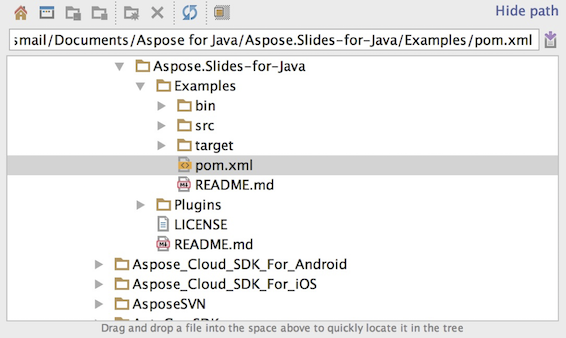
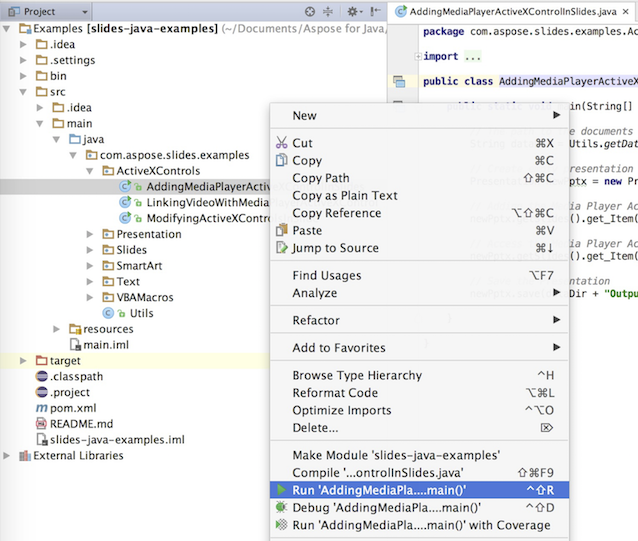
It will open the project and download the dependencies automatically. From the Project tab, browse the examples in **src/main/java** folder. To run an example, just right click on the file and choose "Run ..", the example will be executed and the output will be shown in the built in console output window.
### **Eclipse**
Click on **File** menu and choose **Import**. Select **Maven** - Existing Maven Projects.
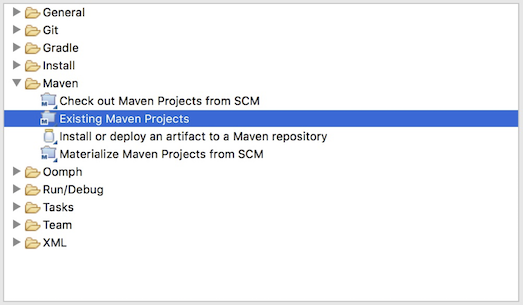
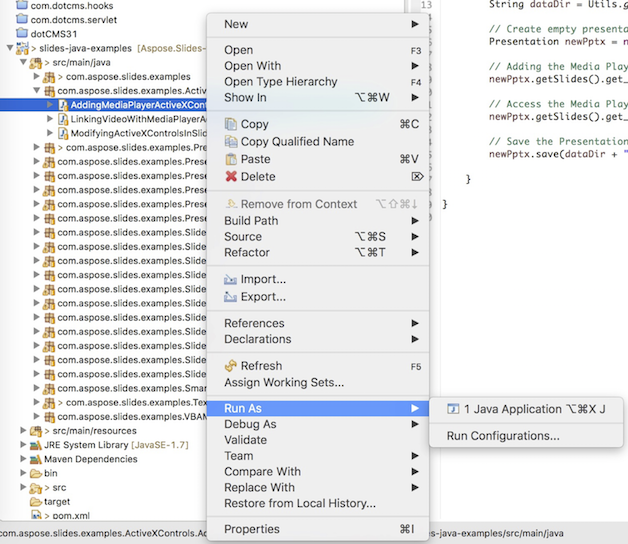
Browse to the folder that you cloned or downloaded from GitHub and select **pom.xml** file. It will open the project and download the dependencies automatically. From the Package Explorer tab, browse the examples in **src/main/java** folder. To run an example, just right click on the file and choose **Run As** - **Java Application**, the example will be executed and the output will be shown in the built in console output window.
### **NetBeans**
Click on the **File** menu and choose **Open Project**. Browse to the folder that you cloned or downloaded from GitHub. The icon of **Examples** folder will show that its a Maven project. Select Examples and open it.
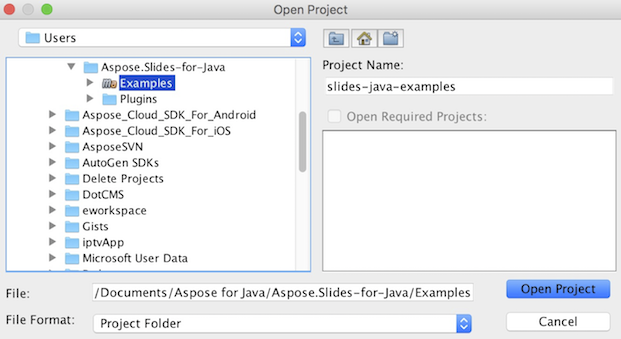
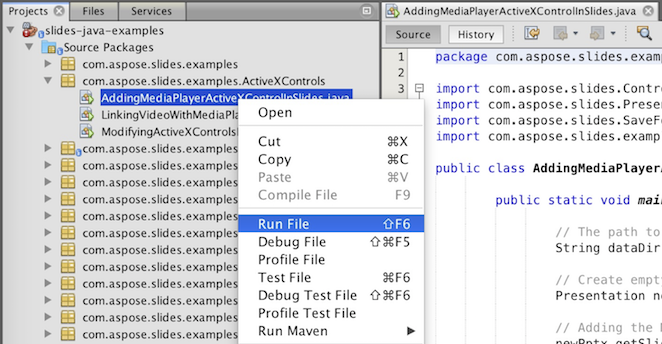
It will open the project and download the dependencies automatically. From the Projects tab, browse the examples in **source packages**. To run an example, just right click on the file and choose **Run File**, the example will be executed and the output will be shown in the built in console output window.
## **เพิ่มไลบรารี Aspose.Slides ลงใน Maven Local Repository**
When you import **Aspose.Slides Examples** project into IDE, Maven automatically downloads aspose.slides JAR file from [Aspose Maven Repository](https://releases.aspose.com/php-java/repo/com/aspose/). In case you do not have access to internet, you can manually add JAR in your local repository.
### **mvn install**
Download the [aspose.slides](https://releases.aspose.com/php-java/repo/com/aspose/aspose-slides/), extract it and copy the aspose.slides-version.jar to somewhere else, for example, c drive. Issue following command:
```php
```
mvn install:install-file
- Dfile=c:\aspose.slides-version.jar
- DgroupId=com.aspose
- DartifactId=aspose-slides
- Dversion={version}
- Dpackaging=jar
```php
```
Now, the **aspose.slides** jar is copied to your Maven local repository.
### **pom.xml**
After installed, just declares the **aspose.slides** coordinate in pom.xml. Add following repository in repositories tab and dependency in dependencies tab.
``` xml
aspose-maven-repository
http://repository.aspose.com/repo/
com.aspose
aspose-slides
18.6
jdk16
```php
### **เสร็จสิ้น**
Build it, now the **aspose.slides** jar is able to retrieve from your Maven local repository.
## **ร่วมพัฒนา**
หากคุณต้องการเพิ่มหรือปรับปรุงตัวอย่าง เราแนะนำให้คุณร่วมทำกับโครงการนี้ ตัวอย่างและโครงการแสดงผลทั้งหมดใน repository นี้เป็นโอเพ่นซอร์สและสามารถใช้ได้อย่างอิสระในแอปพลิเคชันของคุณ
To contribute, you can fork the repository, edit the source code and can submit a Pull Request. We will review the changes and include it in the repository if found helpful.