# 使用 C++ 將 PowerPoint 簡報轉換為 HTML
> 使用 C++ 將 PowerPoint 簡報轉換為 HTML。使用 Aspose.Slides 匯出 PPT 與 PPTX 檔案、選取的投影片、備註、字型、圖像、SVG 與媒體。
Source: https://docs.aspose.com/slides/zh-hant/cpp/convert-powerpoint-to-html/
## **概覽**
Aspose.Slides for C++ 可以在不使用 Microsoft PowerPoint 的情況下將 PowerPoint 簡報儲存為 HTML。基本的轉換只需要載入一個 [Presentation](https://reference.aspose.com/slides/zh-hant/cpp/aspose.slides/presentation/) 並使用 `Save` 呼叫搭配 [SaveFormat](https://reference.aspose.com/slides/zh-hant/cpp/aspose.slides.export/saveformat/)。當需要控制匯出佈局、字型、圖像、備註、評論、SVG 輸出或連結資源時,請使用 [HtmlOptions](https://reference.aspose.com/slides/zh-hant/cpp/aspose.slides.export/htmloptions/)。
本指南聚焦於實用的 HTML 匯出情境:
- 匯出整個簡報或選取的投影片。
- 產生固定版面、回應式或基於 SVG 的 HTML。
- 包含講者備註與評論。
- 控制圖像品質和裁剪圖像資料。
- 嵌入字型或分別儲存字型檔案。
- 選擇外部資源與媒體檔案的寫入與參考方式。
預設情況下,HTML 匯出會產生一個自包含的 HTML 文件,將大部分資源嵌入其中。這對於分享單一檔案很方便,但會導致檔案大小增大。若要在網路上發布,請考慮使用外部資源、降低圖像 DPI,並且僅嵌入在目標環境中不一定可取得的字型。
## **將簡報轉換為 HTML**
若要將簡報匯出為 HTML,請使用 [Presentation](https://reference.aspose.com/slides/zh-hant/cpp/aspose.slides/presentation/) 載入,並以 `SaveFormat::Html` 儲存。
```cpp
auto presentation = System::MakeObject(u"presentation.pptx");
presentation->Save(u"presentation.html", SaveFormat::Html);
presentation->Dispose();
```
此範例會寫入一個 HTML 檔案。呼叫 `Dispose` 會在匯出後釋放檔案句柄與渲染資源。
## **使用 HtmlOptions**
[HtmlOptions](https://reference.aspose.com/slides/zh-hant/cpp/aspose.slides.export/htmloptions/) 是 HTML 匯出的主要設定類別。常見設定包括:
- `SlidesLayoutOptions`:加入備註、評論、講義或其他版面資訊。
- `HtmlFormatter`:變更 HTML 文件結構或委派格式化給控制器。
- `SlideImageFormat`:變更投影片的呈現方式,例如以 SVG。
- `PicturesCompression`:控制圖像 DPI 與輸出大小。
- `DeletePicturesCroppedAreas`:保留或移除裁剪的圖像資料。
- `SvgResponsiveLayout`:使匯出的 SVG 內容自動適應其容器。
- `ShowHiddenSlides`:在需要時包含隱藏投影片。
以下章節分別說明最常用的選項,讓您僅結合工作流程所需的項目。
## **將選取的投影片轉換為 HTML**
`Presentation::Save` 的重載接受投影片編號,使用 1 為基礎的投影片位置。以下迴圈將每張投影片另存為獨立的 HTML 檔案。
```cpp
auto presentation = System::MakeObject(u"presentation.pptx");
auto slideCount = presentation->get_Slides()->get_Count();
for (int slideIndex = 0; slideIndex < slideCount; slideIndex++)
{
auto slideNumber = slideIndex + 1;
auto slideNumbers = System::MakeArray({ slideNumber });
auto htmlFileName = System::String::Format(u"slide-{0}.html", slideNumber);
presentation->Save(htmlFileName, slideNumbers, SaveFormat::Html);
}
presentation->Dispose();
```
當網站或應用程式需要每張投影片對應一個 HTML 頁面時,請使用此模式。若每張投影片使用相同的版面,請建立一個 [HtmlOptions](https://reference.aspose.com/slides/zh-hant/cpp/aspose.slides.export/htmloptions/) 實例並在每次 `Save` 呼叫時傳入。
## **建立回應式 HTML**
[ResponsiveHtmlController](https://reference.aspose.com/slides/zh-hant/cpp/aspose.slides.export/responsivehtmlcontroller/) 透過 [HtmlFormatter](https://reference.aspose.com/slides/zh-hant/cpp/aspose.slides.export/htmlformatter/) 提供回應式 HTML 輸出。當匯出頁面需要更好地適應瀏覽器寬度時,請使用它。
```cpp
auto presentation = System::MakeObject(u"presentation.pptx");
auto controller = System::MakeObject();
auto formatter = HtmlFormatter::CreateCustomFormatter(controller);
auto htmlOptions = System::MakeObject();
htmlOptions->set_HtmlFormatter(formatter);
presentation->Save(u"presentation-responsive.html", SaveFormat::Html, htmlOptions);
presentation->Dispose();
```
若需基於 SVG 的回應式版面,請在 [HtmlOptions](https://reference.aspose.com/slides/zh-hant/cpp/aspose.slides.export/htmloptions/) 上設定 `SvgResponsiveLayout`。當投影片內容匯出為可縮放的 SVG 標記時,此設定很有用。
```cpp
auto presentation = System::MakeObject(u"presentation.pptx");
auto htmlOptions = System::MakeObject();
htmlOptions->set_SvgResponsiveLayout(true);
presentation->Save(u"presentation-svg-responsive.html", SaveFormat::Html, htmlOptions);
presentation->Dispose();
```
## **包含講者備註與評論**
透過 `HtmlOptions.SlidesLayoutOptions` 使用 [NotesCommentsLayoutingOptions](https://reference.aspose.com/slides/zh-hant/cpp/aspose.slides.export/notescommentslayoutingoptions/) 以加入講者備註或評論。備註與評論預設為隱藏,除非您指定它們的位置。
假設來源簡報包含講者備註:
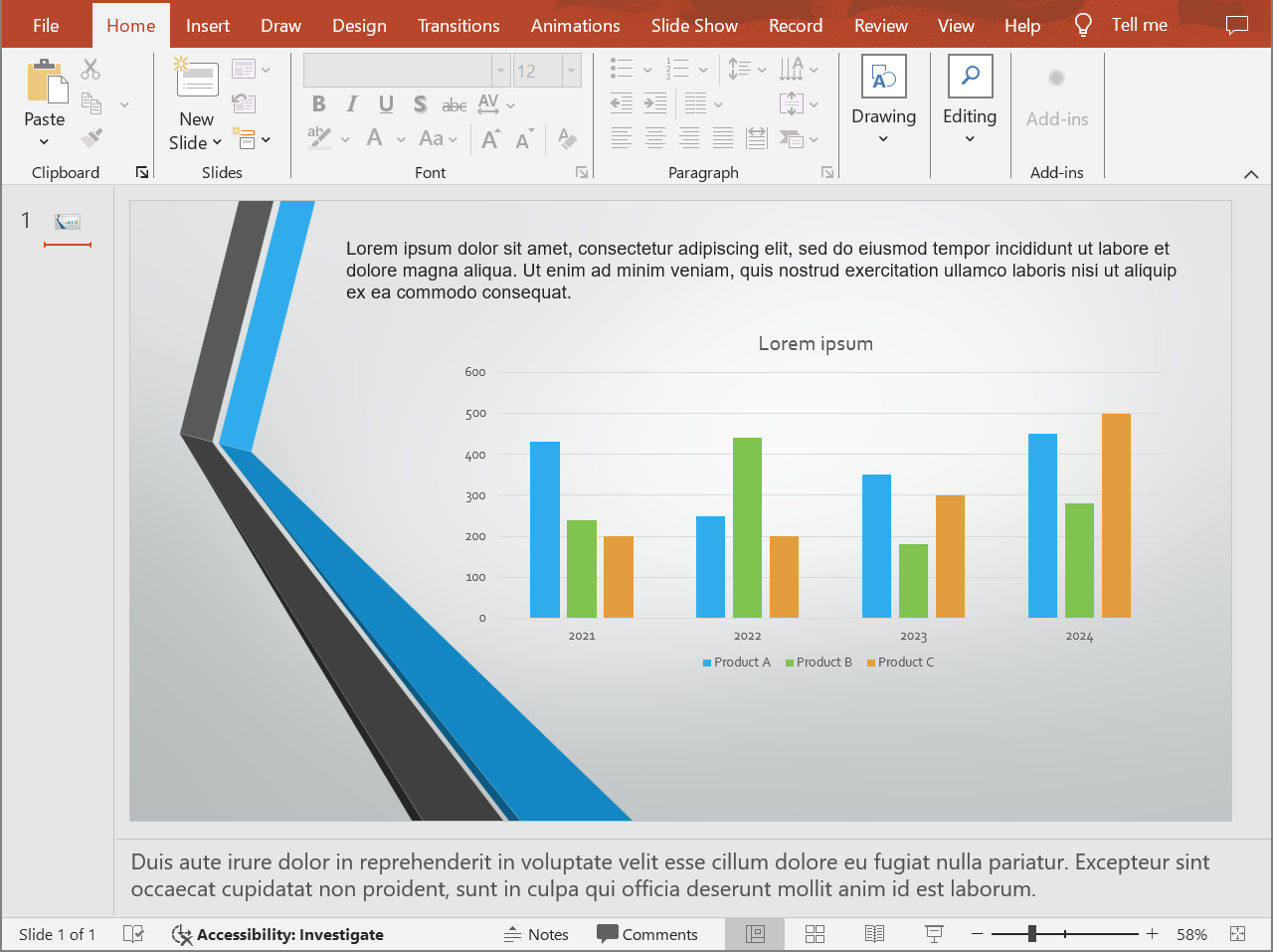
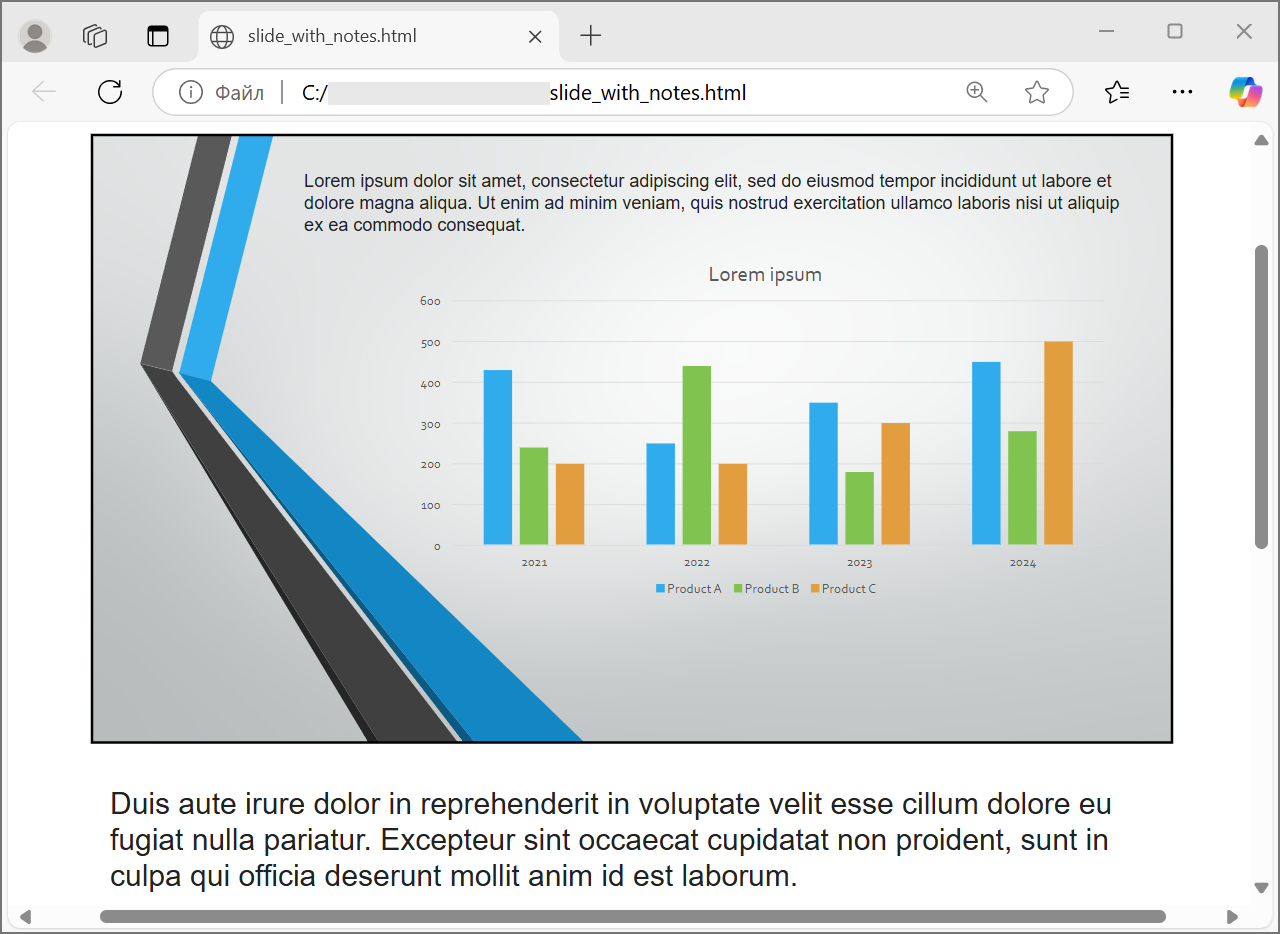
以下程式碼將投影片內容與講者備註(位於投影片下方)一起匯出。
```cpp
auto presentation = System::MakeObject(u"presentation.pptx");
auto layoutOptions = System::MakeObject();
layoutOptions->set_NotesPosition(NotesPositions::BottomFull);
auto htmlOptions = System::MakeObject();
htmlOptions->set_SlidesLayoutOptions(layoutOptions);
presentation->Save(u"presentation-with-notes.html", SaveFormat::Html, htmlOptions);
presentation->Dispose();
```
匯出的 HTML 包含備註區域:
若要匯出評論,請設定 `CommentsPosition`,例如 `CommentsPositions::Right` 或 `CommentsPositions::Bottom`。只需要評論時,省略 `NotesPosition`。若同時需要備註與評論,則兩個屬性皆設定。
## **控制圖像品質與裁剪區域**
HTML 匯出可以壓縮投影片圖像以減少輸出大小。當需要更高圖像品質時,將 `PicturesCompression` 設為來自 [PicturesCompression](https://reference.aspose.com/slides/zh-hant/cpp/aspose.slides.export/picturescompression/) 的值。
```cpp
auto presentation = System::MakeObject(u"presentation.pptx");
auto htmlOptions = System::MakeObject();
htmlOptions->set_PicturesCompression(PicturesCompression::Dpi150);
presentation->Save(u"presentation-dpi-150.html", SaveFormat::Html, htmlOptions);
presentation->Dispose();
```
預設情況下,圖像的裁剪區域可能會從匯出結果中移除。只有在使用者必須能夠還原或檢視這些隱藏圖像部分時才保留裁剪資料。保留它會增加 HTML 大小。
```cpp
auto presentation = System::MakeObject(u"presentation.pptx");
auto htmlOptions = System::MakeObject();
htmlOptions->set_DeletePicturesCroppedAreas(false);
presentation->Save(u"presentation-with-cropped-areas.html", SaveFormat::Html, htmlOptions);
presentation->Dispose();
```
## **新增 CSS**
若要進行簡易樣式設定,將 CSS 字串傳遞給 `HtmlFormatter::CreateDocumentFormatter`。這會變更外層 HTML 文件,同時 Aspose.Slides 繼續渲染投影片內容。
```cpp
auto presentation = System::MakeObject(u"presentation.pptx");
auto cssRules = u"body { margin: 0; background: #f7f7f7; } .slide { margin: 24px auto; }";
auto formatter = HtmlFormatter::CreateDocumentFormatter(cssRules, true);
auto htmlOptions = System::MakeObject();
htmlOptions->set_HtmlFormatter(formatter);
presentation->Save(u"presentation-styled.html", SaveFormat::Html, htmlOptions);
presentation->Dispose();
```
若需自訂文件標頭、連結的 CSS 檔案,或投影片與圖形周圍的自訂標記,請實作 [IHtmlFormattingController](https://reference.aspose.com/slides/zh-hant/cpp/aspose.slides.export/ihtmlformattingcontroller/) 並以 `CreateCustomFormatter` 傳遞給 [HtmlFormatter](https://reference.aspose.com/slides/zh-hant/cpp/aspose.slides.export/htmlformatter/)。
## **嵌入字型**
如果目標環境可能未安裝簡報所使用的字型,請使用 [EmbedAllFontsHtmlController](https://reference.aspose.com/slides/zh-hant/cpp/aspose.slides.export/embedallfontshtmlcontroller/) 在 HTML 中嵌入字型。嵌入可提升視覺相似度,但會增加輸出大小。
```cpp
auto presentation = System::MakeObject(u"presentation.pptx");
auto fontNamesToExclude = System::MakeArray({ u"Arial" });
auto fontController = System::MakeObject(fontNamesToExclude);
auto formatter = HtmlFormatter::CreateCustomFormatter(fontController);
auto htmlOptions = System::MakeObject();
htmlOptions->set_HtmlFormatter(formatter);
presentation->Save(u"presentation-embedded-fonts.html", SaveFormat::Html, htmlOptions);
presentation->Dispose();
```
僅在確信目標瀏覽器或系統已提供該字型時才排除嵌入。對於品牌字型或較不常見的字型,嵌入通常較安全。
## **連結字型檔案而非嵌入**
為減少 HTML 檔案大小,您可以將字型資料寫入獨立的 WOFF 檔案,並在 HTML 中加入 `@font-face` 規則。以下輔助程式擴充了 [EmbedAllFontsHtmlController](https://reference.aspose.com/slides/zh-hant/cpp/aspose.slides.export/embedallfontshtmlcontroller/) 並覆寫 `WriteFont`。
```cpp
class LinkedFontsHtmlController : public EmbedAllFontsHtmlController
{
public:
LinkedFontsHtmlController(
System::String fontOutputDirectory,
System::String fontUrlPrefix)
: EmbedAllFontsHtmlController(System::MakeArray(0)),
m_fontOutputDirectory(fontOutputDirectory),
m_fontUrlPrefix(fontUrlPrefix.TrimEnd(u'/') + u"/")
{
System::IO::Directory::CreateDirectory_(m_fontOutputDirectory);
}
void WriteFont(
System::SharedPtr generator,
System::SharedPtr originalFont,
System::SharedPtr substitutedFont,
System::String fontStyle,
System::String fontWeight,
System::ArrayPtr fontData) override
{
auto font = substitutedFont == nullptr ? originalFont : substitutedFont;
auto safeFontName = MakeSafeFileName(font->get_FontName());
auto safeFontStyle = System::String::IsNullOrWhiteSpace(fontStyle) ? u"normal" : fontStyle;
auto safeFontWeight = System::String::IsNullOrWhiteSpace(fontWeight) ? u"normal" : fontWeight;
auto fontFileName = System::String::Format(u"{0}-{1}-{2}.woff", safeFontName, safeFontStyle, safeFontWeight);
auto fontFilePath = System::IO::Path::Combine(m_fontOutputDirectory, fontFileName);
System::IO::File::WriteAllBytes(fontFilePath, fontData);
auto fontUrl = m_fontUrlPrefix + System::Uri::EscapeDataString(fontFileName);
auto fontFamily = font->get_FontName().Replace(u"\\", u"\\\\").Replace(u"'", u"\\'");
generator->AddHtml(u"");
}
private:
System::String m_fontOutputDirectory;
System::String m_fontUrlPrefix;
System::String MakeSafeFileName(System::String fileName)
{
auto invalidCharacters = System::IO::Path::GetInvalidFileNameChars();
auto safeCharacters = fileName.ToCharArray();
for (int characterIndex = 0; characterIndex < safeCharacters->get_Length(); characterIndex++)
{
if (System::Array::IndexOf(invalidCharacters, safeCharacters[characterIndex]) >= 0)
{
safeCharacters[characterIndex] = u'_';
}
}
return System::String(safeCharacters);
}
};
auto outputDirectory = System::IO::Path::Combine(System::Environment::get_CurrentDirectory(), u"html-output");
auto fontsDirectory = System::IO::Path::Combine(outputDirectory, u"fonts");
System::IO::Directory::CreateDirectory_(outputDirectory);
auto presentation = System::MakeObject(u"presentation.pptx");
auto fontController = System::MakeObject(fontsDirectory, u"fonts");
auto formatter = HtmlFormatter::CreateCustomFormatter(fontController);
auto htmlOptions = System::MakeObject();
htmlOptions->set_HtmlFormatter(formatter);
auto htmlFilePath = System::IO::Path::Combine(outputDirectory, u"presentation.html");
presentation->Save(htmlFilePath, SaveFormat::Html, htmlOptions);
presentation->Dispose();
```
在此範例中,字型檔案會儲存至 `html-output/fonts`,HTML 會以類似 `fonts/BrandFont-normal-400.woff` 的 URL 參考它們。若 HTML 檔案與字型部署至其他位置,請選擇 `fontUrlPrefix` 使其符合部署後的 URL 路徑。
## **外部儲存資源**
自包含的 HTML 輕鬆搬移,但嵌入的 Base64 資源可能導致檔案過大。若應用程式需要外部圖像檔案,請實作 [ILinkEmbedController](https://reference.aspose.com/slides/zh-hant/cpp/aspose.slides.export/ilinkembedcontroller/) 並在 [HtmlOptions](https://reference.aspose.com/slides/zh-hant/cpp/aspose.slides.export/htmloptions/) 建構子中傳入。
外部化資源時,請明確選擇兩條路徑:
- 檔案系統的輸出路徑,應用程式寫入產生的圖像、字型、音訊或影片。
- URL 路徑,瀏覽器從 HTML 文件載入這些檔案時使用的路徑。
## **匯出媒體檔案**
[VideoPlayerHtmlController](https://reference.aspose.com/slides/zh-hant/cpp/aspose.slides.export/videoplayerhtmlcontroller/) 會匯出影片與音訊檔案,並產生可在瀏覽器中播放的 HTML。其建構子接受以下參數:
- `path`:產生的媒體檔案寫入的目錄。
- `fileName`:正在產生的 HTML 檔案名稱。
- `baseUri`:HTML 中指向媒體檔案的絕對 URI 前綴。
若 HTML 檔案為 `html-output/presentation.html`,且媒體檔案儲存於 `html-output/media`,則 `path` 應指向磁碟上的媒體目錄,而 `baseUri` 應指向瀏覽器觀點下的相同目錄。本機預覽時,可從媒體目錄建立 `file:///` URI;部署應用程式時,請使用已發布媒體目錄的絕對 URL。
```cpp
auto outputDirectory = System::IO::Path::Combine(System::Environment::get_CurrentDirectory(), u"html-output");
auto mediaDirectory = System::IO::Path::Combine(outputDirectory, u"media");
System::IO::Directory::CreateDirectory_(outputDirectory);
System::IO::Directory::CreateDirectory_(mediaDirectory);
auto htmlFileName = u"presentation.html";
auto mediaBaseUri = System::MakeObject(mediaDirectory + System::IO::Path::DirectorySeparatorChar)->get_AbsoluteUri();
auto presentation = System::MakeObject();
auto videoStream = System::MakeObject(u"intro.mp4", System::IO::FileMode::Open, System::IO::FileAccess::Read);
auto video = presentation->get_Videos()->AddVideo(videoStream, LoadingStreamBehavior::ReadStreamAndRelease);
auto slide = presentation->get_Slide(0);
slide->get_Shapes()->AddVideoFrame(20.0f, 20.0f, 480.0f, 270.0f, video);
auto controller = System::MakeObject(mediaDirectory, htmlFileName, mediaBaseUri);
auto formatter = HtmlFormatter::CreateCustomFormatter(controller);
auto svgOptions = System::MakeObject(controller);
auto slideImageFormat = SlideImageFormat::Svg(svgOptions);
auto htmlOptions = System::MakeObject(controller);
htmlOptions->set_HtmlFormatter(formatter);
htmlOptions->set_SlideImageFormat(slideImageFormat);
auto htmlFilePath = System::IO::Path::Combine(outputDirectory, htmlFileName);
presentation->Save(htmlFilePath, SaveFormat::Html, htmlOptions);
videoStream->Dispose();
presentation->Dispose();
```
請為每次匯出作業使用唯一的輸出目錄,特別是在伺服器應用程式中。共用的輸出路徑可能導致不同轉換的檔案相互覆寫。
## **效能與資源管理**
HTML 轉換屬於渲染操作,因此處理時間與記憶體使用量取決於投影片數量、圖像解析度、字型、特效、圖表與嵌入的媒體。較高的 `PicturesCompression` DPI 值、嵌入字型、SVG 輸出以及保留的裁剪圖像區域雖可提升相似度,但通常會增加輸出大小。
批次轉換時:
- 及時釋放每個 [Presentation](https://reference.aspose.com/slides/zh-hant/cpp/aspose.slides/presentation/) 實例。
- 為不同作業使用獨立的輸出目錄。
- 除非相似度要求,否則避免嵌入常見字型。
- 若 HTML 用於預覽或縮圖,降低圖像 DPI。
- 在部署路徑確定前,保留來源簡報、產生的 HTML 以及外部資源於同一位置。
## **常見問題**
**HTML 輸出中會保留超連結嗎?**
會。簡報中的超連結會匯出為 HTML,且在目標 URL 有效時仍可點擊。
**我可以平行將簡報轉換為 HTML 嗎?**
可以,但不要在多執行緒間共用同一個 [Presentation](https://reference.aspose.com/slides/zh-hant/cpp/aspose.slides/presentation/) 實例。請使用獨立的簡報實例、獨立的資料流與獨立的輸出目錄來處理不同檔案。詳情請參閱 [multithreading guidance](/slides/zh-hant/cpp/multithreading/)。
**Presentation 物件是執行緒安全的嗎?**
不是。單一的 [Presentation](https://reference.aspose.com/slides/zh-hant/cpp/aspose.slides/presentation/) 實例應在同一執行緒上載入、修改、儲存與釋放。若要平行處理,請為每個執行緒或程序建立獨立的實例。
**為什麼產生的 HTML 檔案很大?**
預設匯出會將資源直接嵌入 HTML。嵌入的字型、高 DPI 圖像、媒體、SVG 內容以及保留的裁剪圖像區域都會增加檔案大小。若較小的輸出比最高相似度更重要,請使用外部資源、排除常見字型的嵌入,並降低 `PicturesCompression`。
**為什麼 PowerPoint 中的 24 pt 字型在 HTML 中顯示為 17.999819 pt?**
這可能是因為 PowerPoint 與 HTML 使用不同的 DPI 模型。PowerPoint 以 72 DPI 的排版點存儲文字大小,而 HTML 版面則基於 96 DPI 的 CSS 像素。Aspose.Slides 在將簡報匯出為 HTML 時,會在這兩套系統之間轉換字型大小,轉換過程可能產生微小的捨入差異。
這些數值並不表示實際的視覺字型大小變化,它們僅是 PowerPoint 與 HTML 之間文字度量轉換的數學副作用。
**我應該如何為媒體匯出選擇 baseUri?**
應從瀏覽器的觀點選擇 `baseUri`,並以絕對 URI 形式傳入。本機預覽時,可使用 `System::MakeObject(mediaDirectory + System::IO::Path::DirectorySeparatorChar)->get_AbsoluteUri()` 從輸出目錄產生。部署時,請使用已發布媒體目錄的絕對 URL。檔案系統的 `path` 與瀏覽器的 `baseUri` 不必相同字串,但必須描述相同的資源位置。
**我可以包含隱藏的投影片嗎?**
可以。當必須匯出隱藏投影片時,請在 [HtmlOptions](https://reference.aspose.com/slides/zh-hant/cpp/aspose.slides.export/htmloptions/) 上將 `ShowHiddenSlides` 設為 `true`。