# 在演示文稿中使用 C++ 应用形状效果
> 使用 Aspose.Slides for C++ 对 PPT 和 PPTX 文件进行高级形状效果转换 - 仅需数秒即可创建醒目、专业的幻灯片。
Source: https://docs.aspose.com/slides/zh/cpp/shape-effect/
Updated: 2025-12-10
While effects in PowerPoint can be used to make a shape stand out, they differ from [fills](/slides/zh/cpp/shape-formatting/#gradient-fill) or outlines. Using PowerPoint effects, you can create convincing reflections on a shape, spread a shape's glow, etc.
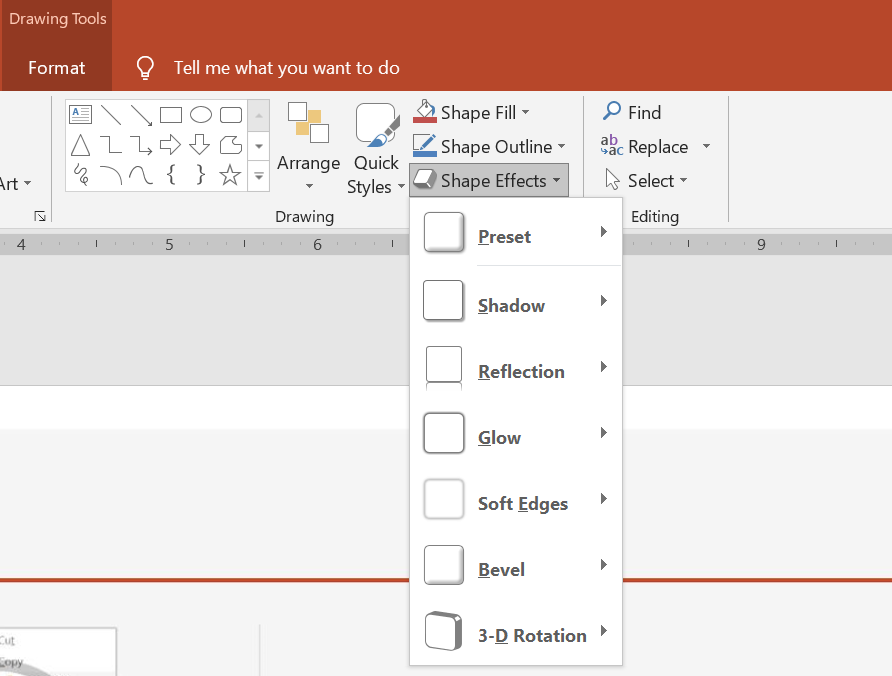 * PowerPoint 提供六种可应用于形状的效果。您可以对形状应用一个或多个效果。
* 某些效果组合比其他组合更好看。出于此原因,PowerPoint 在 **Preset** 下提供选项。Preset 选项本质上是两种或更多效果的已知美观组合。这样,通过选择预设,您无需浪费时间测试或组合不同的效果来寻找合适的组合。
Aspose.Slides 在 [EffectFormat](https://reference.aspose.com/slides/cpp/class/aspose.slides.effect_format/) 类下提供属性和方法,允许您在 PowerPoint 演示文稿中对形状应用相同的效果。
## **应用阴影效果**
以下 C++ 代码展示了如何将外阴影效果([OuterShadowEffect](https://reference.aspose.com/slides/cpp/class/aspose.slides.effect_format#aea1a48246d3240e29092498f648bc028))应用于矩形:
```c++
auto pres = System::MakeObject();
auto slide = pres->get_Slides()->idx_get(0);
auto shape = slide->get_Shapes()->AddAutoShape(ShapeType::RoundCornerRectangle, 20.0f, 20.0f, 200.0f, 150.0f);
auto effectFormat = shape->get_EffectFormat();
effectFormat->EnableOuterShadowEffect();
auto outerShadowEffect = effectFormat->get_OuterShadowEffect();
outerShadowEffect->get_ShadowColor()->set_Color(System::Drawing::Color::get_DarkGray());
outerShadowEffect->set_Distance(10);
outerShadowEffect->set_Direction(45.0f);
pres->Save(u"output.pptx", SaveFormat::Pptx);
```
## **应用反射效果**
以下 C++ 代码展示了如何将反射效果应用于形状:
```c++
auto pres = System::MakeObject();
auto slide = pres->get_Slides()->idx_get(0);
auto shape = slide->get_Shapes()->AddAutoShape(ShapeType::RoundCornerRectangle, 20.0f, 20.0f, 200.0f, 150.0f);
auto effectFormat = shape->get_EffectFormat();
effectFormat->EnableReflectionEffect();
auto reflectionEffect = effectFormat->get_ReflectionEffect();
reflectionEffect->set_RectangleAlign(RectangleAlignment::Bottom);
reflectionEffect->set_Direction(90.0f);
reflectionEffect->set_Distance(55);
reflectionEffect->set_BlurRadius(4);
pres->Save(u"reflection.pptx", SaveFormat::Pptx);
```
## **应用发光效果**
以下 C++ 代码展示了如何将发光效果应用于形状:
```c++
auto pres = System::MakeObject();
auto slide = pres->get_Slides()->idx_get(0);
auto shape = slide->get_Shapes()->AddAutoShape(ShapeType::RoundCornerRectangle, 20.0f, 20.0f, 200.0f, 150.0f);
auto effectFormat = shape->get_EffectFormat();
effectFormat->EnableGlowEffect();
auto glowEffect = effectFormat->get_GlowEffect();
glowEffect->get_Color()->set_Color(System::Drawing::Color::get_Magenta());
glowEffect->set_Radius(15);
pres->Save(u"glow.pptx", SaveFormat::Pptx);
```
## **应用柔化边缘效果**
以下 C++ 代码展示了如何将柔化边缘应用于形状:
```c++
auto pres = System::MakeObject();
auto slide = pres->get_Slides()->idx_get(0);
auto shape = slide->get_Shapes()->AddAutoShape(ShapeType::RoundCornerRectangle, 20.0f, 20.0f, 200.0f, 150.0f);
auto effectFormat = shape->get_EffectFormat();
effectFormat->EnableSoftEdgeEffect();
auto softEdgeEffect = effectFormat->get_SoftEdgeEffect();
softEdgeEffect->set_Radius(15);
pres->Save(u"softEdges.pptx", SaveFormat::Pptx);
```
## **常见问题**
**我可以对同一形状应用多个效果吗?**
是的,您可以在单个形状上组合不同的效果,例如阴影、反射和发光,以创建更具动感的外观。
**我可以对哪些形状应用效果?**
您可以对各种形状应用效果,包括自动形状、图表、表格、图片、SmartArt 对象、OLE 对象等。
**我可以对组合形状应用效果吗?**
是的,您可以对组合形状应用效果。该效果将应用于整个组合。
* PowerPoint 提供六种可应用于形状的效果。您可以对形状应用一个或多个效果。
* 某些效果组合比其他组合更好看。出于此原因,PowerPoint 在 **Preset** 下提供选项。Preset 选项本质上是两种或更多效果的已知美观组合。这样,通过选择预设,您无需浪费时间测试或组合不同的效果来寻找合适的组合。
Aspose.Slides 在 [EffectFormat](https://reference.aspose.com/slides/cpp/class/aspose.slides.effect_format/) 类下提供属性和方法,允许您在 PowerPoint 演示文稿中对形状应用相同的效果。
## **应用阴影效果**
以下 C++ 代码展示了如何将外阴影效果([OuterShadowEffect](https://reference.aspose.com/slides/cpp/class/aspose.slides.effect_format#aea1a48246d3240e29092498f648bc028))应用于矩形:
```c++
auto pres = System::MakeObject();
auto slide = pres->get_Slides()->idx_get(0);
auto shape = slide->get_Shapes()->AddAutoShape(ShapeType::RoundCornerRectangle, 20.0f, 20.0f, 200.0f, 150.0f);
auto effectFormat = shape->get_EffectFormat();
effectFormat->EnableOuterShadowEffect();
auto outerShadowEffect = effectFormat->get_OuterShadowEffect();
outerShadowEffect->get_ShadowColor()->set_Color(System::Drawing::Color::get_DarkGray());
outerShadowEffect->set_Distance(10);
outerShadowEffect->set_Direction(45.0f);
pres->Save(u"output.pptx", SaveFormat::Pptx);
```
## **应用反射效果**
以下 C++ 代码展示了如何将反射效果应用于形状:
```c++
auto pres = System::MakeObject();
auto slide = pres->get_Slides()->idx_get(0);
auto shape = slide->get_Shapes()->AddAutoShape(ShapeType::RoundCornerRectangle, 20.0f, 20.0f, 200.0f, 150.0f);
auto effectFormat = shape->get_EffectFormat();
effectFormat->EnableReflectionEffect();
auto reflectionEffect = effectFormat->get_ReflectionEffect();
reflectionEffect->set_RectangleAlign(RectangleAlignment::Bottom);
reflectionEffect->set_Direction(90.0f);
reflectionEffect->set_Distance(55);
reflectionEffect->set_BlurRadius(4);
pres->Save(u"reflection.pptx", SaveFormat::Pptx);
```
## **应用发光效果**
以下 C++ 代码展示了如何将发光效果应用于形状:
```c++
auto pres = System::MakeObject();
auto slide = pres->get_Slides()->idx_get(0);
auto shape = slide->get_Shapes()->AddAutoShape(ShapeType::RoundCornerRectangle, 20.0f, 20.0f, 200.0f, 150.0f);
auto effectFormat = shape->get_EffectFormat();
effectFormat->EnableGlowEffect();
auto glowEffect = effectFormat->get_GlowEffect();
glowEffect->get_Color()->set_Color(System::Drawing::Color::get_Magenta());
glowEffect->set_Radius(15);
pres->Save(u"glow.pptx", SaveFormat::Pptx);
```
## **应用柔化边缘效果**
以下 C++ 代码展示了如何将柔化边缘应用于形状:
```c++
auto pres = System::MakeObject();
auto slide = pres->get_Slides()->idx_get(0);
auto shape = slide->get_Shapes()->AddAutoShape(ShapeType::RoundCornerRectangle, 20.0f, 20.0f, 200.0f, 150.0f);
auto effectFormat = shape->get_EffectFormat();
effectFormat->EnableSoftEdgeEffect();
auto softEdgeEffect = effectFormat->get_SoftEdgeEffect();
softEdgeEffect->set_Radius(15);
pres->Save(u"softEdges.pptx", SaveFormat::Pptx);
```
## **常见问题**
**我可以对同一形状应用多个效果吗?**
是的,您可以在单个形状上组合不同的效果,例如阴影、反射和发光,以创建更具动感的外观。
**我可以对哪些形状应用效果?**
您可以对各种形状应用效果,包括自动形状、图表、表格、图片、SmartArt 对象、OLE 对象等。
**我可以对组合形状应用效果吗?**
是的,您可以对组合形状应用效果。该效果将应用于整个组合。