

Analyzing your prompt, please hold on...
An error occurred while retrieving the results. Please refresh the page and try again.
Los selectores CSS son una forma práctica de apuntar a elementos SVG concretos antes de editarlos. Con Aspose.SVG for .NET, el código C# puede usar
QuerySelector() y
QuerySelectorAll() para encontrar elementos por nombre de etiqueta, jerarquía, atributos o posición en el árbol SVG, y después actualizar atributos, reemplazar nodos o cambiar datos de ruta.
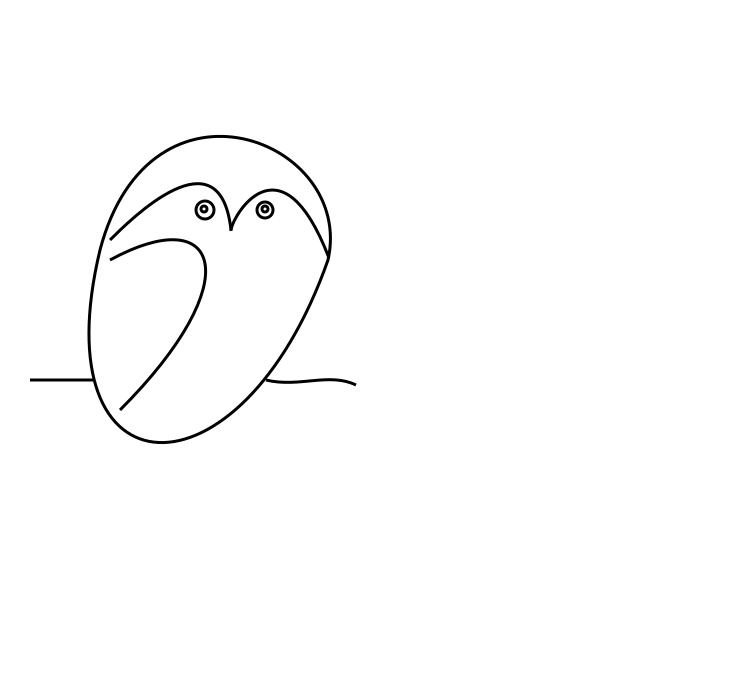
Este artículo usa la ilustración de ejemplo owl.svg. Los ejemplos seleccionan círculos y rutas en el SVG DOM y producen versiones editadas de la imagen vectorial original.
Un flujo de edición basado en selectores suele tener cuatro pasos:
SVGDocument.QuerySelector() para un elemento o QuerySelectorAll() para una lista de elementos.Para una introducción más breve a la navegación DOM, XPath y filtros de nodos, consulte Inspeccionar y navegar SVG en C#.
El primer ejemplo edita el archivo de origen
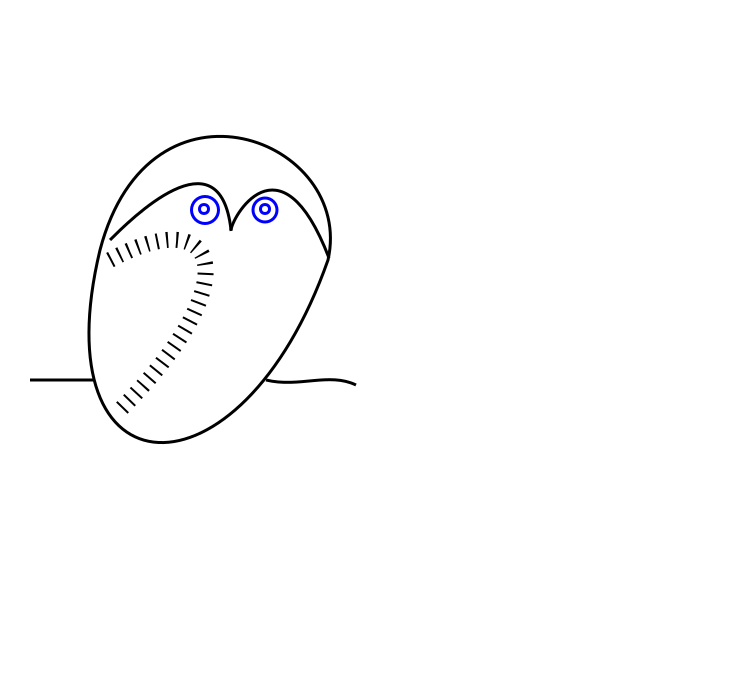
owl.svg. La ilustración del búho está construida con elementos path y circle. El código usa selectores CSS para:
circle y cambiar sus atributos para hacer los ojos más grandes y azules;path que representa el ala y cambiar su apariencia.1using Aspose.Svg;
2using System.IO;
3using Aspose.Svg.Dom;
4using Aspose.Svg.Collections; 1// Edit SVG elements with CSS selectors in C#
2
3// Load an SVG document
4using (SVGDocument document = new SVGDocument(new Url("https://docs.aspose.com/svg/files/owl.svg")))
5{
6 // Get the root <svg> element of the document
7 SVGSVGElement svgElement = document.RootElement;
8
9 // Find the first element that matches the specified in selector
10 SVGGElement gElement = svgElement.QuerySelector("g") as SVGGElement;
11
12 // Find all <circle> elements in a <g> element
13 NodeList circleNodes = gElement.QuerySelectorAll("circle");
14
15 // Make big blue eyes
16 foreach (Node circleNode in circleNodes)
17 {
18 SVGCircleElement circleElement = circleNode as SVGCircleElement;
19 circleElement.R.BaseVal.Value *= 1.5F;
20 circleElement.SetAttribute("stroke", "blue");
21 }
22
23 // Get a path for the owl's wing
24 SVGPathElement wingPath = gElement.QuerySelector("path:nth-child(2)") as SVGPathElement;
25
26 // Apply style attributes to the wing
27 wingPath.SetAttribute("stroke-width", "16");
28 wingPath.SetAttribute("stroke-dasharray", "2 8");
29
30 document.Save(Path.Combine(OutputDir, "owl-edited1.svg"));
31}Puede abrir el archivo SVG editado aquí: owl-edited1.svg.
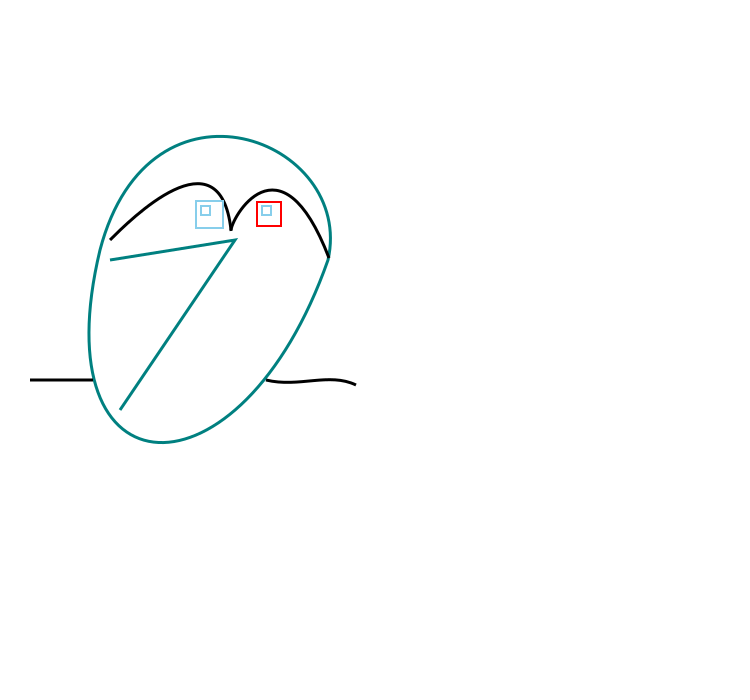
El segundo ejemplo continúa con el mismo archivo de origen owl.svg. Selecciona los ojos redondos originales y los reemplaza por ojos cuadrados:
<g> para los rectángulos de reemplazo.QuerySelectorAll("g:first-child > circle") para seleccionar los círculos del primer grupo.<rect> con los atributos de tamaño y estilo necesarios.<circle> seleccionados.1using Aspose.Svg;
2using System.IO;
3using Aspose.Svg.Dom;
4using Aspose.Svg.Collections; 1// Replace SVG circles with rectangles using CSS selectors in C#
2
3// Load an SVG document
4using (SVGDocument document = new SVGDocument(new Url("https://docs.aspose.com/svg/files/owl.svg")))
5{
6 // Get the root <svg> element of the document
7 SVGSVGElement svgElement = document.RootElement;
8
9 // Create a new <g> element with style attributes and append it as the last child of the <svg> element
10 SVGGElement gElement = (SVGGElement)document.CreateElementNS(SvgNamespace, "g");
11 gElement.SetAttribute("fill", "none");
12 gElement.SetAttribute("stroke-width", "2");
13 svgElement.AppendChild(gElement);
14
15 // Find all <circle> elements from the first <g> element
16 NodeList circleNodes = svgElement.QuerySelectorAll("g:first-child > circle");
17
18 // Make square sky-blue eyes
19 foreach (Node circleNode in circleNodes)
20 {
21 SVGCircleElement circleElement = circleNode as SVGCircleElement;
22
23 float cx = circleElement.Cx.BaseVal.Value;
24 float cy = circleElement.Cy.BaseVal.Value;
25 float r = circleElement.R.BaseVal.Value;
26
27 SVGRectElement rectElement = (SVGRectElement)document.CreateElementNS(SvgNamespace, "rect");
28 rectElement.X.BaseVal.Value = cx - r;
29 rectElement.Y.BaseVal.Value = cy - r;
30 rectElement.Width.BaseVal.Value = 3 * r;
31 rectElement.Height.BaseVal.Value = 3 * r;
32 rectElement.SetAttribute("stroke", "SkyBlue");
33
34 // Add a <rectangle> element into the second (new) <g> element and remove <circle> elements
35 gElement.AppendChild(rectElement);
36 circleElement.Remove();
37 }
38 // Recolor last rectangle in the second (new) <g> element
39 Element lastRect = gElement.LastElementChild;
40 lastRect.SetAttribute("stroke", "red");
41
42 document.Save(Path.Combine(OutputDir, "owl-svg-eyes.svg"));
43}La parte final cambia el ala del búho de una curva a una polilínea y vuelve a colorearla. El ejemplo selecciona el elemento path, actualiza los datos relacionados con la ruta y guarda el resultado:
1using Aspose.Svg;
2using System.IO;
3using Aspose.Svg.Dom;
4using Aspose.Svg.Collections; 1// Modify SVG path data selected with CSS selectors in C#
2
3// Load an SVG document
4using (SVGDocument document = new SVGDocument(Path.Combine(DataDir, "owl-svg-eyes.svg")))
5{
6 SVGSVGElement svgElement = document.RootElement;
7
8 // Get a path for owl's body from the first <g> element
9 Element bodyPath = (svgElement.QuerySelector("g:first-child") as SVGGElement).FirstElementChild;
10 bodyPath.SetAttribute("stroke", "Teal");
11
12 // Get a path for the owl's wing from the first <g> element
13 SVGPathElement wingPath = svgElement.QuerySelector("g:first-child > path:nth-child(2)") as SVGPathElement;
14
15 // Form new wing path data based on the old
16 string d = "";
17 foreach (SVGPathSeg pathSeg in wingPath.PathSegList)
18 {
19 if (pathSeg is SVGPathSegMovetoAbs)
20 {
21 SVGPathSegMovetoAbs pathSegMovetoAbs = pathSeg as SVGPathSegMovetoAbs;
22
23 d += string.Format(" M {0} {1}", pathSegMovetoAbs.X, pathSegMovetoAbs.Y);
24 }
25 if (pathSeg is SVGPathSegCurvetoCubicAbs)
26 {
27 SVGPathSegCurvetoCubicAbs pathSegCurvetoCubicAbs = pathSeg as SVGPathSegCurvetoCubicAbs;
28
29 d += string.Format(
30 " L {0} {1} L {2} {3}",
31 (pathSegCurvetoCubicAbs.X1 + pathSegCurvetoCubicAbs.X2) / 2F,
32 (pathSegCurvetoCubicAbs.Y1 + pathSegCurvetoCubicAbs.Y2) / 2F,
33 pathSegCurvetoCubicAbs.X,
34 pathSegCurvetoCubicAbs.Y
35 );
36 }
37 }
38 // Set d attribute - new path data formation
39 wingPath.SetAttribute("d", d.Trim());
40 wingPath.SetAttribute("stroke", "Teal");
41
42 document.Save(Path.Combine(OutputDir, "owl-edited2.svg"));
43}La imagen compara el búho original y dos versiones editadas.
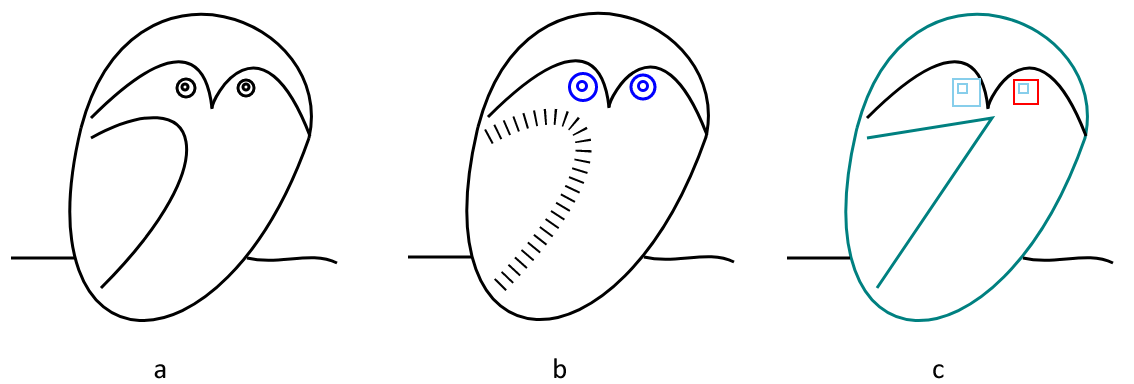
Puede abrir el segundo archivo SVG editado aquí: owl-edited2.svg.
1. ¿Cuándo debo usar QuerySelector() en lugar de QuerySelectorAll()?
Use QuerySelector() cuando solo necesite el primer elemento coincidente. Use QuerySelectorAll() cuando todos los elementos coincidentes deban inspeccionarse o editarse, por ejemplo todos los círculos de un grupo.
2. ¿Los selectores CSS pueden cambiar elementos SVG por sí mismos?
No. Los selectores solo encuentran elementos. Después de seleccionar un elemento, use métodos y propiedades DOM como SetAttribute(), AppendChild(), RemoveChild() o propiedades SVG tipadas para realizar cambios.
3. ¿Las ediciones basadas en selectores pueden convertirse a PDF o imágenes?
Sí. Después de editar el SVGDocument, llame a Converter.ConvertSVG(document, options, outputPath) con las opciones de guardado adecuadas, o guarde primero el archivo SVG y conviértalo más tarde.

Analyzing your prompt, please hold on...
An error occurred while retrieving the results. Please refresh the page and try again.