

Analyzing your prompt, please hold on...
An error occurred while retrieving the results. Please refresh the page and try again.
Usando
Aspose.SVG for .NET, puede realizar una transformación de escala mediante programación. Este artículo cubre ejemplos de C# para escalado SVG. Considera casos de uso de la función scale() en el atributo transform así como una matriz de transformación – matrix(a,b,c,d,e,f).
El escalado es una transformación SVG que amplía o reduce un objeto utilizando un factor de escala. Hay que distinguir el escalado uniforme y direccional. La función de transformación scale(sx, sy) permite escalar imágenes a lo largo de los ejes x e y. El valor del factor de escala sy es opcional y, si se omite, se supone que es igual a sx.
El siguiente fragmento de código C# demuestra cómo crear un elemento SVG <circle>, establecer sus atributos y aplicar una transformación usando la función scale() para el atributo transform.
RootElement apunta al elemento raíz <svg> del documento.<circle> y establezca los atributos requeridos.scale() para el atributo transform que especifica una transformación de escala. En particular, scale(2) significa escalar el elemento <circle> por un factor de 2 en las dimensiones x e y.circleElement a svgElement, puede usar el método
AppendChild().1using Aspose.Svg;
2using System.IO; 1// Scale an SVG circle using the transform attribute with Aspose.SVG
2
3// Create a new SVG document
4using (SVGDocument document = new SVGDocument())
5{
6 SVGSVGElement svgElement = document.RootElement;
7
8 // Create a <circle> element and set its attributes
9 SVGCircleElement circleElement = (SVGCircleElement)document.CreateElementNS("http://www.w3.org/2000/svg", "circle");
10 circleElement.Cx.BaseVal.Value = 150;
11 circleElement.Cy.BaseVal.Value = 150;
12 circleElement.R.BaseVal.Value = 50;
13 circleElement.SetAttribute("fill", "salmon");
14
15 // Apply scaling to the SVG circle
16 circleElement.SetAttribute("transform", "scale(2)");
17
18 // Append the <circle> element to the SVG
19 svgElement.AppendChild(circleElement);
20
21 // Save the document
22 document.Save(Path.Combine(OutputDir, "scale-circle.svg"));
23}Aquí, veremos el ejemplo de C# para escalar una imagen SVG completa en lugar de un solo elemento e implementaremos la transformación usando una matriz de escala. Miremos más de cerca el código C# para aplicar la matriz de escala.
<svg> del documento.transform al elemento raíz <svg>.<svg>. El CTM representa las transformaciones acumulativas aplicadas al elemento e incluye información sobre traducción, escala, escala y sesgo que se pueden aplicar al elemento.transformAttribute: una representación de cadena de una matriz de transformación 2D utilizando los valores de la matriz de transformación modificada transformationMatrix. La notación matricial es matrix(a, b, c, d, e, f).transform del elemento <svg> usando la cadena transformAttribute.1using Aspose.Svg;
2using System.IO; 1// Combine multiple SVG transformations (scale, translate, and rotate) using a transformation matrix with Aspose.SVG
2
3// Load an SVG document
4string documentPath = Path.Combine(DataDir, "snowflake.svg");
5using (SVGDocument document = new SVGDocument(documentPath))
6{
7 SVGSVGElement svgElement = document.RootElement;
8
9 // Get the transformation matrix associated with the svgElement
10 SVGMatrix transformationMatrix = svgElement.GetCTM();
11 transformationMatrix = transformationMatrix.Scale(0.5F);
12
13 // Apply the transformation matrix to the svgElement
14 string transformAttribute = "matrix(" + transformationMatrix.A + "," + transformationMatrix.B + ","
15 + transformationMatrix.C + "," + transformationMatrix.D + "," + transformationMatrix.E + ","
16 + transformationMatrix.F + ")";
17 svgElement.SetAttribute("transform", transformAttribute);
18
19 // Save the document
20 document.Save(Path.Combine(OutputDir, "scale-snowflake.svg"));
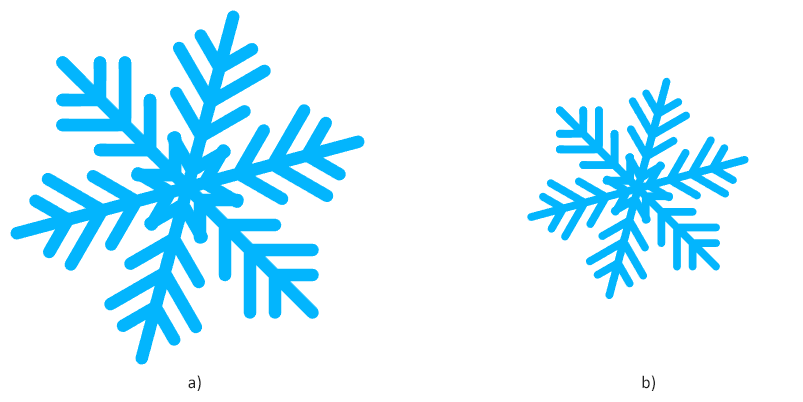
21}La siguiente figura muestra el SVG original (a) y la imagen escalada con un factor de escala de 0,5: la imagen reducida (b).

Analyzing your prompt, please hold on...
An error occurred while retrieving the results. Please refresh the page and try again.