
Analyzing your prompt, please hold on...
An error occurred while retrieving the results. Please refresh the page and try again.
Quick Answer: Use
SVGDocument para cargar SVG, cree
ImageSaveOptions, defina el formato de imagen y llame a
Converter.convert_svg(document, options, output_path). ImageSaveOptions controla fondo, tamaño de página, márgenes y resolución.
Aspose.SVG for Python via .NET puede convertir SVG a formatos ráster como JPG, BMP, TIFF, GIF y PNG. Use JPG si no necesita transparencia, PNG para salida transparente, TIFF para publicación y procesamiento, BMP para salida bitmap simple y GIF para salida ráster ligera.
Para tutoriales específicos, consulte Convertir SVG a PNG en Python y Convertir SVG a JPG en Python. Este artículo se centra en el flujo general SVG-to-image y la elección de formato.
Antes de ejecutar los ejemplos, instale Aspose.SVG for Python via .NET en su entorno Python.
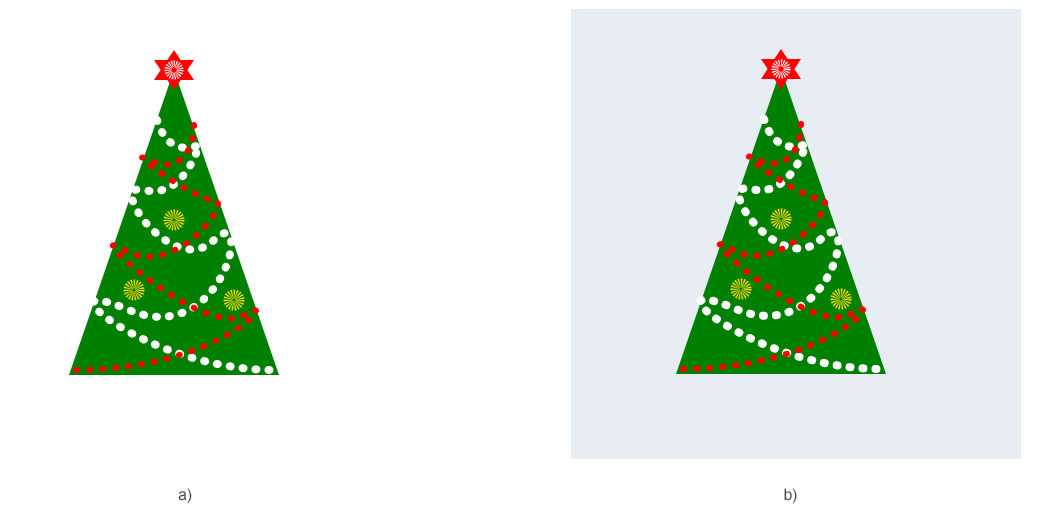
El ejemplo usa SVGDocument, ImageSaveOptions y Converter.convert_svg() para convertir SVG a JPG y configurar fondo, tamaño de página, márgenes y resolución. JPG no admite transparencia, por eso suele ser importante definir un fondo.
 1import os
 2from aspose.svg import SVGDocument
 3from aspose.svg.converters import Converter
 4from aspose.svg.drawing import Margin, Page, Resolution, Size
 5from aspose.svg.rendering.image import ImageFormat
 6from aspose.svg.saving import ImageSaveOptions
 7from aspose.pydrawing import Color
 8
 9# Convert SVG to JPG with custom background, page size, and resolution
10input_folder = "data/"
11output_folder = "output/"
12input_path = os.path.join(input_folder, "christmas-tree.svg")
13output_path = os.path.join(output_folder, "christmas-tree.jpg")
14os.makedirs(output_folder, exist_ok=True)
15
16options = ImageSaveOptions()
17options.format = ImageFormat.JPEG
18options.background_color = Color.from_argb(233, 255, 241)
19options.page_setup.any_page = Page(Size(450, 450), Margin(20, 20, 20, 20))
20options.horizontal_resolution = Resolution.from_dots_per_inch(96.0)
21options.vertical_resolution = Resolution.from_dots_per_inch(96.0)
22
23with SVGDocument(input_path) as document:
24    Converter.convert_svg(document, options, output_path)
La siguiente imagen muestra el SVG de origen y el JPG convertido con fondo personalizado.
Para guardar SVG en otro formato de imagen, defina
ImageSaveOptions.format y use la extensión correspondiente. Por ejemplo, use valores
ImageFormat como ImageFormat.GIF con .gif, ImageFormat.BMP con .bmp o ImageFormat.TIFF con .tiff.
1options.format = ImageFormat.GIF
2output_path = os.path.join(output_folder, "image.gif")| Propiedad | Qué controla |
|---|---|
| format | Formato de destino como JPG, PNG, BMP, TIFF o GIF |
| background_color | Fondo para áreas SVG transparentes |
| page_setup | Tamaño de imagen, márgenes y diseño de página |
| horizontal_resolution | Resolución horizontal en píxeles por pulgada |
| vertical_resolution | Resolución vertical en píxeles por pulgada |
| smoothing_mode | Calidad de renderizado de formas y bordes |
| compression | Ajustes de compresión TIFF |
ImageSaveOptions hereda ajustes de renderizado de
ImageRenderingOptions, por lo que muchas propiedades se comparten entre flujos con converter y con dispositivo.
El método
render_to() envía el contenido SVG a un
ImageDevice. Es útil si su aplicación ya usa dispositivos de renderizado o debe elegir el dispositivo de destino explícitamente.
 1import os
 2from aspose.svg import SVGDocument
 3from aspose.svg.drawing import Margin, Page, Resolution, Size
 4from aspose.svg.rendering.image import ImageDevice, ImageFormat, ImageRenderingOptions
 5
 6# Render SVG to JPG through an ImageDevice
 7input_folder = "data/"
 8output_folder = "output/"
 9input_path = os.path.join(input_folder, "image.svg")
10output_path = os.path.join(output_folder, "image.jpg")
11os.makedirs(output_folder, exist_ok=True)
12
13options = ImageRenderingOptions()
14options.format = ImageFormat.JPEG
15options.horizontal_resolution = Resolution.from_dots_per_inch(96.0)
16options.vertical_resolution = Resolution.from_dots_per_inch(96.0)
17options.page_setup.any_page = Page(Size(600, 600), Margin(10, 10, 10, 10))
18
19with SVGDocument(input_path) as document:
20    with ImageDevice(options, output_path) as device:
21 document.render_to(device)| Problema | Causa probable | Solución |
|---|---|---|
| JPG con fondo negro o inesperado | JPG no admite transparencia | Defina options.background_color antes de convertir |
| Imagen recortada o demasiado grande | La configuración de página no coincide con el viewport o tamaño deseado | Configure page_setup.any_page con Page, Size y Margin |
| Imagen borrosa | Resolución o tamaño de página demasiado bajo | Aumente horizontal_resolution, vertical_resolution o dimensiones |
| Se produce el formato incorrecto | Formato y extensión no coinciden | Defina options.format y la extensión de salida correctamente |
| Faltan imágenes externas o CSS | Recursos relativos no se resuelven | Mantenga recursos junto al SVG o use rutas absolutas correctas |
Use el SVG to JPG Converter gratuito o el SVG Converter general para probar la conversión SVG-to-image antes de implementarla en Python.

Cargue SVG con SVGDocument, defina ImageSaveOptions.format como ImageFormat.JPEG y llame a Converter.convert_svg(document, options, output_path).
Sí. Cambie options.format al valor ImageFormat requerido y use la extensión de salida correspondiente.
JPG no admite transparencia. Un color de fondo hace predecibles las áreas transparentes del SVG en la imagen convertida.
Sí. Configure options.page_setup.any_page con Page, Size y Margin, y defina resolución si es necesario.
Use Converter.convert_svg() para conversión normal de archivos. Use render_to() cuando necesite un flujo con ImageDevice.

Analyzing your prompt, please hold on...
An error occurred while retrieving the results. Please refresh the page and try again.