

Analyzing your prompt, please hold on...
An error occurred while retrieving the results. Please refresh the page and try again.
Les sélecteurs CSS sont un moyen pratique de cibler des éléments SVG précis avant de les modifier. Avec Aspose.SVG for .NET, le code C# peut utiliser
QuerySelector() et
QuerySelectorAll() pour trouver des éléments par nom de balise, hiérarchie, attributs ou position dans l’arbre SVG, puis mettre à jour des attributs, remplacer des nœuds ou modifier des données de chemin.
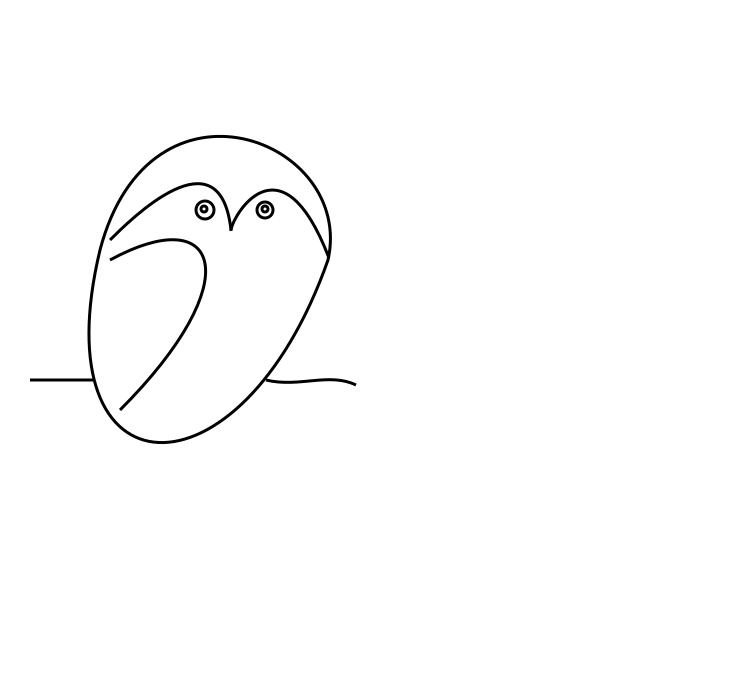
Cet article utilise l’illustration d’exemple owl.svg. Les exemples sélectionnent des cercles et des chemins dans le DOM SVG et produisent des versions modifiées de l’image vectorielle d’origine.
Un flux d’édition basé sur des sélecteurs comprend généralement quatre étapes:
SVGDocument.QuerySelector() pour un élément ou QuerySelectorAll() pour une liste d’éléments.Pour une introduction plus courte à la navigation DOM, XPath et aux filtres de nœuds, consultez Inspecter et naviguer dans SVG en C#.
Le premier exemple modifie le fichier source
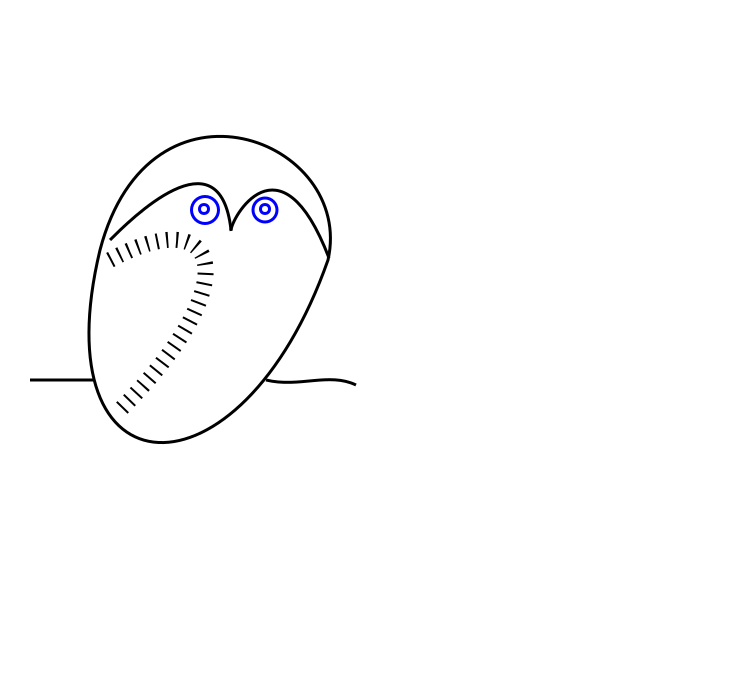
owl.svg. L’illustration du hibou est construite avec des éléments path et circle. Le code utilise des sélecteurs CSS pour:
circle et modifier leurs attributs afin d’agrandir les yeux et de les rendre bleus;path qui représente l’aile et modifier son apparence.1using Aspose.Svg;
2using System.IO;
3using Aspose.Svg.Dom;
4using Aspose.Svg.Collections; 1// Edit SVG elements with CSS selectors in C#
2
3// Load an SVG document
4using (SVGDocument document = new SVGDocument(new Url("https://docs.aspose.com/svg/files/owl.svg")))
5{
6 // Get the root <svg> element of the document
7 SVGSVGElement svgElement = document.RootElement;
8
9 // Find the first element that matches the specified in selector
10 SVGGElement gElement = svgElement.QuerySelector("g") as SVGGElement;
11
12 // Find all <circle> elements in a <g> element
13 NodeList circleNodes = gElement.QuerySelectorAll("circle");
14
15 // Make big blue eyes
16 foreach (Node circleNode in circleNodes)
17 {
18 SVGCircleElement circleElement = circleNode as SVGCircleElement;
19 circleElement.R.BaseVal.Value *= 1.5F;
20 circleElement.SetAttribute("stroke", "blue");
21 }
22
23 // Get a path for the owl's wing
24 SVGPathElement wingPath = gElement.QuerySelector("path:nth-child(2)") as SVGPathElement;
25
26 // Apply style attributes to the wing
27 wingPath.SetAttribute("stroke-width", "16");
28 wingPath.SetAttribute("stroke-dasharray", "2 8");
29
30 document.Save(Path.Combine(OutputDir, "owl-edited1.svg"));
31}Vous pouvez ouvrir le fichier SVG modifié ici: owl-edited1.svg.
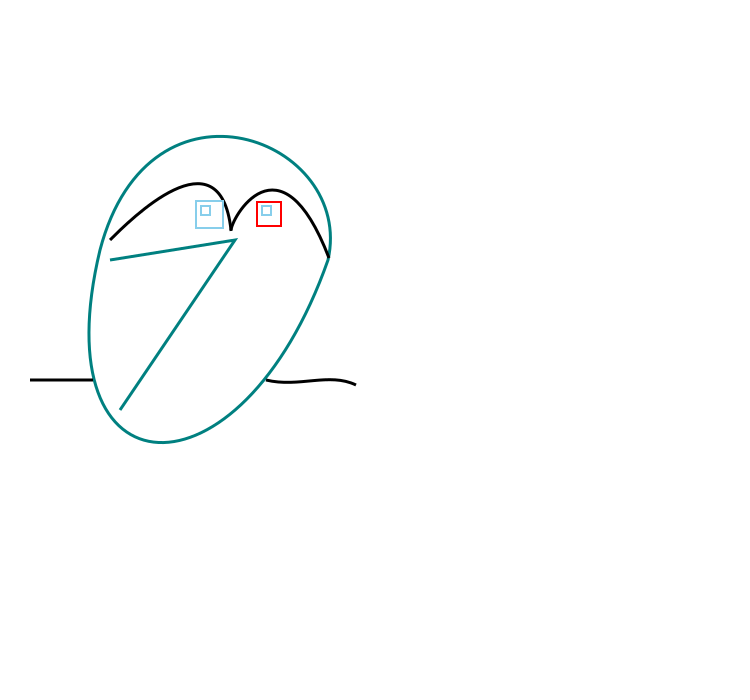
Le deuxième exemple continue avec le même fichier source owl.svg. Il sélectionne les yeux ronds d’origine et les remplace par des yeux carrés:
<g> pour les rectangles de remplacement.QuerySelectorAll("g:first-child > circle") pour sélectionner les cercles du premier groupe.<rect> avec les attributs de taille et de style requis.<circle> sélectionnés du document.1using Aspose.Svg;
2using System.IO;
3using Aspose.Svg.Dom;
4using Aspose.Svg.Collections; 1// Replace SVG circles with rectangles using CSS selectors in C#
2
3// Load an SVG document
4using (SVGDocument document = new SVGDocument(new Url("https://docs.aspose.com/svg/files/owl.svg")))
5{
6 // Get the root <svg> element of the document
7 SVGSVGElement svgElement = document.RootElement;
8
9 // Create a new <g> element with style attributes and append it as the last child of the <svg> element
10 SVGGElement gElement = (SVGGElement)document.CreateElementNS(SvgNamespace, "g");
11 gElement.SetAttribute("fill", "none");
12 gElement.SetAttribute("stroke-width", "2");
13 svgElement.AppendChild(gElement);
14
15 // Find all <circle> elements from the first <g> element
16 NodeList circleNodes = svgElement.QuerySelectorAll("g:first-child > circle");
17
18 // Make square sky-blue eyes
19 foreach (Node circleNode in circleNodes)
20 {
21 SVGCircleElement circleElement = circleNode as SVGCircleElement;
22
23 float cx = circleElement.Cx.BaseVal.Value;
24 float cy = circleElement.Cy.BaseVal.Value;
25 float r = circleElement.R.BaseVal.Value;
26
27 SVGRectElement rectElement = (SVGRectElement)document.CreateElementNS(SvgNamespace, "rect");
28 rectElement.X.BaseVal.Value = cx - r;
29 rectElement.Y.BaseVal.Value = cy - r;
30 rectElement.Width.BaseVal.Value = 3 * r;
31 rectElement.Height.BaseVal.Value = 3 * r;
32 rectElement.SetAttribute("stroke", "SkyBlue");
33
34 // Add a <rectangle> element into the second (new) <g> element and remove <circle> elements
35 gElement.AppendChild(rectElement);
36 circleElement.Remove();
37 }
38 // Recolor last rectangle in the second (new) <g> element
39 Element lastRect = gElement.LastElementChild;
40 lastRect.SetAttribute("stroke", "red");
41
42 document.Save(Path.Combine(OutputDir, "owl-svg-eyes.svg"));
43}La dernière partie transforme l’aile du hibou d’une courbe en polyligne et la recolore. L’exemple sélectionne l’élément path, met à jour les données liées au chemin et enregistre le résultat:
1using Aspose.Svg;
2using System.IO;
3using Aspose.Svg.Dom;
4using Aspose.Svg.Collections; 1// Modify SVG path data selected with CSS selectors in C#
2
3// Load an SVG document
4using (SVGDocument document = new SVGDocument(Path.Combine(DataDir, "owl-svg-eyes.svg")))
5{
6 SVGSVGElement svgElement = document.RootElement;
7
8 // Get a path for owl's body from the first <g> element
9 Element bodyPath = (svgElement.QuerySelector("g:first-child") as SVGGElement).FirstElementChild;
10 bodyPath.SetAttribute("stroke", "Teal");
11
12 // Get a path for the owl's wing from the first <g> element
13 SVGPathElement wingPath = svgElement.QuerySelector("g:first-child > path:nth-child(2)") as SVGPathElement;
14
15 // Form new wing path data based on the old
16 string d = "";
17 foreach (SVGPathSeg pathSeg in wingPath.PathSegList)
18 {
19 if (pathSeg is SVGPathSegMovetoAbs)
20 {
21 SVGPathSegMovetoAbs pathSegMovetoAbs = pathSeg as SVGPathSegMovetoAbs;
22
23 d += string.Format(" M {0} {1}", pathSegMovetoAbs.X, pathSegMovetoAbs.Y);
24 }
25 if (pathSeg is SVGPathSegCurvetoCubicAbs)
26 {
27 SVGPathSegCurvetoCubicAbs pathSegCurvetoCubicAbs = pathSeg as SVGPathSegCurvetoCubicAbs;
28
29 d += string.Format(
30 " L {0} {1} L {2} {3}",
31 (pathSegCurvetoCubicAbs.X1 + pathSegCurvetoCubicAbs.X2) / 2F,
32 (pathSegCurvetoCubicAbs.Y1 + pathSegCurvetoCubicAbs.Y2) / 2F,
33 pathSegCurvetoCubicAbs.X,
34 pathSegCurvetoCubicAbs.Y
35 );
36 }
37 }
38 // Set d attribute - new path data formation
39 wingPath.SetAttribute("d", d.Trim());
40 wingPath.SetAttribute("stroke", "Teal");
41
42 document.Save(Path.Combine(OutputDir, "owl-edited2.svg"));
43}L’image compare le hibou d’origine et deux versions modifiées.
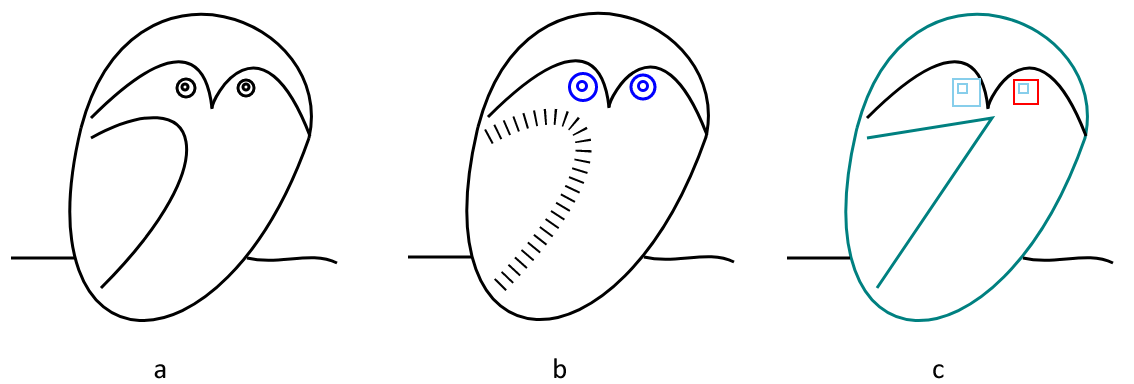
Vous pouvez ouvrir le deuxième fichier SVG modifié ici: owl-edited2.svg.
1. Quand utiliser QuerySelector() plutôt que QuerySelectorAll()?
Utilisez QuerySelector() lorsqu’un seul premier élément correspondant est nécessaire. Utilisez QuerySelectorAll() lorsque tous les éléments correspondants doivent être inspectés ou modifiés, par exemple tous les cercles dans un groupe.
2. Les sélecteurs CSS peuvent-ils modifier des éléments SVG par eux-mêmes?
Non. Les sélecteurs ne font que trouver des éléments. Une fois l’élément sélectionné, utilisez des méthodes et propriétés DOM comme SetAttribute(), AppendChild(), RemoveChild() ou des propriétés SVG typées pour effectuer les changements.
3. Les modifications basées sur des sélecteurs peuvent-elles être converties en PDF ou en images?
Oui. Après avoir modifié le SVGDocument, appelez Converter.ConvertSVG(document, options, outputPath) avec les options d’enregistrement adaptées, ou enregistrez d’abord le fichier SVG et convertissez-le ensuite.

Analyzing your prompt, please hold on...
An error occurred while retrieving the results. Please refresh the page and try again.