

Analyzing your prompt, please hold on...
An error occurred while retrieving the results. Please refresh the page and try again.
SVG embedded content refers to external resources such as raster images or HTML fragments that are incorporated into an SVG document. Aspose.SVG supports embedding these resources using the <image> and <foreignObject> elements.
<image> ElementThe SVG <image> element allows to include and render bitmaps within an SVG object. It can display image formats JPEG, PNG and the SVG pictures too. Attributes of the <image> element indicate that the contents of a file (a bitmap) should be displayed into a given rectangle (viewport) within the current user coordinate system.
How to use the SVG <image> element? The following code snippet shows as a .png and .svg images can embed inside the SVG document:
1<svg width="500" height="400" xmlns="http://www.w3.org/2000/svg">
2    <image href="https://docs.aspose.com/svg/images/svg.png" x="20" y="20" height="180" width="180" />
3    <image href="https://docs.aspose.com/svg/files/shapes.svg" x="250" y="10" height="350" width="350" />
4    <text x="40" y="250">Embedded PNG image</text>
5    <text x="300" y="250">Embedded SVG image</text>
6</svg>
The above code snippet is displayed like this:
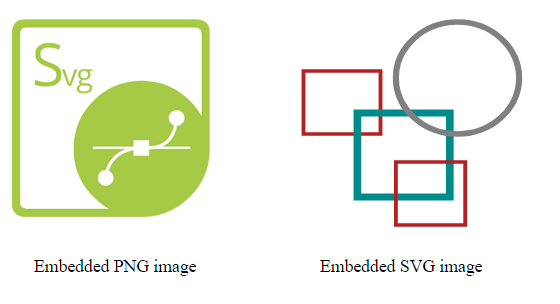
<foreignObject> ElementSVG is designed to be consistent with other XML languages for describing and rendering of embedded content. The <foreignObject> element allows to include in SVG file the elements in a non-SVG namespace. In the context of a browser, it is most likely HTML. The foreign graphical content can be processed with transformations, filters, clipping, masking and compositing.
Let’s see an example:
 1<svg viewBox="0 0 300 300" xmlns="http://www.w3.org/2000/svg">
 2    <style>
 3        div {
 4            color: grey;
 5            font: 14px serif;
 6            }
 7    </style>
 8    <circle cx="65" cy="60" r="60" fill="red" fill-opacity="0.1" />
 9    <!-- example of  HTML text embedding in SVG -->
10    <foreignObject x="20" y="20" width="200" height="180">
11    <!--In the context of HTML embedded in the SVG document, the XHTML namespace is mandatory-->
12        <div xmlns="https://www.w3.org/1999/xhtml">
13        Convert SVG to PNG. Aspose.SVG for .NET can read and convert SVG files to PNG, PDF, XPS, and major image formats.
14        </div>
15    </foreignObject>
16</svg>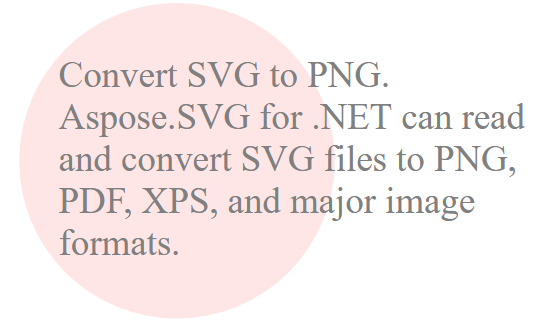
Using <foreignObject> requires declaring the correct XML namespace for the foreign markup, as shown on line 12 of the example.
| Problem | Cause | Solution |
|---|---|---|
| Image does not appear | Missing width/height attributes on <image> | Add explicit width and height values to define the viewport |
HTML inside <foreignObject> is invisible | Incorrect or missing XHTML namespace | Include xmlns="https://www.w3.org/1999/xhtml" on the root HTML element |
| Image is stretched | preserveAspectRatio not set or set to none | Use preserveAspectRatio="xMidYMid meet" (or another appropriate value) to maintain aspect ratio |
| SVG fails to load in older browsers | Use of href without fallback xlink:href | Provide both href and xlink:href attributes for better compatibility |
Embed a PNG image
1<svg width="200" height="200" xmlns="http://www.w3.org/2000/svg">
2    <image href="https://docs.aspose.com/svg/images/drawing/aspose.png" x="0" y="0" width="200" height="200"/>
3</svg>
Embed an external SVG file
1<svg width="300" height="300" xmlns="http://www.w3.org/2000/svg">
2    <image href="https://docs.aspose.com/svg/images/face.svg" x="10" y="10" width="280" height="280"/>
3</svg>
Preserve image aspect ratio
1<svg width="250" height="250" xmlns="http://www.w3.org/2000/svg">
2    <image href="https://example.com/photo.jpg"
3           x="0" y="0"
4           width="250" height="250"
5           preserveAspectRatio="xMidYMid meet"/>
6</svg>Embedding raster images and HTML fragments inside SVG expands the creative possibilities of vector graphics. By mastering the <image> and <foreignObject> elements, you can build rich, interactive visualizations that combine the scalability of SVG with the flexibility of external media.

Analyzing your prompt, please hold on...
An error occurred while retrieving the results. Please refresh the page and try again.