

Analyzing your prompt, please hold on...
An error occurred while retrieving the results. Please refresh the page and try again.
Filling and stroking are the two core painting operations in SVG. Every graphical element - shapes, paths, or text - is rendered by applying a fill (the interior color) and a stroke (the outline). Both can be defined with CSS style attribute properties or as an individual attribute on the element -
presentation attributes.
This article explains how SVG fill and stroke work, clarifies the difference between properties and attributes, and shows practical ways to apply them in real-world SVG graphics.
When an SVG shape is rendered, painting happens in two steps:
Both fill and stroke are optional:
For the SVG color specifying, you can take color names, RGB values, HEX values, etc. In the following examples will be using different ways of writing fills and strokes characteristics.
In SVG, fill and stroke are defined as CSS properties, but they can be applied in different ways.
fill, stroke-width).| Concept | Example |
|---|---|
| CSS property | fill, stroke, stroke-width |
| Presentation attribute | fill="red" stroke="#00ff00"; stroke-width="2" |
| Inline CSS | style="fill:red; stroke:#00ff00; stroke-width:2" |
Throughout this article:
The fill property defines how the interior of a shape or text is painted. It applies to SVG shapes such as <rect>, <circle>, <path>, and text elements. If the fill is not specified, the default value is black.
| Value | Description | Example |
|---|---|---|
| color value | Fills the shape with a solid color | fill="red" |
none | Disables filling | fill="none" |
url(#id) | Uses a paint server (gradient or pattern) | fill="url(#gradient1)" |
currentColor | Uses the current text color | fill="currentColor" |
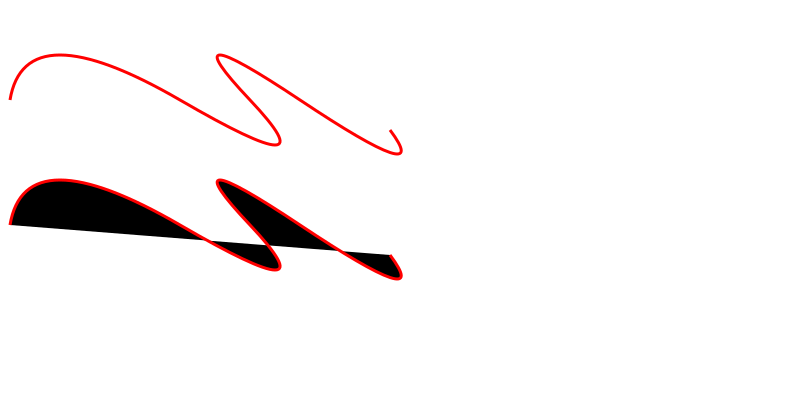
The sample below illustrates the presence and absence of fill="none" (
two-paths.svg):
1<svg height="400" width="800" xmlns="http://www.w3.org/2000/svg">
2    <path d="M 10 100 Q 25 10 180 100 T 250 100 T 300 100 T 390 130" stroke="red" stroke-width="3" fill="none" />
3    <path d="M 10 100 Q 25 10 180 100 T 250 100 T 300 100 T 390 130" stroke="red" stroke-width="3" transform="translate(0 125)" />
4</svg>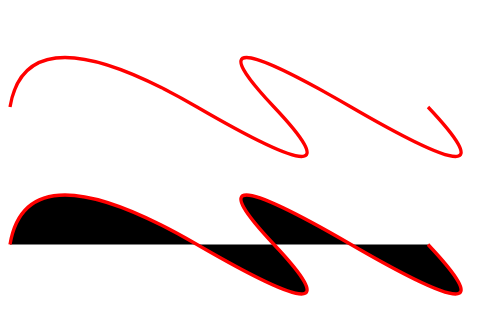
The stroke property defines the paint used for a shape’s outline. Unlike fill, stroke is disabled by default. The stroke is centered on the shape’s path and extends equally inside and outside.
| Property | Description | Example |
|---|---|---|
stroke | Sets the stroke color | stroke="red" |
stroke-width | Controls the thickness of the stroke | stroke-width="5" |
stroke-linecap ValuesFor any line, it is possible to set the shape of its ends. The stroke-linecap property defines how the ends of an SVG line are rendered, and has three possible values:
| Value | Appearance |
|---|---|
butt | Flat edge ending exactly at the path’s end point. |
square | Flat edge that extends half a stroke‑width beyond the end point. |
round | Semi‑circular end whose radius equals half the stroke‑width. |
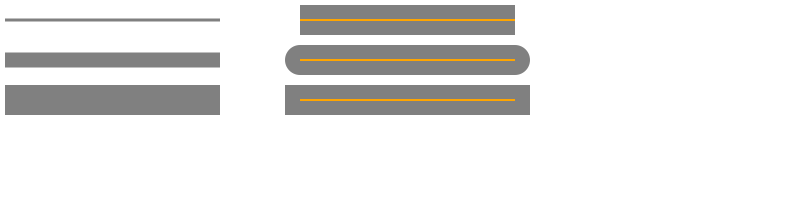
This makes sense if the line has the stroke-width property. The sample below shows as the stroke-width and stroke-linecap define the SVG stroke’s width and form of its ends (
lines.svg).
 1<svg height="200" width="800" xmlns="http://www.w3.org/2000/svg">
 2  <g stroke="grey">
 3    <path stroke-width="3" d="M 5 20 l 215 0" />
 4    <path stroke-width="15" d="M 5 60 l 215 0" />
 5    <path stroke-width="30" d="M 5 100 l 215 0" />
 6  </g>
 7 <g stroke="grey" stroke-width="30">
 8    <path stroke-linecap="butt" d="M 300 20 l 215 0" />
 9    <path stroke-linecap="round" d="M 300 60 l 215 0" />
10    <path stroke-linecap="square" d="M 300 100 l 215 0" />
11  </g>
12  <g stroke="orange" stroke-width="2">
13    <line x1="300" y1="20" x2="515" y2="20" />
14    <path d="M 300 60 l 215 0" />
15    <path d="M 300 100 l 215 0" />
16  </g>
17</svg>
In the sample, we use a <g> element to set common properties on objects, such as stroke and stroke-width.
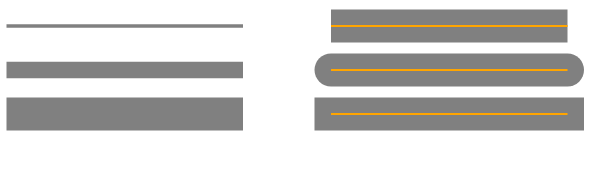
In the example above, the SVG paths (SVG lines) are shown in orange, and the SVG strokes in grey.
stroke-linejoin ValuesThe more often used stroke property is the stroke-linejoin. It define the kind of join of the two meet lines. The stroke-linejoin attribute can take a three value:
| Value | Description |
|---|---|
miter | Extends outer edges to a corner (default). |
round | Rounds the corner with a radius of half the stroke width. |
bevel | Cuts off the corner, creating a flat edge. |
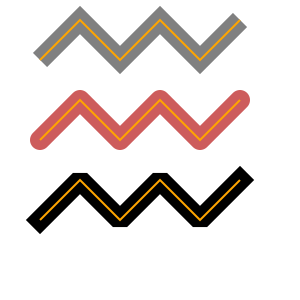
One more sample illustrates a stroke-linejoin values (
linejoin.svg):
 1<svg width="300" height="300" xmlns="http://www.w3.org/2000/svg">
 2    <g stroke-width="20" fill="none">
 3        <polyline points="40 60 80 20 120 60 160 20 200 60 240 20" stroke="grey" stroke-linecap="butt"  stroke-linejoin="miter" />
 4        <polyline points="40 140 80 100 120 140 160 100 200 140 240 100" stroke="#CD5C5C" stroke-linecap="round" stroke-linejoin="round" />
 5        <polyline points="40 220 80 180 120 220 160 180 200 220 240 180" stroke="black"  stroke-linecap="square" stroke-linejoin="bevel" />
 6    </g>
 7    <g fill="none" stroke="orange" stroke-width="2">
 8        <polyline points="40 60 80 20 120 60 160 20 200 60 240 20" />
 9        <polyline points="40 140 80 100 120 140 160 100 200 140 240 100" />
10        <polyline points="40 220 80 180 120 220 160 180 200 220 240 180" />
11    </g>
12</svg>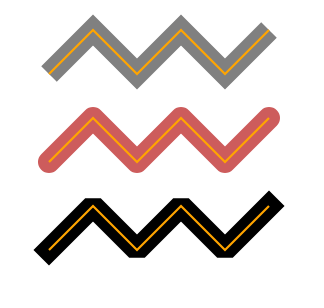
Note, the orange line inside is the object (polyline), around is the SVG stroke.
stroke-dasharrayAll the SVG stroke properties can be applied to any line type, text and outlines of elements like a circle, rectangle, etc. The stroke-dasharray property turns a solid stroke into a patterned dash‑gap sequence. The attribute accepts a list of numbers that define alternating dash and gap lengths (in user units, typically pixels).
1stroke-dasharray="10 5"   /* dash 10, gap 5 */
2stroke-dasharray="20 10 5"/* dash 20, gap 10, dash 5, then repeats */| Property | Description |
|---|---|
stroke-dasharray | Defines dash and gap pattern |
stroke-dashoffset | Shifts the dash pattern |
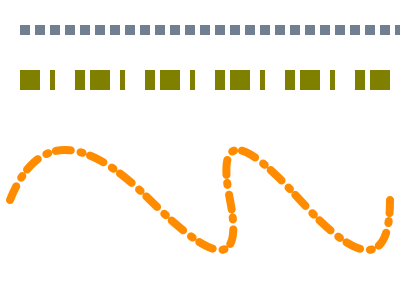
Here is an example of using stroke-dasharray (
dasharray.svg):
1<svg width="400" height="300" xmlns="http://www.w3.org/2000/svg">
2    <line x1="20" y1="30" x2="400" y2="30" style="stroke:rgb(112, 128, 144); fill:none; stroke-width:10; stroke-dasharray:10 5;" />
3    <line x1="20" y1="80" x2="400" y2="80" style="stroke:olive; fill:none; stroke-width: 20; stroke-dasharray: 20 10 5;" />
4    <path d="M 10 200 Q 50 100 150 200 T 230 200 T 300 200 T 390 200" stroke="#FF8C00" stroke-width="8" fill="none" stroke-linecap="round" stroke-dasharray="15 10 2 8" />
5</svg>
For the grey and orange SVG lines, we specify even number of values: each of number couples means “filled-unfilled” areas. If an odd number of values is specified, the list is then repeated to produce an even number of values. For example, 20 10 5 becomes 20 10 5 20 10 5, as for olive-color line.
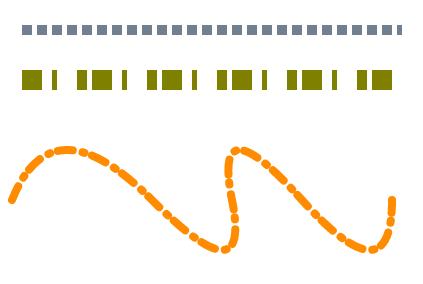
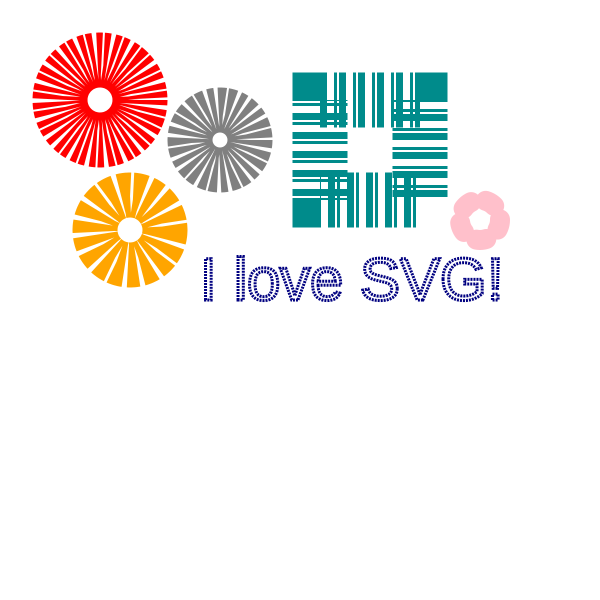
You can experiment with stroke-dasharray attribute. Amazing things can be achieved with SVG strokes and simple SVG shapes (
dasharray-example.svg):
 1<svg height="600" width="600" xmlns="http://www.w3.org/2000/svg">
 2    <g fill="none">
 3        <circle cx="100" cy="100" r="40" stroke="red" stroke-width="55" stroke-dasharray="4,2" />
 4        <circle cx="100" cy="100" r="30" stroke="grey" stroke-width="45" stroke-dasharray="5,2" transform="translate(120,40)" />
 5        <circle cx="100" cy="100" r="35" stroke="orange" stroke-width="45" stroke-dasharray="9,3" transform="translate(30,130)" />
 6		<circle cx="100" cy="100" r="20" stroke="pink" stroke-linecap="round" stroke-width="20" stroke-dasharray="10,15" transform="translate(380,120)" />
 7        <rect x="320" y="100" width="100" height="100" stroke="DarkCyan" stroke-width="55" stroke-dasharray="7 7 3 2" />
 8        <text x="200" y="300" font-family="arial" font-size="60" stroke="#000080" stroke-width="3" stroke-dasharray="2 1">I love SVG!</text>
 9    </g>
10</svg>
| Attribute | Purpose | Example |
|---|---|---|
fill-opacity | Value from 0 (transparent) to 1 (opaque) | fill-opacity="0.6" |
fill-rule | Determines how complex shapes are filled. Options: nonzero (default) or evenodd. | fill-rule="evenodd" |
stroke-opacity | Value from 0 (transparent) to 1 (opaque) | stroke-opacity="0.6" |
stroke-miterlimit | Controls the maximum length of a miter join. Values > 1. | stroke-miterlimit="4" |
stroke-dashoffset | Shifts the start of a dash pattern along the path. | stroke-dashoffset="5" |
These attributes can be combined with the ones shown above to achieve precise visual control.
1. How do I make a path appear only as an outline without any fill?
Set fill="none" (or fill="transparent"). This removes the interior color while preserving the stroke.
2. Why does my stroke-dasharray look uneven on curved paths?
Dash lengths are measured along the path’s length. Curves can stretch or compress dash segments. Adjust the dash values or use stroke-dashoffset to fine‑tune the pattern.
3. When should I use stroke-linecap="round" vs stroke-linejoin="round"?
stroke-linecap affects the ends of open sub‑paths, while stroke-linejoin affects the corners where two segments meet. Use round on both for a fully softened appearance.
4. Can fill and stroke be animated?
Yes. Both properties can be animated using SVG animations or CSS.
5. Can gradients be used for stroke?
Yes. Gradients and patterns can be applied using stroke="url(#id)".
| Problem | Cause | Solution |
|---|---|---|
Shape appears black despite fill attribute | fill attribute omitted or set to default | Add fill="none" or a valid color (fill="#00ff00"). |
| Dashes are missing on a curved line | stroke-dasharray values too small for curve length | Increase dash and gap lengths or use stroke-dashoffset to reposition. |
| Stroke caps look clipped | stroke-linecap not set while using thick strokes | Set stroke-linecap="square" or round for proper end rendering. |
| Miter joins create excessively long spikes | stroke-miterlimit is too low or not set | Increase stroke-miterlimit (e.g., stroke-miterlimit="10"). |
| Opacity applied to both fill and stroke unintentionally | Using opacity instead of fill-opacity/stroke-opacity | Replace opacity with fill-opacity and/or stroke-opacity. |
| Goal | SVG Code |
|---|---|
| Disable fill | fill="none" |
| Solid fill color | fill="orange" |
| Semi-transparent fill | fill-opacity="0.5" |
| Enable stroke | stroke="black" |
| Thicker outline | stroke-width="4" |
| Dashed stroke | stroke-dasharray="10 5" |
| Rounded stroke ends | stroke-linecap="round" |
1. Simple solid fill and stroke
1<svg width="120" height="120" xmlns="http://www.w3.org/2000/svg">
2  <circle cx="60" cy="60" r="50" fill="#4CAF50" stroke="#026802" stroke-width="4"/>
3</svg>
2. Dashed line with offset
1<svg width="200" height="40" xmlns="http://www.w3.org/2000/svg">
2  <line x1="10" y1="20" x2="190" y2="20" stroke="#ff6600" stroke-width="8" stroke-dasharray="15 5" stroke-dashoffset="7"/>
3</svg>
Dashed stroke with rounded caps
1<line x1="10" y1="40" x2="140" y2="40"
2      stroke="black"
3      stroke-width="4"
4      stroke-dasharray="10 6"
5      stroke-linecap="round" />
Related Resources

Analyzing your prompt, please hold on...
An error occurred while retrieving the results. Please refresh the page and try again.