
Analyzing your prompt, please hold on...
An error occurred while retrieving the results. Please refresh the page and try again.
Quick Answer: To edit an SVG file in Python, load it with SVGDocument, access the root <svg> element through document.document_element or document.root_element, create or find elements, update attributes with set_attribute(), and call document.save(output_path).
Aspose.SVG for Python via .NET exposes SVG as a DOM tree. You can create new nodes, insert shapes, find existing elements, change attributes, remove attributes, and save the modified document. This approach is useful for automated SVG editing, template generation, icon customization, diagram updates, and batch changes in SVG files.
Before running the examples, install Aspose.SVG for Python via .NET in your Python environment.
| API | Purpose |
|---|---|
| SVGDocument | Loads, creates, edits, and saves SVG documents |
| document_element | Provides access to the document root element |
| create_element_ns() | Creates SVG elements in the SVG namespace |
| Element.set_attribute() | Sets element attributes such as fill, stroke, cx, or width |
| Element.query_selector() | Finds an element using a CSS selector |
| Node.append_child() | Adds a child node to the end of a parent node |
| Node.insert_before() | Inserts a node before another child node |
The root <svg> element is the outer container of an SVG document. You can access it through document.document_element or document.root_element. Both are useful when you need to add child elements or edit root attributes such as width, height, or viewBox.
1from aspose.svg import SVGDocument
2
3# Create an SVG document, edit root attributes, and save the result
4with SVGDocument() as document:
5    svg_element = document.document_element
6    svg_element.set_attribute("width", "300")
7    svg_element.set_attribute("height", "200")
8    svg_element.set_attribute("viewBox", "0 0 300 200")
9    document.save("set-root-attributes.svg")
The root_element property can be used for the same root SVG access pattern:
1from aspose.svg import SVGDocument
2
3# Create an SVG document, edit root attributes, and save the result
4with SVGDocument() as document:
5    svg_element = document.root_element
6    svg_element.set_attribute("width", "300")
7    svg_element.set_attribute("height", "200")
8    svg_element.set_attribute("viewBox", "0 0 300 200")
9 document.save("set-root-viewbox.svg")Use create_element_ns(namespace_uri, qualified_name) to create SVG elements. The namespace URI for SVG elements is http://www.w3.org/2000/svg. Change qualified_name to create a circle, rect, line, polyline, polygon, ellipse, path, g, or another SVG element. A created element must be added to the DOM before it appears in the saved SVG.
 1from aspose.svg import SVGDocument
 2
 3# Create a new SVG <circle> element, add it to the DOM, and save the result
 4with SVGDocument() as document:
 5    svg_element = document.root_element
 6    svg_element.set_attribute("width", "120")
 7    svg_element.set_attribute("height", "120")
 8    svg_element.set_attribute("viewBox", "0 0 120 120")
 9
10    circle = document.create_element_ns("http://www.w3.org/2000/svg", "circle")
11    circle.set_attribute("cx", "60")
12    circle.set_attribute("cy", "60")
13    circle.set_attribute("r", "40")
14    circle.set_attribute("fill", "#ff7f50")
15    svg_element.append_child(circle)
16
17 document.save("create-circle.svg")Use set_attribute() to set element attributes. For example, a <circle> element needs position, radius, and styling attributes before it becomes visible. The following example creates a circle, updates its attributes, adds it to the SVG, and saves the result.
 1from aspose.svg import SVGDocument
 2
 3# Create a visible circle by setting SVG attributes and saving the document
 4with SVGDocument() as document:
 5    svg_element = document.root_element
 6    svg_element.set_attribute("width", "140")
 7    svg_element.set_attribute("height", "140")
 8    svg_element.set_attribute("viewBox", "0 0 140 140")
 9
10    circle = document.create_element_ns("http://www.w3.org/2000/svg", "circle")
11    circle.set_attribute("cx", "70")
12    circle.set_attribute("cy", "70")
13    circle.set_attribute("r", "40")
14    circle.set_attribute("fill", "#ff0000")
15    circle.set_attribute("stroke", "#2f4f4f")
16    circle.set_attribute("stroke-width", "4")
17    svg_element.append_child(circle)
18
19 document.save("set-circle-attributes.svg")After creating an element, add it to the DOM tree. Use append_child() to add a node as the last child. Use insert_before() when the order matters, for example when adding a background rectangle before existing shapes.
The following example creates a group element, adds a visible rectangle to the group, inserts the group as the first child of the root <svg> element, and saves the result.
 1from aspose.svg import SVGDocument
 2
 3# Add a group with a rectangle as the first child of the root SVG element
 4with SVGDocument() as document:
 5    svg_element = document.root_element
 6    svg_element.set_attribute("width", "220")
 7    svg_element.set_attribute("height", "120")
 8    svg_element.set_attribute("viewBox", "0 0 220 120")
 9
10    group = document.create_element_ns("http://www.w3.org/2000/svg", "g")
11    group.set_attribute("fill", "#d32f2f")
12
13    rect = document.create_element_ns("http://www.w3.org/2000/svg", "rect")
14    rect.set_attribute("x", "20")
15    rect.set_attribute("y", "20")
16    rect.set_attribute("width", "180")
17    rect.set_attribute("height", "80")
18    rect.set_attribute("rx", "8")
19    group.append_child(rect)
20
21    svg_element.insert_before(group, svg_element.first_child)
22
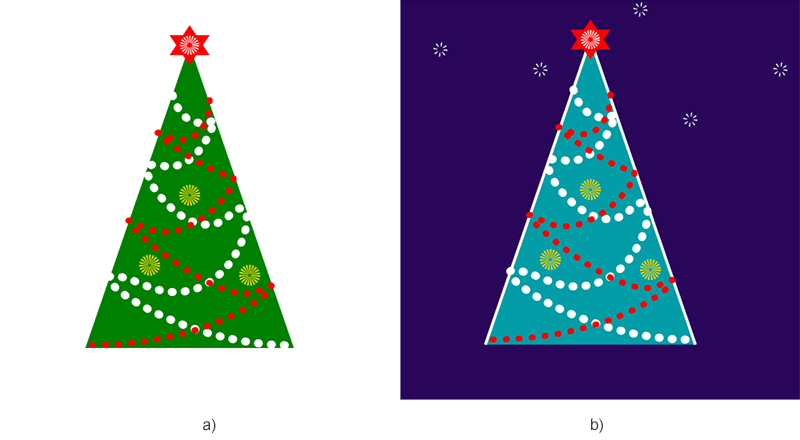
23 document.save("add-g-element.svg")The following example edits an existing SVG file named
сhristmas-tree.svg. It adds a background rectangle, creates a reusable star shape, adds a duplicated star with <use>, finds the first <polyline> element, changes its color and stroke, and saves the edited SVG.
 1from aspose.svg import SVGDocument
 2
 3# Load an SVG file, update its DOM, and save the edited result
 4with SVGDocument("сhristmas-tree.svg") as document:
 5    svg_element = document.root_element
 6
 7    background = document.create_element_ns("http://www.w3.org/2000/svg", "rect")
 8    background.set_attribute("x", "10")
 9    background.set_attribute("y", "10")
10    background.set_attribute("width", "400")
11    background.set_attribute("height", "400")
12    background.set_attribute("fill", "#2a065b")
13    svg_element.insert_before(background, svg_element.first_child)
14
15    star = document.create_element_ns("http://www.w3.org/2000/svg", "circle")
16    star.set_attribute("id", "star")
17    star.set_attribute("cx", "60")
18    star.set_attribute("cy", "50")
19    star.set_attribute("r", "5")
20    star.set_attribute("stroke", "white")
21    star.set_attribute("stroke-width", "4")
22    star.set_attribute("stroke-dasharray", "1 3")
23    star.set_attribute("fill", "none")
24    svg_element.append_child(star)
25
26    star_copy = document.create_element_ns("http://www.w3.org/2000/svg", "use")
27    star_copy.set_attribute("href", "#star")
28    star_copy.set_attribute("transform", "translate(40, 70)")
29    svg_element.append_child(star_copy)
30
31    polyline = svg_element.query_selector("polyline")
32    polyline.set_attribute("fill", "#039da7")
33    polyline.set_attribute("stroke", "white")
34    polyline.set_attribute("stroke-width", "3")
35
36    document.save("сhristmas-tree-edited.svg")
The image below shows the original SVG and the edited SVG result.
| Problem | Likely cause | Fix |
|---|---|---|
| The new element does not appear | The element was created but not added to the SVG DOM | Call append_child() or insert_before() on the parent element |
| The SVG element appears in the wrong layer | SVG painting order depends on document order | Insert backgrounds before existing shapes and overlays after existing shapes |
query_selector() returns nothing | The selector does not match any element in the current document | Check the SVG markup and use a selector that matches an existing tag, class, or ID |
| A created shape is invisible | Required geometry or styling attributes are missing | Set attributes such as x, y, width, height, cx, cy, r, fill, or stroke |
| The saved file is unchanged | Edits were made outside the active document or save() was not called | Modify nodes from the loaded document and call document.save() before leaving the with block |
Load the file with SVGDocument, find or create elements, update attributes, and save the document with document.save().
Create it with create_element_ns("http://www.w3.org/2000/svg", element_name) and add it to the root or another parent with append_child() or insert_before().
Find the target element and set attributes such as fill, stroke, stop-color, or style-related attributes with set_attribute().
Yes. Use query_selector() to find the first matching element. For broader inspection and navigation examples, see the
Navigate SVG article.
SVG paints elements in document order. Later elements are usually drawn above earlier ones, so backgrounds should be inserted before the main artwork.

Analyzing your prompt, please hold on...
An error occurred while retrieving the results. Please refresh the page and try again.