
Analyzing your prompt, please hold on...
An error occurred while retrieving the results. Please refresh the page and try again.
Quick Answer: To create an image stencil or black-and-white vectorization result in Python, configure
ImageVectorizer with
BezierPathBuilder and
StencilConfiguration, set the stencil type and output color, call vectorize(input_path), and save the returned SVGDocument as an SVG file.
An image stencil is a simplified vector version of a raster image. Instead of preserving every color and detail, stencil output focuses on clean shapes, outlines, or limited-color regions that can be used for design, print, cutting, templates, and stylized artwork.
Use image stenciling when the final SVG should be intentionally simplified. It is a good fit for artwork that needs strong contours, limited colors, or a single-color graphic style. Logos, icons, signs, line drawings, and high-contrast illustrations usually produce cleaner stencils than noisy photos.
If you want to preserve more source colors and details, use normal image vectorization instead.
The following example turns tulip.png into a stencil-style SVG. It configures smoothing and path approximation, limits the color count used during vectorization, and applies StencilConfiguration with StencilType.AUTO so the vectorizer can choose the stencil behavior and colors automatically.
 1import os
 2from aspose.svg.drawing import Color
 3from aspose.svg.imagevectorization import (
 4    BezierPathBuilder,
 5    ImageTraceSmoother,
 6    ImageVectorizer,
 7    StencilConfiguration,
 8    StencilType,
 9)
10
11# Create an SVG stencil from a raster image using automatic stencil mode
12input_folder = "data/"
13output_folder = "output/"
14input_path = os.path.join(input_folder, "tulip.png")
15output_path = os.path.join(output_folder, "tulip-stencil.svg")
16os.makedirs(output_folder, exist_ok=True)
17
18path_builder = BezierPathBuilder()
19path_builder.trace_smoother = ImageTraceSmoother(3)
20path_builder.error_threshold = 20.0
21path_builder.max_iterations = 15
22
23vectorizer = ImageVectorizer()
24vectorizer.configuration.path_builder = path_builder
25vectorizer.configuration.colors_limit = 15
26vectorizer.configuration.line_width = 1.0
27
28stencil_config = StencilConfiguration()
29stencil_config.type = StencilType.AUTO
30vectorizer.configuration.stencil = stencil_config
31
32with vectorizer.vectorize(input_path) as document:
33    document.save(output_path)
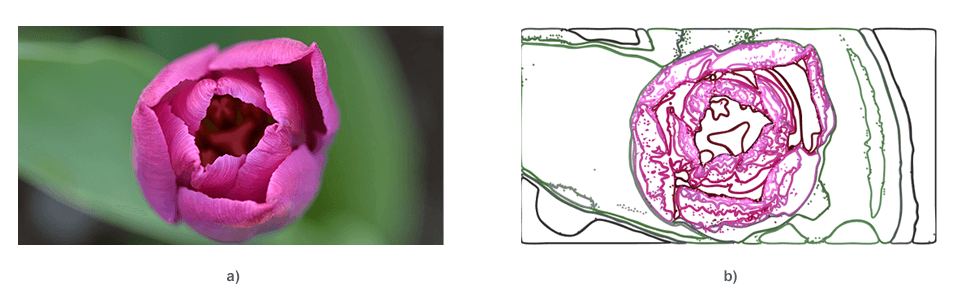
The generated tulip-stencil.svg contains simplified vector geometry with colors selected automatically by StencilType.AUTO. This makes the example useful for showing a general stencil effect before the stricter black-and-white workflow below.
The illustration compares the raster tulip image (a) with the automatically generated color stencil result (b).
Black-and-white vectorization is a stencil workflow where the output intentionally uses one foreground color on a plain background instead of preserving the source palette. Use it for cutting templates, printable outlines, icons, signs, craft artwork, and high-contrast graphics.
The example below turns logo.png into a black stencil SVG. It uses StencilConfiguration with StencilType.MONO_COLOR, sets the stencil color to black, and keeps the color limit low so the source is simplified before the stencil effect is applied.
 1import os
 2from aspose.svg.drawing import Color
 3from aspose.svg.imagevectorization import (
 4    BezierPathBuilder,
 5    ImageTraceSmoother,
 6    ImageVectorizer,
 7    StencilConfiguration,
 8    StencilType,
 9)
10
11# Create a black-and-white SVG stencil from a raster logo
12input_folder = "data/"
13output_folder = "output/"
14input_path = os.path.join(input_folder, "logo.png")
15output_path = os.path.join(output_folder, "logo-black-white-stencil.svg")
16os.makedirs(output_folder, exist_ok=True)
17
18path_builder = BezierPathBuilder()
19path_builder.trace_smoother = ImageTraceSmoother(2)
20path_builder.error_threshold = 12.0
21path_builder.max_iterations = 15
22
23vectorizer = ImageVectorizer()
24vectorizer.configuration.path_builder = path_builder
25vectorizer.configuration.colors_limit = 2
26vectorizer.configuration.line_width = 1.5
27
28stencil_config = StencilConfiguration()
29stencil_config.type = StencilType.MONO_COLOR
30stencil_config.color = Color.from_rgb(0, 0, 0)
31vectorizer.configuration.stencil = stencil_config
32
33with vectorizer.vectorize(input_path) as document:
34    document.save(output_path)
If the black-and-white stencil loses important shapes, reduce smoothing or lower error_threshold. If the output contains too many small fragments, simplify the input image first or increase smoothing slightly.
The illustration below shows how a flat raster logo is simplified into a high-contrast black-and-white SVG stencil.

Note: StencilType.MONO_COLOR is not limited to black. Choose the foreground color in the line stencil_config.color = Color.from_rgb(0, 0, 0), for example by using RGB values for blue, red, green, or a brand color.
Stencil output and normal image vectorization solve different problems. Normal multicolor vectorization tries to preserve visible color regions from the source image. A stencil intentionally discards most color information and produces simplified shapes that are easier to print, cut, trace, or reuse as monochrome artwork.
| Workflow | Output style | Best for |
|---|---|---|
| Normal image vectorization | Multiple color regions and paths | Illustrations, logos, diagrams, and SVG approximations of raster artwork |
| Black-and-white stencil | One foreground color with simplified shapes | Cutting templates, signs, icons, print masks, craft designs, and high-contrast artwork |
| Limited-color stencil | A simplified stencil look with a chosen output color | Branded stencil artwork, previews, and stylized design assets |
| API | Purpose |
|---|---|
| ImageVectorizer | Converts the raster source to an SVG document |
| ImageVectorizerConfiguration | Stores vectorization and stencil settings |
| BezierPathBuilder | Builds vector paths from traced contours |
| ImageTraceSmoother | Smooths traced contours before path construction |
| StencilConfiguration | Configures stencil output |
| StencilType | Defines the stencil mode |
| Color | Sets the stencil color |
| Setting | Effect | Practical guidance |
|---|---|---|
stencil_config.type | Selects the stencil mode | Use StencilType.AUTO for a general stencil result and StencilType.MONO_COLOR for one-color output |
stencil_config.color | Sets the output color for mono-color stencil mode | Pick a high-contrast color when using StencilType.MONO_COLOR |
colors_limit | Controls color quantization before stencil output | Lower values simplify the source and usually produce cleaner stencil shapes |
trace_smoother | Smooths contour fragments | Increase it to reduce jagged edges, but check small details |
error_threshold | Controls path approximation tolerance | Lower values preserve more detail; higher values simplify paths |
line_width | Sets the generated line width | Adjust it to match the target visual scale |
| Problem | Likely cause | Fix |
|---|---|---|
| Stencil has too much detail | Source image is noisy or colors_limit is too high | Preprocess the source, reduce colors, or increase smoothing |
| Important shapes disappear | Simplification is too aggressive | Lower smoothing or reduce error_threshold |
| Output looks jagged | Contours were traced with too little smoothing | Increase trace_smoother and inspect the SVG at the target size |
| Photo output is complex | Continuous-tone photos are difficult to simplify cleanly | Use high-contrast artwork or reduce the photo before vectorization |

Analyzing your prompt, please hold on...
An error occurred while retrieving the results. Please refresh the page and try again.