

Analyzing your prompt, please hold on...
An error occurred while retrieving the results. Please refresh the page and try again.
Quick Answer: To work with SVG filters in Python, load the SVG with
SVGDocument, find the target element with
query_selector(), set its filter attribute with
set_attribute(), and save the SVG.
1from aspose.svg import SVGDocument
2
3with SVGDocument("document.svg") as document:
4    element = document.root_element.query_selector("circle")
5    if element is not None:
6        element.set_attribute("filter", "url(#filter-id)")
7    document.save("filtered.svg")
SVG filters create visual effects such as blur, shadow, glow, lighting, and color processing. A filter is usually defined inside <defs> and applied to a visible element through a filter="url(#filter-id)" attribute. In Aspose.SVG for Python via .NET, you work with filters through the SVG DOM: find target elements, create filter primitives, set attributes, append nodes, and save the edited file.
In this article, you will learn how to:
stdDeviation, dx, dy, and flood-color;A filter workflow has two parts: the filter definition and the filter reference. The definition lives in <defs>, while the visible element points to it by ID.
| Task | SVG markup to edit | Typical API pattern |
|---|---|---|
| Apply an existing filter | filter="url(#filter-id)" | Find the visible element with query_selector() and set the filter attribute |
| Create a new filter | <defs><filter id="..."></filter></defs> | Create SVG elements with
create_element_ns() and append them with
append_child() |
| Configure blur or shadow | Filter primitive attributes such as stdDeviation, dx, dy, flood-color | Find the primitive and update attributes |
| Remove an effect | filter attribute on the visible element | Remove the filter reference with
remove_attribute() |
Use this workflow when an SVG file needs a blur, shadow, glow, or another filter effect:
SVGDocument.<defs> element that stores reusable definitions.<filter> element with a stable id.<feGaussianBlur>, <feOffset>, or <feDropShadow>.filter="url(#filter-id)".The examples below use svg-filters.svg as the input file.
A filter must be defined before a visible element can use it. The following example creates a #blur filter in <defs>, adds an <feGaussianBlur> primitive, applies the filter to the circle, and saves the result as svg-blur-filter-applied.svg.
 1import os
 2from aspose.svg import SVGDocument
 3
 4SVG_NS = "http://www.w3.org/2000/svg"
 5
 6input_folder = "data/"
 7output_folder = "output/"
 8input_path = os.path.join(input_folder, "svg-filters.svg")
 9output_path = os.path.join(output_folder, "svg-blur-filter-applied.svg")
10os.makedirs(output_folder, exist_ok=True)
11
12with SVGDocument(input_path) as document:
13    svg = document.root_element
14    defs = svg.query_selector("defs")
15
16    if defs is None:
17        defs = document.create_element_ns(SVG_NS, "defs")
18        svg.insert_before(defs, svg.first_child)
19
20    blur_filter = document.create_element_ns(SVG_NS, "filter")
21    blur_filter.set_attribute("id", "blur")
22    blur_filter.set_attribute("x", "-20%")
23    blur_filter.set_attribute("y", "-20%")
24    blur_filter.set_attribute("width", "140%")
25    blur_filter.set_attribute("height", "140%")
26
27    gaussian_blur = document.create_element_ns(SVG_NS, "feGaussianBlur")
28    gaussian_blur.set_attribute("in", "SourceGraphic")
29    gaussian_blur.set_attribute("stdDeviation", "3")
30
31    blur_filter.append_child(gaussian_blur)
32    defs.append_child(blur_filter)
33
34    circle = svg.query_selector("circle")
35    if circle is not None:
36        circle.set_attribute("filter", "url(#blur)")
37
38    document.save(output_path)
The code shows both required parts of an SVG filter workflow. The <filter> and <feGaussianBlur> elements define the effect, and the filter="url(#blur)" attribute applies that effect to the visible circle. The illustration compares the source SVG in image (a) with the blurred circle in image (b).

Create a new filter when the SVG does not already contain the effect you need. The next example creates a #label-shadow filter with <feDropShadow>, appends it to <defs>, and applies it to the text label.
 1import os
 2from aspose.svg import SVGDocument
 3
 4SVG_NS = "http://www.w3.org/2000/svg"
 5
 6input_folder = "data/"
 7output_folder = "output/"
 8input_path = os.path.join(input_folder, "svg-filters.svg")
 9output_path = os.path.join(output_folder, "svg-drop-shadow-filter.svg")
10os.makedirs(output_folder, exist_ok=True)
11
12with SVGDocument(input_path) as document:
13    svg = document.root_element
14    defs = svg.query_selector("defs")
15
16    if defs is None:
17        defs = document.create_element_ns(SVG_NS, "defs")
18        svg.insert_before(defs, svg.first_child)
19
20    shadow_filter = document.create_element_ns(SVG_NS, "filter")
21    shadow_filter.set_attribute("id", "label-shadow")
22    shadow_filter.set_attribute("x", "-20%")
23    shadow_filter.set_attribute("y", "-20%")
24    shadow_filter.set_attribute("width", "150%")
25    shadow_filter.set_attribute("height", "150%")
26
27    drop_shadow = document.create_element_ns(SVG_NS, "feDropShadow")
28    drop_shadow.set_attribute("dx", "6")
29    drop_shadow.set_attribute("dy", "8")
30    drop_shadow.set_attribute("stdDeviation", "2")
31    drop_shadow.set_attribute("flood-color", "#455a64")
32    drop_shadow.set_attribute("flood-opacity", "0.6")
33
34    shadow_filter.append_child(drop_shadow)
35    defs.append_child(shadow_filter)
36
37    label = svg.query_selector("#label")
38    if label is not None:
39        label.set_attribute("filter", "url(#label-shadow)")
40
41    document.save(output_path)
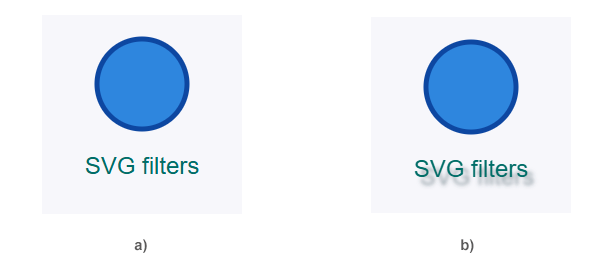
This example shows both parts of the filter workflow: the reusable filter is created in <defs>, and the visible text element receives filter="url(#label-shadow)". If either part is missing, the shadow will not appear. The illustration shows the original label in image (a) and the same label with a drop shadow in image (b).
Filter effects are controlled by attributes on filter primitives. The following example opens the SVG created by the blur example, finds <feGaussianBlur> inside #blur, and increases its stdDeviation value.
 1import os
 2from aspose.svg import SVGDocument
 3
 4input_folder = "output/"
 5output_folder = "output/"
 6input_path = os.path.join(input_folder, "svg-blur-filter-applied.svg")
 7output_path = os.path.join(output_folder, "svg-filter-attributes-edited.svg")
 8os.makedirs(output_folder, exist_ok=True)
 9
10with SVGDocument(input_path) as document:
11    svg = document.root_element
12    blur = svg.query_selector("#blur feGaussianBlur")
13
14    if blur is not None:
15        blur.set_attribute("stdDeviation", "8")
16
17    document.save(output_path)
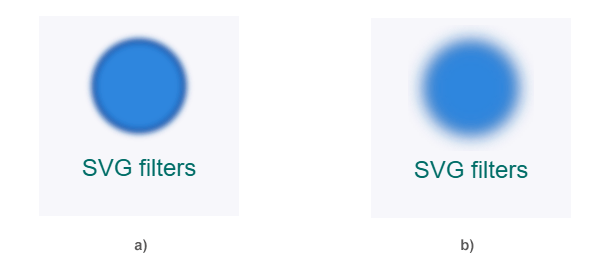
The output uses the same filter ID, but the blur is stronger because the stdDeviation value changed from 3 to 8. The illustration compares the first blur result in image (a) with the stronger blur after editing the filter primitive in image (b).
Removing a filter from a visible element is different from deleting the filter definition. The next example opens the SVG created by the blur example and removes only the filter reference from the circle; the #blur definition can stay in <defs> for reuse.
 1import os
 2from aspose.svg import SVGDocument
 3
 4input_folder = "output/"
 5output_folder = "output/"
 6input_path = os.path.join(input_folder, "svg-blur-filter-applied.svg")
 7output_path = os.path.join(output_folder, "svg-filter-removed.svg")
 8os.makedirs(output_folder, exist_ok=True)
 9
10with SVGDocument(input_path) as document:
11    circle = document.root_element.query_selector("circle")
12
13    if circle is not None and circle.has_attribute("filter"):
14        circle.remove_attribute("filter")
15
16    document.save(output_path)
Use this pattern when a filter should no longer affect a specific element, but other elements may still use the same filter definition.
| Problem | Fix |
|---|---|
| Filter does not appear | Make sure the visible element has filter="url(#filter-id)" and that the ID exists in <defs> |
| Shadow or blur is clipped | Increase the filter region with x, y, width, and height on <filter> |
| Filter affects the wrong element | Apply the filter attribute to the visible shape or group that should receive the effect |
Editing fill or stroke does not change the effect | Update the filter primitive attributes, such as stdDeviation, flood-color, dx, or dy |
| Duplicate filter IDs cause confusing output | Use stable unique IDs and update url(#...) references to match |
| Output file is unchanged | Save the edited document and open the output path, not the input SVG |
Load the SVG with SVGDocument, find the visible target element, and set filter="url(#filter-id)" with set_attribute(). The referenced <filter> must exist in the SVG document, usually inside <defs>.
Create a <filter> element in <defs>, add an <feGaussianBlur> primitive, set stdDeviation, then apply the filter to a visible element with filter="url(#filter-id)".
Create a filter with a shadow primitive such as <feDropShadow>, set attributes like dx, dy, stdDeviation, and flood-color, append the filter to <defs>, and apply it with filter="url(#filter-id)".
Yes. Find the filter primitive, such as #blur feGaussianBlur, and update attributes like stdDeviation. Save the SVG after the change.
Yes. Remove the filter attribute from the visible element. The <filter> definition may remain in <defs> if other elements still use it or if you want to reuse it later.
Analyzing your prompt, please hold on...
An error occurred while retrieving the results. Please refresh the page and try again.