
Analyzing your prompt, please hold on...
An error occurred while retrieving the results. Please refresh the page and try again.
SVG embedded content is SVG markup that references or contains non-basic drawing content, such as raster images, another SVG file, or HTML markup. This topic matters when you build diagrams, reports, badges, infographics, previews, or exported graphics that combine vector shapes with logos, photos, screenshots, or formatted text blocks.
Quick Answer: Use the SVG <image> element to place PNG, JPG, GIF, WebP, or another SVG inside an SVG document. Use <foreignObject> when you need HTML markup inside SVG. Always set x, y, width, and height, control scaling with preserveAspectRatio, and make sure linked resources are available when the SVG is opened, rendered, or converted.
1<svg width="300" height="180" xmlns="http://www.w3.org/2000/svg">
2  <image href="logo.png" x="20" y="20" width="120" height="120" />
3</svg>
SVG is not limited to paths, shapes, and text. It can also include content from other formats. The two most common elements are:
| Element | Use it for | Important notes |
|---|---|---|
<image> | Raster images such as PNG, JPG, GIF, WebP, and another SVG used as an image resource | Requires width and height; external files must be reachable |
<foreignObject> | HTML or other XML content inside an SVG region | Requires correct namespace and may have limited support in some rendering workflows |
Use embedded content when the source should remain as an image or HTML fragment. Do not confuse this with vectorization. Embedding a PNG inside SVG keeps the PNG as pixels; it does not convert the PNG into paths. If you need raster-to-vector tracing, see Convert Image to SVG in C# or Vectorize Images in Python.
<image> for a raster image or nested SVG file, and choose <foreignObject> for HTML markup.x and y to position the embedded content inside the SVG coordinate system.width and height; without them, many renderers will not display the content.href for the source file, URL, or data URI when working with <image>.preserveAspectRatio when the source image should keep its proportions.The SVG <image> element places an image resource into a rectangular viewport inside the SVG coordinate system. The resource can be a raster image, such as PNG or JPG, or another SVG file used as an image.
The most important attributes are:
| Attribute | Purpose |
|---|---|
x, y | Position of the image viewport |
width, height | Size of the image viewport; usually required for rendering |
href | Path, URL, or data URI of the image resource |
preserveAspectRatio | Controls whether the image is fitted, cropped, or stretched |
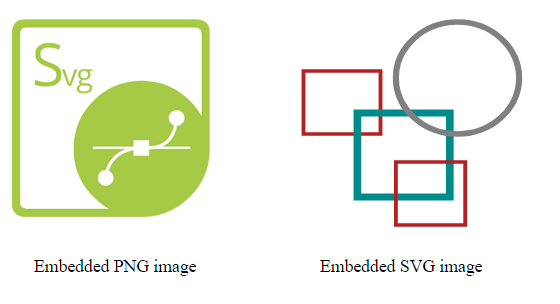
The following example embeds a PNG image and an external SVG file into one parent SVG. Both images are positioned and sized with explicit attributes so the layout is predictable.
1<svg width="500" height="400" xmlns="http://www.w3.org/2000/svg">
2  <image href="https://docs.aspose.com/svg/images/svg.png" x="20" y="20" width="180" height="180" />
3  <image href="https://docs.aspose.com/svg/files/shapes.svg"
4         x="250" y="10" width="220" height="220"
5         preserveAspectRatio="xMidYMid meet" />
6  <text x="40" y="250">Embedded PNG image</text>
7  <text x="300" y="250">Embedded SVG image</text>
8</svg>
The rendered SVG shows two embedded resources: a PNG image on the left and an SVG file on the right.
An <image> element can reference an external file, a remote URL, or a Base64 data URI. External files keep the SVG smaller and easier to edit, but the files must remain available. Data URIs make the SVG more self-contained, but they can significantly increase file size and make the markup harder to maintain.
Use external files for controlled websites, documentation samples, and editable projects. Use data URIs when the SVG must travel as one file and the embedded raster image is small enough to keep the final SVG manageable.
1<image href="data:image/png;base64,..." x="0" y="0" width="200" height="120" />The <foreignObject> element lets SVG contain markup from another XML namespace. In browser-based SVG, the common use case is embedding a small HTML fragment. This is useful for formatted labels, rich text blocks, or UI-like annotations that are easier to express in HTML than with pure SVG text.
The required attributes are:
| Attribute | Purpose |
|---|---|
x, y | Position of the foreign object region |
width, height | Size of the region where the HTML content can render |
The HTML root element inside <foreignObject> should declare the XHTML namespace http://www.w3.org/1999/xhtml. Without the correct namespace, the content may not render. For reliable rendering, place critical text styles such as font-size, font-family, line-height, and color directly on the XHTML element or use a CSS rule that you have tested in the target renderer.
1<svg width="500" height="400" viewBox="0 0 250 200" xmlns="http://www.w3.org/2000/svg">
2  <circle cx="70" cy="70" r="60" fill="red" fill-opacity="0.1" />
3  <foreignObject x="20" y="40" width="210" height="180">
4    <div xmlns="http://www.w3.org/1999/xhtml"
5         style="color:#555; font-family:Arial, sans-serif; font-size:12px; line-height:1.4;">
6      Convert SVG to PNG, PDF, XPS, and major image formats with Aspose.SVG.
7    </div>
8  </foreignObject>
9</svg>
The figure shows an HTML text block rendered inside an SVG region with <foreignObject>.

<foreignObject> is powerful, but it is less portable than basic SVG shapes and text. Some export, security, or server-side rendering workflows may restrict HTML, CSS, scripts, or external resources inside embedded content. If the SVG must render consistently everywhere, prefer pure SVG text and shapes.
| Problem | Cause | Fix |
|---|---|---|
| Embedded image does not appear | Missing width or height on <image> | Add explicit dimensions to define the image viewport |
| Image disappears after conversion | The linked file or remote URL is not available to the renderer | Use an accessible path, configure resource access, or embed a small image as a data URI |
| Image is stretched | preserveAspectRatio is missing or set to none | Use preserveAspectRatio="xMidYMid meet" to keep proportions |
HTML inside <foreignObject> is invisible | Incorrect or missing XHTML namespace | Use xmlns="http://www.w3.org/1999/xhtml" on the root HTML element |
| Output differs across tools | <foreignObject> support varies by renderer, CSS support, or security context | Use pure SVG markup when consistent conversion output is required, or keep critical HTML styles inline |
| SVG file becomes too large | Large raster image is embedded as Base64 | Keep large images external or optimize them before embedding |
Embed a PNG image
1<svg width="200" height="200" xmlns="http://www.w3.org/2000/svg">
2  <image href="image.png" x="0" y="0" width="200" height="200" />
3</svg>
Embed an external SVG file
1<svg width="300" height="300" xmlns="http://www.w3.org/2000/svg">
2  <image href="icon.svg" x="10" y="10" width="280" height="280" />
3</svg>
Preserve image aspect ratio
1<svg width="250" height="250" xmlns="http://www.w3.org/2000/svg">
2  <image href="photo.jpg"
3         x="0" y="0"
4         width="250" height="250"
5         preserveAspectRatio="xMidYMid meet" />
6</svg>
Add a small HTML label
1<foreignObject x="20" y="20" width="160" height="80">
2  <div xmlns="http://www.w3.org/1999/xhtml">HTML label</div>
3</foreignObject>Yes. Use the <image> element with href, x, y, width, and height. The raster image remains raster content inside the SVG; it is not converted into vector paths.
Yes. You can reference another SVG file with <image href="file.svg"> when you want to display it as an image resource. If you need to edit the nested SVG structure as part of the parent document, inline the SVG markup instead.
Yes, through <foreignObject>. The embedded HTML should use the XHTML namespace and should be tested in the target browser or renderer because support can vary.
The renderer may not be able to access the referenced file, URL, font, CSS, or HTML content. Use stable resource paths, embed small assets as data URIs, or configure resource access before conversion.
No. Embedding places the original raster image inside SVG. Converting or vectorizing an image traces pixels into SVG paths and shapes.
<image> and <foreignObject> elements.<foreignObject>.fill, stroke, opacity, and color values used by surrounding SVG artwork.<image>.
Analyzing your prompt, please hold on...
An error occurred while retrieving the results. Please refresh the page and try again.